
Best Podcast Host That Auto-Distributes to YouTube (2026)
Last updated: September 2026
If you want a host that pushes every new episode to YouTube on its own, Transistor is the pick.
It converts your audio to a video with a still background image and uploads it to your channel automatically. The catch you need to hear first: that feature lives on the $49 Professional plan, and what lands on YouTube is a static image, not a real video.
The best podcast host that auto-posts to YouTube: Transistor
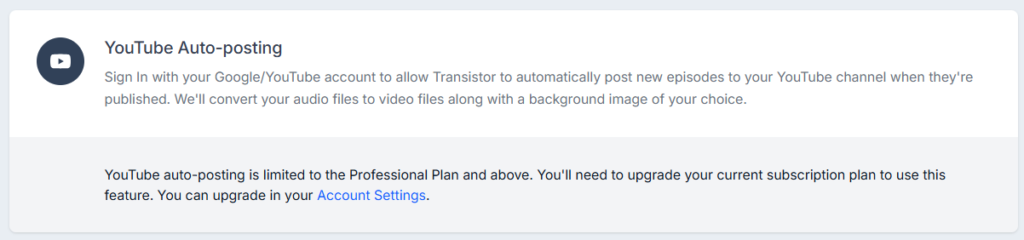
Transistor connects straight to your YouTube channel and posts each new episode without you touching it. Publish to your podcast feed, and the same episode shows up on YouTube as a video, built from your audio and a background image you pick once. No re-uploading, no separate export, no third-party glue. It is the cleanest hands-off setup I have found, which is why it beats the workaround most hosts quietly rely on.
Why Transistor wins for YouTube auto-posting
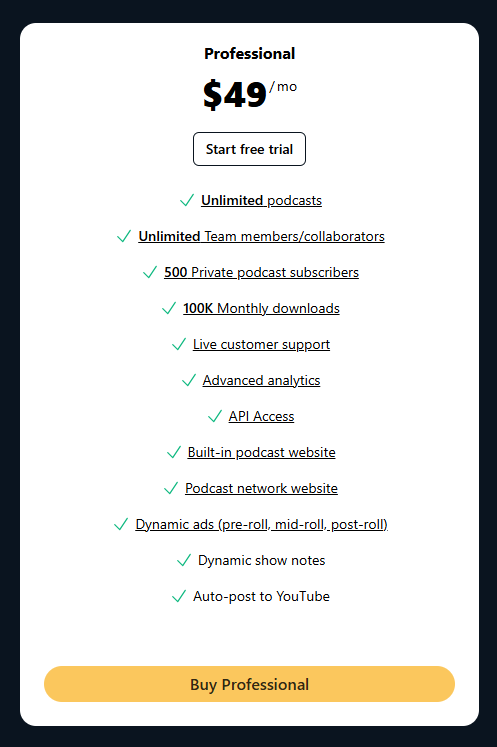
Two things separate a real feature from a checkbox. First, Transistor does the push itself through YouTube’s API, so the upload is genuinely automatic once you connect the channel. Second, it is baked into a host you would want anyway, not bolted on. The feature sits on the Professional plan at $49 a month, which also gets you 100,000 monthly downloads, dynamic ad insertion, and private podcasting. So you are not paying for a YouTube gimmick. You are paying for a serious host that happens to handle YouTube for you. For a creator who wants a presence on the platform without learning video, that is the whole point.
What “auto to YouTube” actually gets you: a static video
Here is the honest part almost nobody spells out. When a podcast host auto-posts to YouTube, it is not making a talking-head video. It takes your audio, slaps a single still image behind it, usually your cover art, and renders that as a video file. The screen does not move. Viewers see one frame for the whole episode while your audio plays. Some tools dress it up with a waveform or captions and call it an audiogram, but the base product is the same: sound over a static picture. If YouTube is the only place you care about reaching, the prior question is whether you need a podcast host at all.
That is fine if your goal is simply to be findable on YouTube and catch people who search there. It is not fine if you expect the reach that real video podcasts pull, because the algorithm and viewers both favor actual moving footage. Know which one you are buying. Auto-posting gives you presence, not a video show. If real video is the goal, that is a different shortlist entirely, and it is in the best podcast hosts for video podcasts. And if you want to record that video live, the tools that handle it are in the best live streaming software for podcasters.
Worth knowing: Transistor now also hosts true video podcasts, so if you actually record video, you can upload and push the real thing to YouTube instead of a static image. The auto-post covered here is the audio-to-static-video path, which is what most audio-only shows use.
Runner-up: YouTube’s own free RSS tool (and when to use it)
Before you upgrade a plan for this, know that YouTube will do the same static conversion for free. You add your podcast’s RSS feed inside YouTube Studio, and YouTube pulls each new episode in and turns it into a static-image video on its own. Any host with a normal RSS feed can feed it, including Buzzsprout and Captivate, and the tool is open to US creators. One limit to know: it does not auto-sync later edits, so a changed title or re-uploaded file means a manual fix on YouTube’s side.
So why pay Transistor for auto-posting at all? Control and reliability. The host-side integration lets you set the background image and keeps the upload inside one dashboard, and it does not depend on YouTube’s importer, which has been region-limited and patchy since launch. If you are happy managing it in YouTube Studio and want zero extra cost, the free RSS route is the honest answer, and I will not pretend otherwise. If you want it handled and out of mind, the native feature earns its keep.
What to look for in a host for YouTube
- Native auto-posting that pushes through YouTube’s API, not just “compatible with YouTube’s RSS import”
- Clear control over the background image or audiogram style, so your channel does not look like a placeholder
- The plan the feature actually sits on, since it is often gated to a mid or upper tier
- Whether you can also upload true video episodes later, if you plan to grow into real video
- An honest read on what publishes: a static image video versus anything moving
Weigh a host against that list before you pay extra just to reach YouTube.
Verdict
For automatic YouTube distribution handled by the host, Transistor is the pick. It pushes every episode to your channel as a static-image video with no manual step, and it is a strong host on its own merits, starting the auto-post feature on the $49 Professional plan. Start a free Transistor trial. The full plan breakdown is in Transistor’s pricing guide, and if you are weighing it against its main rival, here is how Transistor and Captivate compare. The downside to sit with: you are paying for convenience, since YouTube’s own free RSS tool produces the same static video, and neither one gives you a real moving-picture show.
FAQ
Which podcast host automatically posts to YouTube? Transistor has native YouTube auto-posting on its Professional plan ($49 a month), pushing each new episode to your channel as a static-image video without any manual upload.
Does auto-posting to YouTube make a real video? No. The host converts your audio to a video with one still background image. The picture does not move. It gives you a YouTube presence, not the reach of a true video podcast.
Can I get my podcast on YouTube for free? Yes. YouTube’s RSS import tool in YouTube Studio pulls your feed and creates static-image videos at no cost, so you do not strictly need a paid host feature for basic presence.
Does Buzzsprout or Captivate auto-post to YouTube? Both reach YouTube through YouTube’s own RSS importer, which you set up in YouTube Studio, rather than a native host-side push like Transistor’s. Buzzsprout in particular states it does not push video to YouTube itself.






