Should a Podcast Be Mono or Stereo? (2026)
This post contains affiliate links, and we may earn a commission if you sign up through them, at no cost to you. See our Affiliate Disclosure. Specs were checked against Apple’s and Buzzsprout’s own documentation in October 2026. The file sizes and loudness readings come from a test file encoded and measured the same month.
Export a talk show in mono. Save stereo for shows where music or sound design uses the left and right channels. A mono MP3 at 96 kbps runs about 43 MB an hour and sits inside the range Apple recommends for mono audio.
Most of the confusion comes from the idea that mono files are smaller by nature. File size follows bitrate, and the measurements below show where the savings come from.
Key takeaways
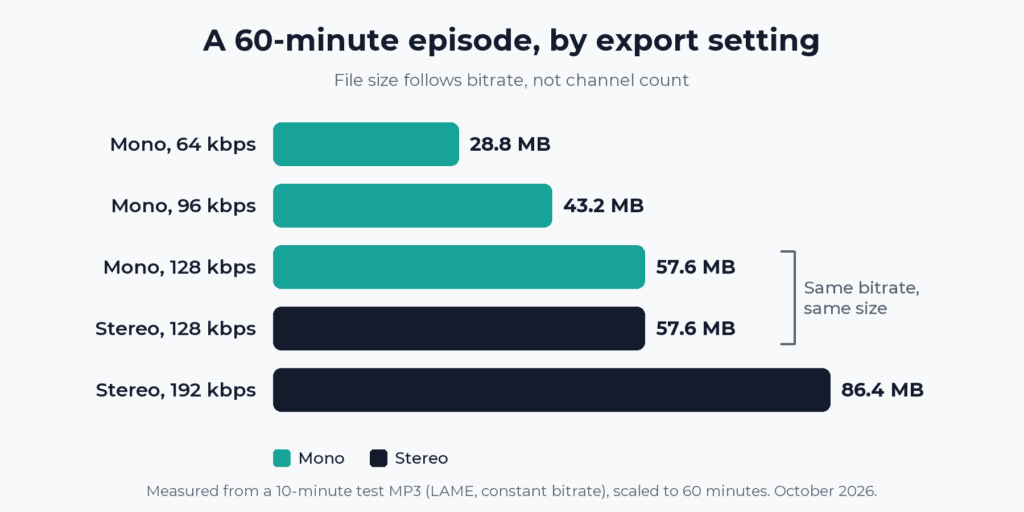
- A 60-minute MP3 at 96 kbps mono is 43.2 MB, and the same hour at 192 kbps stereo is 86.4 MB.
- A 128 kbps mono file and a 128 kbps stereo file are the same size, 57.6 MB an hour, because file size follows bitrate and not channel count.
- Apple Podcasts recommends 64 to 128 kbps for mono feed audio and 128 to 256 kbps for stereo.
- Apple Podcasts Connect does not accept single-channel WAV or FLAC files, so a mono source uploaded in those formats goes up as two identical channels.
- Buzzsprout converts uploads to 96 kbps mono by default, and publishing in stereo takes its Magic Mastering add-on on the Mostly Music setting.
- The same speech measured -20.0 LUFS as a mono file and -17.0 LUFS when copied to both channels with no gain change, so loudness should be measured on the exact file you upload.
What is the difference between mono and stereo for a podcast?
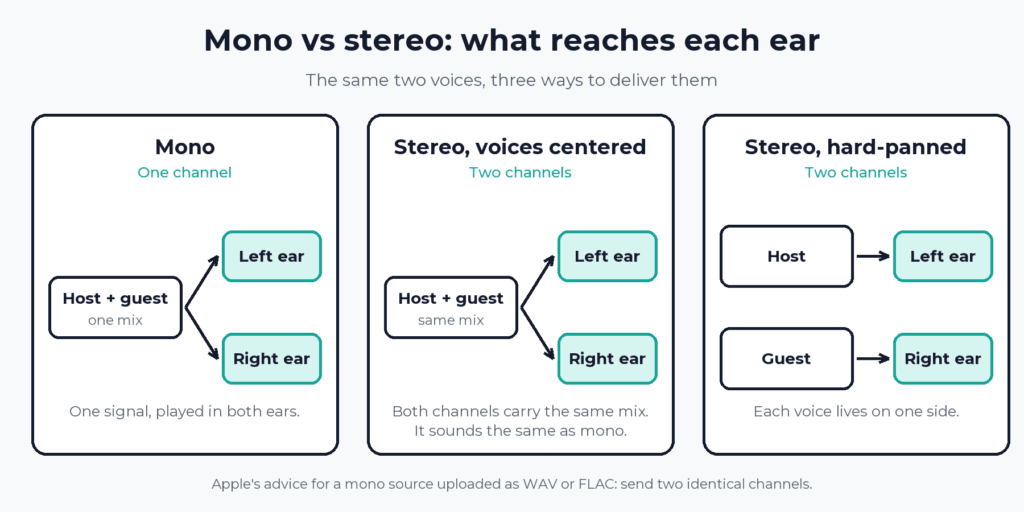
Mono is one channel. Stereo is two, a left and a right. A mono file plays a single signal. A stereo file can play something different on each side, which matters for music and for produced shows that place sounds in space. Two people talking, with both voices mixed to the center, send the same thing to both sides.
Does mono make a podcast file smaller?
Not by itself. An MP3’s size is its bitrate multiplied by its length. A mono file and a stereo file at the same 128 kbps come out identical, 57.6 MB for an hour. Mono saves space because it needs a lower bitrate to do the same job. Apple’s own ranges reflect that: 64 to 128 kbps for mono feed audio, and 128 to 256 kbps for stereo.
| Export setting | 10-minute test file | 60-minute episode |
|---|---|---|
| Mono, 64 kbps | 4.80 MB | 28.8 MB |
| Mono, 96 kbps | 7.20 MB | 43.2 MB |
| Mono, 128 kbps | 9.60 MB | 57.6 MB |
| Stereo, 128 kbps | 9.60 MB | 57.6 MB |
| Stereo, 192 kbps | 14.40 MB | 86.4 MB |
The test file is ten minutes of synthesized speech from two Windows text-to-speech voices, encoded with the LAME MP3 encoder at constant bitrate and sized with ffprobe in October 2026. Synthesized speech works for this table because a constant-bitrate file’s size depends on its bitrate and length, not on who is talking. The 60-minute column is the ten-minute size times six. Variable-bitrate files land in different places, which is why the table sticks to constant bitrate.
Across 1,000 downloads of a 60-minute episode, the gap between 43.2 MB and 86.4 MB is 43.2 GB. Hosts also cap how large a single upload can be, and long stereo episodes hit that limit first. Podcast episode file size limits by host lists each cap.
When is stereo worth the extra size?
When something in the file lives on one side. Music beds with real width, field recordings, and produced narrative shows that place voices and effects in space all qualify. If the stereo image is part of the show, keep it. A host that converts your upload to mono will fold that width away for good.
Hard-panning two hosts is the one stereo habit worth skipping on a conversation show. Each voice then disappears from half the headphones and the listener gets nothing back for it. That is a judgment call, not a rule, and a few narrative shows pan on purpose. If you record two people on separate microphones, keep them on separate tracks while you edit and mix down at the end. How to record two people in the same room covers the setup.
What does Apple Podcasts accept, mono or stereo?
Both, with conditions. These are the details from Apple’s audio requirements page, as checked in October 2026.
- MP3 uploads in Apple Podcasts Connect: mono is recommended at 96 to 128 kbps at 44.1 or 48 kHz, with a 32 kbps minimum. Stereo is recommended at 128 to 256 kbps, with a 64 kbps minimum.
- RSS feed audio, MP3 or AAC: 64 to 128 kbps for mono and 128 to 256 kbps for stereo at 44.1 or 48 kHz.
- WAV and FLAC uploads: single-channel audio is not accepted. Apple says to send the stereo source if there is one, and two identical channels if there is not.
- Loudness: one target for everything, around -16 LKFS with a 1 dB tolerance, and a true peak no higher than -1 dBFS.
Does the loudness target change for mono?
Apple gives one number and no separate figure for mono. The catch is how a meter reads the file. Loudness meters add up the power of every channel, so two identical channels read louder than one.
The same ten minutes of speech measured -20.0 LUFS as a mono file. Copied to both channels with no gain change, it measured -17.0 LUFS. A third version, built with ffmpeg’s default mono-to-stereo conversion, which lowers each channel by 3 dB, measured -20.0 LUFS again, with a true peak of -3.1 dBFS against -0.1 dBFS for the mono original. Same speech, three ways of building the file, and a 3 LU spread.
So meter the exact file you plan to upload. If you set your level in a stereo session and then export mono, or the reverse, read it again after the export. Editors handle the conversion differently, so a rule of thumb about 3 dB will not do the job for you.
What do podcast hosts do to a mono or stereo upload?
Some change it for you. Buzzsprout’s help page says it converts uploads to 96k mono and skips the re-encode only for an MP3 already at 96k or lower in mono. Stereo takes its Magic Mastering add-on on the Mostly Music setting, which outputs 192k stereo for a small fee. You can also turn off automatic mastering and upload a stereo MP3 at 192k or lower. The page calls mono the default because spoken-word shows do not benefit from stereo and stereo files are twice as large. That holds at Buzzsprout’s two settings, 96 kbps against 192 kbps.
Other hosts behave differently. In our August 2026 host-by-host check, Transistor, Captivate, and Castos passed an MP3 through untouched, while RSS.com and Acast encoded uploads to 128 kbps. The full table is in does your podcast host re-encode your audio.
What should you export?
- A talk or interview show with one or two people: mono, MP3, 96 kbps, 44.1 kHz. It matches Buzzsprout’s default and sits inside Apple’s recommended range for mono.
- A show with music or placed sound: stereo, MP3, 128 to 192 kbps.
- A WAV or FLAC going to Apple Podcasts Connect: two channels, even when the source is mono.
If you want your stereo file to arrive intact, pick a host that passes your MP3 through. Transistor and Captivate do. The cost is a paid plan, covered in Transistor pricing and Captivate pricing.
Buzzsprout is still the easiest first host, and its mono default suits a talk show. The downside is that stereo costs extra there. Our Buzzsprout review covers what else its plans include. For the export settings themselves, including format, bitrate, and the room and microphone that matter more than either, see podcast audio quality explained. If you are still choosing a host, start with how to choose a podcast host.
FAQ
Should I record my podcast in mono or stereo?
Record each microphone on its own track, then decide the delivery format when you export. The recording choice and the file you publish are separate decisions. Two people on two microphones give you two tracks to mix down to mono or stereo.
Can I upload a mono WAV to Apple Podcasts?
Not as single-channel audio. Apple Podcasts Connect rejects single-channel WAV and FLAC files. Send the stereo source if you have one, or two identical channels if you do not. A mono MP3 is accepted.
Is 96 kbps mono good enough for a podcast?
For speech, the two most relevant sources agree it is a standard choice. Apple lists 96 to 128 kbps as its recommended range for mono MP3 uploads, and Buzzsprout encodes everything at 96k mono by default. Music-heavy shows should look at stereo at 128 kbps or higher.
How big is a one-hour podcast file?
At constant bitrate, an hour is 28.8 MB at 64 kbps mono, 43.2 MB at 96 kbps mono, 57.6 MB at 128 kbps in either channel layout, and 86.4 MB at 192 kbps stereo.