Podpage Review 2026: Is It Worth It for Your Podcast Website?
This post contains affiliate links, and we may earn a commission if you sign up through them, at no cost to you. See our Affiliate Disclosure. Pricing as of September 2026.
Podpage is worth it if your podcast host is fine but its website is not. It reads your RSS feed, builds a full website, and keeps it current without you touching it. Buy the $19 Pro plan on annual billing. If your host already gives you a site you like, save the money.
Key takeaways
- Podpage is a podcast website builder, not a podcast host, so your audio and RSS feed stay with the host you already pay.
- Podpage costs $12, $19, or $39 a month on annual billing for Basic, Pro, and Elite, or $19, $29, and $59 paid month to month.
- Every new Podpage site gets a 14-day free trial with no credit card, but the site stays private and a custom domain cannot be connected until you subscribe.
- Podpage’s blog, transcripts, contact form, and guest tools all start on the $19 Pro plan, not on the $12 Basic plan.
- Podpage refunds what you paid if you ask within 30 days of a charge, but it does not normally prorate a refund when you cancel an annual plan partway through.
- Podcastpage.io is not Podpage: that domain now redirects to Beamly, a separate website builder that also hosts audio.
Is Podpage worth it in 2026?
For one kind of podcaster, yes. You like your host, you hate the website it gave you, and you do not want to migrate a whole show to fix a front-end problem. Buzzsprout is the textbook case: a good host with a site you can barely rearrange. Podpage sits on top of the feed and gives you a blog, guest pages, email signup, and your own domain.
For everyone else, it is a second bill you may not need. Transistor and Captivate both include a site with a custom domain on every plan, which we lay out in which podcast hosts include a free website.
And if you do buy it, buy Pro. Basic has no blog, no transcripts, and no contact form, and those are most of the reasons to pay for a podcast website builder at all.
What does Podpage build from your RSS feed?
A full site: a home page, an episode list, and a page for every episode with its player, show notes, artwork, chapters, and a transcript when your feed carries one. You paste your feed URL (or a YouTube channel) and Podpage does the rest. Podpage says it works with any host that has a valid RSS feed, and its help center lists Buzzsprout, Captivate, Libsyn, RSS.com, Podbean, and dozens more.
What it does not do is hold your audio. You cannot upload episodes to Podpage, and it does not host your feed. If you are not sure where your feed lives, here is how to find your podcast RSS feed URL.
How fast new episodes show up depends on who you ask. Podpage’s pricing table lists feed checks every 4 hours on Basic, every hour on Pro, and every 30 minutes on Elite. Its help center adds that if your host supports Podping, a new episode usually appears within seconds. There is also a button to check the feed on demand.
How long does Podpage take to set up?
Minutes. I pasted our test show’s Buzzsprout feed into the preview form, which also asked for an email address and where the current website is hosted. Podpage then showed a progress screen that said it was building 20-plus versions of the site, ticking off player links, auto-updates, and listener tools as it went.
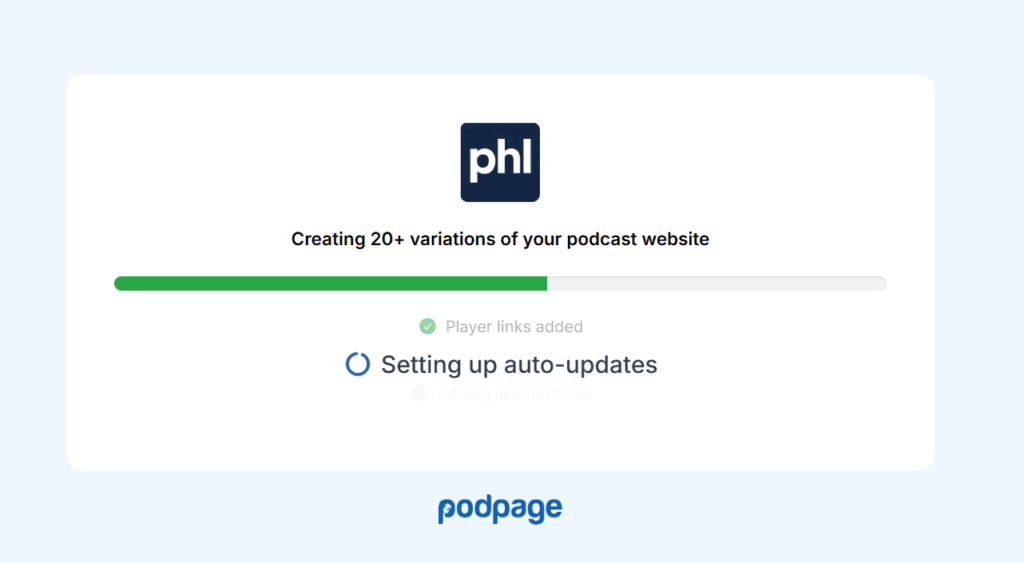
The next step asked for a brand color and whether I wanted dark mode, with a live preview beside it. That preview already had the test episode imported and a menu with Home, Episodes, Leave A Review, and Contact, plus a Follow button. Every plan also includes one live onboarding session if you would rather have someone walk you through it.
How much can you change the design?
Enough for most shows, not enough for a designer. Podpage’s public templates page lists 14 templates, and you can switch between them without losing content. Inside a template you set colors and fonts and rearrange elements, no code needed. Custom CSS and JavaScript unlock on Pro.
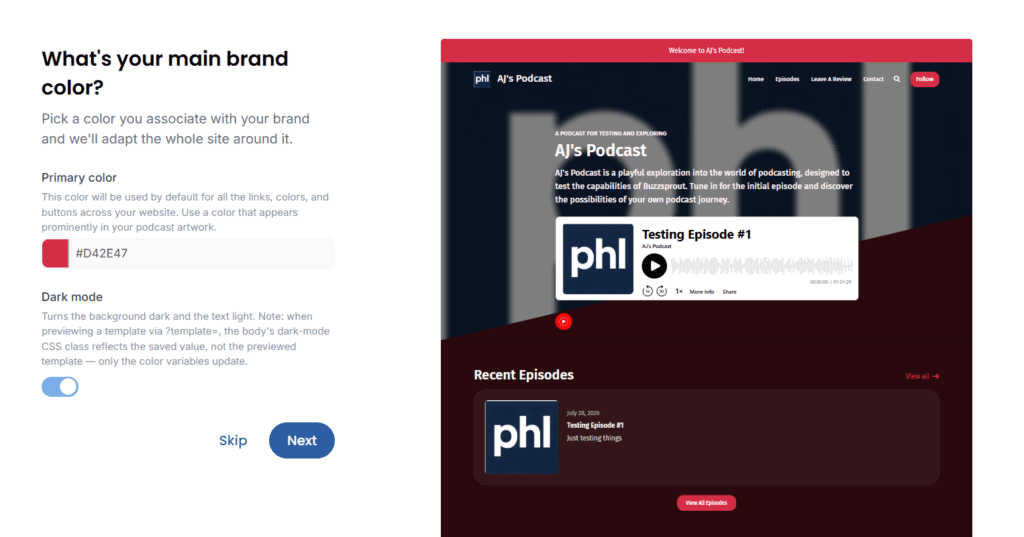
The limit is that you are working inside a template. If you want a blank canvas, Squarespace or WordPress gives you more room and more upkeep. Podpage is also taking a waitlist for “Agent-Built Websites” on Pro and Elite, where you design a custom site with an AI agent. It is early access, so I would not buy a plan for it.
Can you use your own domain on Podpage?
Yes, on every plan including the $12 Basic. Podpage does not sell domains, so you buy one from any registrar and point it at your site. You can use a whole domain or a subdomain like podcast.yourbusiness.com. Podpage issues a free SSL certificate automatically once the DNS points at it.
The domain rules have two limits. First, you cannot put Podpage in a folder of an existing site, like yourbusiness.com/podcast. Podpage’s help center calls that a technical limit, so a business with a main site needs a subdomain. Second, the custom domain needs an active subscription. You cannot connect it during the free trial.
What SEO features does Podpage include?
The basics come on every plan: formatted titles and descriptions, schema markup on episode pages, an automatic sitemap, a managed robots.txt, and clean episode URLs. That covers the technical groundwork without any setup on your part.
Pro adds the pieces that create more pages for Google to find: a blog, unlimited custom pages, and transcripts. It also adds 301 redirects, which matter if you are moving an old WordPress site and want to keep its rankings.
Elite is the search tier. It adds advanced SEO analysis with a target keyphrase and per-page reports, a 404 error report, automatic internal linking, an AI “SEO Boost” that rewrites each episode’s metadata on import, and AI companion blog posts. It is worth $39 a month only if search traffic is a real goal for the show. For most podcasts, the transcripts on Pro do more.
Does Podpage handle transcripts and show notes?
Show notes, yes, on every plan. Each episode page pulls the description and show notes straight from your feed, so whatever you write in your host appears on the site. Pro adds an episode footer for standing text you want under every episode, like sponsor links.
Transcripts start on Pro. If your host puts transcripts in the feed, Podpage imports them automatically in SRT, TXT, HTML, DOCX, or JSON format, though not PDF. You can also paste one in by hand. Pair a transcript with Podpage’s own player and the timestamps become clickable.
What Podpage will not do is write the transcript. Its help center says it does not create transcripts and has no plans to, and its pricing page lists no AI transcripts on any plan, so you need your host or a separate tool for that.
What guest and contact features does Podpage have?
Guest tools are Pro-only, and they are the best reason to pay for it. The guest intake form lets a guest fill in their own bio, photo, email, and social links, answer up to three custom questions, and jump to your Calendly link when they finish. Submitting the form means agreeing to a guest release, either Podpage’s default from Easy Legal for Podcasters or your own PDF.
A guest’s profile page goes live when you attach them to an episode, and Podpage can email the guest when that episode publishes. You can export the guest list, too.
For listeners, Pro adds a contact form, voicemail, comments, surveys, popups, and a mailing list that connects to your email tool. Elite adds routing, so booking requests and fan mail can go to different inboxes. Basic has none of this, and that is the main reason I would not buy Basic.
What does Podpage cost?
Three plans, each priced two ways, per Podpage’s pricing page, checked September 24, 2026. Annual billing saves roughly a third.
| Plan | Billed yearly | Billed monthly | What it adds |
|---|---|---|---|
| Basic | $12/mo | $19/mo | Auto-updating site, custom domain, templates, SEO basics, feed checked every 4 hours |
| Pro | $19/mo | $29/mo | Blog, custom pages, transcripts, guest tools, contact form, mailing list, voicemail, store and sponsor pages, hourly feed checks |
| Elite | $39/mo | $59/mo | AI SEO Boost and AI blog posts, advanced SEO analysis, episode deep links, reviews from 175+ countries, weekly coaching, 30-minute feed checks |
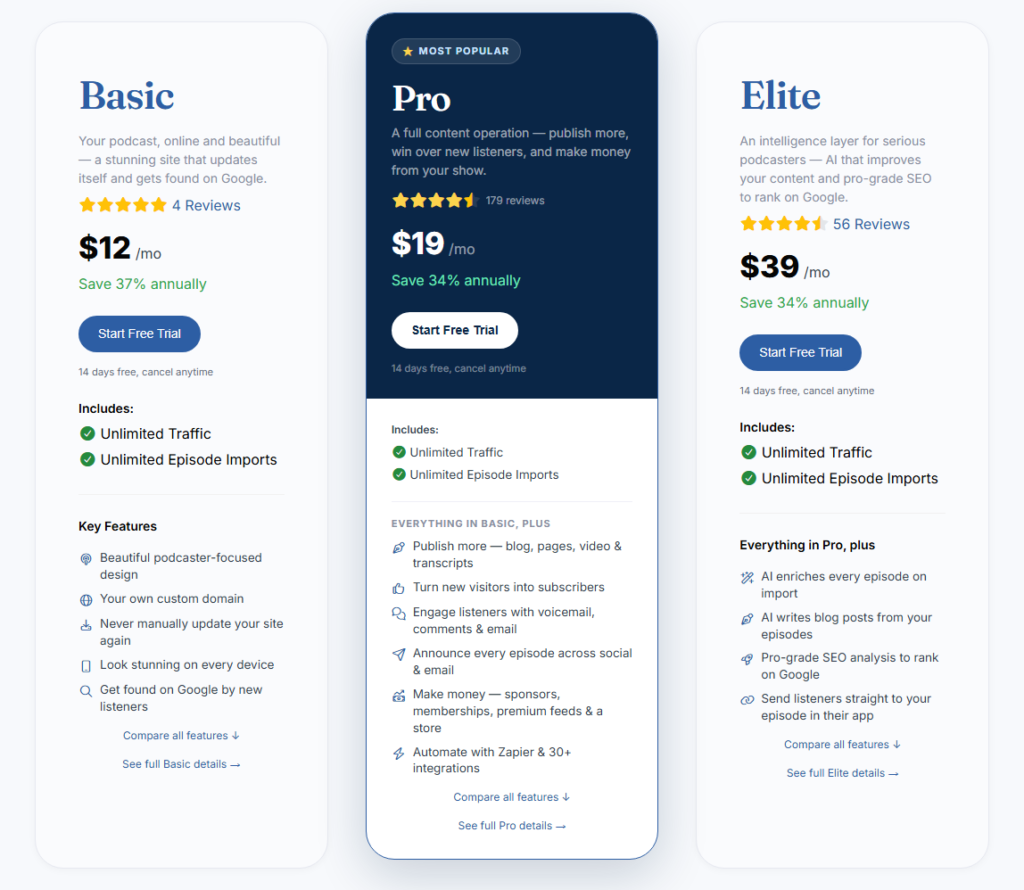
Pro on annual billing works out to $228 a year. Each website is its own subscription, so two shows with separate sites means two bills. Networks can instead buy a single network site: $50 a month for up to 25 shows or $100 a month for up to 100, with each show living at a path on the network’s domain and getting Pro features, not Elite.
Is there a free plan, trial, or Podpage promo code?
There is no free plan. Every new site gets a 14-day free trial with Basic and Pro features and no credit card. During the trial the site is private, so visitors see a “currently private” page, and the custom domain waits until you subscribe. If the trial runs out, the site shows as expired but nothing is deleted.
On codes: Podpage’s help center says its School of Podcasting member discount ended in June 2026. I found no current public code. Annual billing is the discount.
How do cancellation and refunds work?
You cancel yourself, from Billing in the dashboard, with a Cancel Plan button. The cancellation flow may offer to pause your subscription for up to 3 months at no charge instead. Either way, you keep access until the end of the period you paid for.
Canceling takes the site off the public internet but does not delete it. Your content and design are saved, and choosing a plan again brings it back. Deleting the account for good means emailing support.
Refunds are generous at the start and strict later. Podpage’s terms promise a full refund if you ask within 30 days of your first purchase or most recent renewal, and the help center says refunds take 5 to 10 business days to land. After that window, an annual plan is not normally prorated if you cancel midyear. If you are unsure the show will last, pay monthly for the first few months.
Podpage, your host’s free website, or a general site builder?
Start with what you already have. If you host on Transistor or Captivate, the built-in site includes a custom domain and real design control, and Podpage mostly duplicates it. If you host on Buzzsprout, the site is free but fixed, which is exactly the gap Podpage fills.
A general builder like WordPress, Squarespace, or Wix wins when the website is bigger than the podcast, such as a business site with a show attached. The trade is that you post each episode by hand or wire up plugins, while Podpage imports it for you. The fuller breakdown of what each one is for is in podcast hosting vs a website.
If you want one platform to host the audio, build the site, and sell memberships, look at Beamly instead. Its Starter plan is $18 a month on annual billing, and we put it against Podpage in Podpage vs Beamly. One naming trap while you are there: if you searched for podcastpage.io, that is not Podpage. Podcastpage.io was Beamly’s old name, and the domain now forwards to beamly.com.
What are the downsides of Podpage?
The big one is cost stacking. Podpage does not replace your host, so Pro at $228 a year sits on top of whatever you already pay for audio. Two shows on separate sites doubles it.
Basic is thin. No blog, no transcripts, no contact form, no guest tools, no episode search. It is a good-looking auto-updating page and not much more, so the real entry price is $19 a month.
The other catches are smaller. There is no subfolder option for an existing site. Annual plans are not prorated after the 30-day window. You cannot test your real domain during the trial. And there is no phone support, only chat, email seven days a week, and free live video sessions you book. Basic sites also keep a small “Podcast Website by Podpage” link in the footer. Hiding it is a Pro feature, under Settings, then Advanced Settings, then Hide branding.
Verdict: who should use Podpage?
Use Podpage if your host’s website is the weak link, you want a blog, guest pages, and email capture, and you never want to update a site by hand again. Run the free trial, then take Pro on annual billing once you know you will keep it. Start the 14-day Podpage trial here, no card needed.
Skip it if your host already gives you a site you would put your name on, if you want the audio and the site on one bill, or if the podcast is a small corner of a bigger business website. The downside to plan around is simple: Podpage fixes your website, not your hosting, and you pay for both.
Frequently asked questions
Is podcastpage.io the same as Podpage?
No. Podcastpage.io was the former name of Beamly, a separate podcast website builder and host, and the podcastpage.io domain now redirects to beamly.com. Podpage lives at podpage.com.
Does Podpage have a free plan?
No. It has a 14-day free trial with Basic and Pro features and no credit card. After that, plans start at $12 a month on annual billing or $19 month to month.
Does Podpage host my podcast?
No. Podpage builds and hosts the website only. Your audio files and RSS feed stay with your podcast host, and Podpage imports each new episode from the feed.
Can I cancel Podpage anytime?
Yes, from the Billing page in your dashboard. The plan runs to the end of the period you paid for, the site goes offline but is saved, and you can ask for a full refund within 30 days of a charge.
Is Podpage good for SEO?
Every plan includes schema markup, a sitemap, and clean episode URLs. Pro adds the blog, custom pages, and transcripts that give Google more to index, and Elite adds keyphrase analysis and AI-written companion posts.