Castmagic Review 2026: Is It Worth It for Podcasters?
Last updated: October 2026
This post contains affiliate links, and we may earn a commission if you sign up through them, at no cost to you. See our Affiliate Disclosure. Pricing as of September 2026.
Castmagic is worth it if you publish every week and want notes, chapters, titles, social posts, and clips from one upload. It is the wrong buy if you only need an episode description, or if $29 a month for a side project stings. It is still our top pick for AI show notes. Here is why, and where it falls short.
Key takeaways
- Castmagic’s Hobby plan costs $19 a month billed annually ($239 a year) or $29 a month billed monthly.
- Castmagic’s pricing page lists Hobby’s 30 transcribed hours as a “library total,” and Castmagic’s support team confirmed to us that they do not reset each month.
- Castmagic has no free plan, but it processes one recording before you pay and then locks the drafts behind a 7-day trial for $1.
- Castmagic’s jump from Hobby to Starter takes the monthly price from $29 to $69, or from $19 to $48 on annual billing.
- Castmagic’s terms say it gives no refunds for partial months, so a cancellation runs to the end of the billing period you already paid for.
What does Castmagic do?
You give it a recording, it transcribes the audio, and then it writes the pile of text that follows an episode. That means show notes, a timestamped overview, title ideas, quote hooks, discussion questions, and posts shaped for LinkedIn, Twitter, and Threads. It also cuts short clips and audiograms in a section it calls Studio.
Recordings can come from a file upload (up to 10GB each), Zoom, Google Drive, an RSS feed, or a YouTube, TikTok, or Instagram link, per Castmagic’s pricing page. The presets are only the start. You can write your own prompts, borrow community prompts, regenerate any output as often as you like, and chat with the transcript through a feature called Magic Chat. Castmagic says it handles more than 60 languages.
If you are fuzzy on what show notes should contain in the first place, start with what podcast show notes are and why they matter. A tool this broad is easier to judge once you know which three outputs you will use.
What does Castmagic make from one episode?
From a 16-minute test video, it produced 13 drafts before I paid anything. The list opened with quote hooks, a YouTube-to-tweets thread, a Threads post, two timestamped overviews, and a set of discussion questions. The confirmation screen also named show notes and a LinkedIn post in the batch, plus a Studio highlight clip.
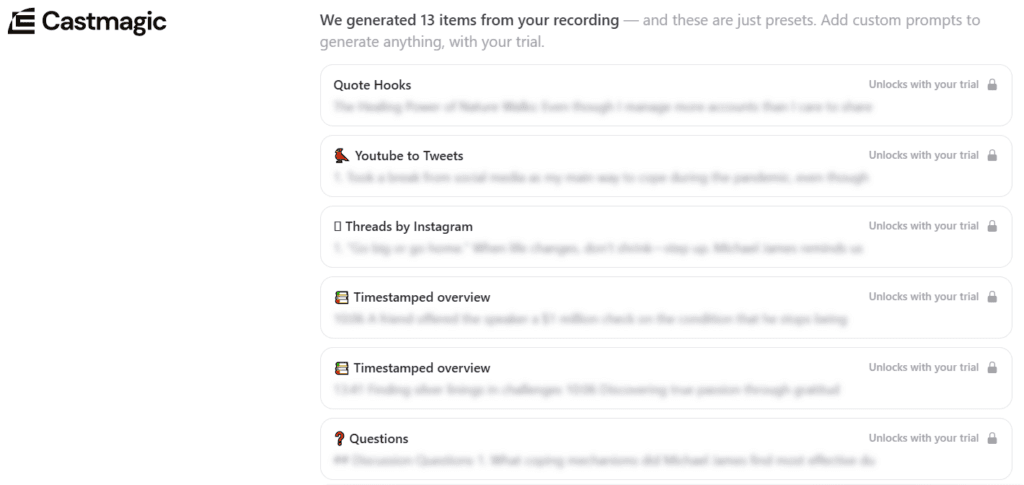
That breadth is the reason Castmagic tops our best AI show notes generator ranking. One upload covers the description, the chapter list, and a week of social posts. Nothing else we tested spun out as many formats from the same file.
Test video: Gratitude “Podcast” Interview: Michael James by David George Brooke, licensed under CC BY.
How good is the output?
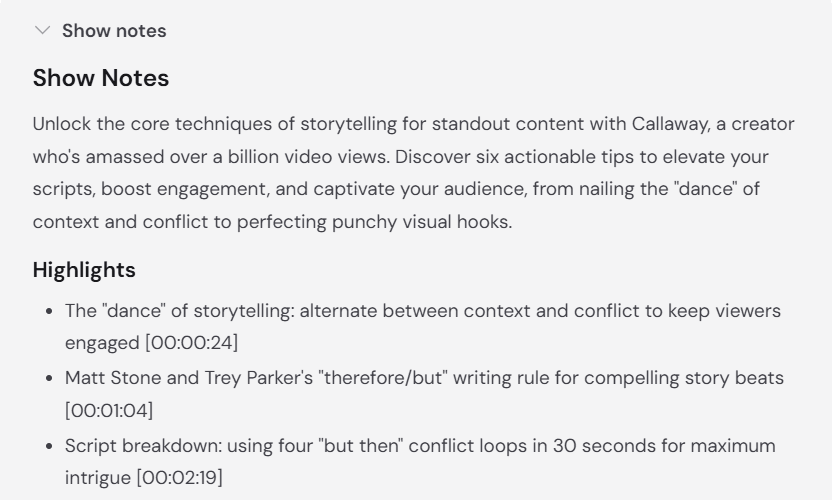
Good enough to save you an hour of drafting, not good enough to publish untouched. Our free run stopped at the locked screen, so those previews stayed blurred. Once the $1 trial was running, we fed it a second recording, a YouTube talk on storytelling. The show notes came back as a short summary plus highlights stamped to the second, which is the part that saves the most typing. Beyond that one run, I lean on what paying users report.
Reviews on Capterra and AppSumo agree on the upside. The time saved is the praise that comes up again and again, along with the custom prompts. They also agree on the main flaw: transcription slips. On AppSumo, the transcription complaints center on non-English recordings, with speaker labels and timestamps named as the weak spots. So the 60-language claim is real, but test your own language before you commit.
Budget ten minutes of editing per episode. Fix guest names, cut any detail that was never said, and rewrite the flattest title. The presets write in a generic voice, and your own prompts are how you pull it closer to yours.
How much does Castmagic cost?
Hobby is $19 a month billed annually, which is $239 up front, or $29 on monthly billing. Starter is $48 or $69, and Team is $139 or $199. Castmagic says the annual rate saves 30 percent. These figures come from Castmagic’s live pricing page, checked in September 2026.
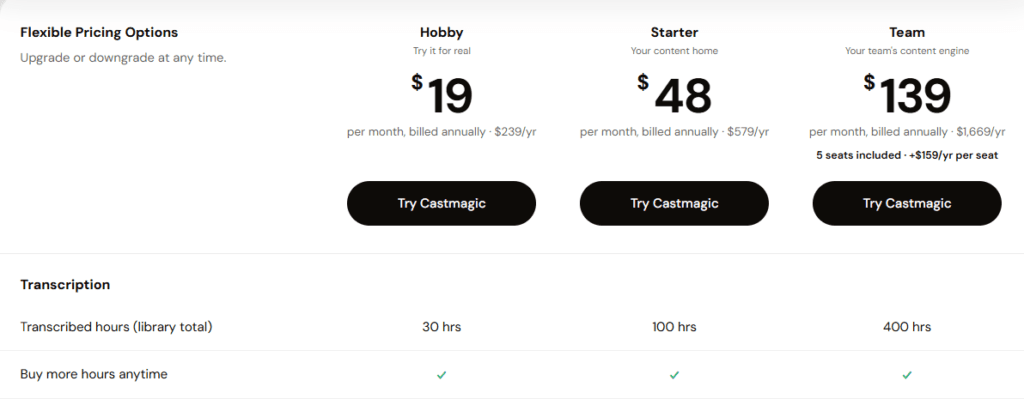
| Plan | Billed annually | Billed monthly | Transcribed hours | Seats | Storage |
|---|---|---|---|---|---|
| Hobby | $19/mo ($239/yr) | $29/mo | 30 (library total) | 3 | 50GB |
| Starter | $48/mo ($579/yr) | $69/mo | 100 (library total) | 5 | 250GB |
| Team | $139/mo ($1,669/yr) | $199/mo | 400 (library total) | 5 included, more at $159/yr or $19/mo each | 1TB |
| Business and Scale | From $699/mo | From $999/mo | Custom | Custom | Custom |
Every plan gets unlimited AI outputs, regenerations, Studio clips, and audiograms, plus AI image generation and the same integrations. The differences are hours, seats, storage, and workspaces (3 on Hobby, 10 on Starter, 25 on Team). API access starts at Starter. Starter also adds an onboarding call, and Team moves you to priority support.
How do Castmagic’s transcription hours work?
The hours are the fuzzy part. The pricing page labels Hobby’s 30 hours a “library total,” and its FAQ describes “a growing library of transcribed hours” that “you build up over time.” The page never says outright whether they reset, so we asked. Castmagic’s support chat told us in September 2026 that the hours do not reset each month. That makes 30 hours a running total for the account, not a monthly allowance. When you use them up, you can add hours without upgrading. Support shared the add-on menu with us: 10 extra hours for $9 a month, 20 for $18, 30 for $27, or 40 for $36. Support told us the add-ons went live about a month before we asked, which puts it around late August 2026. The public pricing page says you can buy more hours at any time but lists none of those prices.
For planning, run the math on your own show. A weekly hour-long episode uses about four to five hours a month. Because the 30 hours are a running total, that covers roughly six months of a weekly show. After that, a 10-hour add-on at $9 a month keeps a weekly show going for far less than the $40 a month jump to Starter.
Is there a Castmagic free trial?
There is no free plan, and the pricing page does not mention a trial at all. What you get instead happens after signup. Castmagic processes your first recording for free, shows you the list of drafts it made, and locks every one behind a 7-day trial that costs $1.
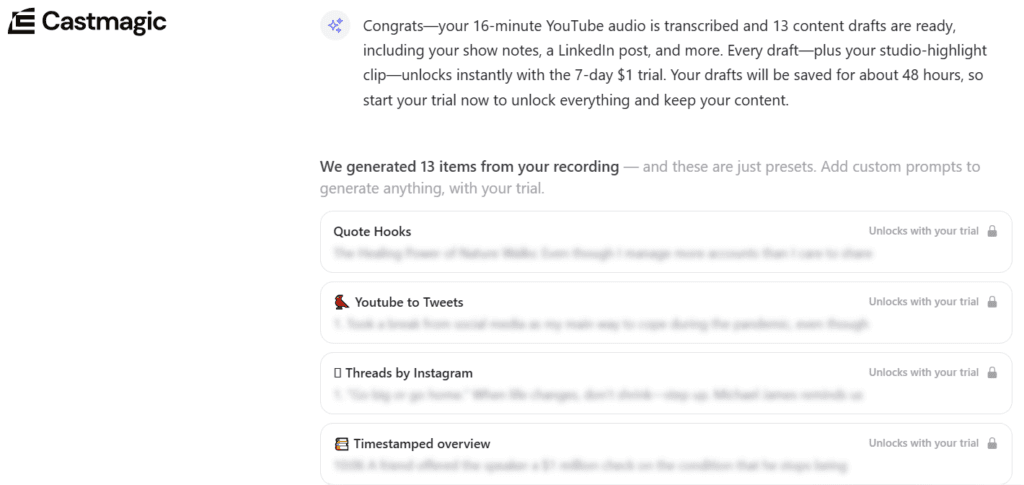
Two things on that screen matter. First, the clock: Castmagic says the drafts are saved for about 48 hours, so the free run is a two-day window, not a sample you can come back to. Second, what the $1 buys. The offer reads “Just $1 to get started, then $29/per month after your trial,” and says Castmagic will email a reminder before the trial ends.
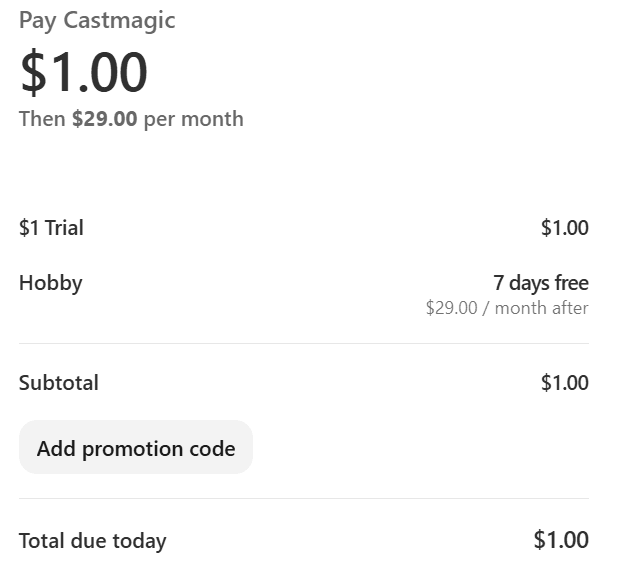
The checkout names the plan. When we started the trial in September 2026, it showed $1.00 due today, then Hobby with 7 days free and $29.00 a month after. So the trial rolls into Hobby on monthly billing, not the $19 annual rate. Cancel before day eight if you do not want that charge.
Can you cancel Castmagic and get a refund?
You can cancel at any time from your account settings or through support. Your plan stays active until the end of the period you paid for. Refunds are harder to get. Castmagic’s terms of service say payments are non-refundable unless the terms state otherwise, and that no refunds are given for partial months.
That makes the billing choice matter. An annual Hobby plan is $239 on day one, and if the tool does not stick, that money is gone. Pay monthly for the first two or three months, then switch to annual once Castmagic is part of your weekly routine.
What are Castmagic’s downsides?
The price ladder is the big one. Hobby at $19 looks cheap, but that rate needs a year paid up front. The step to Starter more than doubles the bill, from $29 to $69 a month on monthly billing. If you outgrow Hobby’s hours, add-ons start at $9 a month for 10 more, and the full step to Starter adds $40 a month.
The hours never reset, and the pricing page does not say so plainly or list what extra hours cost. We only confirmed both by asking support, which is an odd gap for the number the whole plan is built on. The trial also rushes you, with a two-day save window on your free drafts, and it rolls into the $29 monthly rate rather than the cheaper annual one. Reviewers report transcription slips, most of all on non-English audio. And the interface throws a lot at you at once. Expect the first hour to feel like a learning curve, not a magic button.
Smaller things. There is no API on Hobby. There are no partial-month refunds. And if your host already bundles an AI writer, Castmagic may duplicate a tool you pay for.
Who should use Castmagic?
Use it if you publish weekly and actually post the social content, not just the show notes. The value is in the volume: a dozen formats from one upload is only a bargain if you use six of them. It also suits a small team, since Hobby includes three seats, and a show that records on Zoom or already lives on YouTube, because those imports skip the download-and-upload step.
Skip it if all you need is a clean description and chapters. Buzzsprout’s Cohost AI covers that inside the host, as our Buzzsprout review explains, and Podbean has a similar assistant. Skip it too if you publish twice a month and want the lowest bill possible.
What are the best Castmagic alternatives?
Podsqueeze is the budget alternative, with a cheaper entry plan and free generation without a credit card. quso.ai is the pick if the gap is short vertical video rather than notes, since it cuts clips and does not write show notes at all. Both are compared against Castmagic, with prices, in our AI show notes generator guide.
If you go the quso.ai route, our link takes 40 percent off an annual plan at checkout, with no code to type, and monthly plans get no discount. We may earn a commission when you use it. See quso.ai.
Verdict: is Castmagic worth it?
Yes, for a weekly show that wants one tool to turn each episode into notes, chapters, and a stack of social posts. It makes more from a single upload than anything else we have tried, and the free first run shows you the full list of drafts before you pay. Start on monthly billing, keep the ten-minute edit, and move to annual once it earns its place. Try Castmagic.
The honest downside is cost clarity. Between hours that never reset, a trial that rolls into monthly billing, and the jump to Starter, you should read the checkout screen carefully. If you are still sorting out the rest of your setup, how to choose a podcast host covers the piece that comes first.
FAQ
Is Castmagic free? No. There is no free plan. Castmagic processes your first recording for free and then asks for a 7-day trial at $1 to unlock the drafts, which it saves for about 48 hours.
How much does Castmagic cost a month? Hobby is $19 a month billed annually or $29 billed monthly. Starter is $48 or $69, Team is $139 or $199, and Business and Scale starts at $699 a month billed annually.
How many hours do you get on Castmagic? The pricing page lists 30 transcribed hours on Hobby, 100 on Starter, and 400 on Team, labeled as a library total. Castmagic’s support told us those hours do not reset each month. Extra hours cost $9 a month for every 10, up to 40, according to Castmagic’s support.
Does Castmagic give refunds? Not for partial months. Its terms say payments are non-refundable unless stated otherwise, and a canceled plan stays active until the end of the paid period.
Is Castmagic good for non-English podcasts? Castmagic lists more than 60 languages, but AppSumo reviewers report weaker speaker labels and timestamps on non-English audio. Run one episode in your language before paying.