Opus Clip Pricing 2026: Plans, Credits, and Is It Worth It?
Last updated: October 2026
This post contains affiliate links, and we may earn a commission if you sign up through them, at no cost to you. Opus Clip is one of them. See our Affiliate Disclosure. Pricing as of October 2026.
Opus Clip Pro billed yearly is the plan to buy for a weekly video podcast: $174 a year, or $14.50 a month, for 300 credits a month. Starter at $15 a month covers only two hour-long episodes and cannot be billed yearly. Free is a one-episode test with a watermark. The downside is the lock-in. Opus’s terms say it will not refund fees already paid, and one of its own help pages contradicts its pricing page on when yearly credits arrive.
Every limit below is Opus’s own wording from its pricing page, help center, and terms, read on October 12, 2026. Every cost-per-episode figure is our arithmetic on those published numbers.
Key takeaways
- Opus Clip Pro costs $29 a month billed monthly or $14.50 a month billed yearly ($174), and includes 300 credits a month and 2 team seats.
- Opus Clip Starter costs $15 a month, is sold month to month only, and includes 150 credits, enough for two 60-minute episodes.
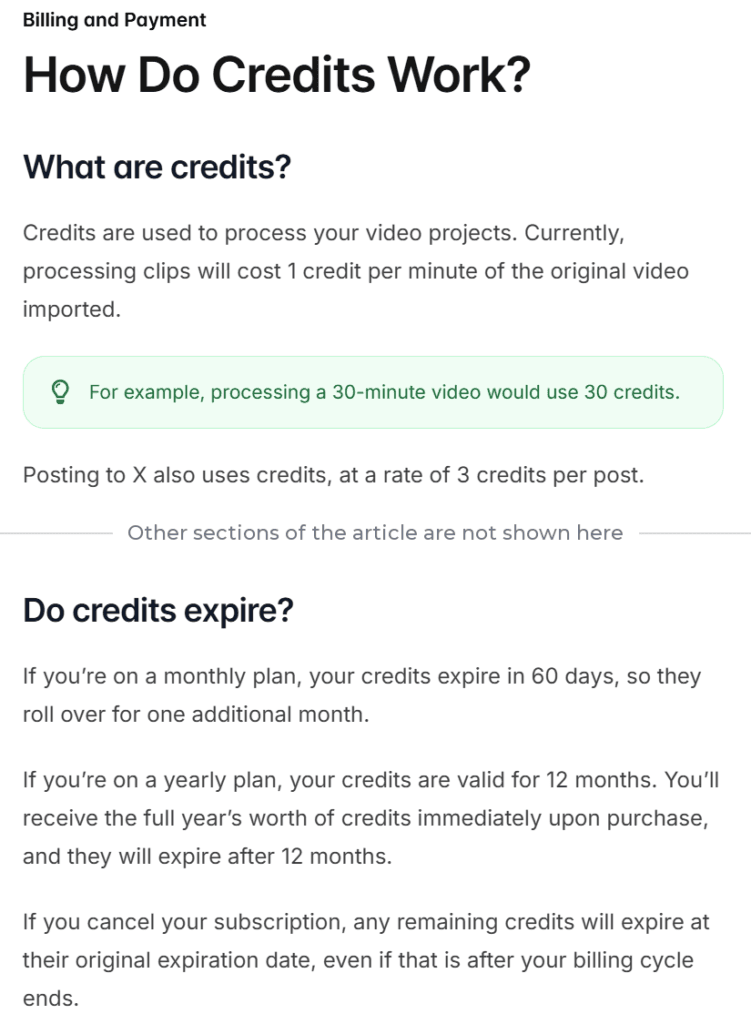
- Opus Clip charges 1 credit per minute of the video you import, so a 60-minute episode costs 60 credits no matter how many clips it cuts.
- Opus Clip’s Free plan gives 60 credits a month, adds a watermark, allows no editing, and stops letting you export a clip after 3 days.
- Opus Clip’s Terms of Service say it will not refund fees already paid and cannot end a paid term early, so yearly Pro is a 12-month commitment.
- Opus Clip publishes no separate API price: the API runs on the same credits and is capped at 900 credits of API use a month on Pro (Beta).
How much does Opus Clip cost in 2026?
Four plans: Free, Starter, Pro, and Business, which is a sales quote. Pro is the only self-serve plan with yearly billing, and the only one sold in packs. Each pack adds 300 credits a month and 2 team seats, up to 4 seats. The prices below come from Opus Clip’s pricing page, checked with both billing toggles on October 12, 2026, and again on October 19, 2026. Yearly billing is printed as a per-month rate with the annual total underneath.
| Plan | Billed monthly | Billed yearly | Yearly total | Credits | Team seats | Who it is for |
|---|---|---|---|---|---|---|
| Free | $0 | $0 | $0 | 60 a month | None | Testing one episode |
| Starter | $15 | Not offered | Not offered | 150 a month | No team workspace | One or two episodes a month |
| Pro, 1 pack | $29 | $14.50 a month | $174 | 300 a month | 2 | A weekly one-hour show |
| Pro, 2 packs | $58 | $29 a month | $348 | 600 a month | 4 | Longer episodes or two shows |
| Business | Quote | Quote | Quote | Custom | Unlimited | Big teams and API contracts |
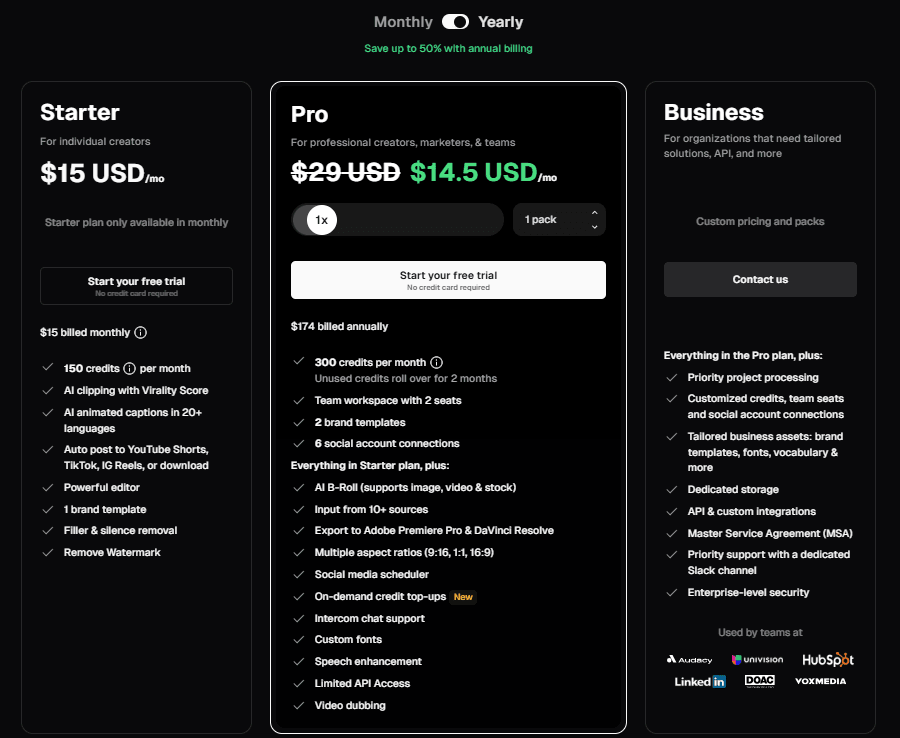
The pricing page offers a free trial on Starter and Pro with no credit card required. Per Opus’s help center, the trial is a 7-day Pro account that drops to the Free plan on its own when the week ends, so the trial does not roll into a paid plan. Opus’s podcaster page puts the trial allowance at 90 minutes of processing, which is one and a half hour-long episodes.
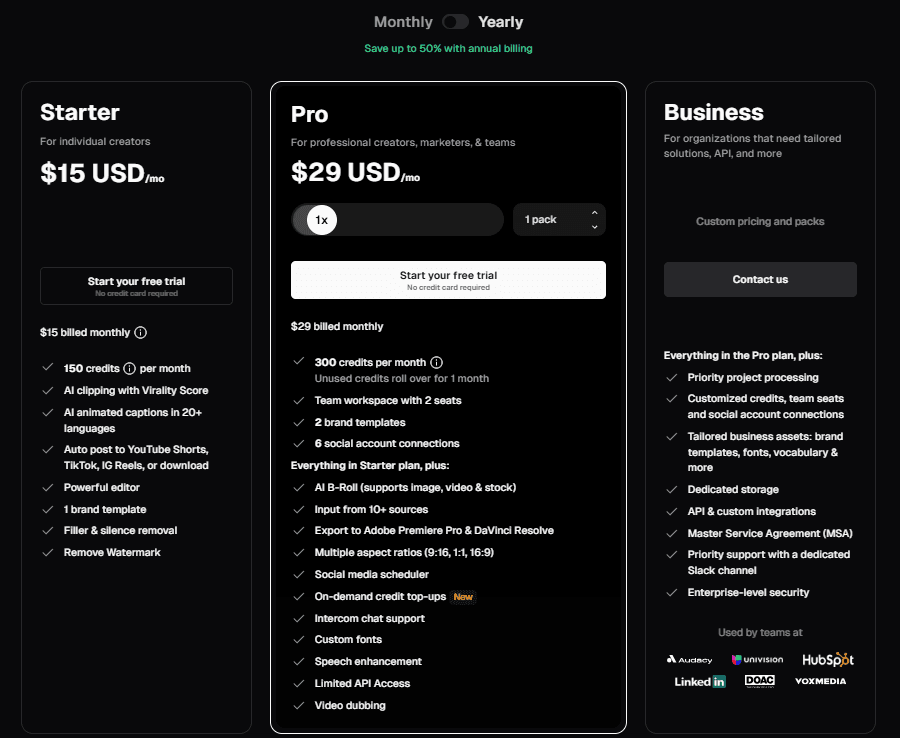
Monthly billing stops at 5 packs, which is $145 a month for 1,500 credits. Yearly billing goes up to 15 packs: $2,610 a year, or $217.50 a month, for 4,500 credits a month. Payments run through Stripe, and Opus’s help center says ACH and wire transfers are for Business only.
What does the Opus Clip free plan leave out?
Editing, a clean export, and anything past one episode a month. The pricing page lists 60 credits a month, clips rendered up to 1080p, auto reframe, and captions with emoji and keyword highlights. It also lists a watermark, no editing, and clips that are no longer exportable after 3 days. Free runs at regular speed, where Starter is faster than Free and trial accounts, and local uploads are capped at 10GB.
Two more limits sit in the help center. Opus’s virality score article says Free users do not see the score, which is a Starter and Pro feature. Its watermark article says upgrading removes the watermark from projects made on Free or the trial. Sixty credits is exactly one 60-minute episode a month, so Free is good for one thing: seeing what Opus pulls from one of your episodes before you pay.
How many credits does a 60-minute podcast episode use?
60. Per Opus’s credits article, processing costs 1 credit per minute of the video you import, not per clip, so a 60-minute episode uses 60 credits whether Opus cuts 5 clips or 30. Partial minutes round down, so an episode that runs 60 minutes 59 seconds still counts as 60, and one that runs 61 minutes counts as 61. Opus’s clip-count article says a 30- to 60-minute video yields 23 to 32 clips, and a 60- to 120-minute video yields 32 to 42.
| Plan | Credits | 60-minute episodes covered | Credit cost per episode (our math) |
|---|---|---|---|
| Free | 60 a month | 1 | $0 |
| Starter | 150 a month | 2, with 30 credits left | $6.00 |
| Pro, billed monthly | 300 a month | 5 | $5.80 |
| Pro, billed yearly | 300 a month | 5 | $2.90 |
The last column is the plan price divided by its credits, times 60. A weekly show uses 240 credits in a four-week month and 300 in a five-week one, so Pro’s 300 covers it, with 60 to spare in the short month and none in the long one. A weekly 90-minute show uses 360 credits in four weeks, which is over the line. That show needs 2 packs ($58 monthly or $348 yearly for 600 credits a month) or has to use the processing timeframe slider to send only part of each episode.
Imports are not the only drain. Posting to X costs 3 credits per clip per X account. Auto Import, when set to process automatically, deducts credits for the full length of every new public YouTube video over 3 minutes, so a weekly show spends credits on every upload. Set it to email notifications if you want to pick the episodes yourself. Opus’s help center does not say whether reprompting a project costs more credits.
Do Opus Clip credits roll over?
Partly, and Opus’s own pages disagree about yearly plans. On monthly billing, credits last 60 days, so unused ones carry into one extra month. On yearly billing, the pricing page shows 300 credits per month and says unused credits roll over for 2 months. The credits article says the full 3,600 arrive at purchase and last 12 months.
The tie-breaker is Opus’s Agent Opus credits FAQ, which says paid credits work in both products. It describes yearly credits as arriving monthly at the plan’s monthly rate, rather than as one balance up front, with a 2-month rollover. That matches the pricing page, so plan around 300 a month. If a 3,600-credit pool is the reason you want yearly billing, confirm it with Opus support before you pay.
Canceling raises a second conflict. One help article says remaining credits keep their original expiry date after you cancel. Another says they expire at the end of the current billing cycle. Use them before you cancel.
What do Starter and Pro add for a podcaster?
Starter, $15 a month, removes the watermark and adds the editor, filler and silence removal, a virality score on every clip, animated captions in 20-plus languages, and posting straight to YouTube Shorts, TikTok, and Instagram Reels. It exports 9:16 only, includes 1 brand template, lists a 30-day export window, and imports from Google Drive, Vimeo, Zoom, Rumble, and StreamYard. It also processes faster than Free.
Pro, $29 a month or $14.50 billed yearly, adds a social scheduler, 16:9 and 1:1 exports, export to Adobe Premiere Pro and DaVinci Resolve, 6 connected social accounts, uploads up to 30GB, and 100GB of cloud storage that saves projects. Its import list grows past 10 sources, including Riverside and Dropbox, and the plan article lists Apple Podcasts links too. The pricing page also lists on-demand credit top-ups for Pro, but prints no price for them. The help center never says whether an audio-only file works.
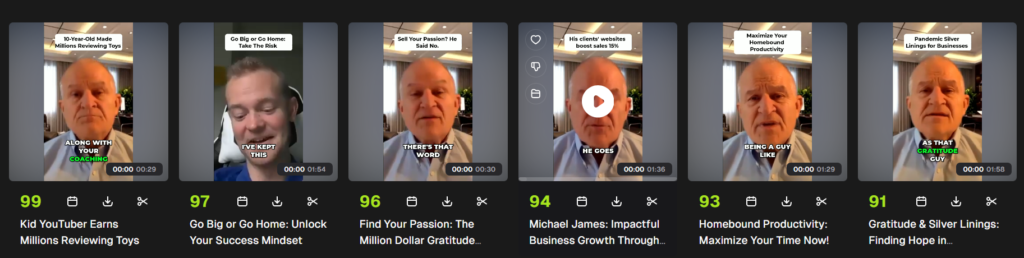
Test video: Gratitude “Podcast” Interview: Michael James by David George Brooke, licensed under CC BY.
The results screen above is what the credits buy: clips sorted best first. Opus’s help center describes the score as a 0 to 99 estimate built from hook, flow, value, and trend, with the highest scores on top by default. Treat it as a sort order, not a forecast.
How do Opus Clip packs and team seats work?
Each Pro pack adds 300 credits a month and 2 seats, and seats stop at 4, which you reach with 2 packs. Per Opus’s team management article, seats cannot be bought alone, and members spend the owner’s credits. Drop to fewer packs and the most recently joined members lose access. More than 4 seats means Business, a quote that lists unlimited seats, priority processing, and a dedicated Slack support channel.
How much does the Opus Clip API cost?
Opus publishes no separate dollar price for its API. The pricing page lists limited API access on Pro, and Opus’s API limits page says access is on Pro (Beta), Max, and Business, with usage drawn from the same credits at 1 credit per minute of video. Pro (Beta) and Max include 15 hours, or 900 credits, of API usage a month per workspace. After that the API returns an error until the first of the next month, while the web app keeps working. Business follows your contract.
Other documented limits: 30 requests a minute per API key, 4 projects running at once on Pro (Beta), a 10-credit minimum per API project, and a 10-hour, 30GB cap per video. API projects expire after 30 days by default. Opus’s API landing page also advertises a self-serve free tier without saying what it includes, and the help center never describes one.
Is Agent Opus pricing the same as Opus Clip pricing?
No. Agent Opus is a separate video generator with its own pricing page. Its Pro plan is $29 a month and Max is $129 a month on both billing toggles, with $348 and $1,548 printed as the annual totals. Opus’s credits article says the Max plan is sold only through Agent Opus, and the Agent Opus credits FAQ says paid credits work in both products. For clips, buy from the Opus Clip pricing page.
What are the catches in Opus Clip pricing?
Credits are spent when you import, not when you keep a clip. A run that disappoints still used its minutes. The one safety net is Opus’s project refund: Pro users can refund a project within 14 days of upload if no clip has been downloaded, and the credits come back. Trial accounts cannot use it, and deleting a project returns nothing.
The product is video first. The pricing page, the help center, and the podcaster page all talk about video imports, and none says an audio-only episode is accepted. If your show has no video, run one episode through the Free plan before you pay for anything.
Prices can move. Opus’s Terms of Service say it can change subscription fees, with advance notice, effective at the end of your current billing cycle.
How do you cancel Opus Clip, and can you get a refund?
Cancel from your Subscription page: Manage plan, then Cancel subscription, then Continue to cancel. Per Opus’s plans article, the change takes effect at the start of the next billing cycle, so a paid plan runs to the end of the term you paid for. Opus says it does not offer pausing. You cancel and resubscribe later.
Cash refunds are the weak spot. Opus’s Terms of Service, effective November 17, 2025, say subscriptions auto-renew at the then-current non-promotional rate, that you get no prorated refund for the current period, and that paid terms cannot be ended early. They add that Opus will not refund fees already paid except as the agreement expressly provides. On yearly Pro, that makes the whole $174 a 12-month commitment. The one exception is for trials: if you cancel before the trial ends and are charged anyway, the terms say to email contact@opus.pro.
Download your clips before you cancel or downgrade. Opus’s cloud storage article says moving to Free or Starter removes saved projects from cloud storage immediately, and the cancel steps warn that projects stop being accessible after 3 days. A yearly Pro plan also cannot be downgraded to Starter in place. Opus says to cancel and resubscribe.
How does Opus Clip pricing compare with Descript and quso?
The three price tags sit close together, but the meters differ, so they are not like for like. Prices below come from Descript’s pricing page, checked October 12, 2026, and quso’s pricing page, re-read October 20, 2026, after quso cut its yearly prices. Descript is priced per person, and quso’s FAQ says one credit is about one minute of processed video.
| Tool and plan | Billed monthly | Billed yearly, per month | What the meter counts |
|---|---|---|---|
| Opus Clip Pro | $29 | $14.50 | 300 credits a month, 1 per imported minute |
| Descript Hobbyist | $24 | $16 | 10 media hours and 400 AI credits a month |
| quso Essential | $39 | $19.50 | 300 credits a month, and the page no longer says yearly billing doubles them |
Descript is the better buy if you already edit episodes there, because its Create clips tool is included from Hobbyist. Opus wins when clips are the only job. Our Opus Clip vs Descript comparison covers how each one picks, captions, and posts clips, the Descript pricing guide covers every Descript plan, and the best podcast clip tool roundup covers quso and the rest.
Is Opus Clip worth it for a podcast?
For a video podcast you publish every week, yes. Pro billed yearly is $14.50 a month for 300 credits, about $2.90 of credit per hour-long episode by our math, and Opus returns 23 to 32 ranked, captioned candidates from a 30- to 60-minute video. That is a cheap first pass, as long as a person reviews what goes out.
It is a poor fit for an audio-only show, since Opus’s materials describe video. It is poor value if you post a clip or two a month, because Free’s 60 credits already cover one episode. And it is a bad deal if you edit in Descript, where Create clips is included from $16 a month billed yearly. The downsides are the 12-month lock-in with no cash refund, a meter that charges for source minutes rather than the clips you keep, and help pages that contradict each other on yearly credits.
Which Opus Clip plan should you buy?
Weekly one-hour video show: Pro. Start with Opus Clip’s free trial on one of your own episodes, then pay. Yearly saves $174 against 12 monthly payments of $29, but it cannot be refunded, so if you are unsure you will keep clipping, pay monthly for two or three months first. The downside: 300 credits leave no room for a 90-minute episode or a fifth Monday.
One or two episodes a month: Stay on Free if you post one episode’s worth of clips, or take Starter at $15 for two. Starter costs $180 over 12 months, which is $6 more than Pro billed yearly, so it only wins if you will not commit to a year. The downside: monthly billing only, 9:16 exports only, and 1 brand template.
Longer episodes, two shows, or a team: Pro with 2 packs, $348 a year or $58 a month, for 600 credits and 4 seats. Beyond 4 seats or heavy API volume, ask Opus for a Business quote. The downside: every added pack is another non-refundable yearly commitment if you pay annually.
FAQ
How much is Opus Clip per month? Starter is $15 billed monthly. Pro is $29 billed monthly, or $14.50 a month billed yearly ($174). Each extra Pro pack adds the same price and 300 credits. Free costs nothing, and Business is a custom quote.
Is Opus Clip free? Yes. The Free plan gives 60 credits a month, with a watermark, no editing, and no export after 3 days. New accounts also get a 7-day Pro trial with no credit card required.
What does the Opus Clip API cost? Opus publishes no separate price. API use draws from the same credits, at 1 credit per minute of video, and Pro (Beta) and Max are capped at 900 credits of API use a month. Business API terms are by contract.
Can I get a refund on Opus Clip? Not for cash, in general. Opus’s terms say fees already paid are not refunded and paid terms cannot be ended early. Pro users can get the credits back for a project within 14 days if no clip was downloaded.
How many Opus Clip credits does a 60-minute podcast use? 60 credits, at 1 credit per minute of imported video. That is one episode on Free, two on Starter, and five on Pro each month.
Checked against Opus Clip’s pricing page (both billing toggles), help center plans, credits, upgrade, team, API, refund, and cancellation articles, Terms of Service, and Agent Opus pricing page, plus the Descript pricing page, October 12, 2026, and quso’s pricing page, re-read October 20, 2026.