Descript Review 2026: Is It Worth It for Podcasters?
This post contains affiliate links, and we may earn a commission if you sign up through them, at no cost to you. See our Affiliate Disclosure. Pricing as of September 2026.
Descript is worth it if you edit your own podcast every week and the edit is what keeps you from publishing. Cutting audio by deleting words, plus one-click filler removal, cuts hours off a weekly edit. Skip it if your episodes need only a trim, or if two people on the show both edit, because every editor is a paid seat.
Key takeaways
- Descript Hobbyist costs $16 a month per person billed yearly and includes 10 media hours, 400 AI credits, and 5 hours of Rooms recording a month.
- Descript caps Studio Sound and Remove Filler Words at 30 AI credits per file, so cleaning a solo episode costs at most 60 credits however long it runs.
- A Descript Rooms session counts once against your media hours for its length, so a one-hour interview with three people uses 60 media minutes, not 180.
- Descript will only clone a voice after the speaker records a spoken consent statement, and it refuses clones of anyone who has not consented.
- Descript’s Hobbyist plan cannot buy extra media hours or AI credits, so a month that runs long means waiting for the reset or upgrading to Creator.
- Descript refunds a plan only within 48 hours of the invoice date, which makes a yearly plan the riskiest way to try it.
Is Descript good for editing a podcast?
Yes, for the job most podcasters dread: cutting a spoken conversation down to the good parts. Descript transcribes your recording, and the transcript becomes the edit. Delete a sentence in the text and the audio under it goes too. Filler words, long pauses, and noisy rooms each get a one-click tool. It also records remote guests, clones your voice to patch a flubbed line, and cuts social clips.
What it does not do is host. Descript hands you a finished file, or sends it straight to a host such as Buzzsprout, Captivate, or Transistor, and the host builds the RSS feed. If that half is still open, start with how to choose a podcast host. The plan-by-plan costs are in our Descript pricing guide, so this review sticks to what using it is like.
What is it like to edit a podcast by text?
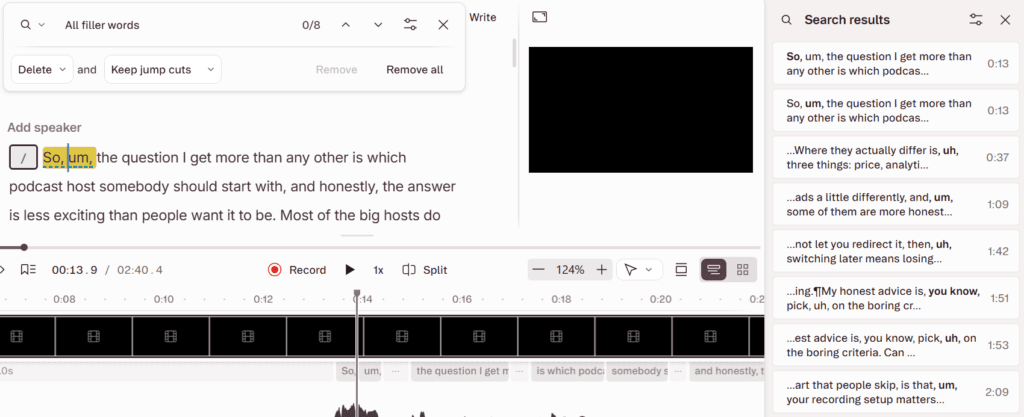
It feels like fixing a document, which is the whole appeal. We tested it on a free account with a 2-minute-40-second scripted segment about podcast hosting, read with the ums and uhs left in on purpose. The file uploaded, the transcript appeared, and the filler words were already underlined in the text before we touched anything. Clicking the “uh” in “they actually differ is, uh, three things” selected the same 0.909 seconds on the timeline below.
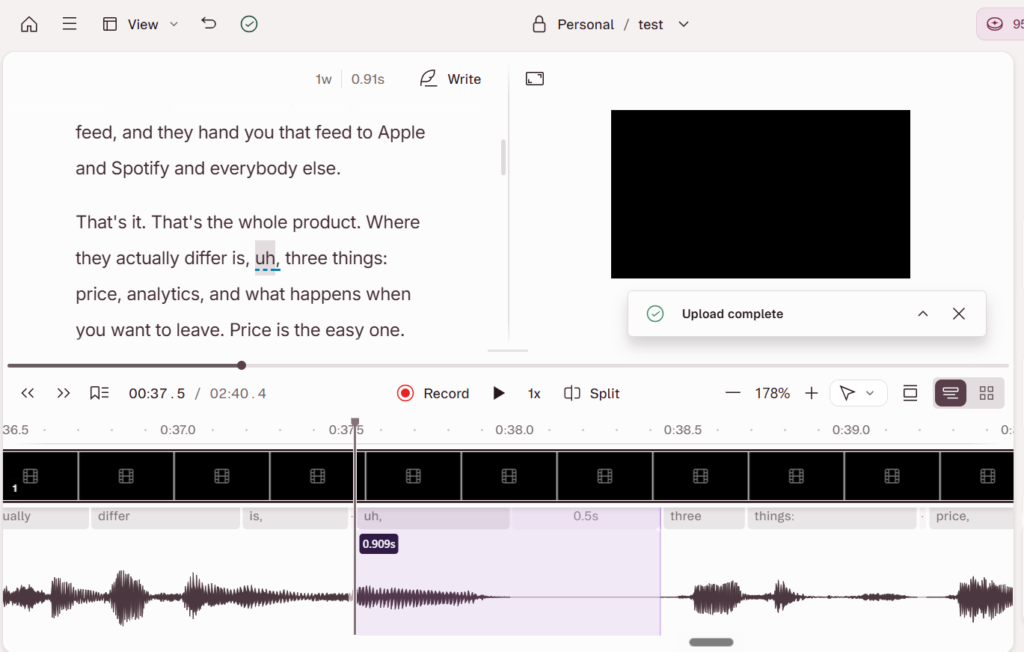
That is the loop for a whole episode. Read the transcript, highlight what should go, press delete. You still hear every cut, because a transcript cannot tell you whether a breath or a laugh should stay, and the waveform sits under the text for the edits that need it.
Our test had two limits. It was a short solo read, not an hour-long interview, so it says nothing about speed on a big file. And the meters moved at once: the upload took our media allowance from 60 minutes to 57, and the AI credit count read 95 of 100 before we had edited a word.
How well do filler-word removal and silence trimming work?
They turn a long listen into a review pass. Remove filler words sits in the AI Tools panel and opens a list of every detected “um,” “uh,” and “you know,” with timestamps and a preview. On our test file it found eight, and the search took our credit meter from 95 to 92. Descript’s filler-word guide gives four choices for each one: delete it, delete it and leave a gap, strike it through while removing the audio, or drop it from the transcript only. An “Avoid harsh cuts” option skips any filler that cannot be cut cleanly.
Two catches. Detection works on English transcripts only. And the tool runs on the whole composition, so cleaning one segment means duplicating it into its own composition first.
Shorten Word Gaps handles dead air the same way. You set what counts as a gap and how long it should become, then shorten gaps one at a time or all at once. Remove Retakes finds repeated lines and false starts. All three spend AI credits, and all three are included on Hobbyist.
Does Studio Sound fix bad audio?
It fixes a lot of it. Descript’s Studio Sound page describes it as an AI effect that cuts background noise and echo from speech, aimed at recordings that sound like a laptop mic in an untreated room. You switch it on in the Properties panel, and an Intensity slider sets how hard it works. On an interview recorded as separate tracks, you apply it per track.
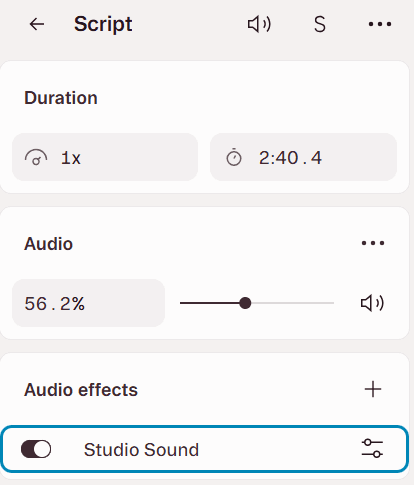
We switched it on for our test file, where it sits under Audio effects in Properties with a settings button beside it. A 2-minute scripted read is no stress test, though, so here are the limits Descript documents. It needs an internet connection. It applies to the whole file, not a section. If the background noise is very loud, it may fail to separate the voice and leave a silent waveform, and the fix is turning the intensity down. Very large files process slowly, and Descript suggests splitting long recordings first. It also costs AI credits, capped at 30 per file.
Can you record remote interviews in Descript Rooms?
Yes. Rooms is Descript’s browser-based recorder, and it takes up to 10 participants per session. Per Descript’s recording specs, each person is recorded on their own device as a separate file and uploaded as the session runs, with audio at 48 kHz, video up to 4K, and a lossless WAV option in Chromium browsers. Each participant also gets a separate cloud backup, so one bad connection does not take the episode down.
After the session, the tracks land in a project already transcribed and bundled into a multitrack sequence. The limit is hours. Descript’s pricing page gives 2 recording hours on Free, then 5, 15, and 25 hours a month on Hobbyist, Creator, and Business. Rooms does not support phones, so every guest needs a laptop or desktop. If recording quality is your main worry, Riverside vs Descript covers the tool built around capture, and how to record a podcast remotely covers the setup.
How does Descript handle multitrack interviews?
Well, through what it calls a sequence. Descript’s sequence guide says a sequence ties several tracks together so one edit in the script cuts every track at once and they stay in sync. Rooms and the built-in recorder create sequences for you. If you recorded elsewhere, you select the files and click Create sequence. The Sequence Editor then lets you change volume, add effects, fix timing, or clean crosstalk on one track alone.
One trap for interview shows: Descript’s AI speaker troubleshooting page says text-to-speech and Regenerate do not work over sequences yet, and using them there removes the video. The workaround takes six steps. If you plan to patch lines with a voice clone, test it on a multitrack project before you rely on it.
What are AI Speech and voice clones, and what are the consent rules?
AI Speech lets you type words and hear them in a stock voice or a clone of your own. For a podcaster, the use is fixing a flubbed name or a wrong number without re-recording. Custom voice clones are included from Hobbyist up, and generating speech spends AI credits. The clone model is based on US English pronunciation, and Descript’s help center admits accents may not come through, though you can switch voice models in settings.
The consent rules are strict, which is the right call. Per Descript’s voice clone guide, the speaker must record a consent statement, in English, before a clone exists. A co-host who cannot record in the app can send you a recording of that statement. Descript will not clone a deceased person, anyone who has not consented, anyone unable to record the statement, or an AI-generated voice, and trying to get around it breaches its terms.
So you cannot clone a guest to fix their line unless they read that statement. Ask before the interview, not after. The wider field, including ElevenLabs and Murf, is in our best AI voice generator for podcasters.
What does Underlord do, and what does it cost?
Underlord is Descript’s AI co-editor, a chat panel where you ask for edits in plain words: add captions, cut five clips under a minute, apply Studio Sound at 70 percent. When we attached our test file in the Underlord chat on the free account, it added the file to the composition and waited for the transcript to finish. It is still labeled beta. Hobbyist gets Underlord, and Creator adds what the pricing page calls “20+ more AI tools.”
The cost is the part to understand. Descript’s usage guide says every Underlord message spends a few credits, even plain chat. When it runs a tool, you pay for its reasoning and for the tool. The same prompt can cost different amounts on different runs, and there is no fixed price per action. Descript’s own Underlord page warns it can “overpromise” and tells you to check its work as you go.
Our advice: run Studio Sound and filler removal by hand from AI Tools, where the 30-credit ceiling applies, and save Underlord for jobs that would take you longer.
Can Descript make clips and captions?
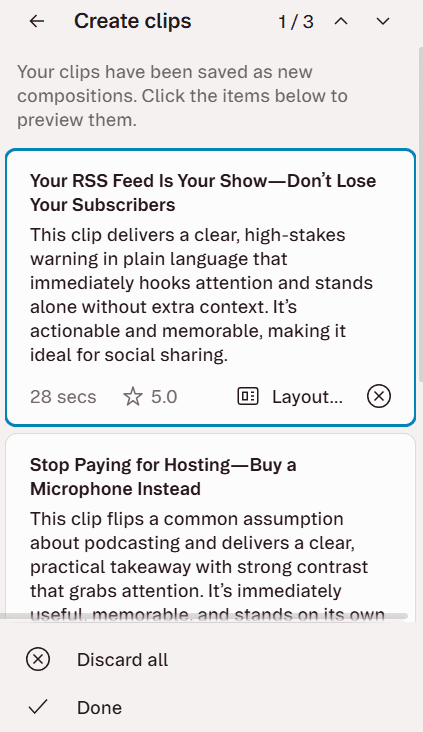
Both, from Hobbyist up. Create clips scans a finished composition and cuts 1 to 20 clips, each 10 seconds to 5 minutes, in portrait or square layouts, and you can give it a topic to steer the picks. Every clip lands as its own editable composition, so you trim it with the same transcript tools. On our 2-minute-40-second test file it made three clips for 30 AI credits. Each clip card shows a star with a number that Descript’s help pages do not explain, and Descript cannot publish YouTube Shorts directly. We compare it with a dedicated clipper in Opus Clip vs Descript.
Captions come straight from the transcript, so they are timed already. The pricing page lists dynamic captions as unlimited on every plan, including Free. You can style fonts, colors, the active word, and animation, and give each speaker a separate caption layer. Check guest names by eye before exporting, since a transcript error becomes a caption error.
What are the export and watermark rules on each plan?
The watermark applies to video, and only on Free. Per the plan table on Descript’s pricing page, checked September 25, 2026:
| Plan | Video export | Watermark | Timeline export to a DAW | Largest upload |
|---|---|---|---|---|
| Free | 720p | Yes | No | 1 GB |
| Hobbyist | 1080p | No | No | 10 GB |
| Creator | 4K | No | Yes | 20 GB |
| Business | 4K | No | Yes | 50 GB |
Audio export length is unlimited on every plan. For audio people, the line to notice is timeline export, which sends your edit to Adobe Audition, Pro Tools, Logic, or Reaper for a final mix. Hobbyist does not get it. If you master in a DAW, that alone puts you on Creator.
How fast do hours and credits run out on a weekly one-hour show?
On Hobbyist, a solo show is comfortable and an interview show is tight. Media hours count everything you upload or record. A weekly one-hour episode on one file uses 4 to 5 hours a month, half of Hobbyist’s 10. Upload a separate one-hour track for each of two people and that becomes 8 to 10 hours, since the usage guide promises the one-charge-per-session rate only for Rooms. A five-episode month then hits the ceiling.
Recording in Rooms is kinder. A one-hour session uses 60 media minutes no matter how many people join, so four or five interviews cost 4 to 5 media hours. They also use 4 to 5 of Hobbyist’s 5 Rooms hours, and one session that runs long can push you past it.
Credits are looser for routine cleanup. Studio Sound and filler removal on a solo episode cost at most 60 credits, or 240 to 300 a month against Hobbyist’s 400. On a two-track interview, Studio Sound runs on each track, so the ceiling rises to about 90 an episode, up to 450 in a five-episode month. Underlord use comes on top. Hobbyist cannot buy top-ups, so when either meter hits zero you wait for renewal or move to Creator.
One habit saves hours: pull files from the media library or another project instead of uploading them again. Descript’s help center says those imports do not use more media minutes.
How hard is Descript to learn?
The first hour is easy. If you can edit a Google Doc, you can cut a podcast in Descript, and the filler words are flagged before you go looking. The harder part is vocabulary. Descript organizes work into projects, compositions, scenes, layers, and sequences, and features such as Studio Sound on one section of a file need a workaround involving duplicate compositions. Expect to read a few help pages the first time you record a multitrack interview or build a clip template.
How does Descript perform on long files?
It depends on your computer and your connection, and Descript says so. Its system requirements page recommends 16 GB of RAM for HD media, 32 GB for 4K on Windows and Intel Macs, and a minimum of 8 GB. It also asks for at least 20 GB of free disk space and a 50 Mbps download and 10 Mbps upload connection, because your media lives in the cloud and uploads before you can edit.
Descript’s performance troubleshooting page says projects with several gigabytes of files, long compositions, or lots of edits can slow the editor, and it suggests splitting work into smaller compositions. For an audio-only one-hour episode, that rarely bites. For a two-camera video interview, plan on it.
What do Descript users complain about?
Two complaints repeat across review sites. The first is speed and stability. Trustpilot reviewers describe glitches, crashes, and lost work, and Capterra reviewers write about projects that freeze while loading, an editor that went from responsive to laggy, and hours of edits lost. Descript’s own help pages confirm that heavy projects slow down.
The second is credits. Trustpilot reviewers say AI credits drain fast on simple jobs, a Capterra reviewer reports credits spent on AI generations that never finished, and Descript’s usage guide concedes that Underlord costs are hard to predict. The scores split sharply, too. As of September 25, 2026, Descript held 2.7 out of 5 from 288 reviews on Trustpilot and 4.6 out of 5 from 183 on Capterra.
Our own list of downsides, all from Descript’s pages: pricing is per person, so a co-host who edits is a second seat. Hobbyist has no top-ups. Studio Sound needs an internet connection. AI Speech does not work over multitrack sequences yet. And the refund window is 48 hours.
How do you cancel Descript, and can you get a refund?
Canceling means downgrading to Free. Per Descript’s cancellation guide, open App Settings with Command or Control plus comma, pick the right Drive if you own more than one, go to the Plan tab, click Change plan, choose Downgrade to Free, pick a reason, click Cancel subscription, and follow the prompts until the confirmation appears. Each Drive bills separately, so check for a second one if charges continue.
Your paid plan runs to the end of the billing term, then the Drive drops to Free with projects intact. Any top-up balance stays, but you cannot spend it on Free. Leaving a legacy plan is permanent. If someone else set up the account, note that Descript support only processes cancellation requests from the Drive owner’s email address.
Refunds are narrow. Descript’s refund policy allows plan refunds within 48 hours of the invoice date and editor seat refunds within 7 days. Top-ups are non-refundable, and there are no prorated refunds for unused time. You request one from support using the account’s email address. On a yearly plan, day three is too late.
Checked against Descript’s help center and pricing page, September 2026.
Who should skip Descript?
Skip it if your show needs a few trims and a music bed. Audacity does that for free. Skip it if two or more people edit, unless the per-seat cost is fine. Skip it if you want to record and edit offline, since Studio Sound and uploads need the internet. And if you only want clips from a finished video, a dedicated clipper posts to Shorts, TikTok, and Reels without the editor attached.
If you are leaving Riverside and want recording and editing in one app, Descript is the pick in our Riverside alternatives roundup, with the Rooms-hours caveat above. Our Riverside vs Descript comparison walks through the trade-offs.
Verdict: is Descript worth it for podcasters?
Yes, for anyone who edits a spoken show every week. Deleting a sentence in a transcript beats hunting for it in a waveform, and filler removal plus Studio Sound deal with the ums and room noise that make a home recording sound amateur. Hobbyist at $16 a month billed yearly covers a weekly solo show with room to spare. Move to Creator at $24 if you run a multitrack interview show, mix in a DAW, or publish 4K video.
The honest downside is predictability. Hours and credits run out, Hobbyist cannot top up, Underlord’s costs vary, and long projects can drag. Start on the free plan, which needs no card, and edit one real episode before you pay. Then pay monthly for the first month, because the 48-hour refund window will not rescue a yearly plan. Try Descript’s free plan.
FAQ
Is Descript good for beginners? Yes for the basics. If you can edit a document, you can cut a podcast in Descript on day one. The advanced features, such as sequences and layers, take longer to learn.
Is Descript free? There is a free plan with 60 media minutes a month, 100 AI credits that do not refill, 2 hours of Rooms recording, and 720p video exports with a watermark. It is enough to test one episode.
Can Descript clone someone else’s voice? Only with that person’s recorded consent. They must read Descript’s consent statement, and Descript refuses clones of anyone who has not consented or cannot record it.
Does Descript replace a podcast host? No. Descript edits and exports. You still need a host to publish your RSS feed to Apple Podcasts and Spotify, though Descript can send a finished episode straight to hosts such as Buzzsprout.