
StreamYard Alternatives: 4 Tools Worth Switching To
This post contains affiliate links, and we may earn a commission if you sign up through them, at no cost to you. StreamYard and Restream are two of them. See our Affiliate Disclosure. Pricing as of October 2026.
Leaving StreamYard? Pick by the reason. Want editing and clips in the same app? Riverside. Want cheaper multistreaming? Restream. Run the show from a Mac? Ecamm Live. Want to pay nothing? OBS Studio. If you just run a live show with remote guests, StreamYard is still hard to beat, and the paid rivals land within about $50 a year of its price.
Key takeaways
- StreamYard Core costs $35.99 a month billed yearly or $44.99 month to month, and includes 3 streaming destinations plus unlimited local recordings of each participant.
- Among plans that go live and record each person on a separate track, Ecamm Pro costs $384 a year, Riverside Grow $408, StreamYard Core $431.88, and Restream Professional $470, all billed yearly.
- Restream Standard costs $19 a month, or $16 billed yearly, for 3 channels with no branding, but per-guest recording starts on Professional and its recordings are kept for only 15 days.
- Riverside Grow costs $34 a month billed yearly and caps separate-track downloads at 20 hours a month, while Riverside Pro at $24 does not list live streaming.
- Ecamm Live lists macOS 11.2 or newer as its requirement, and its Pro plan at $32 a month billed yearly adds isolated audio and video recording.
- OBS Studio is free and open source for Windows, macOS, and Linux, but it has no guest studio of its own.
Why do people leave StreamYard?
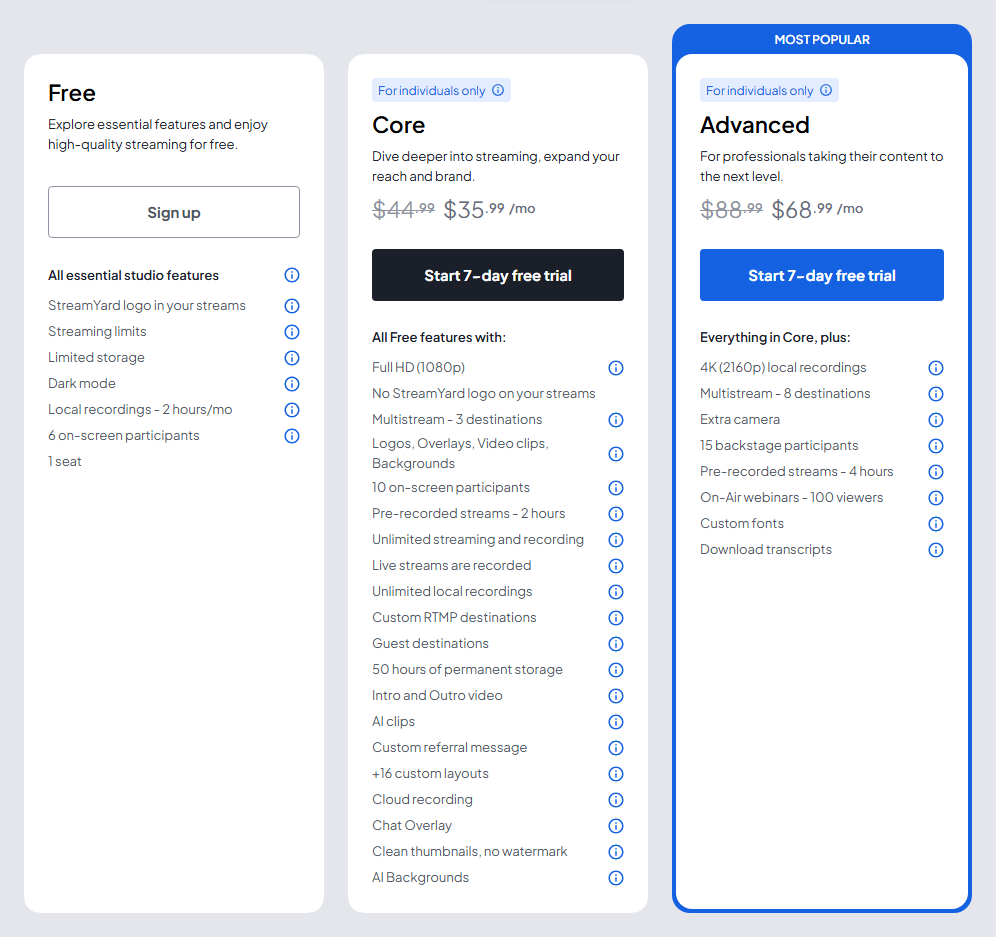
Mostly the bill, then the storage. StreamYard’s pricing page puts Core at $44.99 a month, or $35.99 billed yearly, and Advanced at $88.99, or $68.99 billed yearly. Both are individual plans. StreamYard’s Plan Usage Policy says Free, Core, and Advanced are meant for personal use or for individuals using StreamYard as part of their work, such as freelancers. Company use belongs on Business, which runs $249 a month billed yearly or $299 month to month.
Storage is the second push. Core and Advanced include 50 hours of recordings, per StreamYard’s storage article. Go past that and you can still stream, but the studio stops recording, and the stream is saved only on the social platform. More room is a paid add-on, from $4.99 a month for 100 hours to $17.99 for 400.
Leaving costs something too. StreamYard says your recordings are no longer available once the paid term ends, and it cannot restore them if you come back. Download everything before the last day.
What do the StreamYard alternatives cost for the same job?
The job most podcasters buy StreamYard for is going live to a few places while recording each person on a separate track. Ecamm Pro is the cheapest plan in the table that does both, at $384 a year. Riverside Grow is $408, StreamYard Core is $431.88, and Restream Professional is $470. Every price in the table comes off the vendor’s own pricing page, checked October 8, 2026.
| Tool | Plan | Billed yearly | Billed monthly | Live destinations | Separate tracks | The catch |
|---|---|---|---|---|---|---|
| StreamYard | Core | $35.99 a month ($431.88 a year) | $44.99 | 3 | Yes, unlimited local recordings | 50 hours of storage, individual use only |
| Riverside | Grow | $34 a month ($408 a year) | $45 | Unlimited, 1080p | Yes, up to 20 hours of downloads a month | Pro at $24 does not list live streaming |
| Restream | Professional | $39 a month ($470 a year) | $49 | 5 | Yes, split tracks and a beta local recording | Recordings kept 15 days |
| Ecamm Live | Pro | $32 a month ($384 a year) | $40 | 10 | Yes, isolated audio and video recording | Mac only |
| OBS Studio | Free | $0 | $0 | You set it up | You set it up | No guest studio |
Price alone is a thin reason to switch. The paid options sit within about $50 a year of StreamYard Core in either direction, so the better question is what each one does better and what it costs you in limits.
Which StreamYard alternative is best for editing and clips?
Riverside. It records locally at up to 4K, then edits by text and cuts clips in the same app. StreamYard lists AI clips on Core, but its plans do not list a text-based editor like Riverside’s. Riverside’s paid plans also list podcast hosting and analytics.
Riverside’s pricing page has Pro at $24 a month billed yearly or $35 month to month, with no live streaming listed. Grow, at $34 yearly or $45 monthly, adds 1080p live streaming to unlimited destinations. Both cap separate-track downloads, at 15 hours a month on Pro and 20 on Grow, though recording itself is unlimited. Riverside’s FAQ says that once you hit the cap, you cannot download new separate tracks until the next billing cycle or an upgrade.
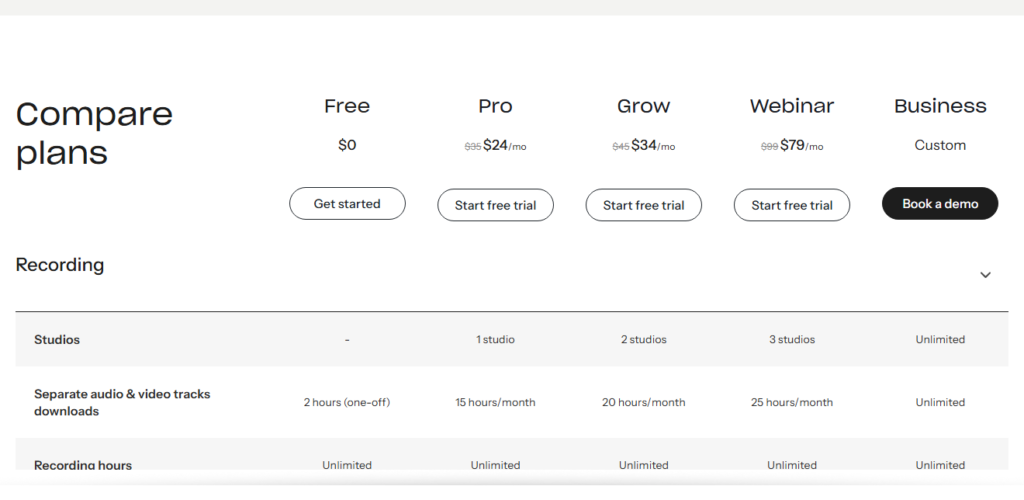
The catch is the meter. Run one real episode through the 14-day free trial and watch how many download hours it uses before you move a weekly show. Live streaming is also a Grow feature, so a show that goes out live every week pays $34 a month, not $24. Our StreamYard vs Riverside comparison covers how the two split the work, and Riverside pricing breaks down every tier. Start at riverside.com.
What is the cheapest way to multistream instead?
Restream Standard. Restream’s pricing page lists it at $19 a month, or $16 billed yearly, for 3 channels at once with no Restream branding. The free plan streams to 2 channels with branding. StreamYard Core costs $35.99 billed yearly for the same 3 destinations.
Restream also works with other software. Its FAQ says you can use any third-party streaming software or its own web-based Studio, so a studio you already own can feed it.
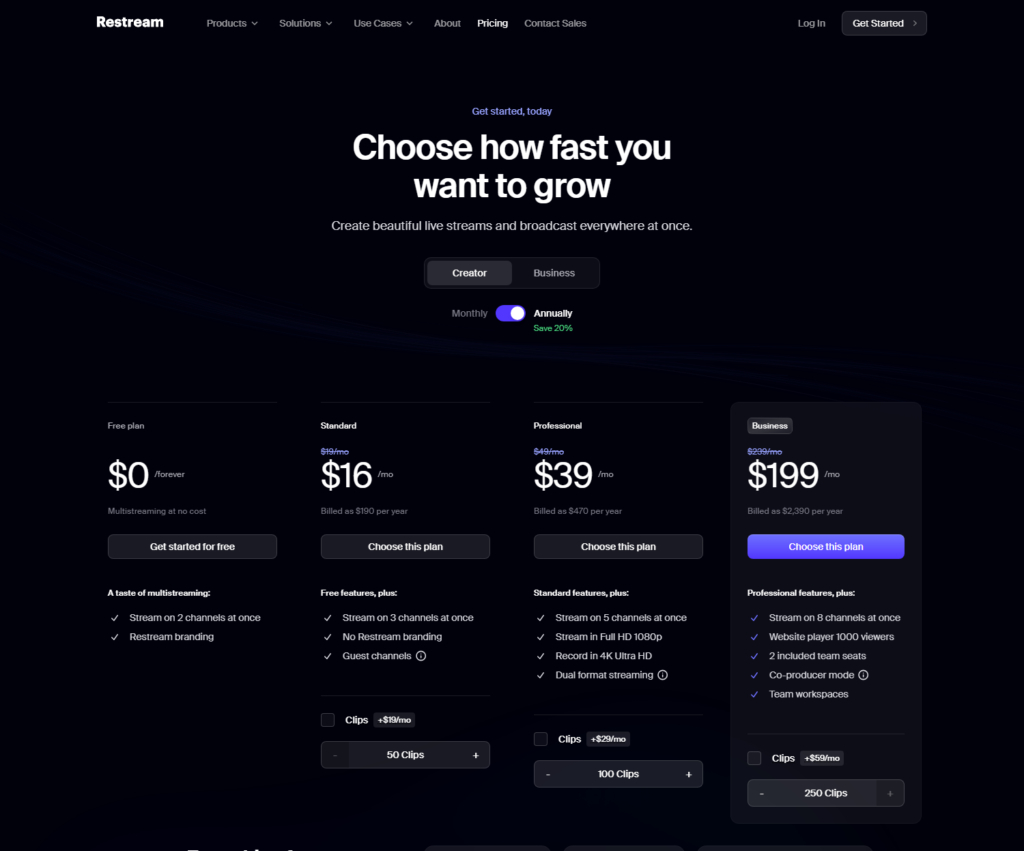
Per-guest recording is where the price climbs. Professional costs $39 a month billed yearly or $49 monthly, and adds 5 channels, Full HD streaming, and 4K recording. Restream’s help center says split-track recordings and local recording of each participant both start on Professional. It still labels local recording a beta, says it works best in desktop Chrome, and leaves out guests who join from a phone.
Restream’s storage window is short. It keeps recordings for 15 days on Standard and Professional and 30 days on Business, so download after every show. StreamYard Core lists 50 hours of permanent storage. Our live streaming software guide compares the two head to head. Try Restream free.
Which StreamYard alternative works best on a Mac?
Ecamm Live, if the show runs from one Mac. Ecamm’s product page lists macOS 11.2 or newer and says remote guests join from any web browser. Its Pro plan adds isolated audio and video recording, and the page says each track is saved separately for editing.
Standard is $16 a month billed yearly ($192) or $20 monthly. It removes the Ecamm watermark and multistreams to 10 destinations. Pro is $32 a month billed yearly ($384) or $40 monthly, and adds isolated recording, Ecamm Interview, and 4K streaming. The 14-day free trial needs no credit card and puts an Ecamm watermark on broadcasts. Ecamm also refunds in full within 14 days of signing up.
The downside is the platform. Ecamm lists only macOS requirements, so whoever runs the show needs a Mac. Guests do not. Start at ecamm.com.
Is there a free StreamYard alternative?
Yes, OBS Studio. Its site calls it free and open source software for video recording and live streaming, with downloads for Windows, macOS, and Linux. It supports Windows 10 and 11 and macOS 13 or newer.
What you give up is the guest studio. OBS has no built-in way to invite remote guests, so people join through a separate call or browser tool that you capture into OBS. Layouts and scenes are yours to build. To reach several platforms at once, you can send the stream to Restream, whose FAQ says it works with any third-party streaming software.
OBS pays off for a show with the same guests every week and someone willing to set it up. A show with a new guest every week usually does better in a studio where guests click a link and walk in.
When should you stay with StreamYard?
When the show is live, the guests are not technical, and you want one browser studio that handles layouts, destinations, and a file per guest. Core at $35.99 a month billed yearly does all three, and the paid rivals above land within $50 a year of it, cheaper or pricier.
Local recording is the feature that matters for audio. StreamYard’s help center says it saves an individual audio file and an individual video file for each participant, recorded on their own device, with the audio downloadable as WAV. You have to tick Record locally for each participant in the studio’s recording settings before the session starts. StreamYard says the separate files cannot be recovered if you forget.
The downsides are the ones above: 50 hours of storage, an individual-only plan, and no text-based editor on the plan list. Try StreamYard free.
How do you leave StreamYard without losing your recordings?
Download every recording first, then cancel. Go to My Account, then Billing or Manage Plan, then Cancel StreamYard subscription. Canceling stops auto-renewal, paid features stay on until the plan expires, and then the account drops to Free. StreamYard says recordings are gone once the paid term ends and cannot be restored, so the download is the step that matters.
Wait to cancel until the new tool has recorded one real episode. A short test clip proves little. Record a full episode, then download every file.
So which StreamYard alternative should you pick?
Want to edit and cut clips in one app? Choose Riverside. Pro is $24 a month billed yearly, and Grow is $34 if you also stream. Start at riverside.com. The downside: separate-track downloads cap at 15 or 20 hours a month.
Want the cheapest multistream? Choose Restream Standard at $16 a month billed yearly. Try Restream free. The downside: recordings expire after 15 days, and per-guest files need Professional at $39.
Run the show from a Mac? Choose Ecamm Pro at $32 a month billed yearly. Start at ecamm.com. The downside: it is Mac only.
Want to pay nothing? Choose OBS Studio, from obsproject.com. The downside: no guest studio, so you build that part.
Live show with guests who are not technical? Stay with StreamYard Core at $35.99 a month billed yearly. Try StreamYard free. The downside: 50 hours of storage and an individual-only plan.
Only Riverside lists podcast hosting on its paid plans. For the other four, the RSS feed that feeds Apple Podcasts and Spotify still lives with a podcast host, which how to choose a podcast host covers.
FAQ
What is the best alternative to StreamYard? It depends on why you are leaving. Riverside is the pick for editing and clips, Restream for cheap multistreaming, Ecamm Live for a Mac-based show, and OBS Studio for paying nothing. For a live show with remote guests, StreamYard itself is still a strong default.
Is there a free alternative to StreamYard? Yes. OBS Studio is free and open source, and Restream’s free plan streams to 2 channels with branding. Ecamm offers a 14-day free trial with a watermark, and StreamYard has a free plan of its own with the StreamYard logo and 2 hours a month of local recording.
Is Restream cheaper than StreamYard? At the entry tier, yes. Restream Standard is $19 monthly or $16 billed yearly, against $44.99 or $35.99 for StreamYard Core, and both stream to 3 destinations. Per-guest recording is where it flips. Restream Professional is $49 monthly or $39 billed yearly, which is more than Core.
Can I use StreamYard Core for a company podcast? StreamYard’s Plan Usage Policy says Core and Advanced are for personal use or individuals using the service as part of their work, such as freelancers. Company use belongs on Business at $249 a month billed yearly. Check the terms of any alternative before you move a company show.






