Murf Pricing 2026: Plans, Fees, and Is It Worth It?
This post contains affiliate links, and we may earn a commission if you sign up through them, at no cost to you. Murf is one of them. See our Affiliate Disclosure. Pricing as of October 2026, read on Murf’s pricing page and help center on October 19 and 20.
Murf Creator costs $19 a month billed yearly ($228) or $29 month to month, and includes 24 hours of voice generation a year. Business is $66 a month billed yearly or $99 monthly. Free lets you build but not download. For a podcaster who wants stock voices for scripted segments, Creator on yearly billing is the plan to buy.
Key takeaways
- Murf Creator costs $19 a month billed yearly ($228 a year) or $29 billed monthly, and includes commercial rights and 100 projects.
- Murf Creator includes 24 hours of voice generation a year on yearly billing and 2 hours a month on monthly billing.
- Murf Business costs $66 a month billed yearly ($792) or $99 billed monthly, and adds Emphasis, Variability, Say It My Way, and a Business License.
- Murf counts voice generation time only when text is newly rendered or edited, and changing the voice, speed, pitch, or pronunciation of the same text costs nothing.
- Murf’s terms allow a refund only within 24 hours of purchase and under 10 minutes of voice generation.
- Murf bills its API separately, at $0.01 per 1,000 characters on Falcon and $0.03 on Gen2, and bills dubbing at 2 credits per minute per language.
How much does Murf cost in 2026?
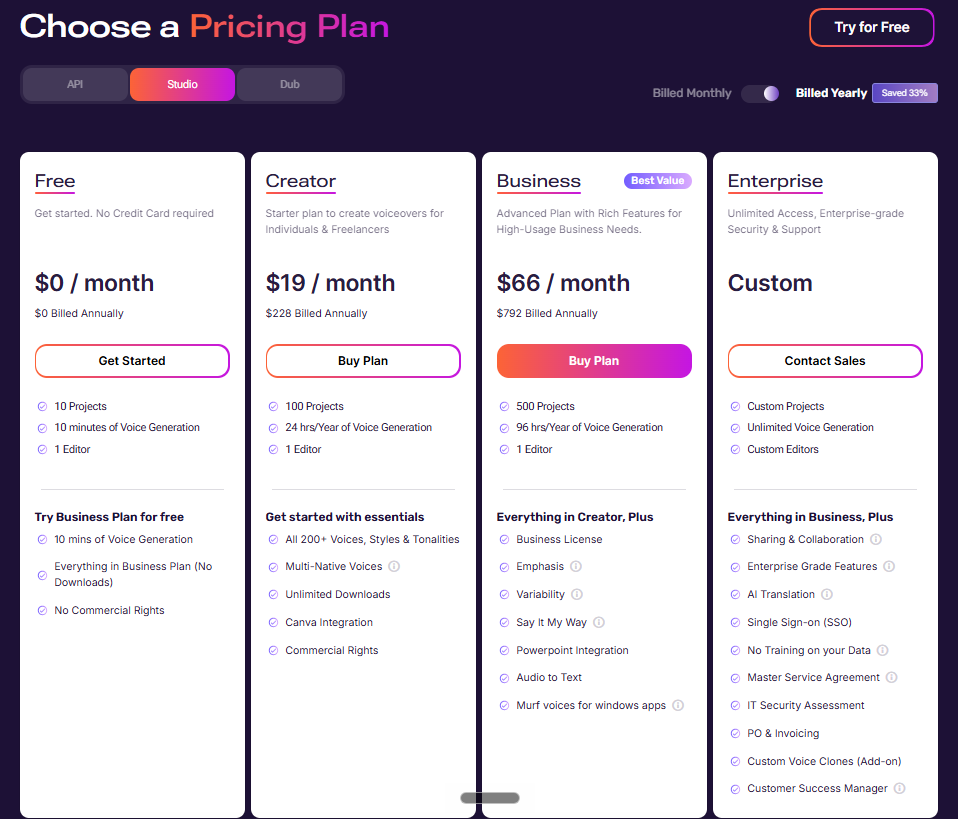
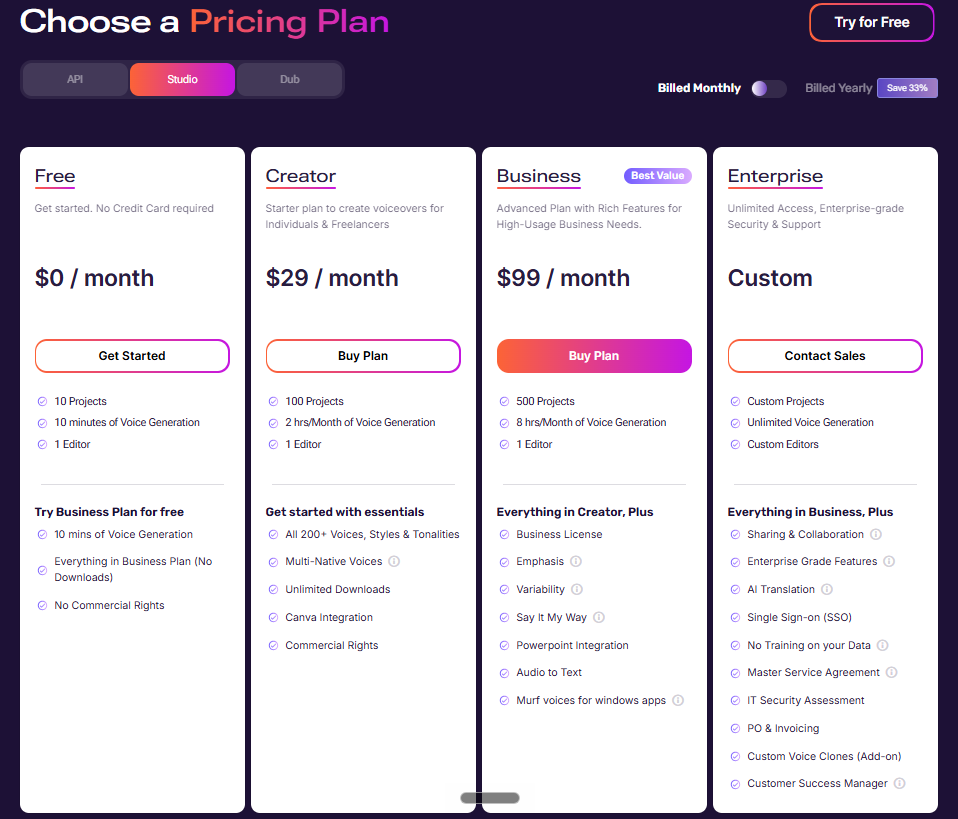
Four plans: Free, Creator, Business, and Enterprise, which is a sales quote. Yearly billing takes about a third off, and Murf’s own badge says “Saved 33%.” The table comes from the Studio tab of Murf’s pricing page with both billing toggles read on October 19 and 20, 2026. The yearly totals are our math.
| Plan | Billed monthly | Billed yearly | Yearly total | Voice generation | Projects |
|---|---|---|---|---|---|
| Free | $0 | $0 | $0 | 10 minutes | 10 |
| Creator | $29 | $19 a month | $228 | 2 hours a month, or 24 hours a year | 100 |
| Business | $99 | $66 a month | $792 | 8 hours a month, or 96 hours a year | 500 |
| Enterprise | Quote | Quote | Quote | Unlimited | Custom |
What does Murf’s voice generation time cover?
Only new speech. Murf’s help center says voice generation time is the length of the speech you generate, and it is used whenever you render a new block or change the text in an existing one. Changing the voice, style, pitch, speed, pause, emphasis, pronunciation, punctuation, or volume on the same text uses none.
Murf estimates that a 1,000-word English script uses about 6 minutes, and says the figure varies with the script, the voice, and the speed. Edit one line and the whole sub-block it sits in is generated again, so the cost of a retake is that sub-block’s length, not the whole script. Tuning how a line sounds is free. Rewriting it is not.
How far does a Murf plan stretch for a podcast?
Further than most shows will use. Take a 40-minute narrated episode generated once, which is about 6,700 words at Murf’s 6-minutes-per-1,000-words estimate. That uses 40 minutes of voice generation time. Creator monthly has 120 minutes, so it covers three such episodes a month. Creator yearly has 1,440 minutes, which is 36 episodes spread however you like across the year. Business monthly has 480 minutes, so 12 episodes.
Per hour of generated speech, our math on the published numbers gives these costs:
| Plan and billing | Hours included | Cost per hour of speech |
|---|---|---|
| Creator, billed yearly | 24 a year | $9.50 |
| Creator, billed monthly | 2 a month | $14.50 |
| Business, billed yearly | 96 a year | $8.25 |
| Business, billed monthly | 8 a month | $12.38 |
These are best-case figures that assume you use every hour and generate each line once. Retakes that change the text spend more.
What does each Murf plan include?
Every paid plan has 200-plus stock voices, unlimited voice styles, and unlimited downloads, and the plan cards list commercial rights on Creator and up. Creator also has the Canva integration and one editor seat. The Free plan has 10 projects and 10 minutes of voice generation, and its card says no commercial rights.
Business is Creator plus the controls that shape a read. It adds Emphasis, Variability, and Say It My Way, a Business License, the PowerPoint integration, Audio to Text, and Murf voices for Windows apps. Voice cloning is not on either plan. Murf lists Custom Voice Clones as an Enterprise add-on, along with sharing and collaboration, SSO, a no-training-on-your-data feature, and a customer success manager. Full broadcasting rights are also an Enterprise add-on.
How much does the Murf API cost?
It is priced apart from the Studio plans. Murf’s pricing page lists text to speech on its Falcon model at $0.01 per 1,000 characters and on its Gen2 model at $0.03, a voice changer at $0.10 a minute, and translation at $0.02 per 1,000 characters. New accounts get $10 of free API credit with no card. Pay-as-you-go credit never expires and allows up to 5 concurrent requests. Most podcasters can skip it. It matters for automated workflows.
What does Murf dubbing cost?
2 credits per minute per language, according to the Dub tab’s calculator on Murf’s pricing page. Its default state shows 10 minutes in one language as 20 credits for $5, which is $0.25 a credit or $0.50 per minute per language. A 40-minute episode dubbed into one language is $20, and into three languages is $60. That is our arithmetic on Murf’s published rate.
What are the catches in Murf pricing?
- Edits cost time. Changing a sub-block’s text generates the whole sub-block again, which uses voice generation time.
- One editor. Creator and Business each list 1 editor, so a co-host who edits needs Enterprise.
- The best controls are on Business. Emphasis, Variability, and Say It My Way are not on Creator.
- No refund after the first day. See the refund rule below.
- Cancelling loses unused hours. Murf says remaining voice generation time is lost after a cancellation, and so is the ability to render and download.
- Prices can change. Murf’s terms say changes to plans apply after 30 days’ notice.
How do you cancel or pause Murf, and can you get a refund?
Cancel from Workspace Settings: open Subscription, choose Cancel Plan, then Continue to cancel. Murf’s cancellation guide says it takes effect at the end of the billing period and recommends cancelling at least a day before renewal. After that you cannot render or download. Your projects stay in the workspace until you delete them, and anything in the trash is removed after 30 days.
Pausing is the alternative. Murf’s pause guide says you can pause for 30 days, starting once the current billing period ends, on monthly and yearly plans. Unused voice generation time carries over to the next cycle. While paused you can view your projects and download ones already rendered, but you cannot edit or render. The card on file is charged when the pause ends.
Refunds are narrow. Murf’s terms of service, dated December 19, 2024, say fees are non-refundable unless the refund section says otherwise. A subscription bought within the last 24 hours with under 10 minutes of voice generation used can be refunded by writing to support@murf.ai. After that, a mid-period cancellation does not refund the most recent charge. Test on the Free plan first.
Is Murf worth it for a podcast?
For scripted segments in a stock voice, yes. Creator billed yearly works out to $9.50 for an hour of speech, and retuning a line costs nothing. That suits intros, ad reads, and narrated explainers you will adjust several times. It is a poor fit if you want a clone of your own voice, since cloning is an Enterprise add-on, or if you want a second person editing.
Murf competes mainly on controls and price per hour. Our AI voice generator roundup covers which tool fits which podcast job, and ElevenLabs pricing shows the main rival’s plans. The downsides to weigh are the single editor seat, the 24-hour refund window, and the fact that the best voice controls start on Business.
Which Murf plan should you buy?
Just testing: the Free plan, which gives 10 projects and 10 minutes but no commercial rights. Try Murf. The downside: nothing from it is usable in a monetized show.
A solo show with scripted segments: Creator billed yearly, $228 for 24 hours. The downside: no emphasis control, and only one editor.
A show that shapes every read, or a company podcast: Business billed yearly, $792 for 96 hours, with Emphasis, Variability, Say It My Way, and a Business License. The downside: $66 a month before you generate a minute.
Your own cloned voice: not Murf on the self-serve plans. See ElevenLabs.
FAQ
How much is Murf per month?
Creator is $29 billed monthly or $19 a month billed yearly ($228). Business is $99 billed monthly or $66 a month billed yearly ($792). Free costs nothing, and Enterprise is a quote.
Is Murf free?
There is a Free plan with 10 projects and 10 minutes of voice generation. It has no commercial rights, so audio from it cannot go in a monetized podcast.
Can I use Murf for a monetized podcast?
Murf’s plan cards list commercial rights on Creator, Business, and Enterprise. A Business License starts on Business, and full broadcasting rights are an Enterprise add-on.
Does Murf offer a refund?
Only in a narrow case. Murf’s terms allow a refund request within 24 hours of purchase if you have used under 10 minutes of voice generation. After that, fees are non-refundable.
How much does Murf cost for an API?
$0.01 per 1,000 characters on the Falcon model and $0.03 on Gen2, billed apart from the Studio plans. New accounts get $10 of free API credit.