StreamYard Review 2026: Is It Good for Podcasting?
Last updated: October 2026
This post contains affiliate links, and we may earn a commission if you sign up through them, at no cost to you. StreamYard is one of them. See our Affiliate Disclosure. Every claim here was checked against StreamYard’s pricing page and help center on October 19, 2026.
StreamYard is good for a podcast you stream live or record on video with remote guests, and a poor fit for an audio-only show you edit heavily. Guests join from a link with no account, every participant gets a separate WAV file, and paid plans start at $14.99 a month billed yearly, though unlimited separate tracks start on Core at $35.99. It does not host your podcast.
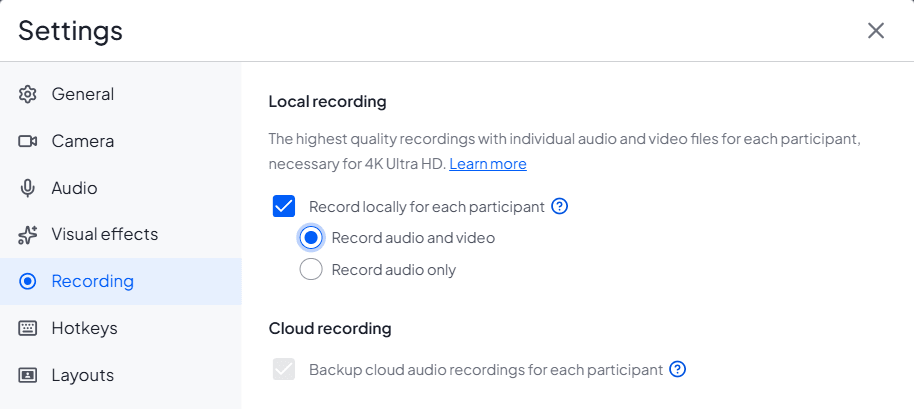
This review covers how the tool behaves in a real session and where it breaks. Plan limits and refund rules live in our StreamYard pricing guide. The screenshots below show StreamYard’s own Recording settings and pricing page.
Key takeaways
- StreamYard saves a separate audio file and a separate video file for each participant, recorded on their own device, and the audio downloads as WAV.
- StreamYard’s local recording has to be switched on before the session starts, and StreamYard says missing files cannot be recovered afterward.
- Guests join a StreamYard studio from an invite link with no account and no download, and hosts can optionally require a Google or Facebook sign-in.
- StreamYard does not offer an RSS feed, so a podcast still needs a separate host.
- StreamYard Core costs $35.99 a month billed yearly or $44.99 billed monthly, and includes unlimited local recordings, 3 multistream destinations, and 10 people on screen. The newer Essential plan, $14.99 a month billed yearly, streams to 2 destinations with the StreamYard logo and does not list unlimited local recordings.
- StreamYard says it holds ISO 27001 and ISO 27701 certification, and that live video is decrypted on its servers to be mixed, so it is not end-to-end encrypted.
Is StreamYard good for podcasting?
Yes for a live or video podcast, no for an audio-first show you edit heavily. StreamYard is a browser studio built for live production, and recording is a strong add-on to that. If your interview goes out live or ends up on YouTube, one tool handles the guest link, the stream, and a clean file for every voice.
If the show is audio only and the edit is the real work, a recorder built for that job fits better. Riverside Pro is the usual pick at $24 a month billed yearly, and StreamYard vs Riverside shows where each one wins. Our live streaming software guide covers the wider field.
What does a StreamYard session look like for a podcaster?
Five steps, most of them clicks inside the studio. This is the flow from StreamYard’s own podcast guide and its local recording article.
- From your dashboard, create a recording studio and give it a name.
- Open Settings, go to the Recording tab, tick “Record locally for each participant,” and choose audio and video or audio only.
- Send each guest the invite link. They do not need an account or a download.
- Click Record, or Go Live for a stream. A pop-up confirms your recording settings before it starts.
- When you finish, everyone stays in the studio until the uploads are done. Then open the recordings dashboard and download the files.
After the session, StreamYard’s Video Library lets you trim hiccups and retakes. It also exports your local recordings as project files for DaVinci Resolve, Adobe Premiere Pro, and Final Cut. Long-form clips of up to 20 minutes can go straight to Facebook, LinkedIn, and YouTube, and a shorts and reels feature cuts vertical clips.
What does StreamYard’s local recording save?
A separate audio file and a separate video file, with audio, for every host and guest, recorded on each person’s own device. The audio downloads as WAV, which is lossless, and the combined audio recording downloads as an MP3. StreamYard also saves separate tracks for each screen share, slide, and shared video.
Two details matter for planning. You cannot download a locally mixed version of the whole show, only the cloud-mixed one. And the extra files do not eat your recording hours: a one-hour podcast with one guest makes two full files and counts as one hour. The Free plan allows 2 hours a month of local recording and cannot use it on live streams. Core and Advanced have no limit. The newer Essential plan’s card does not list unlimited local recordings, so check before you rely on it.
WAV is the right starting point for editing, and our podcast audio quality guide explains why you export MP3 only at the end.
What can go wrong with StreamYard’s local recording?
Mostly setup mistakes and weak connections, and StreamYard cannot recover the files when either one hits. Its local recording article lists the rules.
- Local recording must be on before the session begins. If it was not, StreamYard says it is not possible to recover or generate the individual files afterward.
- Every participant has to stay in the studio until their upload finishes. You can watch each upload on the Recording tab.
- Files upload during the session when a connection runs at 4 Mbps or faster. If someone struggles, StreamYard pauses their uploads to protect the stream and resumes them afterward.
- Each device needs room for the recording. StreamYard recommends 5 GB free, and says Chrome lets it use about 60 percent of the available drive space while Firefox allows 50 percent.
- A private window limits the storage the browser allows and will not save the file if the window closes before the upload finishes.
- If connection problems last too long, a device can run out of space or an upload can corrupt, and StreamYard says it cannot recover lost segments.
None of that is unusual for browser recording. It does put a job on every guest. Tell them to use a normal window, to keep the tab open, and to stay put until you say the upload is done.
Do guests need an account or a download?
No. StreamYard’s guest article says anyone with the guest-invite link can join without logging in or installing software. You can switch on “Guests Must Authenticate” in the studio’s Settings, which makes guests sign in with a Google or Facebook account and lets you ban them if needed. A guest who wants to add their own channel as a destination does need a StreamYard account.
Is StreamYard safe?
It publishes a reasonable security baseline. StreamYard’s security overview says the company is certified under ISO 27001 for information security and ISO 27701 for privacy. It hosts on Google Cloud, forces HTTPS, encrypts stored data, requires two-factor authentication on production systems, and runs third-party penetration tests at least once a year, with reports available under NDA.
The part to know is how live video is handled. Streams inside the studio are encrypted with DTLS 1.2, but StreamYard says it decrypts video and audio on its servers during a broadcast so it can mix and transcode them. That means the stream is not end-to-end encrypted. For a show you are about to publish, that is fine. For a private, sensitive conversation, a live mixer that decrypts on its own servers is the wrong shape of tool.
How much does StreamYard cost?
Essential, new in late October 2026, is $14.99 a month billed yearly or $18.99 billed monthly, for 1080p streaming to 2 destinations with the StreamYard logo. Core is $35.99 a month billed yearly or $44.99 billed monthly. Advanced is $68.99 or $88.99. All three start with a 7-day free trial. Core includes unlimited local recordings, 3 multistream destinations, 10 people on screen, and 50 hours of permanent storage. The Free plan keeps the StreamYard logo, allows 6 people on screen, and has no multistreaming.
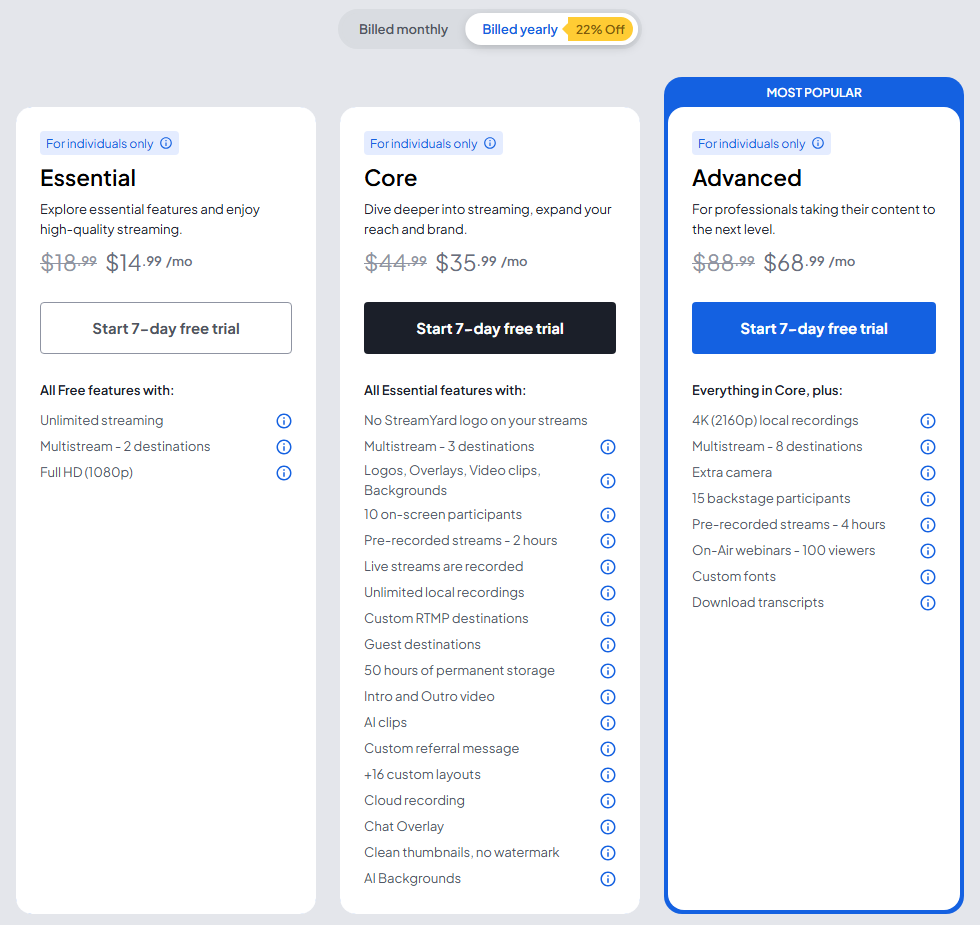
Essential, Core, and Advanced are for individual use only, so a company account needs a business plan. The StreamYard pricing guide has the business tier, storage add-ons, and refund rules.
What are the downsides of StreamYard?
It is not a podcast host. StreamYard’s help center says it does not offer RSS feeds at this time, so Apple Podcasts and Spotify still need a separate host. Read how to choose a podcast host before you budget.
The other limits are smaller. Core holds 50 hours of permanent storage. You cannot download a local mix, only the cloud mix. And local recording depends on every guest’s device and connection, which is a risk you do not carry with a single-file recorder. If a cheaper way to stream to several platforms is your real goal, StreamYard alternatives compares the options.
Who should use StreamYard, and who should pick something else?
A live show or a video podcast with remote guests: StreamYard Core. It streams to 3 places, records every guest on a separate track, and needs nothing from guests but a link. Start a 7-day StreamYard trial. The downside: the 50-hour storage cap fills faster than you expect, so download and clear old episodes.
A recorded interview where audio and editing come first: start with Riverside Pro at $24 a month billed yearly. The downside: no live streaming. How to record a podcast remotely compares the recorders.
Either way: you still need a podcast host, because StreamYard produces files and does not publish an RSS feed.
FAQ
Is StreamYard good for podcasting?
Yes, for live and video podcasts with remote guests. It records a separate WAV file for each participant and needs no guest account. It is a weaker choice for an audio-only show you edit heavily, and it does not host or distribute your podcast.
Is StreamYard safe?
StreamYard says it is ISO 27001 and ISO 27701 certified, hosts on Google Cloud, and uses two-factor authentication on production systems. It decrypts live video on its servers to mix it, so streams are not end-to-end encrypted.
Does StreamYard record each guest separately?
Yes, if you turn on “Record locally for each participant” before the session starts. Each person gets a separate audio file and a separate video file recorded on their own device. The audio is WAV. If the setting was off, the files cannot be recovered.
Can I use StreamYard for audio only?
Yes. The Recording settings offer “Record audio only” as an alternative to recording audio and video. You still get a separate audio file per participant, downloaded as WAV.
Does StreamYard host podcasts?
No. StreamYard’s help center says it does not offer RSS feeds at this time. Record there, edit elsewhere, and upload the finished episode to a podcast host.