How to Turn Your Online Course Into a Private Podcast
Last updated: September 2026
This post contains affiliate links, and we may earn a commission if you sign up through them, at no cost to you. See our Affiliate Disclosure. Pricing as of September 2026.
Your course platform cannot do this. Thinkific, LearnWorlds, Circle, and Skool all play audio inside the course, and none of them builds a podcast feed. You need a podcast host that issues private feeds, or a tool that syncs your students into one.
Key takeaways
- Thinkific’s own help center says it “does not include a direct way to convert video and audio files into a podcast format” and points users to a third-party app.
- Transistor’s $19 Starter plan includes 50 private podcast subscribers, and the $49 Professional plan raises that to 500.
- Castos Essentials costs the same $19 a month and includes up to 100 private subscribers, double what Transistor gives at that price.
- Hello Audio syncs enrolled Thinkific students into a private feed automatically, but the sync needs a paid Hello Audio account and connects one Thinkific product to one feed.
- A private feed gives every student a unique RSS link, so access can be granted and revoked one person at a time.
Can Thinkific, LearnWorlds, Circle, or Skool deliver a private podcast?
No. Not one of them. This is the part course creators get wrong, so settle it before you go shopping for a workaround.
Thinkific is the blunt one. Its support article on converting course content into podcasts says the platform “does not include a direct way to convert video and audio files into a podcast format,” then sends you to a third-party app called Hello Audio. That is the vendor telling you to leave the building. LearnWorlds lists what it supports activity by activity, and the audio options are an uploaded audio lesson and a SoundCloud embed. There is no podcast type and no RSS type, so a student listens on your site or not at all.
The community platforms are the same story. Circle documents no podcast feature anywhere, and its own page for podcasters is about running a community around a show you already publish elsewhere. Skool lists communities, courses, events, and memberships, with nothing about audio feeds.
So every route to a real course podcast runs through something built for audio. What that something is depends on how your students enroll, which is the next question.
What do you actually need to turn course audio into a podcast?
One of two things, and the choice comes down to how students reach the feed.
A podcast host with private feeds: Transistor and Castos both issue a unique RSS feed per subscriber, which you add by hand, by CSV, or through an invite link. Your audio lives where your public show already lives. You keep the students in a list.
A sync tool that reads your course platform: Hello Audio installs from the Thinkific app store, connects to one course product, and adds the people enrolled in it as listeners. New enrollments land in the feed on their own. Nobody keeps a list.
If you are not sure a private feed is the right shape for your material at all, start with what private podcasting is and who needs it, then come back. Everything below assumes you have decided you want one.
Should you sync students automatically with Hello Audio?
If people buy your course continuously, yes. That is the case it was built for. Hello Audio exists because course platforms will not make feeds, and its Thinkific integration is the closest thing to hands-off delivery on offer.
The mechanics, from Hello Audio’s own documentation: you install the app from the Thinkific app store, connect the two accounts, then open a feed and choose Sync with Thinkific. You pick which Thinkific product feeds it, and you can send enrolled students an introductory email. Students already in the course are added as listeners straight away. Anyone who enrolls later joins the feed within a couple of minutes. Students subscribe in one click in Apple Podcasts, Overcast, Podcast Addict, or Pocket Casts.
Two honest catches. The sync requires a paid Hello Audio account and does not run during the free trial, so you cannot test the one feature you are buying before you pay. And the connection is one Thinkific product to one feed, so three courses means three feeds, which is what pushes people up its pricing tiers. It is also a third subscription sitting on top of your course platform and whatever hosts your public show.
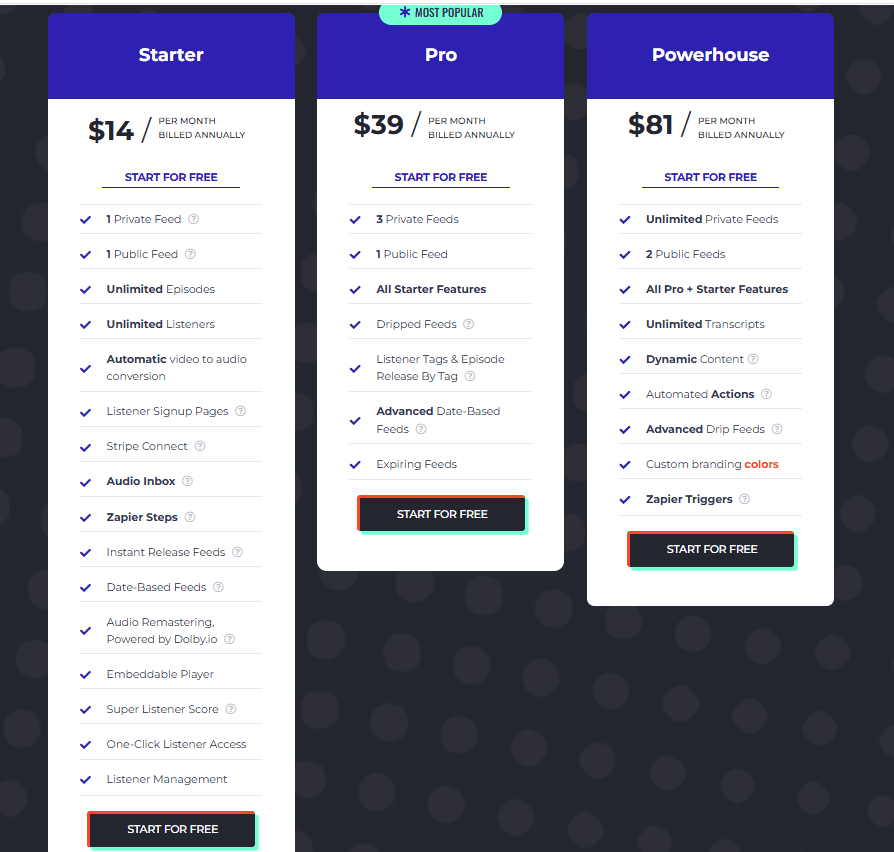
Hello Audio charges for the sync on top of everything else. Starter is $17 a month, or $14 a month billed annually, and carries one private feed with unlimited listeners. Pro is $47 a month, or $39 billed annually, and adds a second and third private feed along with dripped and expiring feeds. Powerhouse is $97 a month, or $81 billed annually, for unlimited private feeds. A 7-day free trial needs no credit card, though as above the Thinkific sync does not run during it. Prices as of September 2026, read off Hello Audio’s own pricing page.
When is your podcast host the better place to run it?
When you already pay one. If a public show is running on Transistor, the course feed is another show in the same account, and Transistor allows unlimited shows on every plan. You are paying for subscriber slots, not for a second product.
Transistor’s Starter plan is $19 a month and carries 50 private podcast subscribers alongside 20,000 monthly downloads. Professional at $49 takes that to 500 subscribers, and Business at $99 to 3,000. Paying yearly gets you 12 months for the price of 10. Castos plays the same game with different math: Essentials is $19 a month or $190 a year and covers up to 100 private subscribers, Growth is $49 for 250, and Pro is $99 for 500. Castos also runs a 14-day free trial with no credit card, which is the easier way to see the setup screen before committing.
Read those two lines against your enrollment and the answer usually picks itself. Under 100 students, Castos gives you twice the allowance for the same money. Past a few hundred, Transistor pulls ahead and keeps going, since $99 buys 3,000 seats there against 500 at Castos. Captivate changes the math for big enrollments, since every Captivate plan includes up to 50,000 private subscribers in total from $19 a month. The best host for a private or internal podcast compares all three.
The cost of this route is your time. Nobody is watching your course platform, so you add students yourself, by hand, by CSV, or through an invite link, and you remove them when a refund lands.
What does a private course feed cost?
Between $19 and $99 a month at the hosts, priced by how many people hold a feed. Here is the entry tier of each route, with what the money buys.
| Option | Entry price | Private subscribers | Students added |
|---|---|---|---|
| Transistor Starter | $19 a month | 50 | Manually, CSV, or invite link |
| Castos Essentials | $19 a month, or $190 a year | Up to 100 | Manually, CSV, or invite link |
| Hello Audio | See the note above | Priced by feeds, not seats | Synced from Thinkific enrollment |
One thing the table cannot show you. If the course feed is your only podcast, a host plan is doing one job for the money. If you also publish a public show, the same plan covers both, and the private feed effectively rides along. That is the calculation people miss when they price this.
How do students subscribe, and can you cut off access?
They get a private link and add it to the podcast app they already use. Apple Podcasts, Pocket Casts, Overcast, and Podcast Addict all take a private feed URL, and the good tools reduce that to one tap. No login, no separate app, no new account to remember. That familiarity is most of the argument for doing this at all, because a lesson in the podcast app gets played on a commute and a lesson in your course player waits for a desk.
Access is per person because the feed is per person. Every student holds a unique URL tied to their own access, so you can see who subscribed, and you can revoke one feed without touching anyone else’s. A refund, a cohort that ended, a student who shared their link: all of it is one revocation. That is the difference between a private feed and an unlisted public feed, which is a single URL anybody can forward.
Which route should you pick?
Rolling enrollment, and you sell through Thinkific: use Hello Audio and let the sync do the work. Paying for a tool to save you from a daily chore is the right trade when the chore never stops.
Already hosting a public show: run the feed at your host. Transistor if the course will grow past a couple of hundred students, since unlimited shows means the private feed adds no plan cost, and the subscriber ceiling is high. Castos if you are under 100 students and want the cheaper seat count at the same $19.
One cohort a year, thirty people, no public show: add them by hand at either host and skip the sync tool entirely. Automation you run twice a year is not worth another subscription.
And if the audio is the product rather than a bonus, price it that way before you build it. The feed is the delivery, not the business, which is the question underneath how podcasts actually make money.
Frequently asked questions
Do I need podcast hosting for a private podcast?
You need something that builds and serves an RSS feed, and that is either a podcast host or a dedicated private-podcast tool. Your course platform will not do it, and neither will a file-sharing link. Transistor and Castos both include private feeds in their normal plans, starting at $19 a month, so if you already pay one of them you are done. Hello Audio is the alternative when the point is syncing students automatically rather than hosting a public show. What you cannot do is host the MP3 somewhere cheap and hand out the URL, because a podcast app subscribes to a feed, not to a file.
How do I track who is listening to a private podcast?
The per-subscriber feed is what makes that possible. Because every student holds a unique URL, downloads are attributable to a person rather than to an anonymous crowd, so you can see who activated their feed and who never opened it. That matters on a paid course, where a student who never subscribed is a refund waiting to happen. It is worth knowing the limit, though. You are seeing downloads, not attention, and a downloaded episode is not a played one. No feed, private or public, can tell you someone finished the lesson.
Is a private podcast actually secure?
It is access-controlled, which is not the same as encrypted. A private feed checks that the token in the URL is valid before serving audio, so an outsider who finds the show cannot subscribe, and a revoked feed stops working. What it cannot stop is a student forwarding their own link, which is exactly why the per-person design matters: a shared feed shows up as one person downloading every episode from several places, and you can revoke that one feed. Treat it as a paywall that works, not as a vault. Confidential company audio deserves the same caution.