RSS.com Pricing 2026: Plans, Fees, and Is It Worth It?
This post contains affiliate links, and we may earn a commission if you sign up through them, at no cost to you. RSS.com is one of them. See our Affiliate Disclosure. Pricing as of October 2026, read on RSS.com’s pricing page and help center on October 20.
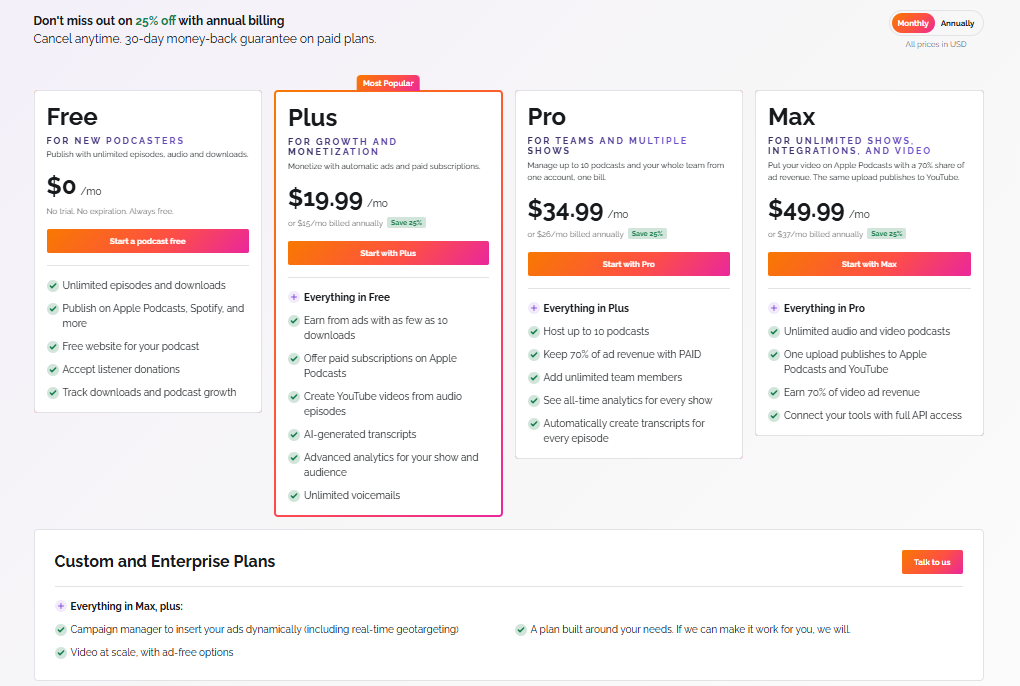
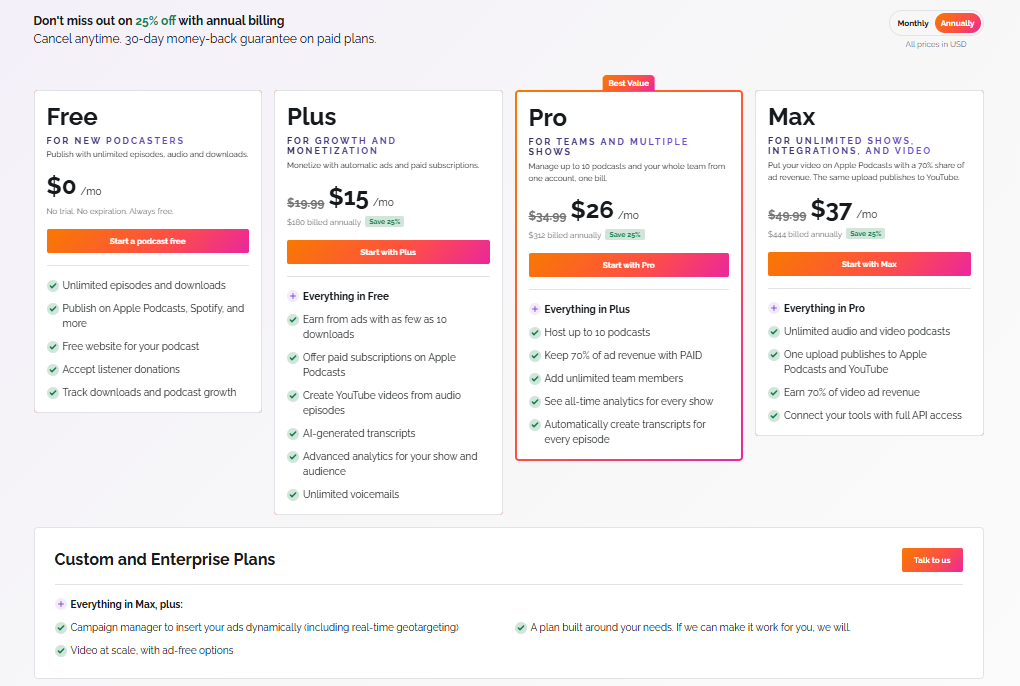
RSS.com has four plans: Free at $0, Plus at $15 a month billed yearly or $19.99 monthly, Pro at $26 or $34.99, and Max at $37 or $49.99. Unlimited episodes and downloads come on every plan. You pay for ads, a second show, and video, which makes Plus the cheapest way to turn ads on.
Key takeaways
- RSS.com Plus costs $15 a month billed yearly ($180) or $19.99 billed monthly, and it adds ads, Apple Podcasts subscriptions, and AI transcripts to the free plan.
- RSS.com Pro costs $26 a month billed yearly ($312) or $34.99 billed monthly, and it is the first plan that hosts up to 10 podcasts.
- RSS.com Max costs $37 a month billed yearly ($444) or $49.99 billed monthly, and it adds unlimited video podcasts, API access, and a 70 percent share of video ad revenue.
- RSS.com’s Free plan covers one podcast with unlimited episodes and downloads, but it asks for a card before the second episode and shows only 30 days of analytics.
- RSS.com refunds a new subscription within 30 days of purchase when you ask support, and renewals are not covered.
- RSS.com gives three free months on a paid plan when you move a show over from another host.
How much does RSS.com cost in 2026?
Four plans plus a quote-only custom tier. Yearly billing takes 25 percent off, and each card on RSS.com’s pricing page shows the monthly equivalent. The table comes from the page with both billing toggles read on October 20, 2026. The yearly savings are our math, taken as twelve months at the monthly price minus the yearly total.
| Plan | Billed monthly | Billed yearly | Yearly total | Yearly saving | Podcasts |
|---|---|---|---|---|---|
| Free | $0 | $0 | $0 | None | 1 |
| Plus | $19.99 | $15 a month | $180 | $59.88 | 1 |
| Pro | $34.99 | $26 a month | $312 | $107.88 | Up to 10 |
| Max | $49.99 | $37 a month | $444 | $155.88 | Unlimited |
| Custom and Enterprise | Quote | Quote | Quote | Quote | Custom |
What does the RSS.com Free plan include, and what is the catch?
One podcast with unlimited episodes, audio, and downloads, a podcast website, distribution to the major directories, listener donations, and standard analytics, with no trial and no expiry date. RSS.com’s free-plan help page adds that episodes are never deleted and that RSS.com inserts no ads of its own.
Free does want a card. The pricing page footnote says you must add a credit card before uploading your second episode and that you will not be charged. The help page says the card is there to verify the account and prevent spam, and that Free is never billed. The other limits are a 30-day view of analytics (RSS.com records the full history, and Plus shows 180 days, while Pro and Max show all of it), only your first voicemail message on the free plan, and one podcast per account.
Our RSS.com review shows the free dashboard in use, and the free podcast hosting comparison sets it against the other free plans.
What does each paid RSS.com plan add?
Plus turns on money, Pro adds shows and people, and Max adds video. This is the comparison table from RSS.com’s pricing page, with the checkmarks written out.
| What you get | Free | Plus | Pro | Max |
|---|---|---|---|---|
| Podcasts | 1 | 1 | Up to 10 | Unlimited |
| Ads inserted dynamically (PAID) | No | Yes | Yes | Yes |
| Paid subscriptions on Apple Podcasts | No | Yes | Yes | Yes |
| Transcripts | Add your own | AI-generated | Automatic on every episode | Automatic on every episode |
| Analytics | Standard | Advanced | All-time | All-time |
| YouTube videos from audio episodes | No | Yes | Yes, without RSS.com branding | Yes, without RSS.com branding |
| Team members | None | Up to 3 | Unlimited | Unlimited |
| Video podcasts | No | No | No | Unlimited |
| One upload to Apple Podcasts and YouTube | No | No | No | Yes |
| 70 percent of video ad revenue | No | No | No | Yes |
| API access | No | No | No | Yes |
Max is the only plan with video podcasts. RSS.com’s video requirements page says Apple video files must be MP4, MOV, or MKV, up to 5 GB and 2 hours, and at least 1080 pixels on the shorter side. A file that misses a limit still publishes, as an audio episode. Above Max sits a custom tier with a campaign manager for inserting your own ads dynamically, including real-time geotargeting, and video at scale. It is priced by quote.
How do RSS.com’s ads pay?
Through a program RSS.com calls PAID, short for Programmatic Ads Inserted Dynamically. A show qualifies at 10 downloads a month, and RSS.com’s July 7, 2026 post says it uses a 70/30 split, so the podcaster keeps 70 percent of advertising revenue. You accept the PAID terms and add a PayPal email. Confirmed earnings move to your balance after a 60-day validation period and are paid automatically at the end of each month.
Two cautions. The pricing page prints the 70 percent line on the Pro card and says only “earn from ads with as few as 10 downloads” on Plus, and the post does not name a plan, so confirm the split at signup if you are buying Plus for the ads. And neither page quotes what ads pay per thousand downloads. Treat any earnings estimate as a guess.
What does it cost to switch to RSS.com?
Nothing for the first three months. RSS.com’s import page offers either free hosting or the first 3 months free on any paid plan when you import a show from another host. The three free months apply to monthly billing, and the page says you can switch to yearly from the dashboard in one click. Moving a show is a separate job, and our guide to switching podcast hosts without losing subscribers covers the redirect.
Is RSS.com’s yearly plan worth it?
If you will stay a year, yes. Yearly billing is 25 percent off, which RSS.com’s own prices make $59.88 on Plus, $107.88 on Pro, and $155.88 on Max. That is about three months of the monthly price on each plan. The risk is the refund rule below, which covers a new subscription for 30 days and nothing after.
A worked example for ads: Plus billed yearly costs $180. At a 70 percent share, the show would need about $257 in gross ad revenue over the year to pay for itself, since $180 divided by 0.7 is $257. That is our arithmetic, and it assumes the 70 percent split applies on Plus. If the show is not earning that, stay on Free.
A second show changes the math. Plus hosts one podcast, so show two moves you to Pro at $312 billed yearly, which is $132 a year more than Plus.
What are the catches in RSS.com pricing?
- The card on Free. You need one on file before the second episode, even though you are never charged.
- One show on Free and Plus. Pro is the first plan with more than one podcast.
- The analytics window. Free shows 30 days and Plus shows 180, though RSS.com records the full history.
- Your audio is converted. RSS.com’s help center says uploads are encoded to a 128 kbps, 44.1 kHz stereo MP3 unless the file already matches, and it caps a single episode at 2 GB. Our guide to hosts that re-encode your audio explains what that means for quality.
- Renewals are not refundable. The 30-day guarantee is for new subscriptions, per RSS.com’s refund page.
- Prices can change. RSS.com’s terms, last modified August 3, 2026, reserve the right to change pricing with reasonable notice and name no notice period.
- Old reviews quote old plans. Some third-party pages still list figures like $4.99 and $8.25 a month, which are not on the pricing page today.
How do you cancel RSS.com or get a refund?
Cancel in the dashboard under Account, then Subscription, then Unsubscribe, or email support@rss.com, according to RSS.com’s terms of service. Cancelling stops the renewal and leaves access in place until the paid term ends. The reactivation page says you can turn renewal back on from the same Subscription page while the status still reads Canceled.
Refunds have a window. RSS.com’s refund page describes a 30-day money-back guarantee on new subscriptions. You email support@rss.com or open a ticket, and the refund ends the subscription, so there is nothing to cancel separately. The terms of service carry no general refund clause and say fees already paid are not refunded when an account is deleted, so ask within the 30 days.
Is RSS.com worth it?
For a first show, the Free plan is the best free host we cover, because episodes never expire and the feed is yours to move. Pay for Plus only when ads matter, and run the $257 figure above before you do. Pro earns its price once you have a second show or a team, and Max is for shows that publish video to Apple Podcasts and YouTube.
The downsides to weigh are the card on the free plan, the 30-day analytics view, the single show on Plus, and the conversion to a 128 kbps MP3. Our RSS.com vs Buzzsprout comparison and the cheapest podcast hosting ranking show where it lands.
Which RSS.com plan should you buy?
A first or hobby show: Free. Start on RSS.com. The downside: the card rule, and no ads until you pay.
One show that wants ads or Apple Podcasts subscriptions: Plus, $180 a year or $19.99 a month. The downside: one podcast and a 180-day analytics view.
Several shows or a team: Pro, $312 a year or $34.99 a month, for up to 10 podcasts and unlimited team members. The downside: $132 a year more than Plus.
Video on Apple Podcasts, or an API: Max, $444 a year or $49.99 a month. The downside: the video files have to meet Apple’s 1080-pixel, 2-hour, 5 GB rules.
FAQ
How much is RSS.com per month?
Plus is $19.99 billed monthly or $15 a month billed yearly. Pro is $34.99 or $26, and Max is $49.99 or $37. Free costs nothing, and the custom tier is a quote.
Is RSS.com really free?
Yes, for one podcast. It has unlimited episodes and downloads with no expiry date. RSS.com asks for a card before the second episode and says it never charges Free.
Does RSS.com have a money-back guarantee?
Yes, for 30 days on a new paid subscription. Email support@rss.com or open a ticket. Renewals are not covered.
Does RSS.com charge for downloads or storage?
No. RSS.com says every plan, including Free, has unlimited episodes, audio, and downloads, with no storage cap and no monthly upload limit.
Can I move my podcast to RSS.com for free?
You can import it from another host and get the first three months of a paid plan free, or host it at no cost on the free plan. RSS.com says the show stays live during the transfer.