
How to Switch Podcast Hosts Without Losing Subscribers
Last updated: September 2026
This post contains affiliate links, and we may earn a commission if you sign up through them, at no cost to you. See our Affiliate Disclosure. Steps verified July 2026.
You can switch podcast hosts and keep every subscriber, but the move lives or dies on one step: the 301 redirect. Locate your RSS feed, import your episodes into a host like Buzzsprout or Transistor, set the redirect on the old feed, then leave the old host live for a week or two while apps catch up.
What do you need before you switch podcast hosts?
Three things, and the third is the one people skip. Your current RSS feed URL, which every podcast app reads to find your episodes. A destination host to land on. And a redirect plan, because a clean move depends on a 301 redirect that forwards your old feed to the new one. Apple is blunt about it: a 301 redirect is what “seamlessly” migrates all followers, including those outside Apple Podcasts, per Apple’s change-hosting-providers guide. Line those three up before you touch anything.
While you are at it, grab your download history if the old host will show it. Some new hosts let you paste in the old totals so your stats do not reset to zero on day one.
How do you find and export your RSS feed?
You copy the feed URL, you rarely download files. Nearly every host lists your RSS feed link on the show’s settings or distribution screen, and that single URL is what your new host reads to pull your title, artwork, show notes, and every episode. There is usually no export-everything button, and you do not need one. The new host fetches your MP3s straight from the feed during import.
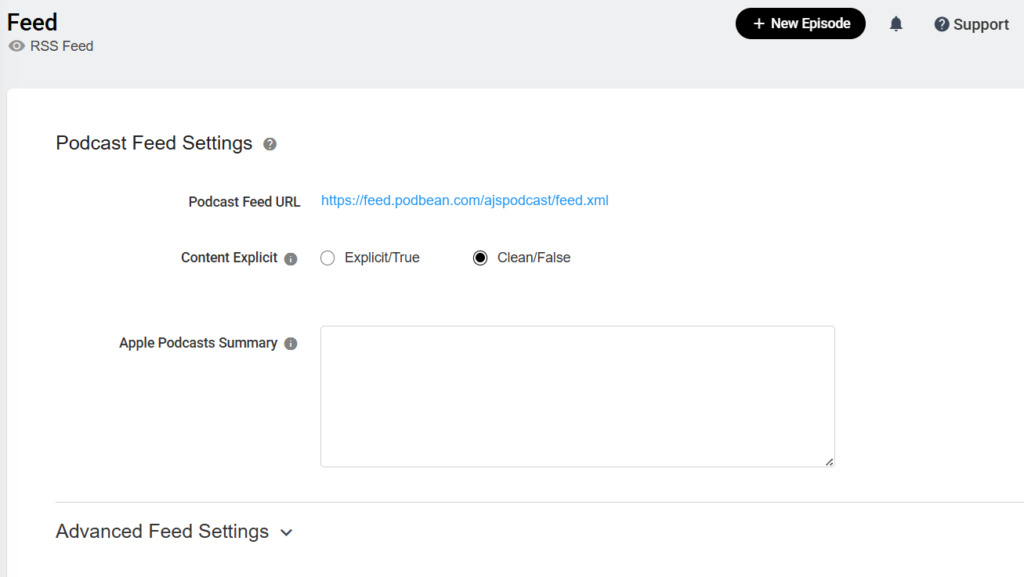
One catch. If your old host locked the feed to block transfers, the import will fail until you turn that off. On Buzzsprout, for example, you deactivate the “Lock Feed from Transfer” box before a new host can read the feed. Check for a lock setting first so you are not debugging a stalled import later.
How do you import your episodes into a new host?
Point the new host at your old feed and let it copy everything over. On Buzzsprout you search for your show during signup, and it pulls in your episodes and details, a job the host says takes about 15 minutes start to finish, per Buzzsprout’s migration guide. On Transistor you pick Import an Existing Podcast and paste the RSS feed directly, then confirm ownership through a verification email.
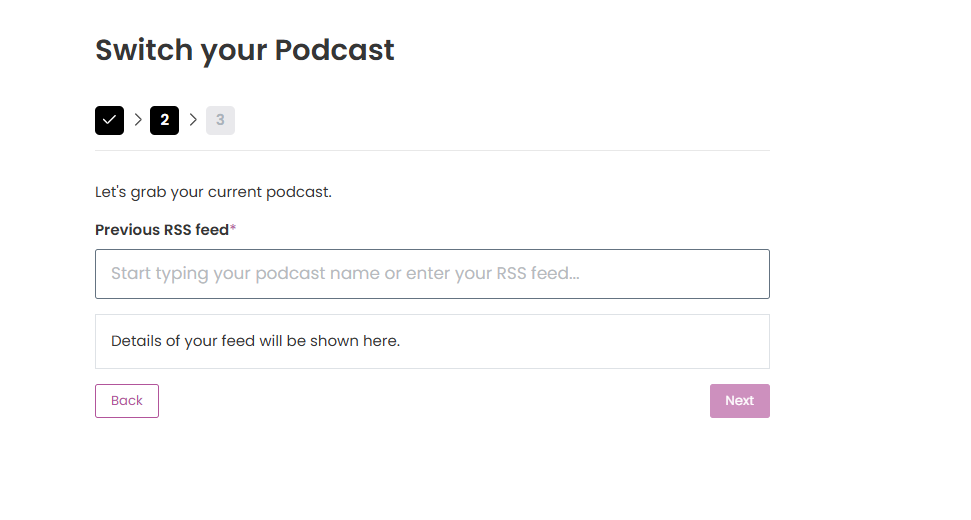
Watch the episode count. Some old hosts only expose the most recent episodes in the feed, and an importer can only grab what it can see. Transistor spells this out: it needs every episode present in the feed to import them, so count the items in your feed and make the total match your real episode count before you move on, per Transistor’s feed-prep guide. If your old host truncates the feed, expand that limit first.
How do you set the 301 redirect on your old feed?
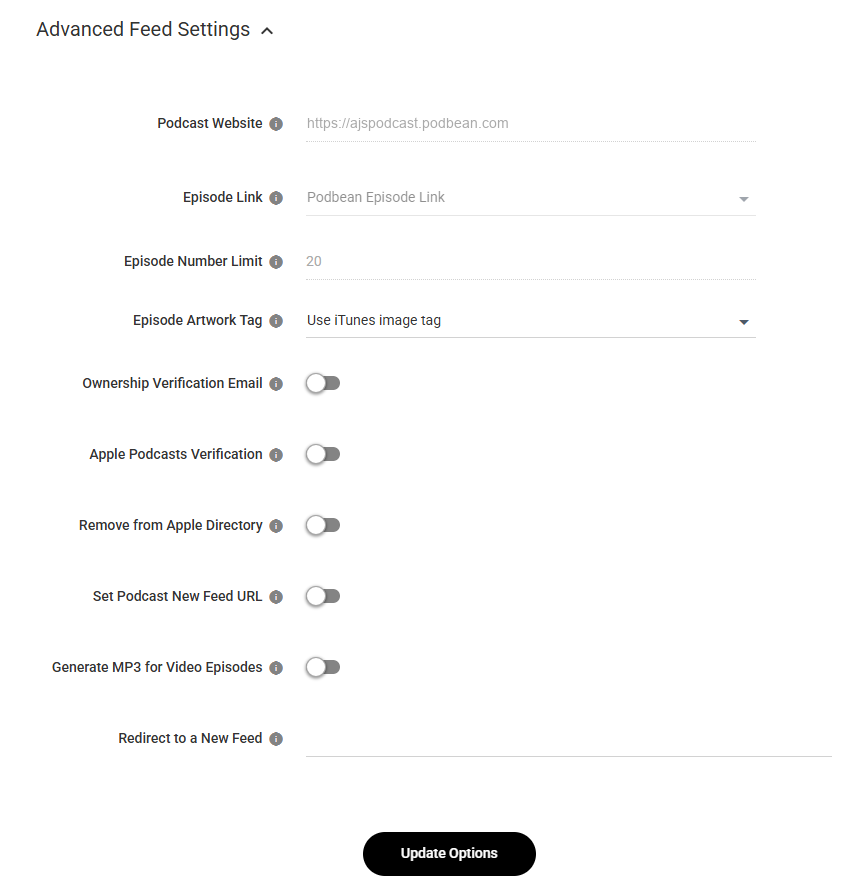
You set it last, after the import finishes and before you publish anything new. The redirect works like mail forwarding. It tells Apple Podcasts, Spotify, and every other directory that your feed has a new address, so listeners move over without lifting a finger. Do it too early, while episodes are still copying, and apps can start following a feed that is missing shows. Host-specific walkthroughs help here, and we have one for moving off Spotify for Creators and one for moving off Podbean.
The order matters more than the mechanics. Captivate lays out the same sequence: finish the import, set the redirect on the old host after migrating but before publishing new content, then keep the old account live, per Captivate’s 301 redirect guide. Whichever host you land on, the redirect control lives in the old host’s settings, not the new one.
How long should you keep the old host live?
At least two weeks, and a month is safer. Apps do not all check your feed on the same schedule, so the redirect lands at different times across Apple, Spotify, Overcast, and the rest. Buzzsprout tells departing users to keep the old host active at least two weeks before deleting it. Captivate asks for at least three weeks on the old account.
Kill the old feed too soon and the redirect dies with it. Listeners get stuck on a dead address, new episodes never reach them, and your download numbers fall off a cliff. There is no clean recovery. You would be asking every subscriber to re-add the show by hand, and most never will. Pay for the overlap month. It is cheap insurance.
How do you verify the move worked in Apple and Spotify?
Publish one new episode on the new host and watch where it shows up. If your redirect took, that episode appears in Apple Podcasts and Spotify under your existing show, on top of your old back catalog, with no duplicates. Apple confirms the redirect migrates all followers to the new feed, so a correctly redirected show keeps its place and its subscribers, per Apple’s guide.
Give it a few days before you panic. Directories update on their own clocks, so a new episode may hit Spotify hours before Apple, or the other way around. If episodes come in doubled or flagged as new, that is a GUID problem, not a redirect problem, and it is worth fixing at the feed rather than by deleting and re-uploading episodes. The full fix is in duplicate episodes after switching hosts.
Which host is the easiest to switch to?
For a first move, Buzzsprout is the gentlest landing. The import is a search box, not a config screen, and there is a free tier that hosts two hours of audio a month so you can test the migration before you pay. Paid plans start at $15 a month for the Audio plan. Pricing as of August 2026. The honest downside: episodes on the free plan drop off after 90 days, so it is a trial, not a home. Start with Buzzsprout’s free plan and confirm your episode count imported before you redirect.
If you run more than one show, Transistor is the better call. One $19-a-month Starter plan hosts unlimited podcasts with 20,000 monthly downloads, and its importer reads your RSS feed directly with an ownership check built in. Pricing as of August 2026. Its catch is the flip side of that strength: there is no free-forever tier, so you start paying the day you leave. Grab Transistor’s free trial and match your episode count before the redirect. Not sure which host fits yet? Weigh the options in Buzzsprout Alternatives or the case for leaving Libsyn, or start from scratch with how to choose a podcast host.
FAQ
Will I lose my subscribers when I switch podcast hosts? No, as long as you set a 301 redirect on the old feed. The redirect forwards every app and directory to your new feed, so subscribers and your back catalog carry over. Skip the redirect and listeners keep pulling a feed that never updates.
How long does switching podcast hosts take? The import itself runs in minutes on most hosts. The full move takes a week or two, because that is how long apps need to pick up the redirect. Keep the old host live the whole time.
Do I have to tell Apple and Spotify separately? No. The 301 redirect does it for you. Apple says the redirect migrates all followers, including those outside Apple Podcasts, so you set it once on the old feed and every directory updates on its own, per Apple’s change-hosting guide.
Why do old episodes show up as duplicates after I switch? Your episode GUIDs changed during the import. Apps use that unique ID to tell episodes apart, so a new ID reads as a brand-new episode. Avoid it by importing through the new host’s RSS importer rather than uploading files by hand, since the importer is what carries the original IDs across.






