Is Riverside Free? A 14-Day Trial, Not a Free Plan (2026)
This post contains affiliate links, and we may earn a commission if you sign up through them, at no cost to you. StreamYard is one of them. See our Affiliate Disclosure. Read on Riverside’s pricing page, FAQ, sign-up page, and blog on October 20, 2026.
No. Riverside says it no longer offers a free plan and replaced it with a 14-day free trial of Pro, Grow, or Webinar. The trial needs a credit card and bills you on day 15 unless you cancel. Riverside’s sign-up page and FAQ still say free, so some of its own pages lag behind. If you want separate-track recording for $0, Zencastr and StreamYard each list a free plan.
Key takeaways
- Riverside’s own blog post, last updated September 10, 2026, says Riverside no longer offers a free plan and substitutes a 14-day free trial.
- Riverside’s free trial covers the Pro, Grow, or Webinar plan, requires a credit card, and converts to a paid subscription on day 15 unless you cancel.
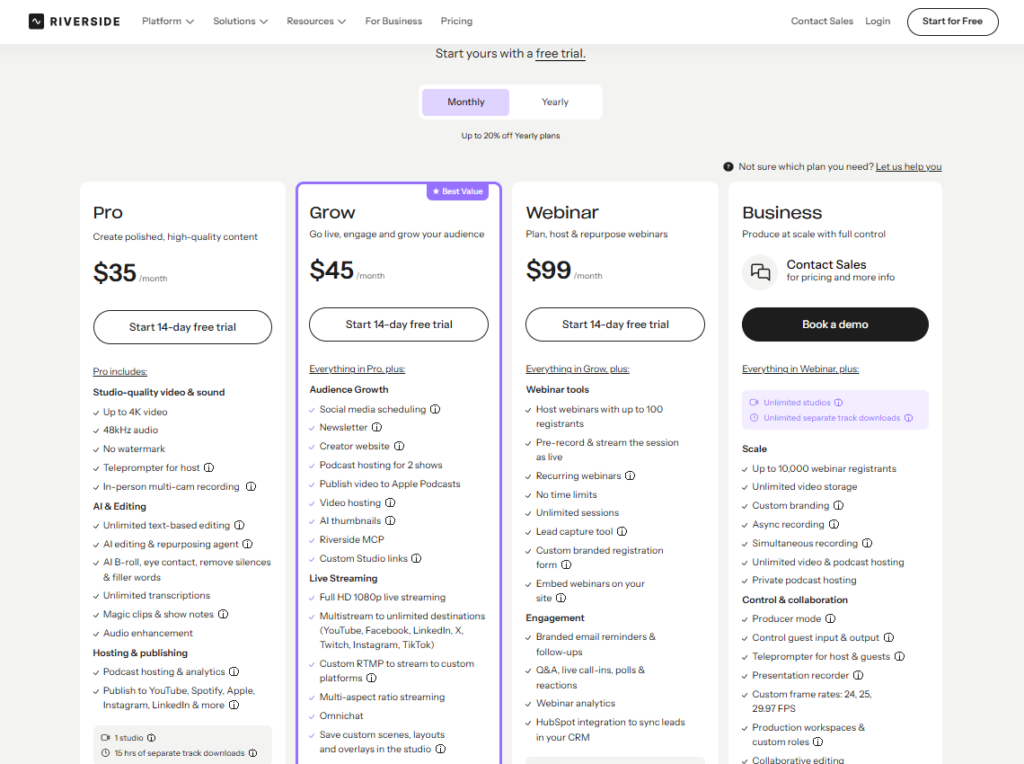
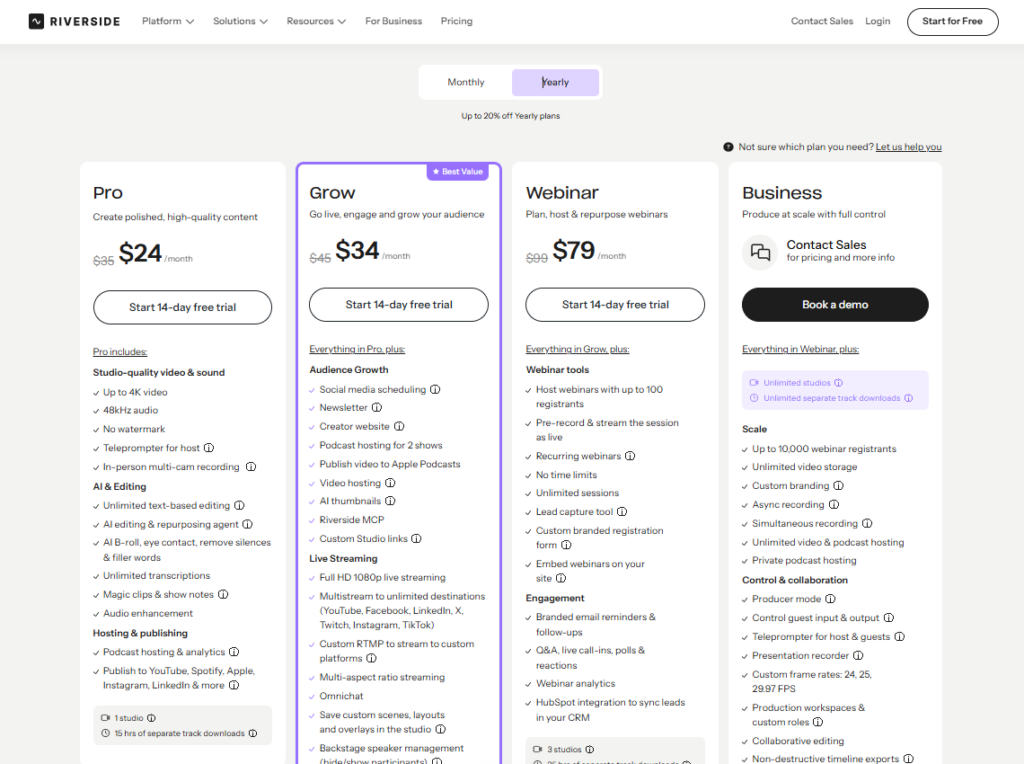
- Riverside’s pricing page lists Pro at $35 a month billed monthly, and prints the yearly price as $24 in our screenshot and $29 in Riverside’s own post.
- Riverside’s sign-up page and FAQ still say you can sign up free, and the FAQ still names a free plan, so Riverside’s pages disagree with each other.
- Riverside says its trial exports have no watermark and that the trial records up to 10 people in a session.
- Zencastr’s pricing page lists a Free plan, and StreamYard’s Free plan includes 2 hours of local recordings a month.
Is Riverside free in 2026?
Not as a plan. Riverside’s pricing page opens with “Start yours with a free trial,” and its four plan cards are Pro, Grow, Webinar, and Business. Pro, Grow, and Webinar each carry a “Start 14-day free trial” button, and Business is a sales call. There is no Free card. Riverside’s own post on the question, last updated September 10, 2026, is blunt: Riverside no longer offers a free plan, and the 14-day trial took its place.
What happened to Riverside’s free plan?
It was replaced in September. Earlier guides, including our own September Riverside pricing guide, described a free plan with 2 hours of separate-track downloads, 720p video, and a watermark. Riverside’s post says that plan became a trial. A help-center article titled “What is included in a free account?” still shows up in search results. When we opened it on October 20, Riverside sent us to a sign-in screen, so we could not read it.
The post itself shows the seams of the change. Its trial section still carries a sentence about a “2-hour limit” on exporting separate tracks, a leftover from the free plan, beside the 15, 20, and 25 hours the paid plans list. Treat the pricing page and the dated post as current, and the leftovers as stale.
Does Riverside still say free anywhere?
Yes, in two places. Riverside’s sign-up page reads “Sign up to join Riverside, it’s free,” and its FAQ answers “Can I try Riverside for free?” with “Yes! You can sign up for free, no credit card required,” adding that the free plan lets you explore recording, editing, and some AI tools. That FAQ also mentions “Free, Standard, and Pro plans,” names that no longer appear on the pricing page.
We did not create an account, so we cannot say what a sign-up without a trial can do. Read the checkout screen before you enter a card, and trust the dated post over the undated FAQ.
What does the Riverside free trial include?
Everything in the plan you pick, per Riverside’s post. That means up to 4K video and 48 kHz audio, recording each person locally, up to 10 people recorded in a session, the editor and AI tools, podcast hosting, and exports without a watermark. Separate-track downloads are capped at 15 hours on the Pro trial, 20 on Grow, and 25 on Webinar, and the Grow and Webinar trials add live streaming. Business has no trial.
The catch is the card. Riverside’s post says you need a credit card to start, that it is not charged when the trial begins, and that it is charged automatically on day 15 unless you cancel. To cancel, open Settings, then Plan & Billing, and use the Cancel plan button at the bottom of the page. Riverside says your recordings stay in the account after you cancel. Set a reminder for day 12.
How much does Riverside cost after the trial?
Monthly billing is $35, $45, and $99 for Pro, Grow, and Webinar. Yearly billing is where Riverside’s own pages differ. The pricing page screenshot we took prints $24, $34, and $79 a month, and its FAQ lists the same yearly figures. Riverside’s September 10 post says annual billing brings the plans to $29, $39, and $79. The post also says paid plans start at $35 a month in the US, UK, Canada, Australia, and the euro area, so your price may depend on where you are. Confirm the yearly figure at checkout. Our Riverside pricing guide covers every tier.
| Plan | Billed monthly | Yearly, per month, pricing page screenshot | Yearly, per month, Riverside’s September 10 post | Separate-track downloads a month |
|---|---|---|---|---|
| Pro | $35 | $24 | $29 | 15 hours |
| Grow | $45 | $34 | $39 | 20 hours |
| Webinar | $99 | $79 | $79 | 25 hours |
| Business | Quote | Quote | Quote | Unlimited |
Is there a free way to record with guests?
Yes, with limits. Zencastr’s pricing page lists a Free plan beside a custom Enterprise plan. Its table shows 6 participants, unlimited separate-track recording, and unlimited transcription hours on Free. When we checked an account in September, a welcome message described part of the package as free “for a limited time,” so confirm the terms before you build a weekly show on it.
StreamYard’s Free plan includes 2 hours of local recordings a month, 6 people on screen, and the StreamYard logo on streams. Our StreamYard pricing guide covers what Free leaves out. Descript says its Free plan includes what you need to record, edit, and mix audio and video, and our Descript pricing guide lists the limits. Riverside also runs a page of browser tools, including a microphone test, a webcam test, and a WAV to MP3 converter, which we did not test.
Is Riverside’s free trial worth using?
Yes, if you will run a real session during the 14 days. The trial gives full access to local recording, which is the reason to pay for Riverside, and a card you can cancel before day 15 costs nothing. Record one full interview with a guest, download the separate tracks, and watch how many of the 15 hours it uses before you decide.
Skip it if you only need a quick test. A trial that bills automatically on day 15 is easy to forget, and the free options above need no card. The downsides to weigh are the card, the auto-billing, and yearly prices that Riverside’s own pages state two ways.
Which free option should you pick?
A real interview with a remote guest: Riverside’s trial on Pro, with a reminder to cancel on day 12. The downside: it needs a card and bills on day 15.
Separate tracks for $0, audio first: Zencastr Free, with up to 6 participants. The downside: its welcome message called part of the package free for a limited time.
A live show with remote guests: StreamYard’s Free plan covers 2 hours of local recordings a month. Try StreamYard free. The downside: it keeps the StreamYard logo and has no multistreaming.
Editing first: Descript Free, then read Riverside alternatives for the rest of the field. The downside: Descript is an editor, so it does not record remote guests the way Riverside does.
FAQ
Is Riverside free?
No, not as a plan. Riverside says it replaced its free plan with a 14-day free trial of Pro, Grow, or Webinar, and the trial needs a credit card.
Does Riverside have a free trial?
Yes, 14 days on Pro, Grow, or Webinar. Business has no trial. Your card is charged on day 15 unless you cancel, per Riverside’s post.
Do I need a credit card for the Riverside free trial?
Yes. Riverside’s post says a card is required to start and is not charged until day 15. Its FAQ still says no card is needed to sign up, so read the checkout screen.
Is Riverside free forever?
No. Riverside’s post says the trial converts to the paid plan you chose unless you cancel before it ends.
Does the Riverside trial have a watermark?
No, according to Riverside’s post. The trial gives full access to the paid plan, including exports without a watermark.
What is the best free alternative to Riverside?
Zencastr lists a Free plan with unlimited separate-track recording for up to 6 participants. StreamYard’s Free plan includes 2 hours of local recordings a month, and Descript has a Free plan for editing.
Checked against Riverside’s pricing page, FAQ, sign-up page, tools page, and September 10, 2026 blog post, plus the Zencastr, StreamYard, and Descript pricing pages, October 19 and 20, 2026.