How to Write Podcast Show Notes: Template and Example
Some pages on this site contain affiliate links, and we may earn a commission if you sign up through them, at no cost to you. This guide has none, but the AI show notes roundup it links to does. See our Affiliate Disclosure. The Apple Podcasts and Spotify rules below were read on their own help pages on October 20, 2026.
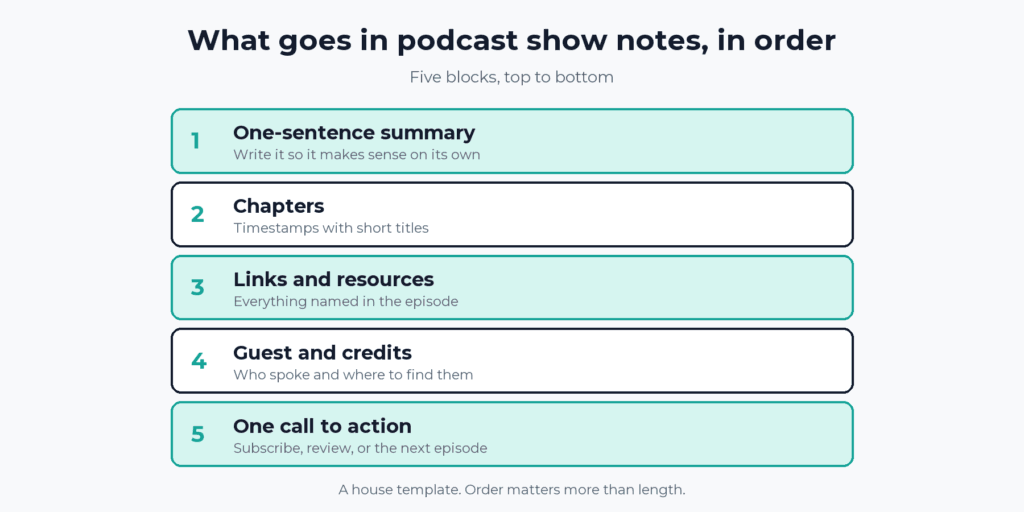
Write podcast show notes in five blocks, in this order: a one-sentence summary, chapters, links, the guest and credits, and one call to action. The summary goes first because it is what a listener reads before deciding to press play. With a saved template, the whole job takes about ten minutes.
Apple Podcasts and Spotify both read your notes from the feed, and they do not agree on every rule. Below are the limits each one publishes, a before-and-after example, and a chapter list that satisfies both.
Key takeaways
- Podcast show notes work best as five blocks in a fixed order: a one-sentence summary, chapters, links, guest and credits, and one call to action.
- Apple Podcasts accepts up to 10,000 characters in an episode description and allows the HTML tags p, ol, ul, li, and a when they are wrapped in CDATA.
- Spotify supports links (https only), headers, bulleted and numbered lists, paragraphs, and line breaks in notes for shows hosted elsewhere.
- Both Apple Podcasts and Spotify read chapters from timestamps in the episode description, and both need at least three chapters, with the first at the start of the episode.
- A chapter list with at least three chapters, the first at 00:00:00, none shorter than two minutes, and titles under 40 characters and five words satisfies both apps’ published guidance.
How do you write podcast show notes?
Write them after the episode is edited, using five blocks in a fixed order. The summary comes first because it is the part a listener sees before tapping for more. Chapters and links come next, since those are what people use once the episode is playing. The guest, the credits, and a single call to action finish it. Using the same order every episode also means a listener learns where to look.
What goes in each block of podcast show notes?
- One-sentence summary. Write it so it makes sense with nothing around it, since it may be the only line someone reads. Name the topic and the payoff. “How to move a podcast to a new host without losing a subscriber” tells a listener more than “Episode 14.”
- Chapters. A timestamp and a short title for each section. Apple and Spotify set different rules for these, so they get their own section below.
- Links and resources. Every tool, book, article, and offer named in the episode, each with a label and a full https link. A bare URL tells nobody what it is. Put sponsor and offer links first, because those are the ones you want clicked.
- Guest and credits. The guest’s name, role, and one link where listeners can find them. Add the editor and any sponsor credits after.
- One call to action. A single ask: subscribe, leave a review, or play the next episode. Two asks split the response.
Our explainer on what show notes are covers why they matter. This page covers how to write them.
What does a good before and after look like?
Here is a sample episode, invented for this example. First come the notes as most shows write them, then the same notes rebuilt with the five blocks. The first version is accurate and tells a listener almost nothing.
Before:
Episode 14: Switching Hosts. In this episode we talk about switching podcast hosts and some of the things to watch out for. Thanks for listening and see you next week!After:
How to move a podcast to a new host without losing a subscriber: export, redirect, then check both apps before you cancel the old plan.

00:00:00 The Short Version
00:02:10 Export Your Episodes
00:09:30 Set the Redirect
00:16:45 Check Both Apps

Links mentioned:
Apple's guide to changing your RSS feed URL: https://podcasters.apple.com/support/837-change-the-rss-feed-url

Guest: Sample Guest, producer at Sample Studio. Find them at https://example.com/sample-guest

Credits: Edited by the show team.

Next episode: how to read your first month of download numbers. If this one helped, send it to one friend who is about to switch hosts.
The first line now says what the episode delivers. The chapters let a listener jump straight to the redirect step. The one link is labeled, and there is a single ask. The chapter titles are three words each, and the spacing between them is more than two minutes, which fits the chapter rules below.
What do Apple Podcasts and Spotify accept in show notes?
Both read the description from your RSS feed, and both accept links, lists, and paragraphs. Apple publishes a 10,000-character limit and a short list of allowed HTML tags. Spotify publishes its own tag list and warns that descriptions can look different on different platforms. The table pulls each from the platform’s own help page.
| Apple Podcasts | Spotify | |
|---|---|---|
| Where it reads the notes | The episode description tag, which Apple lists under Recommended tags, so it is not required | The feed description for shows hosted elsewhere, or the rich text editor for shows hosted at Spotify |
| Length | Up to 10,000 characters | No limit stated on its formatting page |
| HTML it allows | p, ol, ul, li, and a, wrapped in CDATA | Links (https only), headers, bulleted and numbered lists, paragraphs, and line breaks |
| Chapters from the description | Yes, first at 00:00:00, at least three | Yes, in the form “timestamp title,” first at 00:00, at least three |
Sources: Apple’s RSS tag reference, Apple’s chapters page, Spotify’s show notes formatting page, and Spotify’s chapters page, all read October 20, 2026.
Spotify says it sends your HTML to listening platforms as written, which is why the same notes can look different from one app to the next. If your host has a rich text editor, it writes the tags for you. If you edit the feed XML by hand, wrap anything that contains HTML in CDATA, as Apple says. Our guide to how podcast RSS feeds work shows where the description sits in the feed.
How do you write chapters that work on Apple Podcasts and Spotify?
Put a timestamp and a short title on each line of the description, starting at 00:00:00, with at least three chapters. Both apps read chapters from the description, and both generate their own when you write none. Yours replace the generated ones. Spotify’s help page says manual chapters show instead of automatic ones, and Apple says chapters you provide are always displayed.
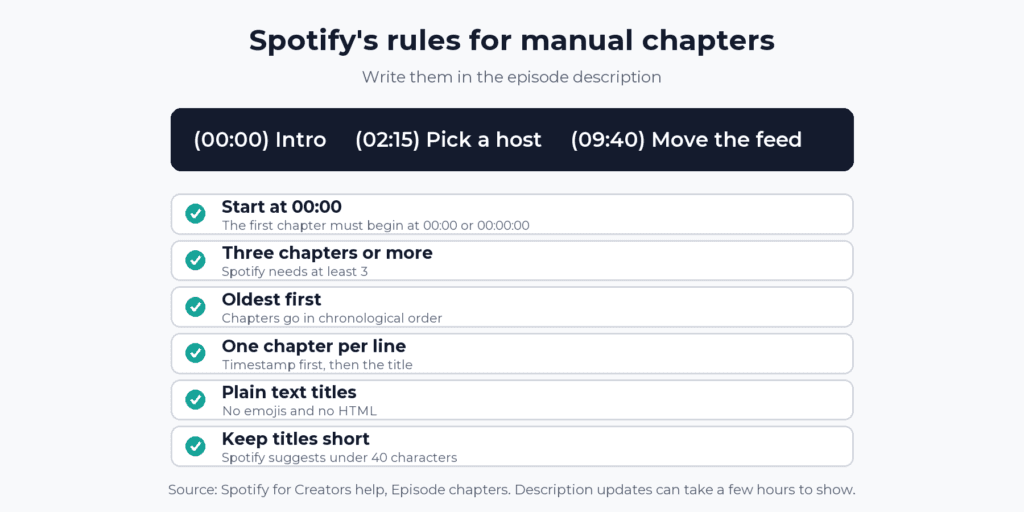
Apple’s page adds guidelines of its own, and they are stricter than Spotify’s. The two compare like this:
| Rule | Apple Podcasts | Spotify |
|---|---|---|
| Minimum chapters | 3 | 3 |
| First chapter | 00:00:00 | 00:00 or 00:00:00 |
| Spacing | Guideline: none shorter than 2 minutes | At least 30 seconds between start times |
| Chapters per hour | Guideline: no more than 6 | None stated |
| Title length | Guideline: no more than 45 characters and fewer than 5 words | Tip: under 40 characters |
| Title format | Title case, and spell out small numbers | Plain text, no emojis or HTML, and index numbers like “1 -” are removed |
Spotify accepts MM:SS and HH:MM:SS, and Apple says to start the first chapter at 00:00:00, so HH:MM:SS is the format that fits both. Apple also suggests chapters for any episode longer than 10 minutes.
Write one list to the stricter of each rule and it fits both apps’ published guidance. The sample above does it: four chapters, three-word titles, no numbering, and gaps of more than two minutes. After you save, give the apps time. Spotify says description updates can take a few hours to reach every platform, and Apple says chapter changes appear after its next crawl of your feed, with a contact route if 24 hours pass.
If you write nothing, both apps may build chapters for you. Spotify’s automatic chapters are English only and not yet available to every show. Apple says its automatic chapters start with iOS 26.2 and cover English full and bonus episodes, not trailers or episodes under 10 minutes.
What is a copy-and-paste show notes template?
Save this in your host’s episode description field or a text file, and fill it in for each episode. It is plain text, so it works in any editor.
[One sentence that says what this episode delivers and why it matters.]

00:00:00 [Short Title]
00:00:00 [Short Title]
00:00:00 [Short Title]

Links mentioned:
[Label]: https://
[Label]: https://

Guest: [Name], [role] at [company]. Find them at https://

Credits: [Editor and any sponsor credits.]

[One call to action.]
If you edit the HTML yourself, keep to tags that both Apple and Spotify list:
<p>One sentence that says what this episode delivers.</p>
<p>00:00:00 Short Title</p>
<p>00:09:30 Short Title</p>
<p>00:16:45 Short Title</p>
<p>Links mentioned:</p>
<ul>
<li><a href="https://example.com">Label</a></li>
</ul>
<p>Guest: Name, role at company.</p>
Write each chapter on its own line, as both apps ask, then check how your host turns your line breaks into the feed. Press Enter after each chapter in the editor and look at the result in both apps.
How long should podcast show notes be?
Long enough to hold the summary, the chapters, and the links, and no longer. Apple’s limit is 10,000 characters, which a 40-minute episode with a dozen links never comes near. Keep the summary to one or two sentences. Everything else grows with the number of links and chapters, so a short solo episode may be three lines and an interview may fill a screen. Cut anything a listener will not use.
How long does it take to write show notes?
About ten minutes for a 40-minute episode with a handful of links, once the template is saved. That is our estimate, not a measured figure. This order keeps it quick:
- Copy the chapter points from your editor or transcript.
- List every link you mentioned, with a label for each.
- Write the one-sentence summary last, once you know what the episode actually delivered.
- Add the guest, the credits, and one call to action from the saved template.
- Preview the notes in your host and in both apps, and fix any line breaks.
Can AI write your show notes?
For a first draft, yes. Tools can produce a summary, chapters, and quotes from your audio or transcript. A person still has to check the guest’s name, the numbers, and every link before publishing. Our roundup of the best AI show notes generators compares the tools and what they cost.
What mistakes make show notes worse?
- Opening with “In this episode” or the episode number. The first line should say what the episode delivers.
- Bare URLs. A link with no label does not tell a listener what is behind it.
- Chapters that break the rules. Both apps want at least three, with the first at the start. Spotify also wants plain text titles with no emojis or HTML, and it strips index numbers.
- Two or three calls to action. Pick one.
- Pasting a whole transcript. Show notes are a summary with links. A transcript is a separate thing, as our explainer says.
FAQ
What should I put in podcast show notes?
A one-sentence summary, chapters, links to everything you mentioned, the guest and credits, and one call to action. Use that order every episode.
Do podcast show notes need timestamps?
Neither app requires them, though Apple suggests chapters for any episode over 10 minutes. If you add them, write at least three with the first at 00:00:00 so both Apple Podcasts and Spotify can read them.
Where do I write my podcast show notes?
In the episode description field in your podcast host. It becomes the description in your RSS feed, which Apple Podcasts and Spotify read. If your show is hosted at Spotify, you write them in the rich text editor in Spotify for Creators.
How long can Apple Podcasts show notes be?
Apple’s RSS reference allows up to 10,000 characters in an episode description. Links and some HTML work if the description is wrapped in CDATA, which most hosts do for you.