
Best Podcast Website Builder (2026): Podpage vs Beamly
Last updated: September 2026
This post contains affiliate links, and we may earn a commission if you sign up through them, at no cost to you. See our Affiliate Disclosure. Pricing as of August 2026.
Get Podpage if you want to keep your current host but hate the site it gave you, and get Beamly if you want one platform to host the show, build the site, and sell memberships. Those are the two standalone podcast website builders worth paying for, and the right pick comes down to whether you are layering a better site onto an existing host or replacing the whole stack.
First, the honest gut-check most of these “best website builder” posts skip: a lot of you do not need one of these at all. If you host with Transistor or Captivate, you already have a real website with a custom domain baked into your plan, and a separate builder is redundant. I break that down in which podcast hosts include a free website. A dedicated builder earns its monthly fee in exactly two situations. Your host’s built-in site is too rigid to live with, which is the classic Buzzsprout complaint about its fixed layout. Or you want design, SEO, and monetization control your host was never going to give you.
What does a standalone podcast website builder do?
It gives you a real website for your show without touching your podcast host, and in one case, it replaces the host too. That “in one case” is the whole reason the two tools here are not interchangeable.
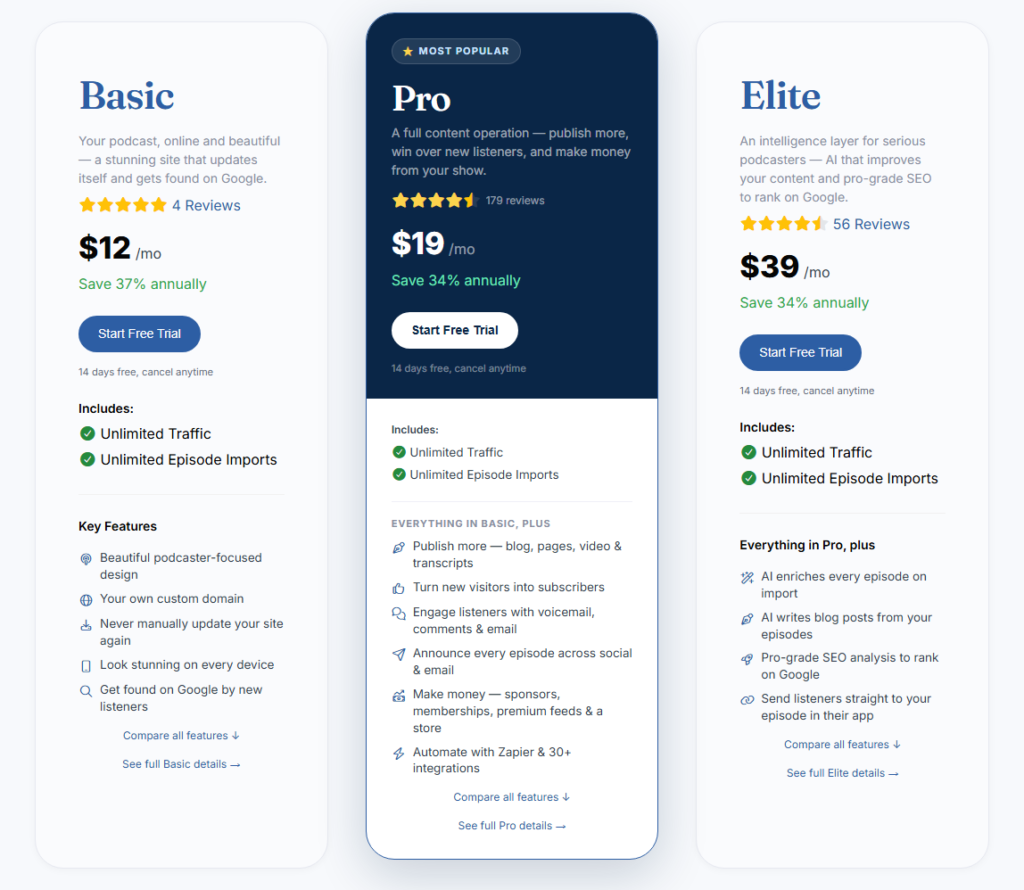
Podpage sits on top of whatever host you already use. It reads your RSS feed, pulls in every episode, and builds a clean, self-updating site with your own domain on it. You keep Buzzsprout, Libsyn, Podbean, or wherever your audio lives, and Podpage just handles the front door. Publish an episode to your host and the site updates itself, no copy-paste: every 4 hours on Basic, every hour on Pro, and every 30 minutes on Elite.
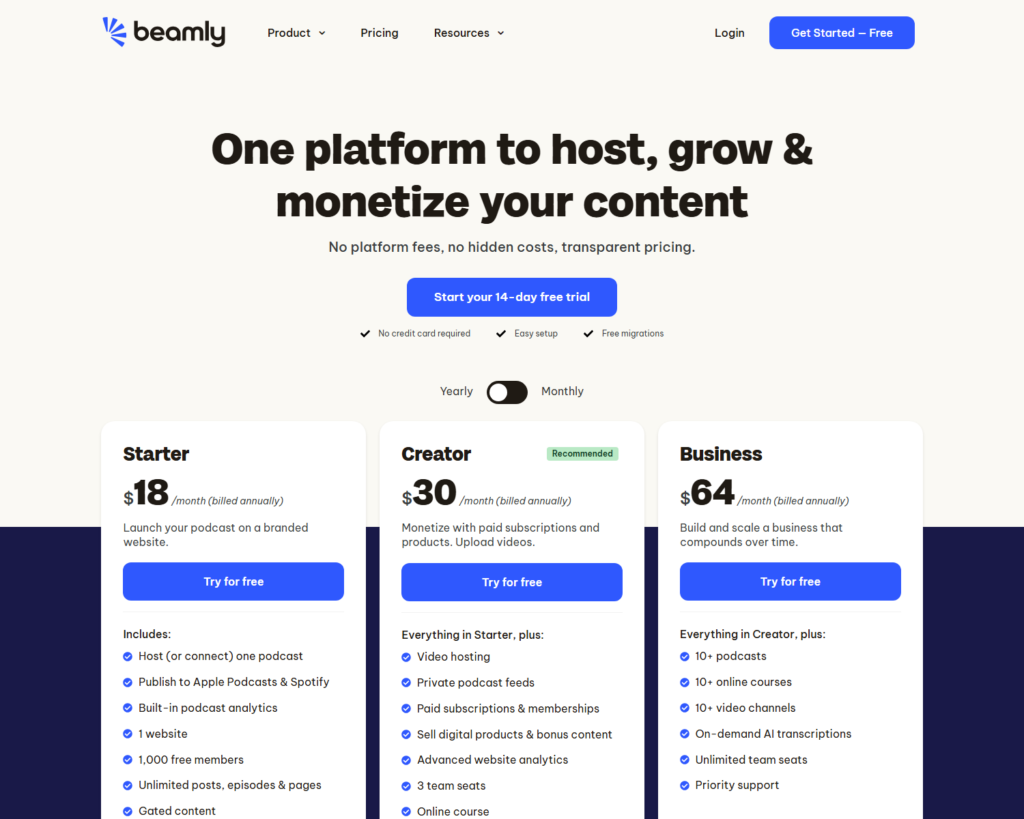
Beamly, which used to be Podcastpage.io before the 2025 rebrand, went a different direction. It is closer to an all-in-one now. It can host your audio, publish you out to Apple Podcasts and Spotify, build the website, and run paid memberships and courses on top. So one of these is a layer, and the other wants to be your whole setup. Pick accordingly.
Podpage vs Beamly: which podcast website builder should you use?
Here are the two side by side on the things that decide it. Both entry prices below are the per-month rate on annual billing, which is how nearly everyone buys these.
| Podpage | Beamly (ex-Podcastpage.io) | |
|---|---|---|
| Entry price | $12/mo Basic (billed annually) | $18/mo Starter (billed annually) |
| Most-popular tier | $19/mo Pro (billed annually) | $30/mo Creator (billed annually) |
| Custom domain | Included on every plan, Basic up | Included from Starter |
| Hosts your audio? | No, layers on your existing host | Yes, can host and distribute for you |
| Blog and SEO tools | Blog on Pro, advanced SEO on Elite | Blogging and AI show notes from Starter |
| Memberships and monetization | Store, sponsors, private feeds on Pro | Paid subscriptions, memberships, courses on Creator |
| Free trial | 14 days, no card, 30-day money-back | 14 days, no card |
Two things worth calling out from that table. Podpage puts the custom domain on its cheapest plan, so even at $12 a month you are not stuck on a builder-branded subdomain. And the audio-hosting row is the real fork: if you already pay a host you are happy with, paying Beamly to also host is money you do not need to spend, and Podpage is the cheaper, cleaner add-on.
When is Podpage the best podcast website builder?
When your host is fine but its website is not, Podpage is the pick. This is the Buzzsprout situation almost exactly. Buzzsprout is a genuinely good host, but its site is a fixed layout you can barely touch, no real blog, no page-building. Rather than migrate your whole show to fix a website problem, you keep Buzzsprout for the audio and point Podpage at your feed.
What you get on the $19 Pro tier is the part that matters for growth: a proper blog, unlimited custom pages, episode transcripts, guest profiles, email capture, and monetization through a store, sponsors, and private feeds. Move up to the $39 Elite plan and you unlock the advanced SEO analysis, keyphrase targeting, and AI-written companion blog posts, which is the tier for people whose actual goal is ranking episodes on Google.
The $12 Basic plan is the honest floor, and it is a clean auto-updating site with your domain, but no blog and slower episode syncing, so most people who care enough to buy a builder will want Pro. A builder captures the email address. Sending to it is a separate tool, and that choice comes down to Beehiiv vs Kit for a podcast newsletter.
The downside to plan around: Podpage does not host your audio, so it is a second bill on top of your host, not a replacement for it. If you were hoping to consolidate, this is not the tool that does it.
When should you choose Beamly instead?
Choose Beamly when you want the site and the business behind the show in one place. This is the all-in-one case. Beamly hosts your audio, pushes you to the major apps, builds the website, and runs paid subscriptions, memberships, digital products, and courses without a separate membership platform bolted on. Its $30 Creator plan is the one most creators land on, since that is where video hosting, private feeds, and the paid-subscription tools live, and Beamly advertises zero platform fees on what you sell.
For a creator who is starting fresh, or who is already thinking about charging listeners, that bundle is genuinely appealing. You are not stitching a host, a website builder, and a membership tool together and paying three bills. The $18 Starter plan covers the essentials with one podcast, one site with a custom domain, AI transcripts, and blogging, which is enough to launch.
The honest catch: Beamly only pays off as an all-in-one. If you already have a host you like and just want a better front-end, you are paying for hosting and membership machinery you will not use, and Podpage does the website job for less. Consolidation is the whole value here, so buy it for that or not at all.
What about Fusebox and the cheaper options?
Fusebox is a different animal, and for most people it is not a full website builder at all. It is best known for its smart podcast player, the embeddable audio widget you drop onto a site you already have, though it has expanded into hosting and simple site features too. If what you want is a slick player on an existing WordPress or Squarespace site rather than a whole new site, that is the Fusebox lane, at $9 a month for Starter and $19 for Pro, with about a third off if you pay yearly.
And do not overlook the free option sitting in front of you. If your host is Transistor or Captivate, the built-in site is good enough that a paid builder is hard to justify. The tools on this page are for people whose host site genuinely falls short, or who want a real blog, deep SEO control, or a membership business the host does not offer. Match the tool to the gap. Podcasters have a great overview of what a podcast site needs to do on Apple Podcasts’ own listener-facing pages, which is a useful sanity check for what your homepage should link out to.
Verdict: which podcast site builder wins?
For most people layering a better site onto a host they already like, Podpage is the one I would point you to. It is cheaper to add, it puts your custom domain on every plan, and the Pro and Elite tiers give you the blog and SEO tools that actually move episodes up in search. It is the fix for a weak host site without the pain of migrating your whole show.
Go with Beamly instead if you want one platform doing everything, especially if memberships or paid subscriptions are part of the plan. It costs more at the entry point, but it replaces your host, your site, and your membership tool at once, and that consolidation is worth real money if you use all of it.
Still deciding where your audio should live in the first place, before you worry about the site on top? Start with how to choose a podcast host.
FAQ
Do I need a podcast website builder if my host already gives me a site? Usually no. Hosts like Transistor and Captivate include a strong built-in website with a custom domain, so a separate builder is redundant. You need one mainly when your host’s site is too rigid, like Buzzsprout’s fixed layout, or when you want a real blog, deeper SEO tools, or memberships the host does not offer.
Does Podpage host my podcast? No. Podpage builds and hosts your website, but it does not host your audio files. It connects to your existing host through your RSS feed and imports every episode automatically, so you keep paying your current host for the audio and pay Podpage for the site.
Is Beamly the same as Podcastpage.io? Yes. Beamly is the rebrand of Podcastpage.io, and it has grown beyond a pure website builder into a more all-in-one platform that can host your show, distribute it, build the site, and run paid memberships and courses.
What does the best podcast website builder cost in 2026? Podpage starts at $12 a month on its Basic plan billed annually, with the popular Pro tier at $19 a month. Beamly starts at $18 a month for Starter, billed annually, with its Creator tier at $30 a month. Both offer a 14-day free trial with no credit card required.






