
Podcast Feed Rejected by Apple? The Validation Fix Checklist
Last updated: September 2026
This post contains affiliate links, and we may earn a commission if you sign up through them, at no cost to you. See our Affiliate Disclosure.
A rejected feed almost always fails on one specific tag, not the whole thing. Apple names the problem when it bounces you, so read the error first. The usual suspects are cover art that is the wrong size, a missing website or author tag, no valid category, or a duplicate submission. Fix the one it flags, rerun a validator, and resubmit. Here is the checklist.
Why did Apple reject my podcast feed?
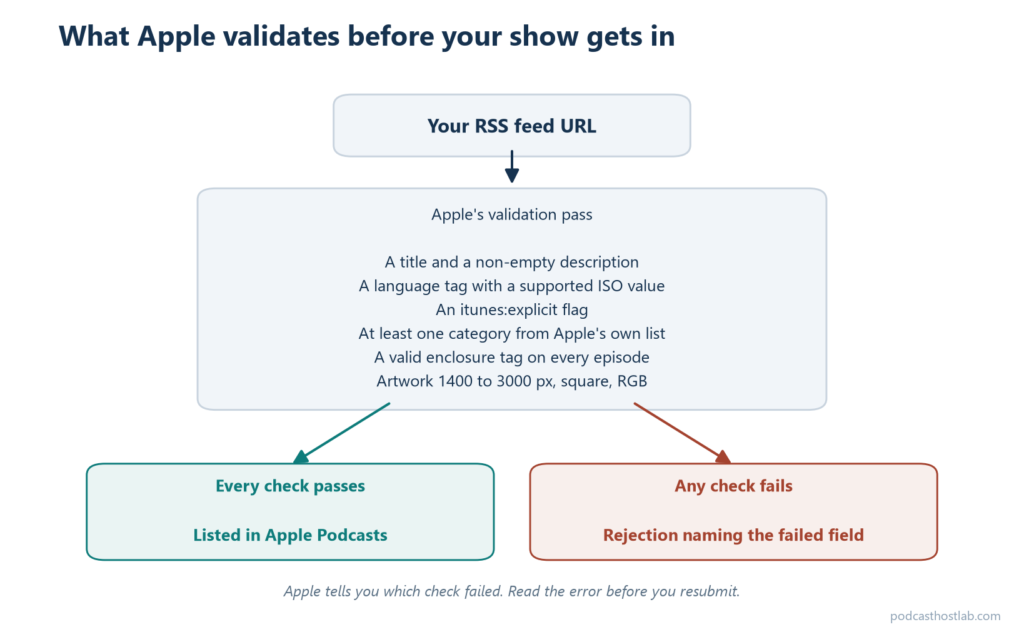
Because one required piece is missing or malformed, and Apple validates the whole feed before it lets a show in. Its validation checks look for a channel-level title, a non-empty description, a language tag with a supported ISO value, an itunes:explicit flag, at least one supported category, and valid enclosure tags on every episode. If half those names mean nothing to you, the podcast RSS feed format guide explains what each one does.
Miss any one and the submission stops. The good news is that Apple tells you which check failed rather than giving a vague “try again,” so the error message is your map. Do not guess and resubmit blind. Read the exact field it names, fix that, and only then run it back through. Most rejections are a single line in the feed, not a rebuild.
What are Apple’s cover art requirements?
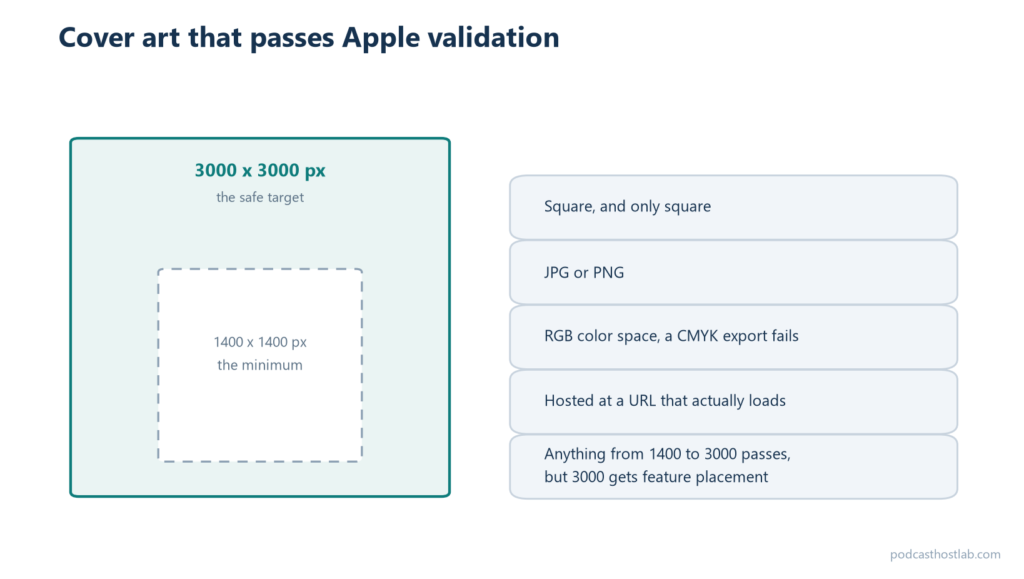
Square, between 1400 by 1400 and 3000 by 3000 pixels, in the RGB color space, saved as JPG or PNG. Cover art is one of the required elements Apple validates, and art outside that pixel range or in the wrong format is one of the most common bounces. Aim for 3000 by 3000, which is what the apps prefer for feature placement.
Two traps catch people. A CMYK image looks fine on your screen but fails Apple’s RGB check, so export specifically as RGB. And the artwork has to live on a server that answers a normal request, because if the image URL is broken or blocked, Apple reads it as no art at all. Grab the exact file spec from your host’s artwork page before you upload, since a wrongly exported image is the quietest reason a feed gets kicked back.
Why does Apple say my website or author is missing?
Because your host left those tags blank, and Apple treats them as required feed data. The show needs a channel-level link to a website and an author value, both of which live in your host’s show settings rather than in the feed file you would edit by hand. Apple’s feed requirements expect the core channel tags present and populated.
This one is almost always a settings problem. Open your show on your host, find the fields for website URL and author or owner name, and fill in anything empty. Some hosts default the website to your show’s landing page, which satisfies the check, but if you cleared it or never set it, the tag goes missing and Apple objects. If you cannot find them, ask your host. Fast, human support on a question like this is one reason Buzzsprout wins for beginners in Acast vs Buzzsprout.
Why is my category invalid or missing?
Because the feed either has no category or uses one Apple does not recognize. Apple requires at least one supported category value, pulled from its own fixed list, so a made-up category like “Golf Tech” or a typo in the tag fails validation outright. Pick the category from your host’s dropdown rather than typing your own.
There is a sneakier version of this. Apple’s validation also chokes on an improperly escaped ampersand inside a category tag, so a category such as “Society and Culture” is safe while a raw “&” character can break the whole feed. If your host lets you free-type a category, that is where the bad character sneaks in. Choose from the preset list, save, and the escaping is handled for you.
What does an “already submitted” or duplicate feed error mean?
It means Apple already has that feed URL on file, usually from an earlier submission you forgot about or a duplicate show entry. You cannot submit the same RSS feed twice, so the fix is to find the existing listing in Apple Podcasts Connect rather than adding it again. Check the account you first submitted under.
If you genuinely moved hosts and the old feed is still registered, that is a migration issue, not a fresh rejection, and the right move is a proper redirect rather than a second submission. How to switch podcast hosts without losing your subscribers covers the 301-redirect step that hands the old feed over cleanly. Submitting a duplicate on top of a live show is what creates two competing listings, so resolve the original before you touch the submit button.
How do I run a feed validator before resubmitting?
Paste your feed URL into a validator and read the report before you go anywhere near Apple. Free tools like Cast Feed Validator and Podbase check the same tags Apple does and flag the exact line that will fail, which turns a vague rejection into a specific to-do. Run it, fix every error it lists, then run it again until it comes back clean.
Validators catch the invisible problems: an unclosed tag, a bad character, an image URL that does not respond. Clearing them locally means Apple’s own validation pass has nothing left to reject. Once the feed is clean, resubmitting is the easy part, and the full submission walkthrough is in how to submit your podcast to Apple and Spotify. If the show was accepted but a single episode still will not appear, that is a different fix, covered in podcast not showing in Apple Podcasts or Spotify.
FAQ
What is the most common reason Apple rejects a feed? Cover art that falls outside the 1400 to 3000 pixel range or sits in the wrong color space or format. Missing category and author tags are close behind. Apple names the failed check in the error, so start there.
Does my artwork have to be exactly 3000 by 3000? No, anything from 1400 by 1400 up to 3000 by 3000 passes, as long as it is square, RGB, and a JPG or PNG. Larger within that range is better for feature placement, so 3000 by 3000 is the safe target.
My feed passes a validator but Apple still rejects it. Why? Recheck the artwork URL and color space, which some validators do not test fully, and confirm the feed has no block tag and a past release date. If it still fails, the error text in Apple Podcasts Connect names the specific field to fix.






