
Podcast Not Showing on Apple Podcasts or Spotify? Fix It
Last updated: September 2026
This post contains affiliate links, and we may earn a commission if you sign up through them, at no cost to you. See our Affiliate Disclosure.
Nine times out of ten it is timing, not a broken feed. Apple Podcasts can take up to 24 hours to pull a new episode, and Spotify is usually quicker but not instant. Before you panic, confirm the episode is actually published, open your RSS feed to check it is in there, and give the apps a poll cycle. Here is the full fix, in order.
Why isn’t my new episode showing in Apple Podcasts or Spotify yet?
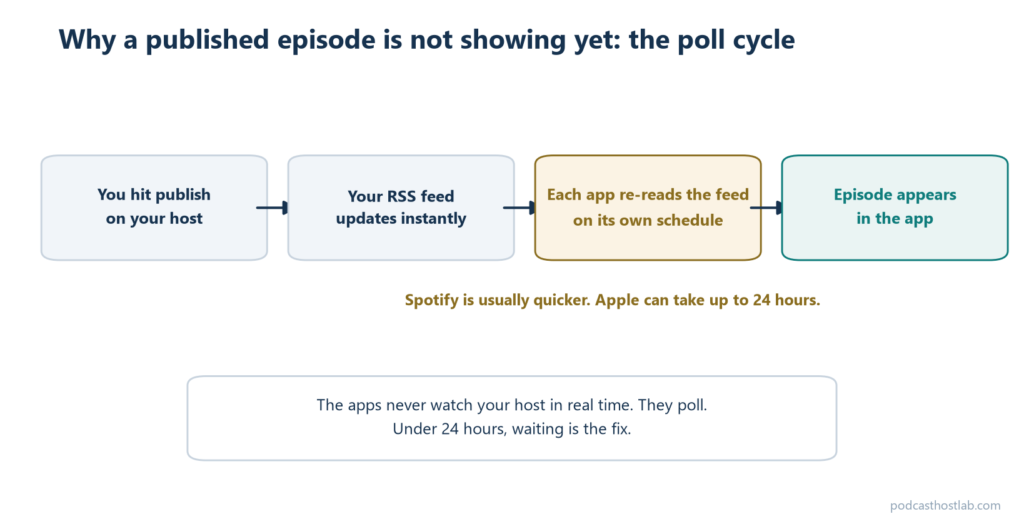
Almost always because the app hasn’t polled your feed yet. Apple only asks you to start troubleshooting if a new episode has not appeared within 24 hours of publishing, so anything under that window is normal. Spotify is generally faster, but it still warns that changes can take up to 24 hours to reflect on all platforms.
The apps are not watching your host in real time. Each one re-reads your feed on its own schedule, notices the new item, then downloads the audio and indexes it. That is why the episode is already live on your host’s own page while the apps still show yesterday’s list. Wait out the first 24 hours before you assume anything is actually wrong.
How do I force Apple or Spotify to refresh my feed?
You cannot force a poll on demand, but you can nudge it. Spotify’s own advice, when a file will not update, is to save the new image or audio under a slightly different URL so the platform sees a genuine change in your feed. Most hosts do this for you when you re-save an episode.
In Apple Podcasts Connect, open your show and use the refresh control on the feed to prompt a fresh read. It does not skip the queue, but it clears a stale cached copy. If you edited artwork or audio and the old version is stuck, that cached-file problem is the usual cause, and the changed-URL trick is the real fix. A hard refresh will not rescue a feed that has an actual error in it, so if a nudge does nothing, move to the checks below.
Is the episode actually published, and are you following the right show?
Check this before you touch the feed. On your host, confirm the episode reads as published and not saved as a draft or scheduled for a future date. Apple specifically checks that your show has a Published status and a release date that precedes the current date, and a date set even a few hours ahead will hold the episode back.
Then rule out the boring one. Search the show from a second device or a friend’s account, because a followed show on your own phone can cache an old episode list for a day even after the app has the update. If it shows up for someone else, the episode is live and only your app is behind. That single check saves a lot of wasted troubleshooting.
How do I check my RSS feed is valid?
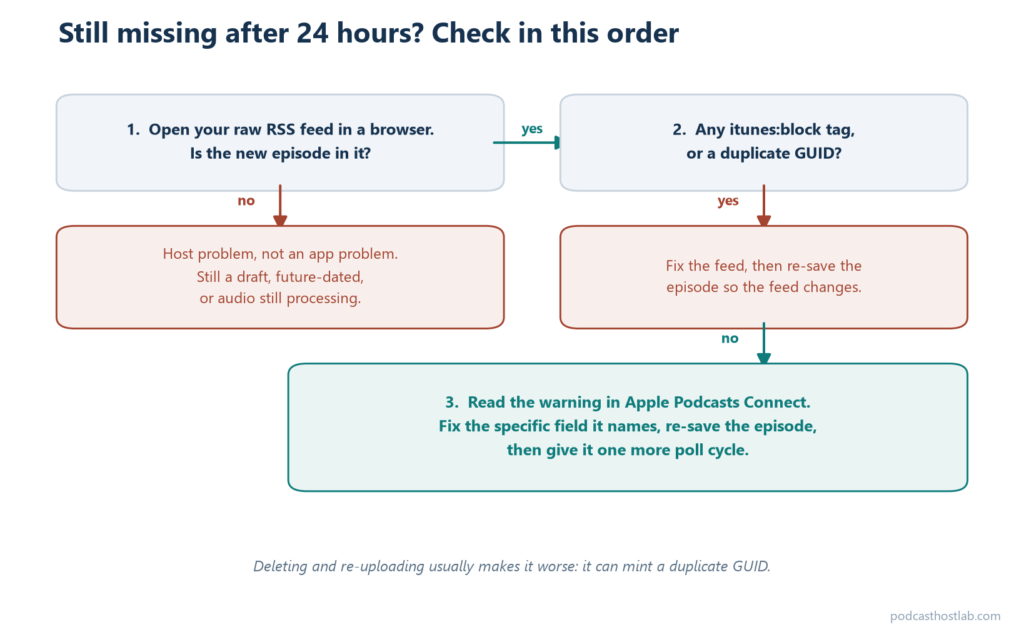
Open the feed URL in a browser and read it. If the new episode is not in the raw feed, no app can pull it, so the problem is on your host, not on Apple or Spotify. Look for two specific things Apple flags: duplicate GUIDs or enclosure tags, which it ignores, and an <itunes:block> tag, which tells Apple to hide the show or episode outright.
A GUID is the unique ID on each item. If two episodes share one, or a plugin rewrote an old GUID, an app treats the new episode as a repeat and skips it. For a clean readout instead of squinting at XML, run the feed through a validator, and the mechanics behind all of this are in how podcast RSS feeds work. If the validator reports hard errors rather than a missing episode, you are looking at a rejection, covered in podcast feed rejected by Apple.
What if Apple Podcasts Connect shows a warning?
Treat any warning as the actual cause and stop guessing. A flagged feed in Apple Podcasts Connect quietly stalls distribution, so open your show there and read the error text before doing anything else. Apple tells you which tag or field it choked on, which beats trial and error every time.
Common culprits it surfaces: a missing required tag, artwork that fell out of spec, or audio that is still processing on the host side. Freshly uploaded audio can sit in a processing state for a while, and until it finishes, the enclosure the app needs is not ready. Fix the specific thing Apple names, re-save the episode so the feed changes, and give it another poll cycle. If you are setting a show up for the first time rather than debugging a live one, start with how to submit your podcast to Apple and Spotify.
FAQ
How long before a new episode shows up on Apple Podcasts? Up to 24 hours is normal. Apple only recommends troubleshooting once an episode has not appeared within that window. After the first pull, later episodes usually land within minutes to a few hours.
Why is my episode on Spotify but not Apple? The two apps poll on different schedules, and Apple tends to lag Spotify. As long as the episode is in your raw RSS feed with no block tag and a past release date, Apple will catch up on its next read.
I published it, but it is not in my feed at all. Now what? That is a host problem, not an app problem. Confirm the episode is published and not a draft or future-dated, then reload the feed URL. If it is still missing, contact your host, because the apps can only show what the feed contains. How fast that support answers is one of the real reasons to pay for hosting, covered in Spotify for Creators vs Buzzsprout.
Does deleting and re-uploading the episode help? Usually no, and it can create a duplicate GUID that makes things worse. Re-save the existing episode instead so the feed updates cleanly, then wait for the next poll.






