
What Is a GUID in a Podcast Feed?
Last updated: September 2026
This post contains affiliate links, and we may earn a commission if you sign up through them, at no cost to you. See our Affiliate Disclosure. Details as of July 2026.
A GUID is the permanent ID your host writes into your RSS feed for every episode, and apps use it to tell one episode from another. Apple leaves no wiggle room here: every episode must carry one, and it must never change. Change a GUID and every app treats that episode as brand new.
What is a GUID in a podcast feed?
GUID stands for globally unique identifier. The RSS 2.0 specification defines it as a string that uniquely identifies an item, and says an aggregator may use that string to decide whether an item is new. That is the whole job. It is not your episode title, not the audio URL, and not the file name.
It sits inside each <item> block, one per episode.
<item>
  <title>Episode 12: The One About Feeds</title>
  <enclosure url="https://example.com/episode-12.mp3" length="28311552" type="audio/mpeg"/>
  <guid isPermaLink="false">ep-12-a1b2c3d4e5</guid>
</item>
Here is that same block in a live feed rather than a mock-up, a real episode on Transistor viewed as raw XML. If the rest of that block is unfamiliar, our guide to the podcast RSS feed format walks through each tag.
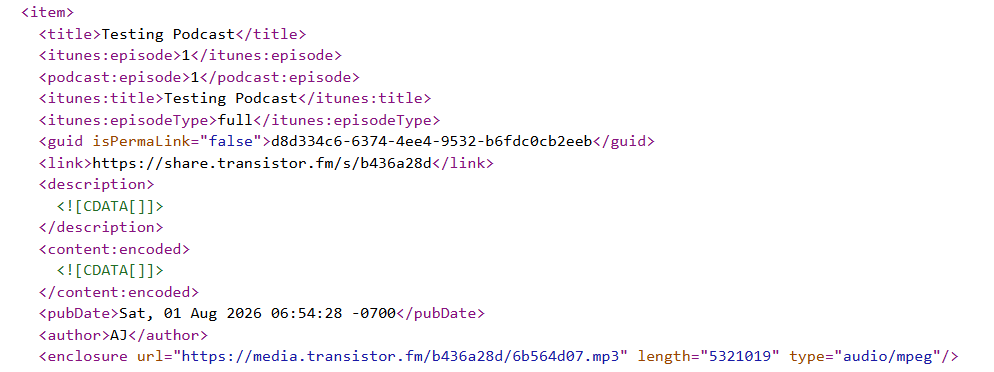
The isPermaLink attribute is the part people misread. It is optional and defaults to true, which tells an app the GUID is a real web address it could open. Most hosts set it to false and use an opaque string instead, because an ID tied to a URL dies the day the URL does.
Apple’s podcast requirements put it in one sentence: “All episodes must contain a globally unique identifier (GUID), which never changes.”
What happens if a GUID changes?
Your listeners get your back catalog a second time.
An app knows your episodes only by their GUIDs. Swap them and it sees a feed full of items it has never encountered, pulls them all down, and depending on the app and the listener’s settings, announces every one. Fifty episodes, fifty notifications. Your download numbers jump in a way that looks like growth and is not, because the same people are re-fetching files they already had.
Then the second problem. The old entries often do not vanish, so someone scrolling your show sees every episode twice with no way to tell which copy is current. Apple’s guidance on changing your feed URL is blunt about the cause: keep the original episode GUIDs, or listeners see duplicates.
Almost every “why did my episodes duplicate” question traces back to this one field. If it already happened to you, the fix is in duplicate episodes after switching hosts.
What is the podcast:guid tag?
Two different GUIDs live in a modern feed, and they get confused constantly. Episode GUIDs identify episodes. The podcast:guid tag, from the Podcasting 2.0 namespace, identifies the show itself.
It appears once at the channel level, and its value is a UUIDv5 built from your feed URL with the protocol scheme and any trailing slash stripped off, combined with the podcast namespace UUID ead4c236-bf58-58c6-a2c6-a6b28d128cb6. Your feed URL only matters at the moment that identifier is first assigned. After that, it is meant to follow the show for the rest of its life, even once the feed URL changes.
That matters if you are moving hosts. Your new host is supposed to find the existing show GUID in your old feed and carry it into the new one, so directories and analytics services still recognize you as the same show. Not every host does it. Ask support before you commit, because nobody advertises this either way.
How do you protect your GUIDs when you switch hosts?
Import from your old feed, and never re-upload the audio by hand.
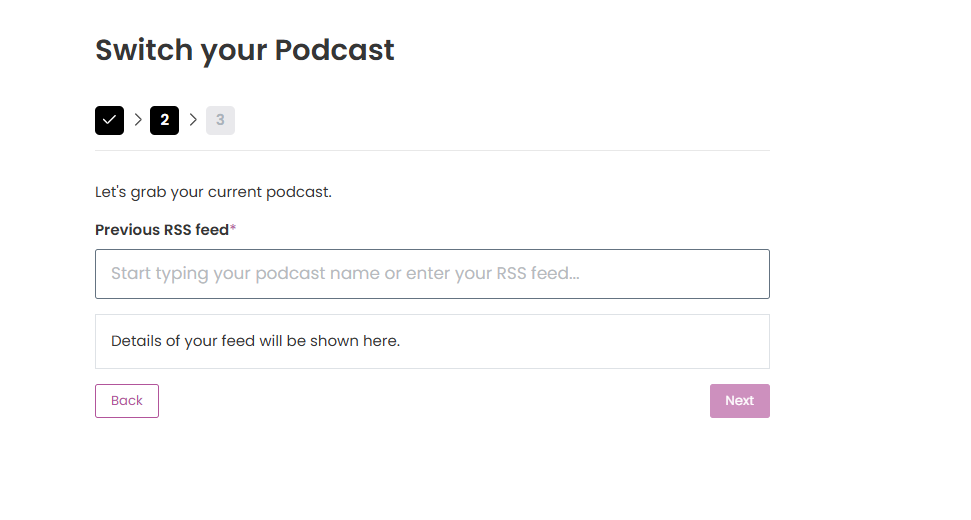
A proper RSS import reads your old feed and copies each episode’s existing GUID into the new host. Uploading your MP3 files manually creates fresh episodes with fresh GUIDs, which is the duplicate mess above, delivered by your own hand. Nothing in the interface warns you, because from the host’s side you did a normal upload.
Three checks worth ten minutes:
- Use the new host’s import-by-RSS tool, not a bulk file upload.
- Open both feeds in a browser afterward and compare a few
<guid>values. Identical strings mean the import did its job. - Leave the redirect on the old feed for at least four weeks, alongside the
itunes:new-feed-urltag, which is what Apple asks for.
The full order of operations, redirect included, is in how to move off Podbean without losing subscribers. If Podbean is the host you are leaving, Podbean alternatives sorts the replacements by why you are going. For the rest of the tags around this one, see what a podcast RSS feed is and how it works.
FAQ
What does GUID stand for? Globally unique identifier. In a podcast feed it is the permanent ID attached to each episode, and apps use it to recognize an episode they have already seen.
Where do I find my podcast’s GUID? Open your RSS feed URL in a browser and look inside any <item> block for the <guid> line. Your host writes it, and most dashboards never show it to you. If you do not know your feed address, that is where to find your feed URL.
Can I change an episode’s GUID? You can, and you should not. Apple requires the GUID to never change, and changing one makes every app treat that episode as brand new.
Is a GUID the same as the episode URL? No. The isPermaLink attribute defaults to true, which implies a URL, but most hosts set it to false and use an opaque string, because an ID tied to a URL breaks when the URL changes.
Do I have to create GUIDs myself? No. Your host generates one per episode automatically, and that is part of what a feed does for you. The only time GUIDs become your problem is a host migration.






