
Best Podcast Host for Beginners in 2026
Last updated: September 2026
This post contains affiliate links, and we may earn a commission if you sign up through them, at no cost to you. See our Affiliate Disclosure. Pricing as of August 2026.
If you have never published a podcast before, start with Buzzsprout as your go-to podcast host.
Nothing else gets you from a raw audio file to a live episode with less friction. The support is actual humans who answer fast, and a free tier lets you test the whole thing before you pay a cent. Skip it only if you already know you will run several shows.
The best podcast host for beginners: Buzzsprout
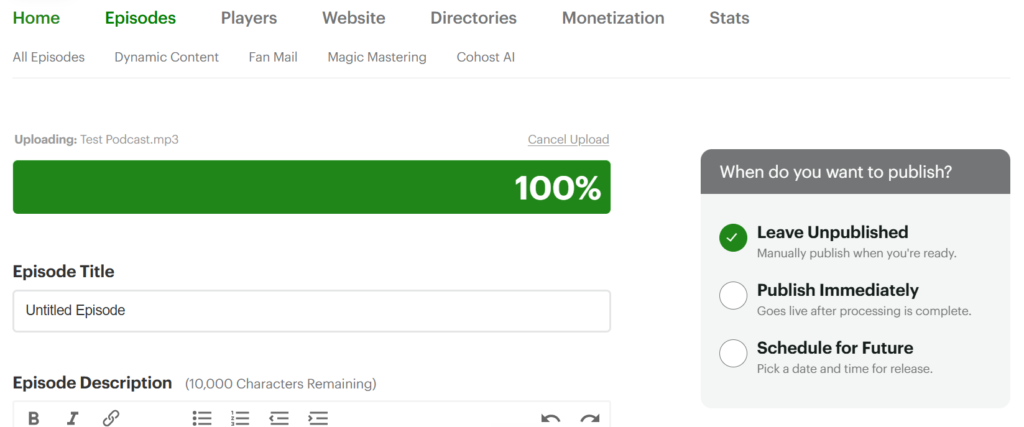
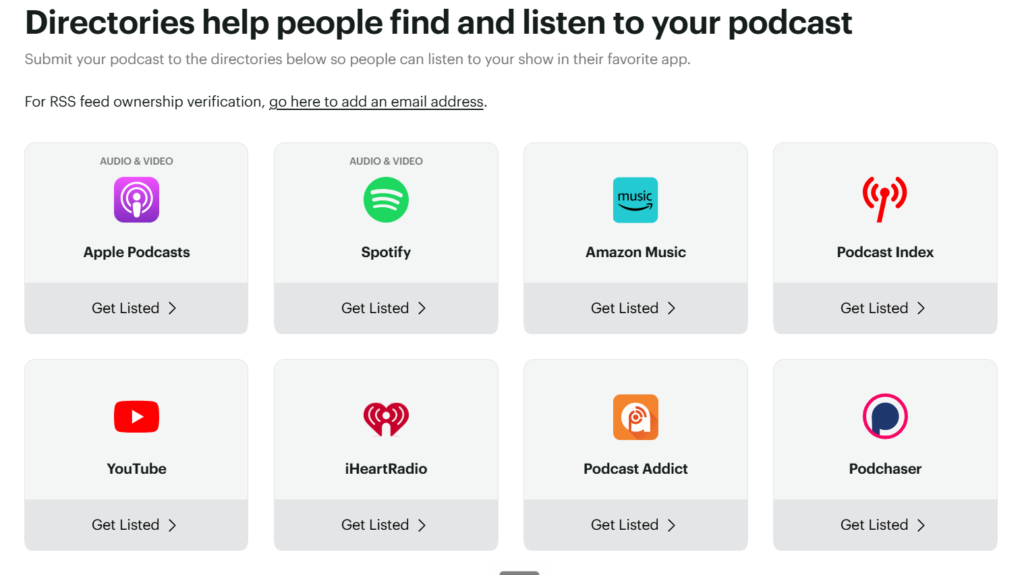
Buzzsprout wins this one because it refuses to overwhelm you. You upload an episode, fill in a title and a description, hit publish, and it handles the rest: the RSS feed, the submission to Apple Podcasts and Spotify, the hosting, and a basic show website once you are on a paid plan. There is no wall of settings to decode on day one. For a first-time podcaster, that clean path from file to live episode is worth more than any feature list, because the thing that kills most new shows is not a missing feature. It is friction.
Why Buzzsprout wins for beginners
Three things set it apart when you are new, and none of them are flashy.
First, the onboarding. The dashboard walks you through your first episode instead of dumping you into an empty control panel, and the built-in help docs are genuinely written for people who have never touched an RSS feed. Second, the support. Email a question and a real person answers, usually the same day, which matters a lot the first time a directory rejects your feed and you have no idea why.
Third, the free plan. You can upload up to two hours of content a month and Buzzsprout hosts those episodes for 90 days before they come down. That is enough to publish a few real episodes, see your show live on Apple and Spotify, and decide if podcasting is even for you before spending anything. When you are ready to pay, Buzzsprout pricing lays out what each tier costs and what it adds. And if you are wondering why not just stay on Spotify’s own free hosting instead, Spotify for Creators vs Buzzsprout weighs that trade directly.
When you are ready to pay, the entry Audio plan runs $18 a month, or $15 if you pay for the year up front, and lifts the upload cap to 6 hours a month. Storage of what you publish is unlimited on the paid tiers, and your episodes stop expiring. Hosting is the one recurring line in what it actually costs to start a podcast.
Runner-up: Transistor (and when it’s the better call)
If you already know you want more than one show, or you can see yourself scaling into a small network, start on Transistor instead. Every Transistor plan hosts unlimited podcasts on one account and one bill, starting at $19 a month, so you are not boxed in by the single-show limit that Buzzsprout builds around.
It is a slightly steeper learning curve than Buzzsprout, and there is no free-forever tier, only a trial. But for a beginner who is really a future podcast network in disguise, paying once for unlimited shows beats outgrowing your host in month three. The full breakdown lives in Transistor’s pricing guide, and I put the two head to head in Transistor vs Buzzsprout.
What to look for in a host for beginners
You do not need much when you are starting. You need these:
- A genuinely simple publish flow, so your first episode does not take a weekend
- Automatic distribution to Apple Podcasts, Spotify, and the other big directories
- Real support you can reach, ideally by email or chat, when something breaks
- A free plan or a real trial, so you can test before you commit
- Clear, honest pricing with no surprise per-episode fees
Nail those five and you can ignore dynamic ad insertion, advanced analytics, and the rest until you need them. Still fuzzy on the basics? Start with what a podcast host does.
Verdict
For a first podcast, Buzzsprout is the pick. Easiest setup, support that answers like a human, and a free tier to test the water before you pay. Start with Buzzsprout free. For the plan-by-plan detail, read our Buzzsprout review.
The one honest catch to plan around: Buzzsprout is built for a single show per account, so if you launch a second podcast you pay for a second subscription, and the free tier is capped at roughly two hours a month with episodes that expire at 90 days. If a network is where you are headed, start on Transistor instead. Here is why it wins for running multiple shows on one account.
For everyone else taking a first swing at this, Buzzsprout is the softest possible landing. And if the name you keep hearing is Libsyn, the old guard of this business, that one is Libsyn vs Buzzsprout.
What free-tier traps should beginners know before picking?
The word “free” hides a cost on most beginner plans, and it usually costs you episodes. Buzzsprout’s free plan hosts each episode for 90 days, then expires it out of your feed and off Apple and Spotify. There is a 90-day safety net before permanent deletion, but the episode goes dark from listeners the day it expires.
Acast’s free Starter plan is capped a different way. It lets you publish up to 5 episodes, and to lift that cap without paying you have to opt into their ad marketplace. So the free route either deletes your back catalog or boxes you in at five episodes. This is why the honest beginner pick is often a cheap paid plan from the start. You spend $15 to $18 a month and your episodes just stay put, which is the whole point of hosting.
FAQ
What is the best podcast host for beginners? Buzzsprout. It has the simplest publish flow, responsive human support, and a free plan so you can test before paying. The cheapest paid plan is $18 a month, or $15 billed annually.
Does Buzzsprout have a free plan? Yes. You can upload up to two hours of content a month, and those episodes stay live for 90 days before they come down. It is enough to publish a few episodes and see your show on Apple and Spotify.
Can beginners host more than one show on Buzzsprout? Not on a single account. Buzzsprout is one show per account, so a second podcast means a second subscription. If you plan to run several shows, Transistor is the better start.
Is Buzzsprout or Transistor better for a first podcast? Buzzsprout, unless you already know you will run multiple shows. Buzzsprout is easier to start on. Transistor is the better call the moment a second show enters the picture.
Impact-Site-Verification: 5f7407dd-03bb-4059-aff5-8b6c132b5adb






