
How to Move Your Podcast Off Spotify for Creators (2026)
Last updated: September 2026
This post contains affiliate links, and we may earn a commission if you sign up through them, at no cost to you. See our Affiliate Disclosure. Steps verified July 2026.
You can move your podcast off Spotify for Podcasters, now called Spotify for Creators, and keep every subscriber and your whole back catalog, but only if you set the redirect correctly. Grab your RSS feed, import it into a paid host like Transistor or Captivate, then turn on the redirect from inside Spotify. Skip that redirect, and you start over from zero.
Before you switch: what do you need?
Three things, and the third is the one people forget. First, your current RSS feed URL from Spotify for Creators, which is what every podcast app reads to find your episodes. Second, a destination host to land on, because the free Spotify platform is what you are leaving and you need somewhere that owns your feed. Third, and this is the part that saves your show, access to the redirect setting inside Spotify for Creators, which has to be done from a web browser and not the phone app.
Your audience and subscriber base do not live in a file you download. They follow the feed. That is why the redirect matters more than anything else here. Get the feed pointed correctly and Apple, Spotify, Overcast, and the rest quietly update themselves. Botch it and your listeners keep pulling an old feed that never gets new episodes.
How do you find and copy your RSS feed on Spotify for Podcasters?
Log in to Spotify for Creators on a desktop browser. Open your show, go to Settings, and look for your RSS feed link. Spotify shows the feed URL and your current hosting partner on that screen. Copy the full RSS URL and paste it somewhere you can grab it in a second, like a notes app.
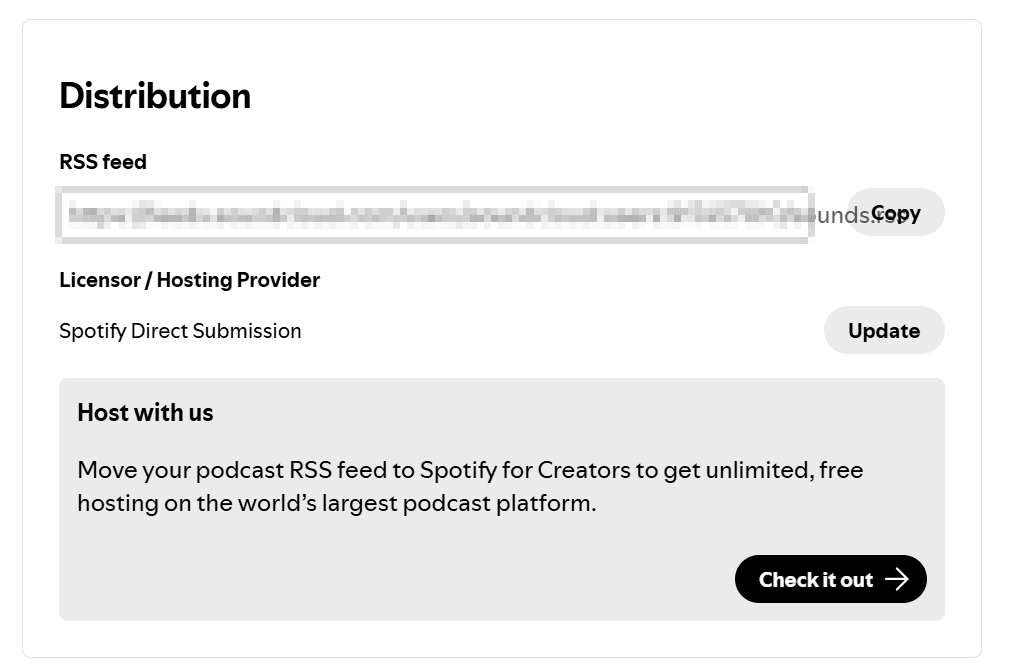
One catch worth naming. Anchor never gave creators a true export button, and Spotify for Creators keeps that pattern. You are not downloading your MP3 files by hand. Your new host pulls them straight from that RSS feed during import, so the feed URL is the only thing you need to copy. Spotify moves menus around, so if it is not on the main settings screen, check for a “Your RSS feed” link in the show’s settings area.
Step by step: moving from Spotify for Podcasters to a paid host
Do these in order. The redirect comes last on purpose.
- Copy your RSS feed URL from Spotify for Creators, as covered above.
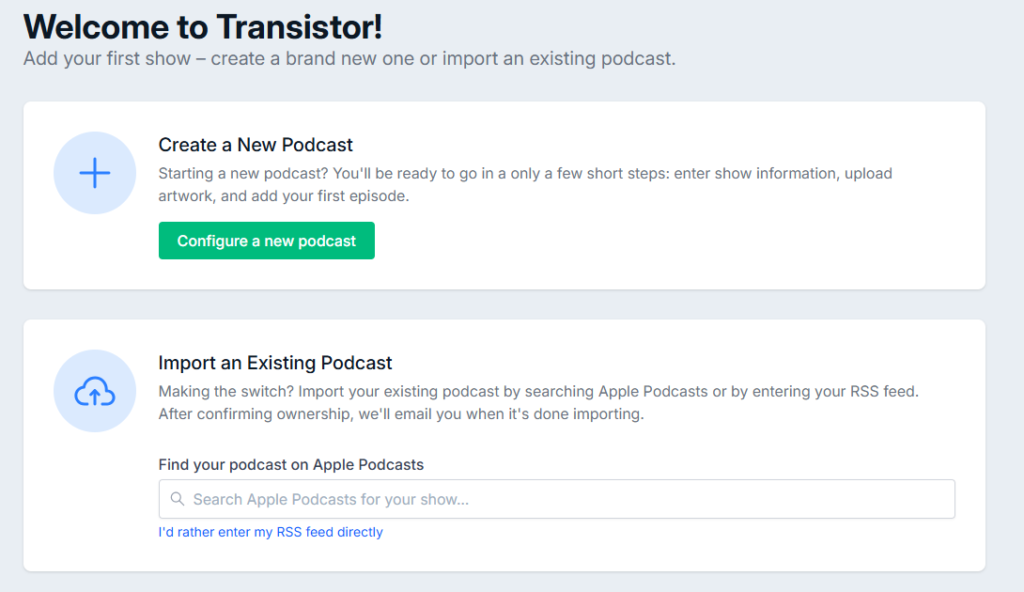
- In your new host, start a new show and choose the import option. In Transistor, that is Add Show, then Import an Existing Podcast, then the link to enter your RSS feed directly.
- Paste your Spotify feed URL and run the validation. The host reads your title, description, artwork, and every episode from the feed.
- Confirm you own the show. Transistor sends a verification email to the address listed in your Spotify feed, the one in the feed’s
itunes:emailtag (one of the fields in the podcast RSS feed format), not your Spotify login, and the import only starts once you click through it. If your feed hides that email, make it visible first or the verification will not reach you. - Let the import finish. It copies your audio files, cover art, show notes, and publish dates onto the new host. Check that your episode count matches before you go further.
- Only now, go back into Spotify for Creators, open Settings, find the redirect podcast section, paste your new host’s RSS feed URL into the redirect field, and save.
That order is not optional. If you turn on the redirect before the import is fully done, apps can start following a feed that is missing episodes.
How do you not lose your downloads and subscribers?
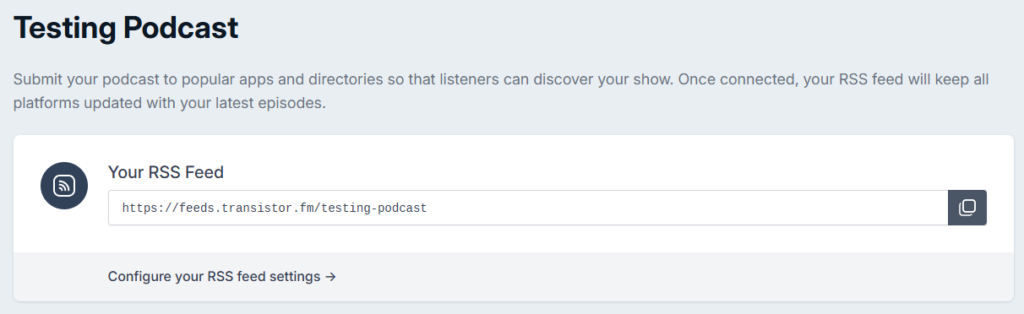
The redirect is the whole game, so treat it carefully. A podcast redirect works like mail forwarding. Every app that has your old Spotify feed gets pointed at the new one, and it updates automatically without you contacting Apple, Spotify, or anyone else one by one. The address you forward to is your new host’s feed URL, which Transistor puts on the show’s distribution screen with a copy button.
Follow four rules. Do not set the redirect until your new host shows all your episodes imported and correct. Do not delete your Spotify for Creators account right after flipping the switch, because the old feed has to stay live for the forwarding to work. Keep the redirect running four weeks. Spotify sets a much lower bar, asking only that you wait a week after redirecting before you delete the account, and Spotify’s own redirect page warns the redirect itself can take up to seven days to finish. Four weeks is Apple’s number, and Apple is the one every app that is not Spotify takes its cue from, so that is the one to follow.
Here is what breaks if you rush it. Delete the old account too soon and the redirect dies with it, so listeners on Apple Podcasts and Overcast keep hitting a dead feed. New episodes never reach them, your download numbers crater, and your subscriber count on the new host looks like a brand-new show. There is no clean fix after the fact. You would be asking every listener to resubscribe by hand, and most never will.
Which host should you switch to?
For most people leaving Spotify for Creators, Transistor is the destination I would pick. Its import tool reads your Spotify feed directly, pulls every episode and your artwork over automatically, and walks you through the ownership check, so the migration is close to hands-off. Every plan hosts unlimited shows on one bill starting at $19 a month, and you get real analytics that the free Spotify dashboard never gave you. Start with Transistor’s free trial and confirm the import before you touch the redirect. The honest downside: there is no free-forever tier, so the day you leave Spotify you start paying. Full plan breakdown is in Transistor’s pricing guide.
If your reason for leaving is growth and monetization rather than running several shows, Captivate is the equally strong call at $17 a month, with marketing and audience tools built around growing a single show. Like Transistor, it hosts unlimited shows on every plan, so the choice comes down to which tools you want. Either way, you are moving to a host that actually owns your feed, which is the point of leaving. New to this and not sure a paid host is worth it yet? Read the best podcast hosts for beginners first.
FAQ
Can you move a podcast off Spotify for Podcasters without losing subscribers? Yes. Import your RSS feed into a new host, then set a 301 redirect inside Spotify for Creators. The redirect forwards every app and directory to your new feed, so your subscribers and back catalog carry over.
Does Spotify for Creators let you export your podcast? Not as a file. There is no download-everything button. Your new host imports your episodes straight from your RSS feed URL, which you copy from the Settings screen.
How long should you keep the Spotify redirect active? Four weeks. Spotify only asks you to wait a week after redirecting before deleting the account, but Apple tells publishers to maintain the redirect for at least four weeks, and Apple sets the pace for every app outside Spotify. Do not delete your old Spotify account while the redirect is live.
What happens if you delete your Spotify account before redirecting? The redirect stops working, listeners get stuck on a dead feed, and new episodes never reach them. Recovering those subscribers means asking each one to resubscribe manually, which almost never works. Migrate and redirect first, delete last.
Will I lose my subscribers when I switch? No. The 301 redirect you set on the old RSS feed carries your followers to the new feed, and each app re-pulls from it on its next check. Apple is unusually plain about this in its own docs: your existing followers, including the ones outside Apple Podcasts, are migrated and not affected by the move. Your subscriber base and download history ride along, as long as the redirect stays live.
How long before the directories update after I redirect? Allow a week or two. Spotify says the redirect alone can take up to seven days to complete, and apps poll feeds on their own schedules after that, so the change lands at different times across Apple, Overcast, and the rest. Keep the old feed live the whole time, and do not cancel the old host until the redirect has run four weeks, which is Apple’s floor.
Why do old episodes show up as new or duplicated after the move? The new host did not preserve your episode GUIDs, the unique ID each app uses to tell episodes apart. Change those IDs and apps read every old episode as brand new, re-downloading the whole catalog or showing duplicates. Pick a host whose import keeps the original GUIDs, and confirm the episode count matches before you flip the redirect.






