
How to Record Two People in the Same Room for a Podcast
This post contains an affiliate link, and we may earn a commission if you sign up through it, at no cost to you. See our Affiliate Disclosure. Every setup claim here was checked against the manufacturer’s or software vendor’s own documentation in September 2026.
Give each person their own mic and their own track, on one audio device. Two USB mics show up as two separate devices, and most recording apps only listen to one. If you both own a Rode PodMic USB, the free Rode Connect app fixes that on Mac or Windows. The sturdier fix uses each mic’s XLR output and a two-input audio interface.
Key takeaways
- Audacity’s manual says Audacity can only record from one sound device at a time, so two USB mics need a workaround before it will record both.
- On a Mac, Apple’s Audio MIDI Setup can combine two USB mics into one Aggregate Device, with Drift Correction turned on for the mic that is not the clock source.
- Descript’s help center says Windows does not natively support multiple USB microphones at the same time and points Windows users to third-party apps.
- Rode’s PodMic USB guide says the free Rode Connect app can connect up to four PodMic USB mics to one computer at the same time, on Mac or Windows.
- The Rode PodMic USB has an XLR output as well as USB-C, so two of them can plug into a two-input audio interface with phantom power switched off.
Why won’t two USB mics record at the same time on one computer?
Because each USB mic is a complete audio device. It carries its own converter and its own clock, so your computer sees two separate sound cards. Most recording apps pick one input device and ignore the rest. Audacity’s own recording FAQ says it plainly: Audacity can only record from one sound device at a time. Descript’s desktop recorder works the same way, and its help center says it supports one input routed through your system.
The clocks are the sneaky part. The same Audacity page warns that two USB mics have separate clock speeds, so the two inputs may drift apart over time. Over a long episode, one voice can creep out of sync with the other. Every fix below does one of two things. It either makes the two mics behave like one device, or it swaps them for one device with two inputs.
How do you combine two USB mics on a Mac?
Build an Aggregate Device in Audio MIDI Setup, the utility that ships with macOS. Apple’s support article on Aggregate Devices walks through it, and the short version takes about two minutes.
- Open Audio MIDI Setup from Applications, then Utilities.
- Click the Add (+) button at the bottom of the sidebar and choose Create Aggregate Device.
- Tick the Use box next to both USB mics.
- Pick one mic as the clock source. Apple says to choose the device with the most reliable clock.
- Turn on Drift Correction for the other mic, the one that is not the clock source.
- Double-click the new device to rename it, then select it as the input in your recording app. Descript’s help says to restart the app first if it was already open.
Apple lists Logic Pro, GarageBand, and MainStage as apps that can use an Aggregate Device, along with most other Core Audio apps. Audacity’s manual points Mac users to the same fix. It works, but it is still two clocks being corrected in software. Use it as a free patch for gear you already own. I wouldn’t build a show around it. And one catch for Descript users: Descript’s recorder takes one mixed input, so you will not get two separate tracks out of it.
Can you record two USB mics at once on Windows?
Not with anything built into Windows. Descript’s help article on multiple USB mics says Windows does not natively support multiple USB microphones at the same time, and that you need a third-party app to do it. There is no Aggregate Device menu to go looking for.
Audacity’s FAQ lists a few Windows workarounds, mostly third-party routing software that merges two devices into one stream. It also warns that aggregating two devices that use ASIO drivers is unlikely to work correctly. That is a lot of fiddling to end up with the same two-clock problem. On Windows, you have three cleaner routes: the mic maker’s own software (Rode Connect for PodMic USBs), a recording app that accepts two USB mics directly, such as Riverside’s in-person mode in Chrome or Edge, or one two-input interface.
What’s the easiest fix if you both have a Rode PodMic USB?
Download Rode Connect. It’s free, and it’s the fix that needs no new gear. Rode’s PodMic USB user guide says Rode Connect can connect up to four PodMic USB or other Rode USB mics to one computer at the same time. Rode lists it for macOS 11 or later and Windows 10 version 1803, so Windows users are covered too.
The setup assistant puts each mic on its own channel, and Rode’s guide has you plug headphones into the 3.5mm jack on the mic. Then set the recording mode before you hit record. Rode’s Connect user guide explains that Stereo gives you one finished mix, while Multi-channel exports a folder with a separate file for every mic, plus a stereo mix. Pick Multi-channel. Separate tracks are the whole point, because they let you fix one voice without touching the other.
Rode also makes UNIFY, a virtual mixing app for Windows 10 and macOS 12 or later that Rode says can record multichannel audio. It is built mainly for streaming, and Connect is the simpler tool for a two-person podcast. Either way, you are still leaning on two USB clocks, which is why I’d put money toward the next setup instead.
What is the cleanest setup for two people in one room?
Two mics on XLR cables into one audio interface with two mic inputs, then one USB cable to the computer. The computer sees a single device with a single clock and two channels, so the drift problem and the one-device limit both go away. Any app that records those two channels separately can split the voices, which rules out Descript’s one-input recorder.
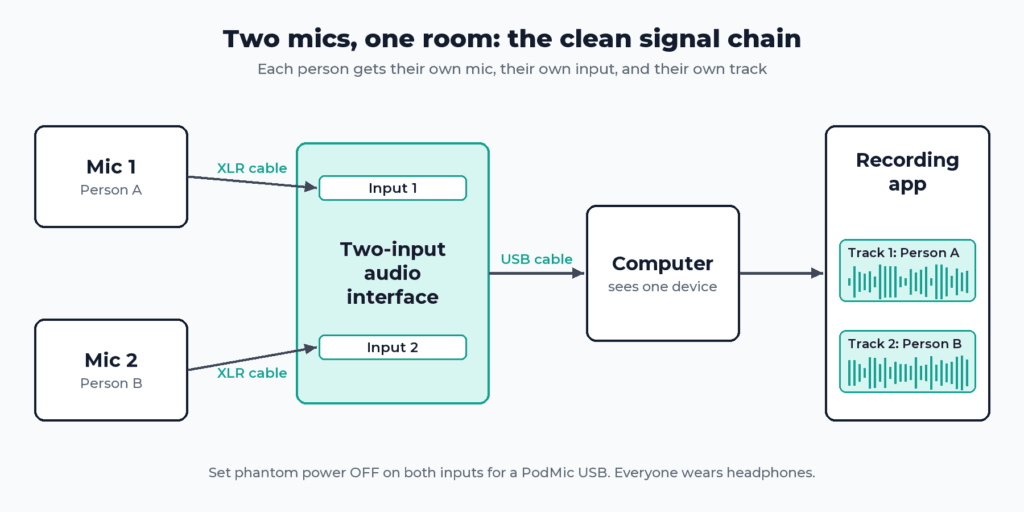
The PodMic USB already has the XLR jack, so you don’t need new mics. Rode’s user guide shows the XLR cable plugging into the base of the mic. It adds one warning that matters: switch phantom power off on the interface, because phantom power affects the PodMic USB’s output level. Turn the input gain all the way down before you plug in, then bring it up while each person talks.
In Audacity, the first fix its FAQ lists for two mics is a device with separate left and right mic inputs, one mic on each. Record the two inputs as one stereo track, one person per side, and Audacity’s Split Stereo to Mono command turns it into two mono tracks you can edit on their own. In Riverside’s browser studio, you pick input 1 for one person and input 2 for the other. Interfaces come in many brands. What matters is two mic inputs with their own gain knobs and a headphone output.
Should you use a portable podcast recorder instead?
If you want to record without a computer, yes. A portable recorder with two or more XLR inputs does the interface’s job and writes the files to a memory card itself. The Zoom PodTrak P4 product page is a good picture of the category. It lists four XLR mic inputs, four headphone outputs with their own volume controls, separate-track recording of every input, and SD card recording. Zoom also says it doubles as a two-input USB audio interface, which gives you both setups in one box.
For two people in one room, that headphone count matters most. With a single headphone output, Riverside’s guide suggests a headphone splitter or shared earbuds, which works but gets old fast. The downside of any recorder is one more box to charge, set up, and copy files off after every session.
Can each person just record on their own laptop?
You can, and it costs nothing if you both own laptops. This is the double-ender, the same trick remote shows use, and our guide to recording a podcast remotely covers the tools that automate it. In one room, it comes with three problems.
First, drift. Audacity’s manual notes that devices on different computers have separate clock speeds, so the two files may slide apart over a long take. Second, sync. You line the files up by hand in the edit, so start with one loud clap both mics can hear. Third, somebody forgets to press record, and there is no second take of a good conversation. If you go this way, record a WAV on both machines, not a compressed file, and keep the export settings for the finished episode for later.
Can Riverside or Descript record two people in the same room?
Riverside can, with separate tracks. Riverside’s in-person recording guide covers one computer with one shared camera and two microphones. USB mics plug straight into the computer, and XLR mics go through an interface. You add the second person as an in-person guest and assign them the other mic.
Riverside’s guide lists in-person recording for the Pro, Grow, Webinar, and Business plans, so the free plan is out. In a browser, it needs Chrome or Edge, not Safari. It also uses only channels 1 and 2 of an interface there. The Riverside Mac app goes up to four cameras and four mics on one computer. If you also want video, try Riverside, and check what each Riverside plan costs before you commit. Descript is the weaker pick for this job. Its recorder takes one mixed input, so both voices land on one track. Our Riverside vs Descript comparison covers where Descript earns its place, which is the edit.
How do you stop the two mics from picking each other up?
Get each mic close and point it away from the other person. Sitting three feet apart, you will always get a little of each voice in the other mic. That’s normal, and separate tracks make it manageable. What cuts it most is distance to your own mouth. Rode’s guide says the PodMic USB sounds best about 5 to 10 cm away, roughly two to four inches, and calls it a tight cardioid mic that rejects sound from the sides and back.
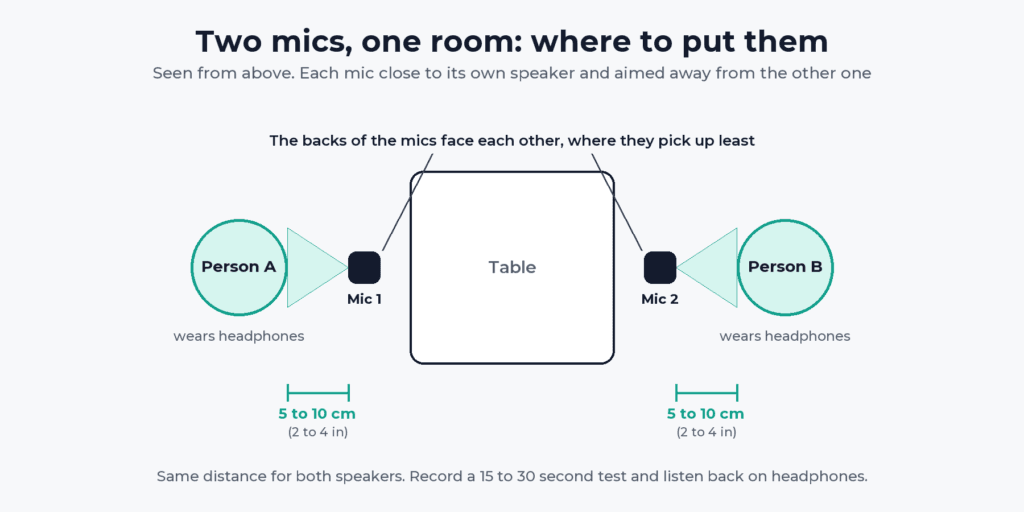
Riverside’s in-person best practices add a few more. Sit slightly farther apart and angle the mics away from each other. Keep both people the same distance from their own mic. Set the gain so normal speech peaks clearly and the other voice stays quiet. Record a 15 to 30 second test and listen back on headphones. Treat the room with soft furnishings once the mics are sorted. Panels help with echo, but they won’t fix a mic that sits a foot from your face.
Which setup should you pick?
If you already own two PodMic USBs, start with Rode Connect tonight and see if it holds up. If you are buying anything, buy the two-input interface. It fixes the problem at the hardware level and works with any app that records two channels. The table compares every option on cost, effort, and sound.
| Setup | Cost level | Difficulty | Sound quality |
|---|---|---|---|
| Two USB mics in Rode Connect | Free with Rode USB mics you own | Easy | Good, separate tracks, two clocks |
| Two USB mics as a Mac Aggregate Device | Free | Medium | Good, drift correction required |
| Two USB mics in Riverside in-person mode | Paid Riverside plan | Easy | Good, separate tracks |
| Two XLR mics into a two-input interface | Low, one interface plus cables | Easy once set up | Best, one clock, separate tracks |
| Portable recorder with XLR inputs | Medium | Easy | Best, no computer needed |
| Each person records on their own laptop | Free | Hard | Good, but drift and manual sync |
Whichever you choose, the recording setup is only half the job. You still need a real host for the finished episode, and our breakdown of what it costs to start a podcast puts the gear and hosting side by side.
FAQ
What’s the best two people in same room setup with two Rode PodMic USBs? Run both mics into Rode Connect on one computer and record in Multi-channel mode, which gives each person a separate file. For a longer-term setup, use each mic’s XLR output into a two-input audio interface with phantom power switched off.
Can Audacity record two USB mics at once? Not directly. Audacity’s manual says it records from one sound device at a time. On a Mac, combine the mics into an Aggregate Device first. On Windows, use the mic maker’s software or a two-input interface.
Can two people share one mic for a podcast? They can, but you lose separate tracks, so you cannot turn one voice up without the other. Riverside’s in-person guide recommends one mic per person and notes that a shared mic saves one audio track.
Do both people need headphones when recording in the same room? Riverside’s best-practices page says headphones are not required when everyone is in the room, but its recording guide says that for the best audio, every in-person participant should wear them. They let you hear bleed, pops, and level problems while there is still time to fix them.






