How to Record a Podcast Remotely With a Guest (2026)
Last updated: September 2026
This post contains affiliate links, and we may earn a commission if you sign up through them, at no cost to you. See our Affiliate Disclosure. Pricing as of September 2026.
The short version: if you want to record a podcast remotely, do not record the call itself. Record each person locally and stitch the tracks together after. That one move is why a Riverside or Zencastr session sounds clean while a straight Zoom call sounds like a Zoom call. Each voice is captured at full quality on that person’s own machine, so one guest’s flaky Wi-Fi does not drag the whole recording down with it. Use a tool built for it, get separate tracks, and you can fix one person without touching the other.
What is the best way to record a podcast with a remote guest?
Record each person locally, on separate tracks, using a browser-based tool made for remote recording. The reason is simple: the audio never depends on the connection. Riverside captures each participant locally in up to 4K video and 48kHz audio, then uploads those files after you stop, so a dropped call does not equal a ruined episode.
This is what podcasters mean by the double-ender, and dedicated platforms automate what used to be a fiddly manual process. Instead of both people hitting record in Audacity and emailing giant files later, the tool does the local capture, the syncing, and the upload for you. You still get isolated tracks for editing. You just skip the part where someone forgets to press record. Buzzsprout’s remote-recording guide makes the same call: local, lossless, separate tracks beat a conference call every time.
Why does local recording beat Zoom or a normal call?
Because Zoom squeezes your audio down to fit the connection, and whatever arrives is what you keep. Local recording grabs each voice at full quality on that person’s own device before the internet gets a say. Play one back next to a Zoom recording and you won’t need me to explain the rest.
Two things break on a normal call. First, quality tracks your worst connection, so a guest on hotel Wi-Fi drags everyone down. Second, everyone lands on one mixed track, so you cannot lower one loud voice or cut one person’s dog barking without hitting the other. Local recording fixes both. Full-quality audio regardless of bandwidth, and separate files you can edit independently. That is the whole reason the remote-recording tools exist, and it is worth the setup.
What tools record a podcast remotely?
Three names cover almost everyone: Riverside, Descript, and Zencastr. All three record each guest locally on separate tracks. They split on what they do around that. If it comes down to the first two, Riverside vs Descript goes deeper.
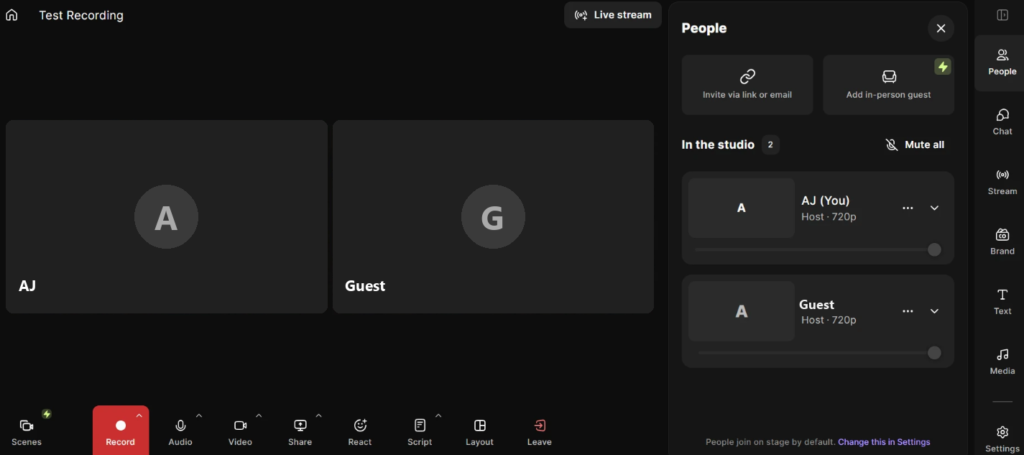
- Riverside is the video-first pick. Its Pro plan is $24 a month billed annually, records up to 4K video and 48kHz audio locally, gives you 15 hours of separate track downloads a month, and adds AI clips and show notes. The free plan gives you two hours of multitrack recording total, not per month, with a watermark and 720p video. Enough to test it, not enough to run a show on.
- Descript overlaps on recording but earns its keep in the edit. Its Creator plan runs $24 a month billed annually with 30 hours of media, and it edits audio by editing the transcript, which is faster than a waveform once it clicks. There is a free plan with 60 minutes a month.
- Zencastr is the free one, and I mean actually free. Its Vibecastr plan costs nothing and still gives you unlimited separate audio and video tracks, up to 4K, 48kHz WAV, and room for six people. The only paid tier left is Enterprise.
How do you record a remote podcast, step by step?
The whole flow takes about five minutes to set up once you pick a tool. Create a studio in Riverside, Descript, or Zencastr, then send your guest the link. No install, it runs in the browser. That link is doing the real work, because it tells the tool to record your guest locally instead of over the call.
- Start a session and check that local recording is on (it is the default in these tools).
- Send the guest the join link and have them use headphones so your voice does not bleed into their mic.
- Do a ten-second test record and play it back before the real thing.
- Record. Watch that each person shows as a separate track.
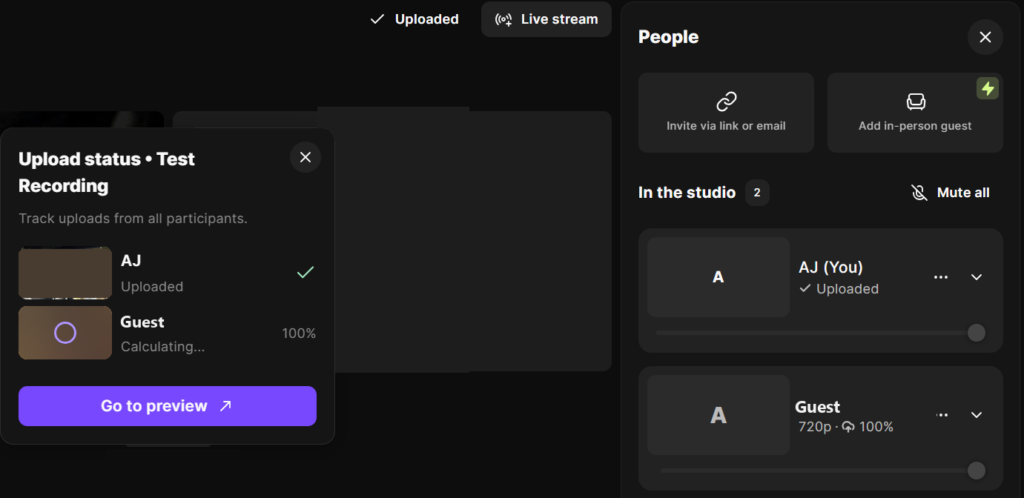
- When you stop, wait for every local file to finish uploading before anyone closes the tab. This is the step people skip and regret.
- Download the separate tracks and edit, then publish through your actual host.
One thing to keep straight: none of these tools is your podcast host. They record and edit. You still publish through a real host that owns your RSS feed and gets you listed in the directories. If you do not have one yet, start with our pick for the best podcast hosting for beginners.
Which remote recording tool should you use?
For a video-first show, use Riverside. Local capture up to 4K, clean separate tracks, and the best clip tools of the three make it the default for anyone who wants the video, not just the audio. Try Riverside free, then move to Pro at $24 a month when the watermark and 720p cap start to bug you. The honest downside: it is a recording tool priced like one, and local 4K files still have to upload after you stop, so a weak connection slows that final step.
If your show lives in the edit, use Descript. Start with Descript and lean on transcript-based editing, which is genuinely faster for heavy cutting, ad reads, and filler-word cleanup. The downside: its recording is fine but not quite Riverside’s on raw video quality, so video-first creators still lean the other way. And if money is tight, just use Zencastr. It’s free, the tracks are separate, and there’s no hour cap. You give up Riverside’s clip tools and Descript’s editor, and plenty of interview shows never miss either.
For the full cost breakdown on the video-first pick, see our Riverside pricing guide.
FAQ
How do I record a podcast with a remote guest? Use a tool like Riverside, Descript, or Zencastr that records each person locally on separate tracks. The audio is captured at full quality on each device, so a bad connection does not wreck the recording, and you get isolated files to edit.
Is local recording better than Zoom for podcasts? Yes. Zoom sends compressed audio over the connection, so quality tracks your worst internet. Local recording captures full-quality audio on each device first, and gives you separate tracks instead of one mixed file.
Do I need a podcast host if I use Riverside? Yes. Riverside records and edits, it does not publish your feed. You still need a real host to own your RSS feed and list you on the directories. Riverside handles capture, and the host handles everything after.
What is the cheapest way to record a podcast remotely? Zencastr’s free plan. It records unlimited separate audio and video tracks for up to six people, which covers most interview shows. Riverside and Descript have free plans too, but both cap you: two hours of multitrack recording total on Riverside, 60 minutes a month on Descript.