StreamYard Pricing 2026: Plans, Fees, and Is It Worth It?
This post contains affiliate links, and we may earn a commission if you sign up through them, at no cost to you. StreamYard is one of them. See our Affiliate Disclosure. Pricing as of September 2026.
StreamYard costs $35.99 a month for its Core plan if you pay for the year, or $44.99 month to month. For a podcast that goes out live, Core is the plan to buy: it streams to 3 places at once and records every guest on a separate track with no hourly cap. Advanced at $68.99 is worth it for 4K files or webinars. Free is a test drive, not a studio. And if you sign up with a company email, StreamYard expects you on its $249 Business plan.
Key takeaways
- StreamYard Core costs $35.99 a month billed yearly or $44.99 billed monthly, and includes multistreaming to 3 destinations and unlimited local recordings of each participant.
- StreamYard Advanced costs $68.99 a month billed yearly or $88.99 billed monthly, and adds 4K local recordings, 8 destinations, and On-Air webinars for 100 viewers.
- StreamYard’s Business plan costs $249 a month billed yearly or $299 billed monthly, includes 2 seats, and is required for signups that use a company email domain.
- StreamYard’s free plan cannot multistream, does not record live streams, and limits local recording to 2 hours a month in recording sessions.
- StreamYard’s refund policy, updated September 22, 2026, allows refund requests within 20 days of a monthly charge and 60 days of a yearly one, while its pricing page still advertises a 7-day money-back guarantee.
How much does StreamYard cost in 2026?
Four self-serve plans: Free, Core, Advanced, and Business, plus an Enterprise tier you get a quote for. Yearly billing takes 22 percent off the two individual plans and 17 percent off Business. The prices below come from StreamYard’s pricing page, checked with both billing toggles on September 25, 2026. StreamYard only prints the per-month rate, so the yearly totals are our own math.
| Plan | Billed monthly | Billed yearly | Yearly total | Multistream destinations | Who it is for |
|---|---|---|---|---|---|
| Free | $0 | $0 | $0 | None (1 at a time) | Trying the studio |
| Core | $44.99 | $35.99 a month | $431.88 | 3 | Individuals only |
| Advanced | $88.99 | $68.99 a month | $827.88 | 8 | Individuals only |
| Business | $299 | $249 a month | $2,988 | 10 | Companies, 2 seats included |
| Enterprise | Quote | Quote | Quote | Not listed | Large organizations, 5+ seats |
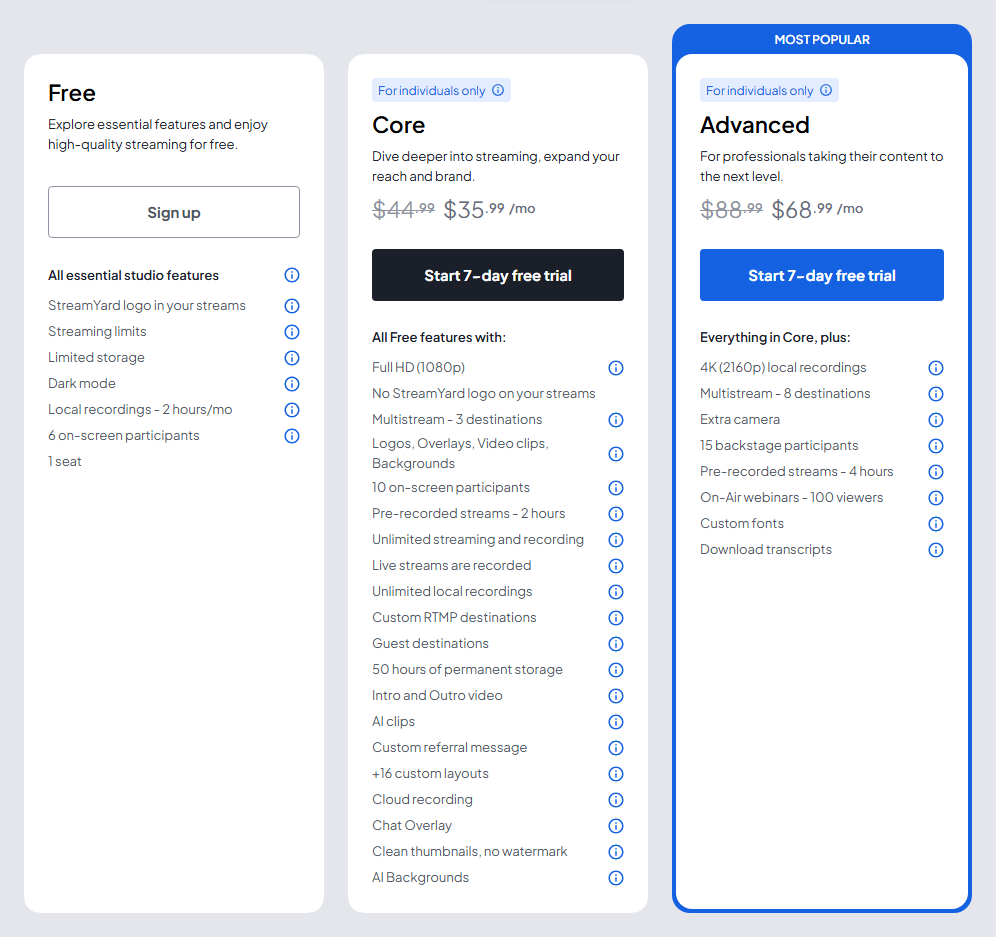
Every paid plan starts with a 7-day free trial. The pricing page adds that prices “may vary depending on promotional campaigns,” and StreamYard’s help center says it does not give individual discounts, so any deal will show up on the plans page itself. It bills in US dollars or Indian rupees only, through Stripe, by card. PayPal is not accepted.
What does the free plan leave out?
Most of what a podcast needs. StreamYard’s free plan limits page lists no multistreaming, no custom RTMP, the StreamYard logo on every stream, 6 people on screen, no custom overlays or backgrounds, and 5 hours of recording storage. Live streams on Free are not recorded at all. Local recording, the separate file for each guest, is capped at 2 hours a month and only works in a recording session, not while you are live.
The same page also lists “no ability to download recordings,” and it warns that free recordings older than 12 months are deleted. Streaming hours are metered on Free too, and StreamYard shows your remaining time on the Billing page rather than publishing a number. So Free is useful for one thing: checking that your guests can join from a link and that the studio suits you. Anyone who wants files to edit into an episode needs Core.
What do Core and Advanced get a podcaster?
Core, $35.99 a month billed yearly or $44.99 monthly: 1080p, no StreamYard logo, multistreaming to 3 destinations, and 10 people on screen, which is you plus 9 guests. Every live stream is recorded automatically, up to 10 hours per stream. You also get unlimited local recordings, custom RTMP, guest destinations so a guest can stream to their own channel, intro and outro videos, AI clips, a chat overlay, and 50 hours of permanent storage. Pre-recorded streams can run up to 2 hours.
Local recording is the feature that matters for audio. StreamYard’s help center says it saves an individual audio file and an individual video file for each participant, recorded on their own device. The audio downloads as WAV. The combined recording comes down as an MP3. You have to tick “Record locally for each participant” in the studio’s Recording settings before the session starts. If you forget, the separate files cannot be recovered.
Advanced, $68.99 a month billed yearly or $88.99 monthly: Everything in Core, plus 4K (2160p) local recordings, 8 destinations, an extra camera, 15 backstage participants waiting to come on, 4-hour pre-recorded streams, On-Air webinars for 100 viewers, custom fonts, and transcript downloads. For an audio show, none of that is essential. It earns the extra $396 a year only if you publish 4K video, stream to more than 3 places, or run webinars as well as the show.
When do you need StreamYard Business?
When the account belongs to a company, whether or not you want the extra features. StreamYard’s Plan Usage Policy says Free, Core, and Advanced are for personal use or individuals working as freelancers. Its plans article goes further: a signup with a business email domain needs the Business plan. Since December 2025, StreamYard has also been moving accounts it judges to be commercial onto Business at their next renewal, with email warnings 30 and 15 days ahead.
Business costs $249 a month billed yearly or $299 monthly and includes 2 seats. It adds 10 destinations, 4K local recordings, On-Air webinars for 1,000+ viewers, reusable studios, 700+ hours of storage, 24-hour stream recordings, and priority support. StreamYard’s seat article says you can add seats yourself up to 10 in total, and beyond that support quotes an add-on. It does not publish a per-seat price. Enterprise starts at 5 seats and adds SSO, an uptime SLA, and a dedicated account manager, on a quote.
The practical advice for a company podcast: sign up with the email you will actually use, and budget for Business from day one. A Core plan bought on a work address is the setup most likely to get repriced at renewal.
What are the catches in StreamYard pricing?
Storage is the first. Core and Advanced both hold 50 hours, and StreamYard’s storage article says that once you pass it, you can still stream, but StreamYard stops recording. A weekly two-hour show fills 50 hours in about six months. More storage is a paid add-on: 100 hours for $4.99 a month or $53.88 a year, 200 hours for $8.99 or $101.88, and 400 hours for $17.99 or $203.88. Downloading and deleting old episodes costs nothing.
Seats are the second. Individual plans cannot add seats at all, per StreamYard’s seat-limit article, so a co-host who wants their own login pushes you toward Business at $249. Guests do not need a seat. They join the studio from a link.
Last, StreamYard is not a podcast host. Its help center says it does not offer an RSS feed, so Apple Podcasts and Spotify still need a separate host, which is another bill. Our guide on how to choose a podcast host covers that half of the budget.
How does StreamYard compare with Riverside and Restream on price?
On yearly billing, StreamYard Core costs the most of the entry plans that matter to podcasters: $431.88 a year, against $288 for Riverside Pro, $408 for Riverside Grow, and $190 for Restream Standard. Month to month, it is $44.99 against $35, $45, and $19. Riverside and Restream prices come from Riverside’s pricing page and Restream’s pricing page, both checked September 25, 2026.
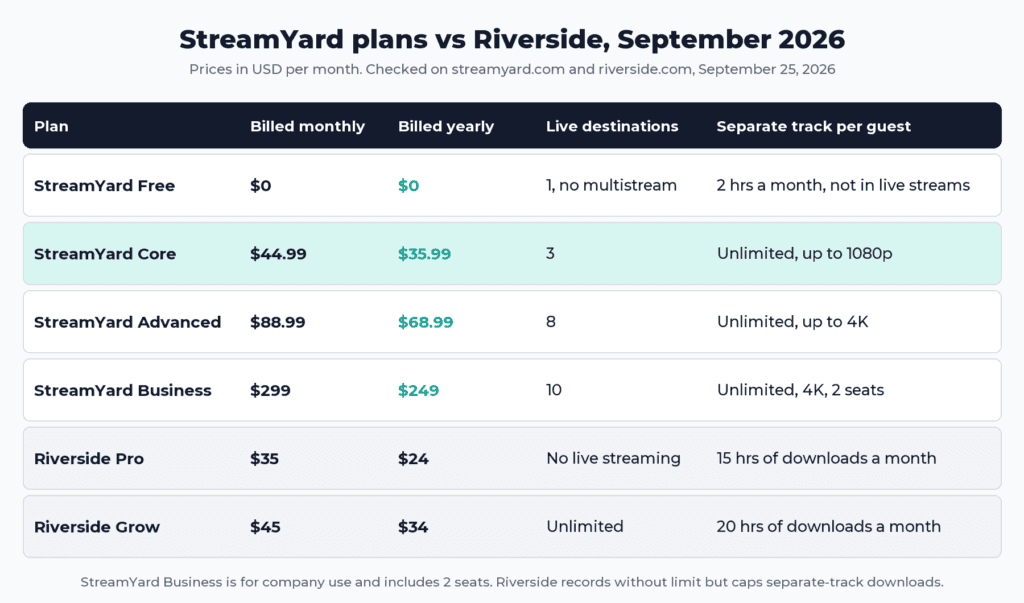
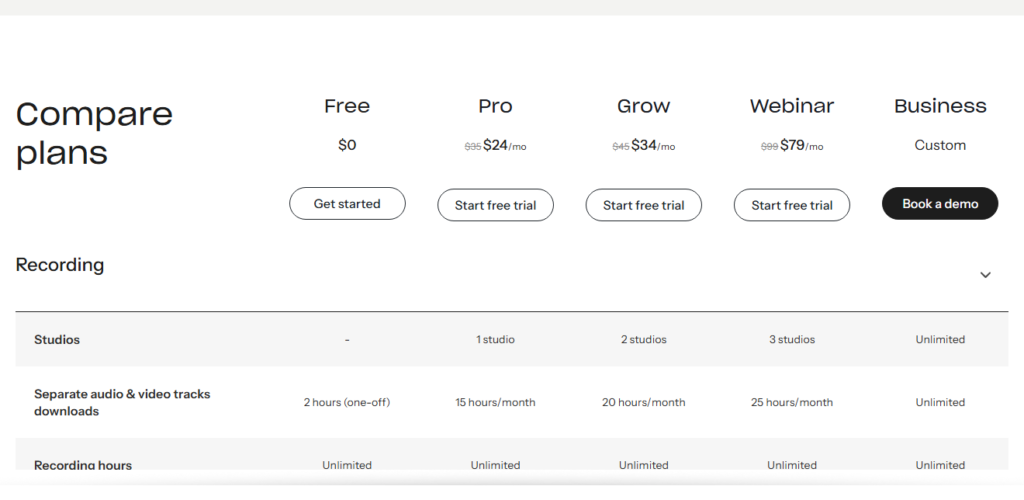
Riverside Pro is cheaper for recording, but it does not live stream, and it caps separate-track downloads at 15 hours a month even though recording itself is unlimited. Once you hit the cap, new tracks wait for the next billing cycle or an upgrade. Grow adds 1080p live streaming to unlimited destinations and raises the cap to 20 hours. StreamYard Core has no hourly cap on local tracks, so a show that records long or often gets more files per dollar.
Restream is the cheap way to be everywhere. Standard is $19 a month or $190 a year for 3 channels without branding. Professional, at $49 a month or $470 a year, adds 5 channels, 1080p streaming, and 4K recording. Restream’s local recording of each participant starts on Professional, and its help center still calls the feature a beta, which is why we rank it below StreamYard for podcasts. Our live streaming software guide goes through that trade in detail, and Riverside’s plan breakdown covers every Riverside tier.
How do you cancel StreamYard, and can you get a refund?
Cancel from My Account, then Billing or Manage Plan, then Cancel StreamYard subscription. Per StreamYard’s cancellation guide, paid features stay on until the plan expires, and then the account drops to Free. When the paid term ends, your recordings go with it, and StreamYard says it cannot restore them if you come back. So download every file you want before the last day. StreamYard also offers pausing a subscription as a way to keep access to recordings.
Refunds depend on which StreamYard page you read. The pricing page FAQ still describes a 7-day money-back guarantee that applies only to your first charge. The refund policy in the help center, last updated September 22, 2026, is more generous: requests within 20 days of a monthly charge or 60 days of a yearly charge, through a self-service refund page. Only the most recent charge qualifies. App Store purchases go through Apple.
The newer policy should govern, but the safe move is to ask inside 7 days so both pages agree. Know the side effect before you click: a refund drops the account to Free immediately, and StreamYard warns that this can cost you content. Download first, then request. If you bought a yearly plan by mistake, StreamYard will switch you to monthly and keep the unused time as account credit.
Checked against StreamYard’s pricing page (individual and business tabs), refund policy, Plan Usage Policy, Platform Terms, and help center, September 25, 2026.
Is StreamYard worth it?
For a live show, yes. Core at $35.99 a month buys a browser studio that guests join from a link, 3 destinations at once, an automatic recording of every stream, and a WAV file per guest with no hourly meter. Riverside Pro does not stream, and Restream’s per-guest local recording needs its Professional plan at $470 a year. Core gives you both on the entry plan.
For a recorded interview you never stream, it is poor value. You would pay $431.88 a year for live tools you do not use, and you still need an editor and a podcast host. Riverside Pro does the recording job for $288 a year and adds text-based editing. If you want to see how the two tools split in practice, read StreamYard vs Riverside.
Which StreamYard plan should you buy?
Live show: Core on yearly billing. It saves $108 against 12 monthly payments and covers YouTube, Facebook, and LinkedIn at once. Start a 7-day StreamYard trial. The downside: 50 hours of storage fills faster than you expect, so download and clear old episodes.
Recorded interview: Skip StreamYard and start with Riverside Pro at $24 a month billed yearly, at riverside.com. The downside: 15 hours of separate-track downloads a month and no live streaming. How to record a podcast remotely compares the recorders.
Both, a recorded show that also goes live: If the live stream is weekly and people watch it, pay for StreamYard Core and edit elsewhere. If you stream now and then, Riverside Grow at $34 a month billed yearly covers both jobs in one app, with a 20-hour track cap. Advanced only makes sense once you need 4K video, more than 3 destinations, or webinars.
FAQ
How much is StreamYard a month? Core is $44.99 billed monthly or $35.99 a month billed yearly. Advanced is $88.99 or $68.99. Business is $299 or $249 and includes 2 seats. The Free plan costs nothing.
Can you use StreamYard for free? Yes, with the StreamYard logo on your streams, 6 people on screen, and no multistreaming. Free live streams are not recorded, and local recording is limited to 2 hours a month in recording sessions.
Does StreamYard offer a refund? Yes. Its refund policy, updated September 22, 2026, accepts requests within 20 days of a monthly charge or 60 days of a yearly one, though the pricing page still says 7 days. A refund moves the account to Free right away, so download your recordings first.
Can I use StreamYard Core for my company? No. Core and Advanced are for individual use, and StreamYard’s help center says a signup with a company email domain needs the Business plan, at $249 a month billed yearly.
What happens to my recordings if I cancel StreamYard? They stay available until the paid term ends. After that the account moves to Free, and StreamYard says those recordings are no longer available and cannot be restored.