Substack Podcast Hosting: What It Does and Doesn’t Do (2026)
This post contains affiliate links, and we may earn a commission if you sign up through them, at no cost to you. Captivate, Transistor, and RSS.com are among them. We have no affiliate link for Substack. See our Affiliate Disclosure. We have not tested Substack’s podcast tools hands-on. Every Substack fact on this page was read on Substack’s own pages on November 20, 2026, and the host prices were read on each host’s own pricing page the same day.
Yes. Substack hosts a podcast for free, builds the public RSS feed you submit to Apple Podcasts, connects to Spotify with one button, and counts downloads to an industry standard. Hosting costs nothing, and Substack keeps 10% of paid subscription revenue. The gaps are real. Dynamic ad insertion is still an early-access sign-up, Apple video is for select creators, and we found no Substack page on moving a show off the platform.
Below you get the exact menu path from Substack’s help center and a dated table of what a Substack podcast gives you. There is also a middle route: keep a dedicated host and let Substack read its feed.
Key takeaways
- Substack charges no monthly fee to host a podcast and keeps 10% of subscription revenue from paid subscribers, before card processing fees.
- Substack accepts MP3, WAV, and AAC uploads and picks an MP3 encoding quality between 96 and 192 kbps for each episode, based on its length and stereo separation.
- Every Substack podcast gets a free public RSS feed, but Substack says Apple Podcasts and other apps will not accept the feed URL until you have published an episode.
- Substack’s Podcast dashboard shows average downloads at 7, 30, and 90 days after publishing, plus top countries and top players, and counts them to IAB Tech Lab guidelines, version 2.2.
- Substack’s dynamic ad insertion opened for early-access sign-ups on October 21, 2026, with no launch date, so a sponsor read has to be recorded into the episode for now.
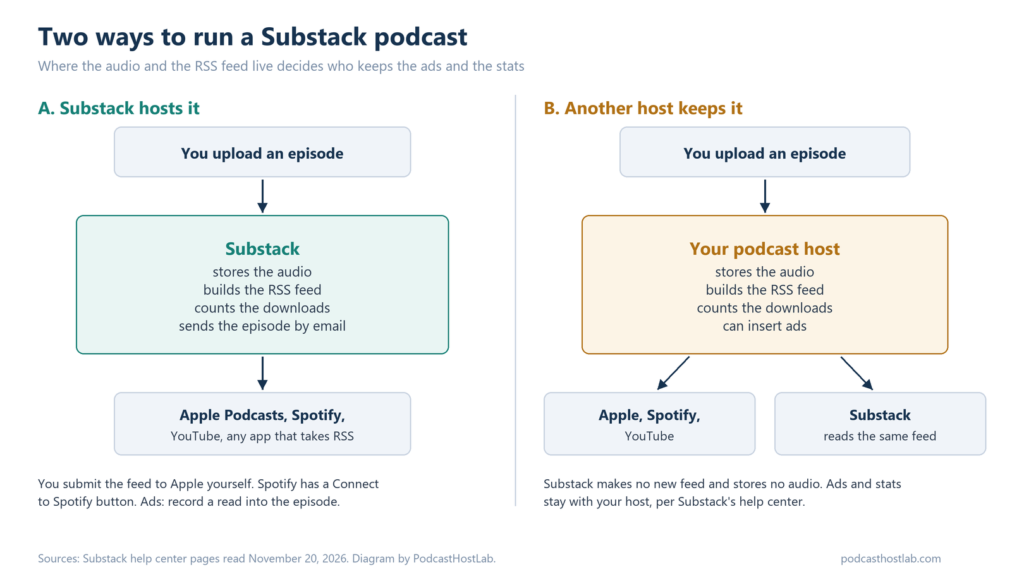
- Substack can read the RSS feed of a podcast hosted on another service, and in that setup it says the audio, ads, and analytics stay on the original host.
Can Substack host a podcast?
Yes, and it covers what a host does for a small show. You upload an MP3, WAV, or AAC file, or record in the browser. Substack stores it, writes it into a free RSS feed, and counts the downloads. Each episode can go out by email and to the Substack app, or publish as a web post only.
So it is a real host. It suits a writer whose audience already reads the newsletter. No second login, no second bill. Where it thins out is everything around the host: ads, stats depth, video delivery, and the way out. The sections below take those one at a time.
What is the exact menu path for adding a podcast on Substack?
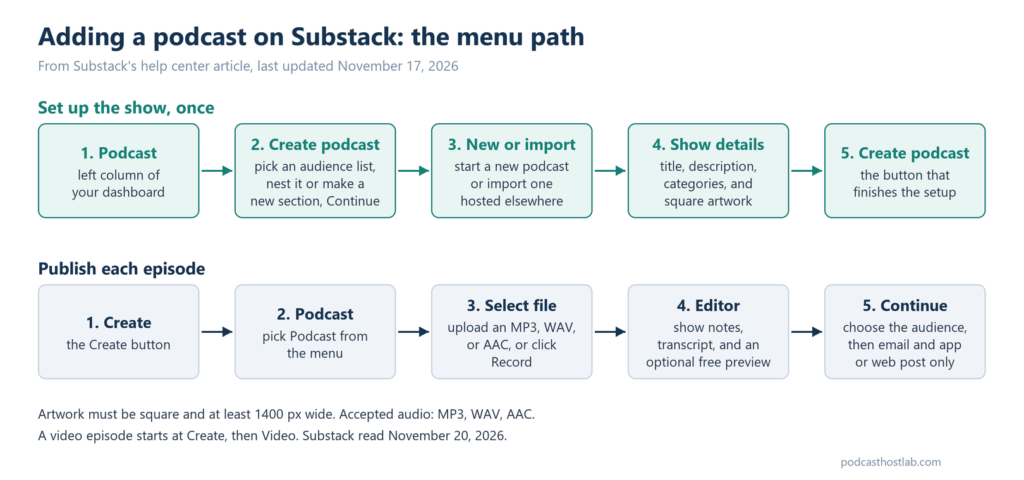
Substack’s help article, How do I create and publish a podcast on Substack?, was last updated November 17, 2026. Below are its steps, with Substack’s own button names. Steps one to four happen once per show. Steps five to eight repeat for every episode.
- Click Podcast in the left column of your dashboard.
- Select Create podcast, choose an audience list, and decide whether to nest the show in your publication or create a new section. Select Continue.
- Choose to start a new podcast or import one hosted elsewhere.
- Enter a title, description, categories, and square artwork at least 1400 pixels wide, then click Create podcast.
- Click Create and select Podcast.
- Upload an MP3, WAV, or AAC file with Select file, or capture audio with Record.
- In the editor, write show notes for external players and manage the transcript, which Substack generates for you.
- Click Continue, choose the audience on the Publish page, and pick whether to send the episode by email and to the Substack app or publish it as a web post only.
Three more paths come from the same help center.
- A video episode: Click Create, select Video, and upload or record the file. To put an audio-only version in your podcast feed, turn on Add audio to podcast RSS feed.
- A second show: Open the Podcasts section of your publication’s Settings and click Add podcast.
- Apple Podcasts and Spotify: Copy your feed URL from podcast settings. For Apple, open Apple Podcasts Connect, click Add Show, then Add a show with an RSS feed. For Spotify, click Connect to Spotify in your podcast settings.
What does a Substack podcast give you, and what does it leave out?
Every cell below was read on Substack’s own pages on November 20, 2026. The last column names the Substack page and the date its help center shows for the last update. Where a page says nothing, the cell says that instead of guessing.
| What you ask about | What Substack’s pages say | Substack page and its last update |
|---|---|---|
| Hosting fee | No monthly fee. Substack keeps 10% of subscription revenue from paid subscribers, before card processing fees. | How much does Substack cost? (Nov 20) and Substack’s podcast page |
| RSS feed | A free public feed for every podcast, and private feeds for paid subscribers. Apps will not accept the feed URL until you publish an episode. | How do I distribute my podcast to apps? (Oct 29) |
| Apple Podcasts | You submit the feed yourself in Apple Podcasts Connect. Substack says it never gets your Apple login. | How do I distribute my podcast to apps? (Oct 29) |
| Spotify | A Connect to Spotify button in podcast settings. Paid episodes are locked on Spotify through Open Access, and free previews are not supported there. | How can I distribute my paid Substack podcast on Spotify? (Oct 29) |
| YouTube | New episodes upload to YouTube and YouTube Music automatically from your feed. Missed ones can be added by hand in YouTube Studio. | How do I distribute my podcast to apps? (Oct 29) |
| Analytics | Average downloads 7, 30, and 90 days after publishing, daily and cumulative downloads, per-episode totals, top countries, and top players, counted to IAB Tech Lab guidelines, version 2.2. A third-party tracking prefix can be added in Podcast Settings. Retention and listening time are not described. | Understanding your Substack Podcast dashboard (Oct 5) and Are Substack podcast analytics IAB certified? (Oct 23) |
| Audio files | MP3, WAV, or AAC. Substack picks an MP3 quality between 96 and 192 kbps from the episode’s length and stereo separation. | How do I create and publish a podcast on Substack? (Nov 17) and How is my Substack podcast encoding quality chosen? (Oct 22) |
| File size and length caps | None stated on the help pages we searched, so no number goes here. | Help center searched Nov 20 |
| Transcripts | Generated automatically for each episode. You can edit it, replace it with a .txt, .srt, or .vtt file, or hide it. | How do I create and publish a podcast on Substack? (Nov 17) |
| Video | Recommended maximum upload of 20 GB. Apple Podcasts video delivery is limited to select creators who request access from Substack Support. Spotify gets only the audio automatically, and video goes in through Spotify for Creators. | Guide to video posts on Substack (Nov 14), How do I publish video podcast episodes to Apple Podcasts? (Nov 2), and How can I sync my video episodes to Spotify? (Oct 31) |
| Sponsor ads | Record a read into the episode. Dynamic ad insertion is an early-access sign-up with no launch date. | Substack’s October 21 announcement post |
| More than one show | A podcast can sit on each newsletter section. No limit is stated. | How can I create multiple newsletters or podcasts under one publication? (Nov 19) |
| Moving a show in or out | Moving in: import from an RSS feed, and Substack becomes your host. Moving out: no help page found. | How do I move my podcast to Substack? (Nov 18) and help center searched Nov 20 |
Two things stand out. The stats are downloads, countries, and players, which is plenty for a newsletter-first show and thin for one that sells ads. And no file size or length cap appears on any help page we read. That silence is not a promise, so ask Substack before you plan a daily two-hour show.
What can’t a Substack podcast do?
Four things, each tied to a row in the table.
- Swap ads across old episodes. Dynamic ad insertion is an early-access sign-up that opened October 21, 2026, with no date for a full launch. Until then a sponsor read is recorded into the episode and stays there. Our Substack and beehiiv sponsorship comparison covers who can run an ad today.
- Show how long people listen. The dashboard page describes downloads, countries, and players, and no retention or listening-time chart. Our guide to reading podcast analytics covers the numbers you do get.
- Deliver video to Apple and Spotify on its own. Apple video needs a request to Substack Support, and Spotify gets only the audio unless you upload the video there yourself. Our list of podcast hosts that support video on Apple Podcasts shows who does it natively.
- Show you the way out. Substack’s help center has a page for moving a podcast in. We searched it on November 20 and found none for moving one out. The page for editing your feed covers only title, artwork, description, and byline. That matters because Apple and Spotify follow your feed URL, and leaving means redirecting it. How to switch podcast hosts explains the redirect.
Can you keep your podcast host and still publish on Substack?
Yes. Substack’s help center has a page for exactly this, updated the day we read it. Click Podcast in the left dashboard, click I have a podcast hosted elsewhere, and click Save. Then click Distribute to Substack, paste your RSS feed URL, check the prefilled show details, and click Continue. The last screen asks whether to auto-publish new episodes and whether to import your back catalog.
What this does matters more than the steps. Substack reads your feed, makes no new one, and stores no audio. Per its help page, synced episodes keep using your host’s audio URL, so ads your host inserts keep running and your analytics stay on the host. With auto-publish off, new episodes arrive as drafts. You need to be an owner or admin of the publication.
Substack’s feature page adds that imported back-catalog episodes do not notify subscribers, and only new episodes you publish do. We would pick this setup for any show that sells ads or wants more than the dashboard describes. The feed URL stays with a host, and Substack becomes one more place to listen.
When is a dedicated host worth paying for?
If the newsletter is the product and the show is an extra, stay on Substack and pay nothing. Add a host when one of three things is true. Prices below are as of November 2026, each read on that host’s own pricing page on November 20. Substack’s page asks only for an active podcast with an RSS feed on an outside host, so any of these can feed it.
You want sponsor ads that swap across old episodes now. Captivate Personal is $17 a month billed yearly, covers up to 30,000 downloads a month and unlimited shows, and starts with a 30-day free trial. Captivate’s pricing page lists dynamic content insertion with AMIE on every plan. Start a Captivate trial. The downside: $17 a month billed yearly is $204 a year, against $0 to host on Substack, so pay it only if ads or stats will earn it back.
You want the show to live apart from the newsletter. Transistor Starter is $19 a month for unlimited shows and 40,000 downloads a month, with unlimited team members and a 14-day free trial. Its private podcasts hold up to 200 subscribers on that plan. Try Transistor. The downside: there is no free plan, and dynamic ads start on the $49 Professional plan, not Starter.
You want a free host that is not Substack. RSS.com Free is $0 for one show with unlimited episodes and downloads, and RSS.com says there is no trial and no expiration. See RSS.com’s free plan. The downside: it covers one show, and RSS.com asks for a card before your second episode, though it says it will not charge it. Spotify for Creators is the other free host, and Spotify for Creators vs Buzzsprout covers it.
Transistor vs Captivate settles the choice between the two paid hosts, and our free podcast hosting comparison lines up every free plan.
How do you move a podcast to Substack?
Click Podcast on your dashboard, then Create podcast, choose Import an existing podcast, paste your current RSS feed URL, click Submit, and click Import all episodes. Imported episodes show up in your Posts column. If you already have a Podcast section, edit it under Sections in Settings and click Import podcast.
Importing makes Substack your host. Substack’s page says to tell your previous host to use your new feed link and redirect, so existing listeners follow you. It also says new episodes you publish on the old host will not appear on Substack by themselves. If you would rather keep your host, use the route in the section above instead.
Is Substack good enough for your podcast?
For a writer with a newsletter, yes. It is free, it gives you a real RSS feed, it counts downloads to an industry standard, and it can sell paid episodes into Spotify through Open Access. Our breakdown of Spotify Memberships and the alternatives shows what each platform leaves you from a paying listener.
Host elsewhere the moment ads, deeper stats, or video on Apple and Spotify matter, and let Substack read the feed so subscribers still find the episodes there. The one risk we would weigh before starting a long-running show on Substack alone is the exit. Substack documents the way in and, in the pages we read, says nothing about the way out. Ask how a feed move works before episode 50, not after.
FAQ
Is Substack podcast hosting free?
Yes. Substack charges no monthly hosting fee. If you turn on paid subscriptions, it keeps 10% of that revenue, before card processing fees.
Does Substack give you an RSS feed for Apple Podcasts and Spotify?
Yes. Every Substack podcast gets a free public RSS feed. You submit it to Apple Podcasts Connect yourself, and Spotify has a Connect to Spotify button in podcast settings. Apps will not accept the feed until you have published an episode.
Is there a file size limit on Substack podcast uploads?
None is stated on the Substack help pages we read. Accepted audio formats are MP3, WAV, and AAC. For video, Substack gives a recommended maximum of 20 GB. Ask Substack Support before planning very long audio episodes.
Can a Substack podcast have video?
Yes. Click Create, select Video, and upload or record the file. Substack can add an audio-only version to your podcast feed. Apple Podcasts video delivery is limited to select creators who ask Substack Support, and Spotify gets only the audio automatically.
Checked against Substack’s help center pages named in the table, Substack’s podcast page, its distribution page for podcasts hosted elsewhere, and its October 21, 2026 announcement post, plus the Captivate, Transistor, and RSS.com pricing pages, on November 20, 2026. The page dates are the last-updated dates Substack’s help center shows.