Best Tool to Turn Your Podcast Into Clips (2026)
Last updated: September 2026
This post contains affiliate links, and we may earn a commission if you sign up through them, at no cost to you. See our Affiliate Disclosure. Pricing as of September 2026.
The best tool for turning a long episode into short vertical clips is Opus Clip for most people, and quso.ai (the tool that used to be Vidyo.ai) if you want a real free tier. If your show is audio only, skip both and look at Podsqueeze, which makes audiograms from plain audio. One hard caveat up front: the first two need actual video to work. A static cover image over audio gives a clipper almost nothing worth posting.
Key takeaways
- Opus Clip is the best overall podcast clip tool for shows recorded on video, with a Starter plan at $15 a month for 150 credits.
- Opus Clip charges 1 credit per minute of source video, so one 60-minute episode uses 60 of Starter’s 150 monthly credits.
- quso.ai, formerly Vidyo.ai, has the most usable free plan of the podcast clip tools, with 75 credits a month at 720p and watermarked clips.
- Podsqueeze is the best clip tool for audio-only podcasts because it turns chapters into audiograms, starting at $8.99 a month for 8 clips or audiograms.
- Opus Clip and quso.ai need real video to reframe, so a static cover image over audio gives them nothing to work with.
- AI clip tools pick clips hit or miss, so plan on about two minutes per clip to fix the in and out points and the captions.
What does a podcast clip tool do?
You hand it a long recording, usually a 30- to 90-minute video episode, and it hunts for the moments that might travel on their own: a hot take, a clean story, a laugh, a quotable line. Then it crops that moment to a 9:16 vertical frame, tracks the speaker so their face stays centered, burns in animated captions, and spits out a short clip sized for Reels, Shorts, and TikTok.
The good ones add a virality guess, auto-generated titles, and B-roll. The pitch is that one hour-long upload becomes ten or fifteen ready-to-post shorts while you do something else. That part is real, and it is useful. What the marketing skips is how much of that output you throw away, which is the next section.
Do AI clip tools pick good clips?
Honestly, it is hit or miss, and you should plan around that. The auto-selection is a strong first pass, not a finished edit. On a good episode I keep maybe three or four clips out of a dozen the tool hands me, and every one I post I re-crop and re-caption before it goes out.
The usual failures are the same across all of these. The tool clips into the middle of a thought, or ends on a trailing word, or centers the wrong speaker on a two-person shot, or writes a caption that misspells a guest’s name in 40-point type. The virality scores are a loose signal at best, not a ranking you should trust.
So treat the AI as the assistant that finds candidate moments and does the boring 9:16 crop, then spend two minutes per clip trimming the in and out points and fixing the caption line. That two-minute edit is the difference between a clip that looks native and one that screams batch-generated. None of these tools removes that step, whatever the homepage says.
Do these work for an audio-only podcast?
A true clip tool does not, and this is the thing nobody tells you before you pay. Opus Clip and quso.ai crop and reframe video. If your episode is one static square of cover art sitting over an audio track, there is nothing to reframe, and you are paying clip-tool money for a slideshow.
What an audio show can make is an audiogram: your cover art or logo, a caption track, and the audio, cut to a short social video. Podsqueeze is the one tool in this roundup whose own pages say it takes audio-only files. Its clip maker breaks the episode into chapters, you pick the chapter, and it exports either an audiogram or a short video clip with subtitles generated automatically. You can change the aspect ratio, colors, and fonts, and upload your own logo and cover image. It will not turn an audiogram into a talking-head clip, because there is no face to track. If you want that, you need a camera on the recording, even a simple two-person Riverside session or a webcam capture.
Can you clip a video you did not record in the app?
Depends on the tool and the plan, and it matters more than people expect. Opus Clip advertises input from over 10 sources, including YouTube, Google Drive, and Zoom recordings, per Opus’s own comparison. Read the pricing table closely, though. That 10-plus-source import is listed as a Pro feature. Starter takes local video files up to 10GB and auto-imports from a verified YouTube account, which covers most back catalogs but not a guest’s Drive export.
quso.ai’s homepage lists imports from YouTube, Vimeo, Zoom, Google Drive, Dropbox, and more, and says every source works on the free plan. Recorder-first tools work the other way. Riverside, for one, only clips what you recorded inside Riverside or a local file you upload, so there is no pasting a random YouTube URL to chop it up. Before you commit to a clipper, check exactly where it will accept video from, because a tool that only clips its own recordings is dead weight for the fifty episodes you already published somewhere else.
Which podcast clip tool is best overall?
Opus Clip is the best all-around pick because it has the most reliable clip detection of the group and it strips the watermark on its cheapest paid plan. Starter is $15 a month, billed monthly only, with 150 credits a month. It removes the watermark and includes AI clipping with the virality score, reprompt controls to re-run the clipping, animated captions, and auto-posting to YouTube Shorts, TikTok, and Instagram Reels. Pro is $29 a month, or $14.50 a month billed annually at $174 a year with 3,600 credits a year, and adds the 10-plus-source import, the social scheduler, multiple aspect ratios, and a two-seat team workspace.
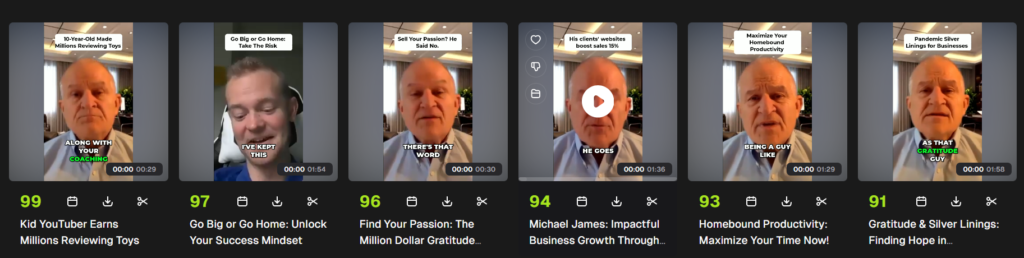
The catch is how it meters you. Opus’s help center says processing costs 1 credit per minute of the original video you import, so a 60-minute upload burns 60 of Starter’s 150 credits whether it makes 5 clips or 20. That is two full hour-long episodes a month, and a weekly show will run out. The fix Opus offers is a processing-timeframe slider, so you can send only the segment you want clipped. The free plan gives you 60 credits a month, but clips carry a watermark, there is no editing, and exports expire after three days, so it is a demo, not a workflow.
What is the best budget podcast clip tool?
quso.ai, formerly Vidyo.ai, is the budget pick because it has the most usable free plan of the group and a cheap annual rate. The free plan gives you 75 credits a month at 720p, and quso’s pricing FAQ says one credit is roughly one minute of processed video, which is enough to test it properly before spending a cent. Free-plan publishing is TikTok only, your data is kept for seven days, and free clips carry a quso watermark. The Lite plan is $29 a month, or $19 a month billed yearly, and unlocks unlimited 1080p clips, 100 credits a month (200 on annual billing), exports in 16:9, 9:16, and 1:1, and publishing and scheduling to six platforms.
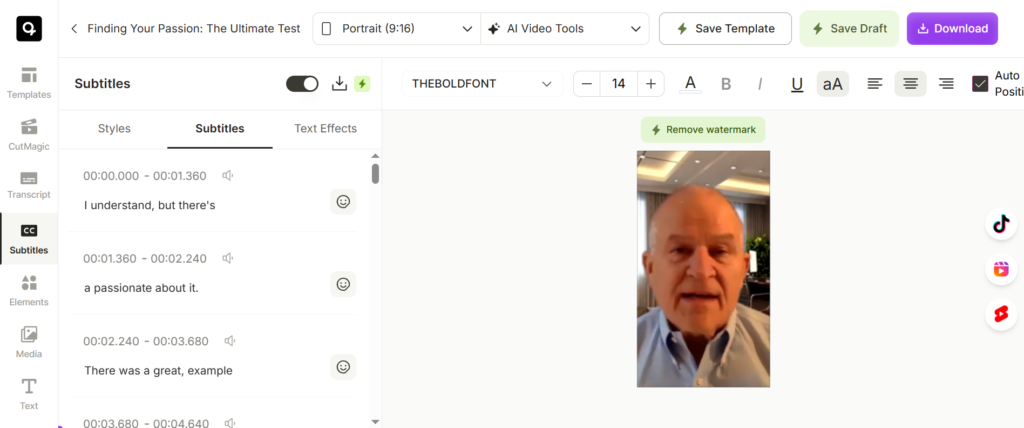
The name change is the first thing to know, because a lot of older guides still call it Vidyo.ai and the pricing screenshots floating around are stale. quso’s pricing page now tells Vidyo.ai customers their plan and pricing are unchanged. The tool itself is fine. Clip selection is a notch behind Opus in my testing, the free tier holds you at 720p, and 100 credits on monthly Lite is under two hour-long episodes, so a weekly interview show should either pay annually or step up to Essential ($39 a month, or $26 billed yearly, with 300 credits).
Is Podsqueeze a good podcast clip tool?
Podsqueeze is a good pick if clips are one part of the job rather than the whole job. It is built as a podcast production suite first: transcripts, show notes, audio enhancement, and a podcast website, with clips and audiograms included in every plan. Starter is $8.99 a month for 120 minutes of podcast time and 8 video clips or audiograms. Pro is $49 a month for 320 minutes and 20 clips or audiograms, and paying yearly takes 30 percent off. Unused minutes roll over, up to three times your monthly allowance.
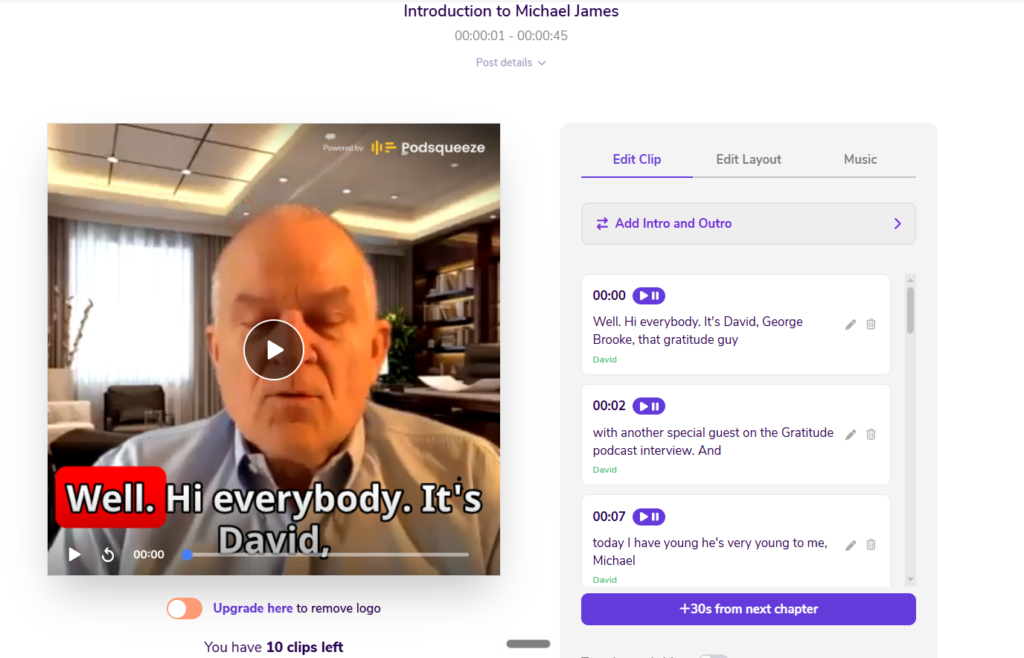
The downside is control. Podsqueeze has you pick from the chapters it detects, and it also offers one-click shorts that trim each chapter to under 60 seconds. Its clip pages say nothing about speaker tracking or face reframing, so do not buy it expecting Opus-style talking-head crops from a two-camera video. And 8 clips a month on Starter is two per weekly episode. For an audio show that wants audiograms plus show notes from one upload, that trade is fine. You can generate a clip free, without a credit card, before paying.
What happened to Munch?
Munch used to be the usual third name in this roundup, and you will still see it recommended as a clip tool in older guides. It has changed. getmunch.com now redirects to Munch Studio, and the homepage headline pitches it as “the AI that does your social media marketing for you”: it learns your business from your website and content, then writes, schedules, and tracks social posts. Clipping is no longer the product.
Video repurposing does survive as a line item on the Munch Studio pricing page. Essential is $38 a month ($456 a year) with 500 minutes of repurposing, and Premium is $60 a month ($720 a year) with 1,000 minutes, both with a 7-day free trial and no free plan. If you want an AI to run your whole social calendar, that is what you are buying. If you just want clips from your episodes, both Opus Clip and quso.ai cost less and are built for that job, so Munch is out of the recommendations here.
How do the top podcast clip tools compare?
Here are the three ranked on the entry price and what that first real plan gives you. Every figure was checked against each vendor’s own pricing page in September 2026.
| Tool | Free plan | Entry paid plan | Price/mo | What the entry plan gives you | Best for |
|---|---|---|---|---|---|
| Podsqueeze | Free clips to test (logo on), no card | Starter | $8.99 (30% off yearly) | 120 min of podcast time, 8 clips or audiograms, show notes and transcripts | Audio-only shows, clips plus show notes |
| Opus Clip | Yes, 60 credits/mo, watermarked, 3-day exports | Starter | $15 (monthly only) | 150 credits/mo (1 credit per source minute), no watermark, virality score, auto-post | Best overall |
| quso.ai (ex-Vidyo.ai) | Yes, 75 credits/mo, 720p, watermarked | Lite | $29 ($19 billed yearly) | Unlimited 1080p clips, 100 credits/mo (200 yearly), publish to 6 platforms | Best free tier, cheapest yearly |
Two things to read off that table. Podsqueeze is the cheapest monthly entry, but it is selling a production suite with a small clip allowance, not a clipping engine. And quso.ai looks pricier than Opus at the monthly paid tier, but it has the free plan you can actually run on, and its yearly rate is only a few dollars more than Opus Starter, so for a tight budget it wins on the free line and the yearly line.
If you want to compare the full stack around clipping, Recast Studio is a fourth option worth a look for template-driven branded clips, at $14 a month for Starter and $26 for Professional, with annual billing cutting both.
Which podcast clip tool should you buy?
Get Opus Clip if you record video and want the most reliable auto-clipping and a watermark-free plan for the price of a couple of coffees. Start with Opus Clip. Plan around the credit cap, because 150 credits is 150 minutes of source video, and a long weekly show will eat that fast.
Get quso.ai if you want to try AI clipping for free before paying, or you will pay yearly and want the most credits for the money. Try quso.ai. Its clip picks are a step behind Opus, and the Vidyo.ai rebrand means half the guides you will find are out of date.
Get Podsqueeze if your show is audio only, or you want audiograms, show notes, and transcripts out of one upload. Try Podsqueeze. Just know you are picking clips from chapters, not getting a reframed talking-head edit.
Whichever you land on, remember what makes clips work: real video going in if you want real clips, and a two-minute human edit on every clip going out. The tool finds the moment and does the crop. You still make the call on what is good enough to post. For where clipping fits in a full podcast workflow, see how to choose a podcast host, and if you need a camera on your recordings first, how to record a podcast remotely is the place to start. Short-form clips are how episodes get discovered on YouTube Shorts, TikTok, and Reels, so the effort pays back if the source is video.
FAQ
What is the best tool to turn a podcast into clips in 2026? Opus Clip is the best overall for most creators who record video, with the most reliable clip detection and a watermark-free Starter plan at $15 a month. quso.ai, formerly Vidyo.ai, is the budget pick thanks to a usable free plan and a $19-a-month yearly rate. Podsqueeze is the pick for audio-only shows.
Can I turn an audio-only podcast into clips? Not talking-head clips. Opus Clip and quso.ai crop and reframe video, so a static-image audio show gives them nothing to work with. What you can make is an audiogram, and Podsqueeze takes audio-only files and exports audiograms with automatic subtitles from $8.99 a month.
Are AI-selected clips good enough to post as-is? No. The auto-selection is a solid first pass, but it clips into the middle of thoughts, mis-centers speakers, and writes captions that misspell names. Budget about two minutes per clip to trim the in and out points and fix the caption before posting.
Is there a free podcast clip tool? quso.ai has the best free plan, with 75 credits a month at 720p, which is enough to test it properly. Opus Clip’s free plan gives 60 credits a month but watermarks clips and stops exports after three days. Podsqueeze lets you generate clips free with no credit card, though free clips carry its logo.
Is Munch still a podcast clip tool? Not primarily. Munch is now Munch Studio, sold as an AI that runs your social media marketing. Its paid plans still include video repurposing minutes, starting at $38 a month, but for clipping alone Opus Clip or quso.ai is the better buy.