
Libsyn 5 Explained: Login, Dashboard, and Libsyn 4
Last updated: October 2026
This post contains affiliate links, and we may earn a commission if you sign up through them, at no cost to you. See our Affiliate Disclosure. Checked against Libsyn’s help center in September 2026.
Libsyn 5 is Libsyn’s current dashboard, and “Libsyn Five” is the same thing spelled out. You reach it from the Log In button on libsyn.com with the email and password you already have. Libsyn 4 is the older interface. You will rarely need it, but it still turns up in two corners of the help docs.
Below is where everything lives once you are inside: publishing, stats, the storage meter, distribution, your website, and the ad programs. We set up a test show on a 162 MB plan to capture the screens. If you are here to compare what Libsyn costs rather than learn the dashboard, see Libsyn pricing, all nine plans.
Key takeaways
- Libsyn 5 is Libsyn’s current publishing dashboard, first released as a beta on March 30, 2021.
- The Log In button on libsyn.com opens Libsyn 5, and an existing Libsyn account signs in with the same email and password it always used.
- Libsyn 4 still appears in Libsyn’s 2026 help docs for two jobs: editing an old Libsyn 4 podcast page and picking ad slots through Libsyn Pro.
- In Libsyn 5, the setup screens for Destinations, Website, Advertising, and PodRoll all sit on the Settings page behind the gear icon.
- The Libsyn 5 Monthly Storage meter counts megabytes uploaded this month and resets at midnight GMT on the first of every month.
- The “Apple Podcasts / Libsyn Classic Feed” in Libsyn 5 is your main RSS feed, not a link back to the old interface.
What is Libsyn 5, and how is it different from Libsyn 4?
Libsyn 5 is where Libsyn’s login sends you now. Libsyn put out the first beta on March 30, 2021, and on January 20, 2022 its blog announced that the login button “now takes you directly to the new Libsyn publishing experience.” That same post promised no new username or password and no additional fees.
Libsyn 4 is what came before. If a guide shows you a Libsyn screen that does not match yours, it was almost certainly written against Libsyn 4, and the menu names will not line up. Libsyn’s own help center is titled Libsyn 5, and its current articles describe the newer layout.
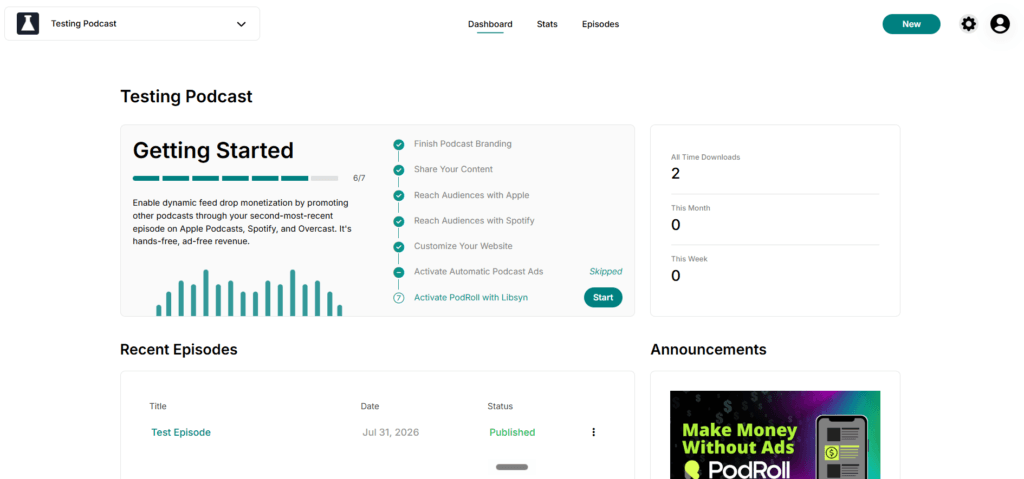
What you get in Libsyn 5: a dashboard per show with a download snapshot, a quick-links panel for your feed and player, a monthly storage meter on the front page, and a guided Getting Started checklist that walks a new show through Apple, Spotify, the website, and both ad programs.
How do you log in to Libsyn 5?
Go to libsyn.com and click Log In at the top of the page. That button opens the Libsyn 5 sign-in. Enter the email and password on your account, and the dashboard loads at five.libsyn.com with “Libsyn Five” in the browser tab. There is no separate Libsyn 5 account to create.
Forgot the password? Click Forgot Password on the sign-in page and enter the email you normally use. Libsyn only sends the reset link if it recognizes that address, so a typo or an old work email will look like nothing happened. A new password needs at least eight characters with one uppercase letter, one lowercase letter, and one number.
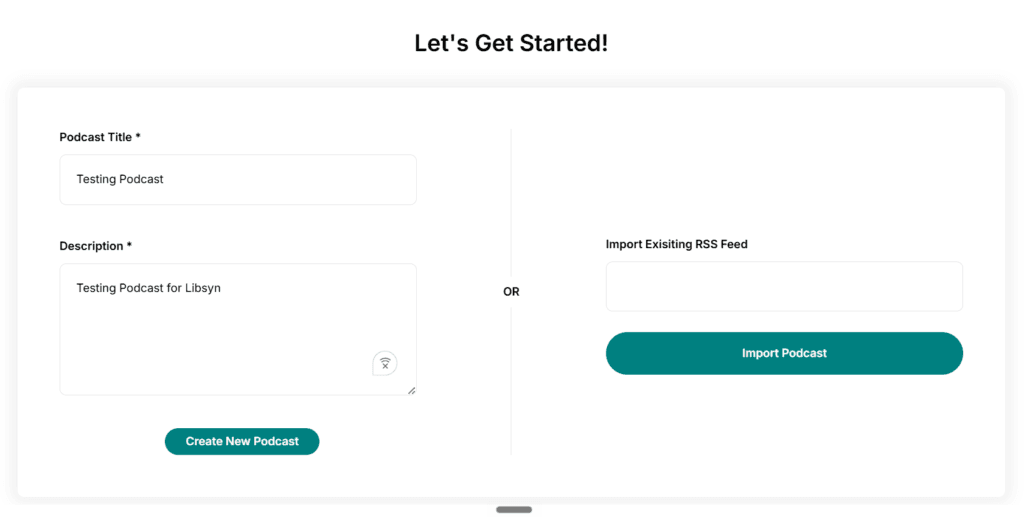
Brand new to Libsyn? Signing up happens at signup.libsyn.com, not on the login page. After you verify your email and click Login to Libsyn, you land on a screen that asks you to create a new show or import an existing RSS feed from another host.
Can you still use Libsyn 4?
For everyday publishing, you do not need it. The current help docs send you to Libsyn 4 in only two situations.
First, the old podcast page. If you built a Podcast Page in the Libsyn 4 interface, an Edit Legacy Website button appears on the Website settings page in Libsyn 5, and you edit it from there. Second, ad slots for Libsyn Pro shows. When a show joined the advertising program through Libsyn Pro, the episode form shows a “Save and Continue to Libsyn4 Slot Picker” link, and slot picking happens in Libsyn 4.
When Libsyn 5 became the default in 2022, Libsyn said the older interface was “not gone” and that switching between the two was available. We could not find a current Libsyn page that says whether that switch still exists for a regular show, or one that announces Libsyn 4 being shut off. When we signed in to a Libsyn 5 test account in September 2026, the dashboard offered no option to switch back to Libsyn 4.
Where is everything on the Libsyn 5 dashboard?
There are four zones, and once you know them the rest of the interface stops feeling hidden.
Top left is the show selector. Click the arrow to switch shows or add another one. Every show is billed as its own plan, which our breakdown of every Libsyn plan covers in full.
Along the top middle is the menu. Libsyn’s dashboard doc lists Dashboard, Stats, Episodes, Social, and Advertising. On our test show, which sat on a 162 MB plan with no ad program switched on, only the first three appeared.
Top right are the New button, the gear icon, and your profile icon. New starts an episode or a recording in Connect. The gear opens the Settings page, where most of the setup lives. The profile icon holds Account Settings, Billing, Support, and Logout.
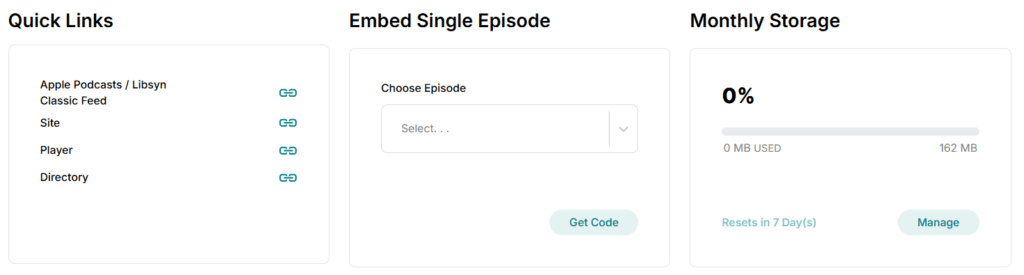
The body of the page shows your download snapshot, your 10 most recent episodes, an Announcements panel that is Libsyn promoting its own products, and a row of three panels: Quick Links, Embed Single Episode, and Monthly Storage.
How do you publish an episode in Libsyn 5?
Click New at the top right, then Episode. The Add Episode form opens. From there:
- Add your media file at the top of the page.
- Upload square episode artwork, or skip it to use the show artwork.
- Fill in the title, description, and other episode details.
- Under Availability, pick Immediately on Publish or Schedule Episode. Your first episode has to go out immediately.
- Click Save and Continue to reach the Assets tab for widescreen artwork and your own transcript, then an Advertising tab if Automatic Ads are on.
- Click Publish, or Save as Draft to finish later.
One trap here: the upload in step 1 is what counts against your monthly storage. Libsyn also accepts uploads over FTP, and its Publish an Episode guide covers both routes.
Where are your stats, and why are some locked?
Click Stats in the top menu. Every plan with stats gets the basic package: all-time downloads, this week and this month, the last 7 and 30 days, a Last 5 Episodes chart, and an Episode Totals table that shows each episode at 7, 30, and 90 days and all-time. You can also set a custom date range and view it daily, weekly, or monthly.
Scroll past Downloads by Episode and the advanced sections begin: downloads per country, per app or user agent, per destination, per stats code, and YouTube views, plus stats export. Those need the Advanced plan or higher. On a 162 MB plan, the country map loads blurred behind an Upgrade Your Plan button, which is how we found the line.
The $8 Bare Essentials plan is different again. Libsyn lists its statistics as the dashboard snapshot and nothing more. If downloads matter to you, and for anyone selling ads they do, learn what the numbers mean before you pick a tier.
What does the Monthly Storage meter measure?
It measures what you uploaded this calendar month, in megabytes. It does not measure downloads, and it does not measure your back catalog. That number, not your audience size, decides which plan you need.
Every file you upload this month is marked Active and counts toward the quota. At midnight GMT on the first of the month, Libsyn flips those files to Archived, they stop counting, and the meter resets. Archived episodes stay live for listeners. Libsyn is explicit that there is no cap on how much you store overall.
The meter shows the percentage used, megabytes used against your plan’s allowance, and the days until reset. Its Manage button opens the File Manager. If you run short mid-month, you can delete an Active file or pay a one-time fee to archive a file early, which our Libsyn review weighs against upgrading.
Where do you submit to Apple Podcasts and Spotify in Libsyn 5?
Click the gear icon, then Destinations. Three destinations are connected by default: Apple Podcasts / Libsyn Classic Feed, Spotify, and Website. Connected does not mean listed, though. If your show is not on Apple Podcasts or Spotify yet, you still have to submit it, and Libsyn wants your show settings complete and at least one episode published before you connect anything.
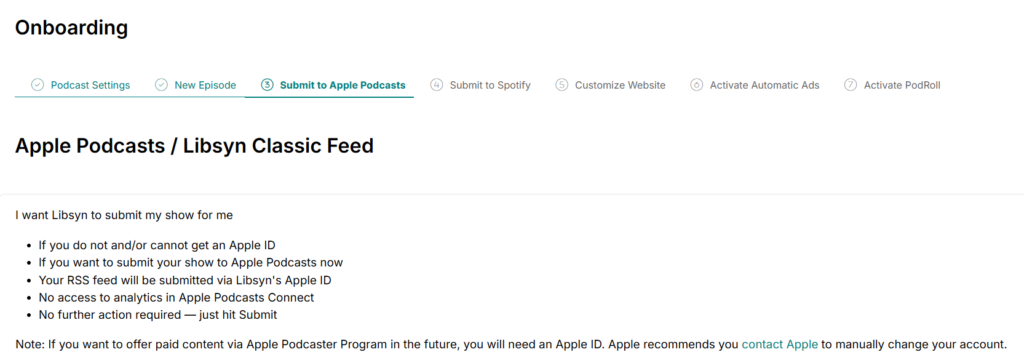
For Apple, click Manage on the Apple Podcasts / Libsyn Classic Feed row. You get two choices. Submit Show sends your feed in under Libsyn’s own Apple ID, which is quick but leaves you without Apple Podcasts Connect analytics or Apple subscriptions. Link to Existing Show uses your own Apple ID and keeps both. If you want Apple’s analytics or might sell Apple subscriptions, take the second option.
The same Destinations page adds WordPress, Blogger, iHeartRadio, Deezer, Amazon Music and Audible, Gaana, Player FM, JioSaavn, and Boomplay. Our guide to submitting to Apple, Spotify, and YouTube covers the directory side.
Where is your RSS feed in Libsyn 5?
On the dashboard, in Quick Links. Click the copy icon next to Apple Podcasts / Libsyn Classic Feed and the feed URL lands on your clipboard.
The name trips people up. “Classic” here has nothing to do with Libsyn 4. Libsyn calls this your main RSS feed, and Apple Podcasts and any other directory reading the standard feed pull from it. If you are moving hosts or submitting somewhere new, this is the URL you want. Our walkthrough on finding a podcast RSS feed URL covers other hosts too.
Where do you set up your Libsyn podcast website?
Gear icon, then Website. Every show gets a site with About, Blog, and Contact pages you can switch on, a producer message, theme and font colors, a Google Font, and slots for a Google Analytics ID and a Google verification ID.
You choose the address once. The default is sites.libsyn.com followed by your show’s ID number. You can pick a personalized yourname.libsyn.com address instead, or connect a domain you already own, which Libsyn charges $2 a month per domain. If you had a Podcast Page in Libsyn 4, the Edit Legacy Website button on this same page is how you reach it.
Where are ads and PodRoll in Libsyn 5?
Setup and earnings live in two different places, which is the other thing that confuses people.
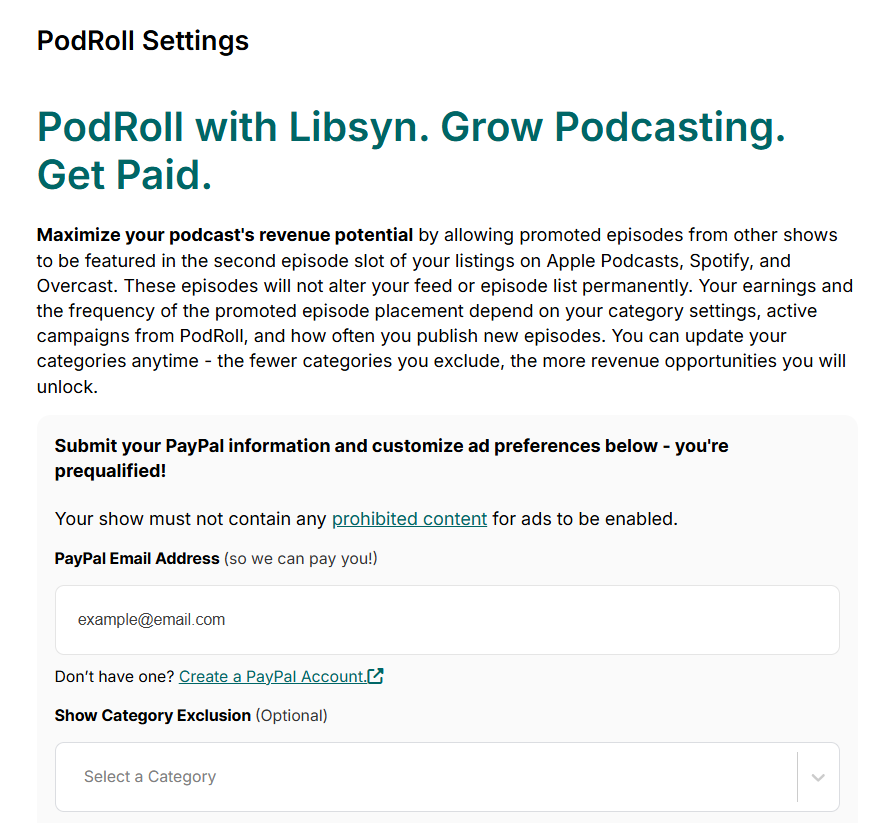
To enroll, click the gear icon and choose Advertising for Automatic Podcast Ads or PodRoll for PodRoll. Both ask for a PayPal email and let you exclude categories. Automatic Ads replies by email within 5 business days, and an approved show starts with two pre-roll and four post-roll slots. PodRoll activation can take up to 24 hours, and suggestions only appear after you publish a new episode.
To see what you earned, click Advertising in the top menu. Revenue for a month does not show until 30 days after that month ends. The revenue shares and payout thresholds for each program are in our full review of Libsyn.
Is the Libsyn 5 dashboard any good?
It works. Everything a show needs is in there, and the Getting Started checklist is a decent way to make sure you did not skip Apple or Spotify.
Three things still annoy me. The settings that matter most (distribution, the website, and both ad programs) sit behind an unlabeled gear icon. The main feed carries the word Classic, which sounds like the old interface and is not. And Libsyn 4 still sits behind two features, so you cannot fully forget it exists.
If you already host on Libsyn, learn the four zones above and you are set. If you are still choosing a host, the dashboard is not the reason to pick Libsyn either way. The ad marketplace and the storage metering are, and our review covers both. Shows that have outgrown it should look at the hosts Libsyn users switch to. If you decide to leave, here is how to move off Libsyn without losing subscribers. If the numbers work for you, start a 30-day Libsyn trial. Every plan gets one, and no promo code is needed.
Frequently asked questions
Is Libsyn Five the same as Libsyn 5?
Yes. Libsyn 5 is the dashboard’s name in Libsyn’s help center, and “Libsyn Five” is the name in the browser tab at five.libsyn.com. They are one product.
Where is the Libsyn sign in page?
Click Log In at the top of libsyn.com. It opens the Libsyn 5 sign-in. Use Forgot Password there if you are locked out.
Do I need a new account for Libsyn 5?
No. When Libsyn made Libsyn 5 the default in January 2022, it said existing users keep the same username and password and pay no extra fees.
Is Libsyn 4 still available?
Libsyn’s current docs still send users to Libsyn 4 for two things: editing a legacy podcast page and picking ad slots through Libsyn Pro. We found no Libsyn page announcing a shutdown date, and a Libsyn 5 test account we checked in September 2026 had no option to switch back.






