Best Podcast Editing Software (2026)
This post contains affiliate links, and we may earn a commission if you sign up through them, at no cost to you. See our Affiliate Disclosure. Pricing as of November 20, 2026.
Use Descript if you want to cut audio by deleting words in a transcript. Use Alitu if you would rather one $38 tool did the editing, the hosting, and the website. Use Riverside if the problem is the recording, not the edit. And if you are two episodes in, use Audacity and spend nothing.
Key takeaways
- Descript’s Hobbyist plan is $16 a month billed annually, or $24 month to month, and includes 10 media hours.
- Descript’s free plan watermarks exports and caps you at one media hour a month, so it is a trial rather than a workflow.
- Alitu costs $38 a month and bundles hosting for up to 1,000 downloads a month, which is the reason to buy it and the reason it can be redundant.
- Riverside Pro is $24 a month billed annually. Recording is unlimited, and it includes 15 hours of separate-track downloads a month.
- Audacity is free, open source, and enough for a solo show, and nobody pays us a commission when you download it.
Which podcast editing software should you actually use?
Start with what is wrong with your episodes, because these tools solve different problems and the marketing makes them sound identical.
If editing takes you too long, buy Descript. It transcribes the episode and lets you cut the audio by deleting words on the page, which is a different job from dragging waveforms. If you hate the whole production chain and want one subscription to end it, buy Alitu. If your guests sound like a phone call, no editor will save you and the fix is Riverside, which records everyone locally instead of capturing the call.
And if none of that is your problem yet, do not buy anything. A solo show that needs trims and a music bed is an Audacity job, and Audacity costs nothing.
How much does podcast editing software cost?
Between nothing and $38 a month for the tools most podcasters end up in. Prices below came off each vendor’s own page on November 20, 2026, and the annual column is what you pay per month when you commit for a year.
| Tool | Billed annually | Month to month | What the entry plan gives you |
|---|---|---|---|
| Audacity | Free | Free | Full editor, no caps, no account |
| Descript Hobbyist | $16 per person | $24 | 10 media hours a month, 1080p exports, no watermark |
| Riverside Pro | $24 | $35 | 15 hours a month of separate-track downloads, 4K |
| Alitu | About $31.67, two months free on annual | $38 | Recording, editing, hosting to 1,000 downloads, website |
Two notes the table flattens. Descript charges per person, so a co-host who also edits is a second seat. Alitu looks expensive next to the others until you notice it replaces a hosting bill, at which point the comparison is $38 against an editor plus a host.
Is Descript worth it for editing a podcast?
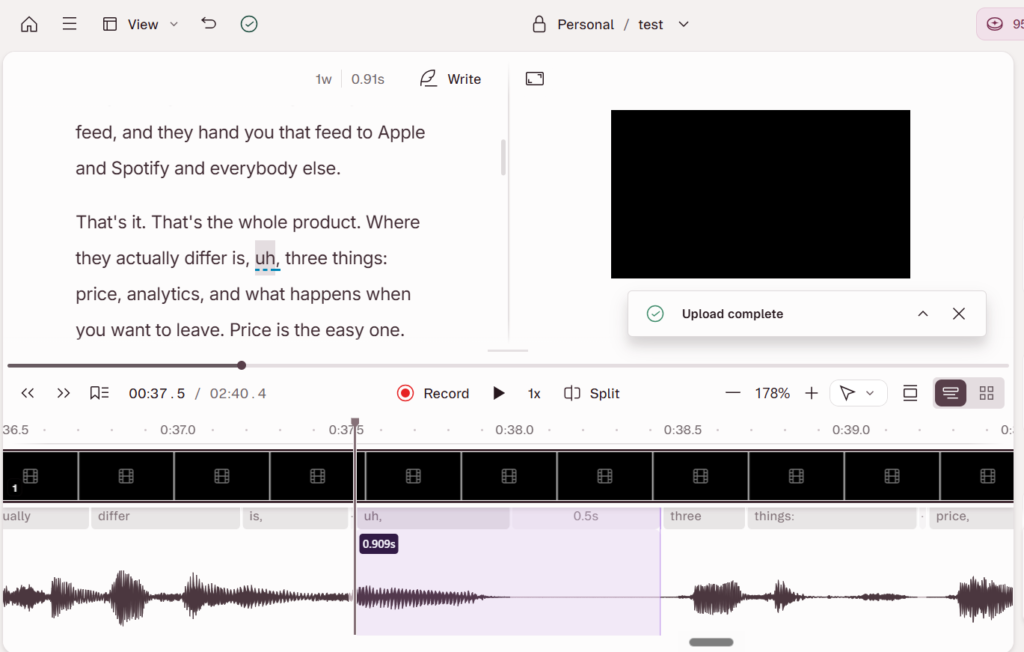
For most shows, yes, and the reason is the transcript. You delete a sentence in the text and the audio goes with it. Removing filler words is a checkbox rather than a hunt, and Studio Sound cleans up a room that was never treated. For anyone who edits their own show weekly, that is the difference between an hour and twenty minutes.
Hobbyist at $16 a month billed annually covers 10 media hours, which is a weekly 45-minute show with room to spare. Creator at $24 annually takes you to 30 hours and 4K exports if your podcast is also a video. The free plan is a demo, not a plan: one media hour a month and a watermark on anything you export.
The honest catch is the seat. Descript prices per person, so a two-host show where both edit pays twice, and the media-hour cap counts what you import rather than what you publish. Re-importing a long interview twice eats the allowance fast. We walk through how it compares with recording-first tools in Riverside vs Descript.
When is Alitu the better buy?
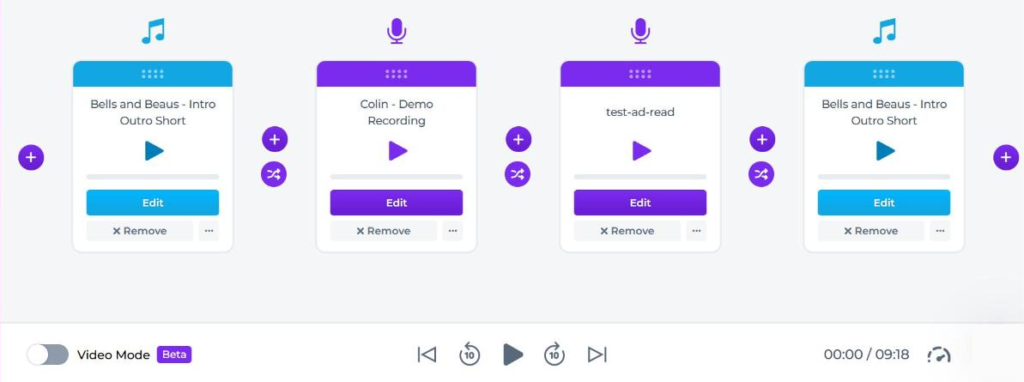
When you do not want a production chain at all. Alitu records, cleans, assembles, hosts, and publishes to Apple Podcasts from one place, and it handles the audio housekeeping for you: noise removal, leveling and mastering, and file conversion happen as you upload, and its Magic Filters trim filler words and silences when you switch them on. It costs $38 a month, or two months free if you pay for the year, after a 7-day trial and a 30-day money-back guarantee once the card is charged.
The bundled hosting is the part worth doing arithmetic on. It carries you to 1,000 downloads a month, which covers a show that is still finding listeners. Past that it is $10 a month for up to 10,000, and at that point you are paying Alitu for something a dedicated host does better and cheaper.
So the honest downside is redundancy. If you already pay Transistor or Buzzsprout, you are buying a second host you will not use, and Alitu becomes the most expensive editor on this page. It also trades control for speed: the automatic cleanup is good, but beyond switching a couple of steps off, you cannot fine-tune it the way a real editor lets you.
Do you need Riverside if you already have an editor?
Only if your raw audio is the problem. Riverside is a recorder, not an editor, and it earns its place by capturing each person locally at full quality instead of recording the compressed call. Bad internet stops mattering. That is a recording fix, and no amount of editing reproduces it.
Pro is $24 a month billed annually, or $35 month to month, for unlimited recording, 15 hours a month of separate-track downloads, and 4K exports. That download cap is the one to watch. Grow at $34 annually raises it to 20 hours. There is a free tier, but it gives you a single 2-hour multi-track session and 720p, so treat it as a test.
If you record solo into a decent microphone, skip it. The whole argument for Riverside is remote guests, which is also why it sits at the center of recording a podcast remotely.
Can you edit a podcast for free?
Yes, and plenty of shows should. Audacity is free, open source, runs on Windows, Mac, and Linux, and has no export caps, no watermark, and no account. It does trims, levels, noise reduction, and a music bed, which is the entire job for a solo show. On a Mac, GarageBand does the same for nothing.
What you give up is speed and cleanup quality. Audacity edits waveforms, so finding the cough means looking for it, and its noise reduction is not in the same class as Studio Sound or Alitu’s automatic pass. That trade is fine at two episodes a month and painful at eight.
The rule we would give a new podcaster: edit free until the editing is what stops you publishing. Then buy the tool that removes the specific step you dread. Paying $38 a month to avoid a job you do twice a month is not a workflow, it is a subscription.
The verdict
Most podcasters should edit in Descript at $16 a month billed annually, because editing by text is the one change that makes a weekly show sustainable. Take the seat pricing seriously if you have a co-host who edits.
Buy Alitu instead if you want the whole chain handled and you are not already paying a host, and accept that you are trading fine control for not thinking about it. Add Riverside only when guests are the reason your episodes sound rough. Use Audacity while you are still deciding whether this show is a habit, and put the money toward a better microphone, which does more for your audio than any of this software. The numbers behind that claim are in podcast audio quality explained.
Frequently asked questions
Do I need editing software if my host has AI tools?
Usually yes, because they do different jobs. Host-built AI writes show notes, chapters, and titles from a finished file, which is publishing help rather than editing. None of it cuts a rambling answer, removes a cough, or fixes levels between two guests. The exception is a show that needs no cutting at all, and those are rarer than people think before they listen back. If your host’s tools are the reason you are considering skipping an editor, listen to one raw episode end to end first and count the things you would remove.
Is editing by text as good as editing the waveform?
For speech, it is better, and it is the reason Descript sells. Deleting a sentence in a transcript is faster and more accurate than finding the same sentence in a waveform, and the transcript doubles as your show notes source. Where it falls down is anything musical or tightly timed: crossfades, a music bed that has to land on a beat, a laugh you want to keep half of. Those still want a waveform, which is why Descript also gives you one. Most podcasts never need it.
Will editing software also host my podcast?
Alitu will, up to 1,000 downloads a month, and it publishes to Apple Podcasts in a click. Descript and Riverside will not: they hand you a finished file that you upload to a host, which is the normal split. That is not a knock on either one, since hosting is a separate job with its own economics, analytics, and distribution. If bundling appeals, read what a host actually does in what is a podcast host before you pay for it twice.