StreamYard vs Riverside: Best for Live or Recorded Podcasts?
Last updated: October 2026
This post contains affiliate links, and we may earn a commission if you sign up through them, at no cost to you. See our Affiliate Disclosure. Pricing as of September 2026.
Get StreamYard if your podcast goes out live. Get Riverside if it is a recorded interview show you edit afterward. Both now record each guest locally on separate tracks, so the real split is what happens next: StreamYard is a live studio that records on the side, and Riverside is a recorder and editor that streams once you pay for Grow.
Key takeaways
- StreamYard Core costs $35.99 a month billed yearly or $44.99 month to month, and includes unlimited local recordings of each participant.
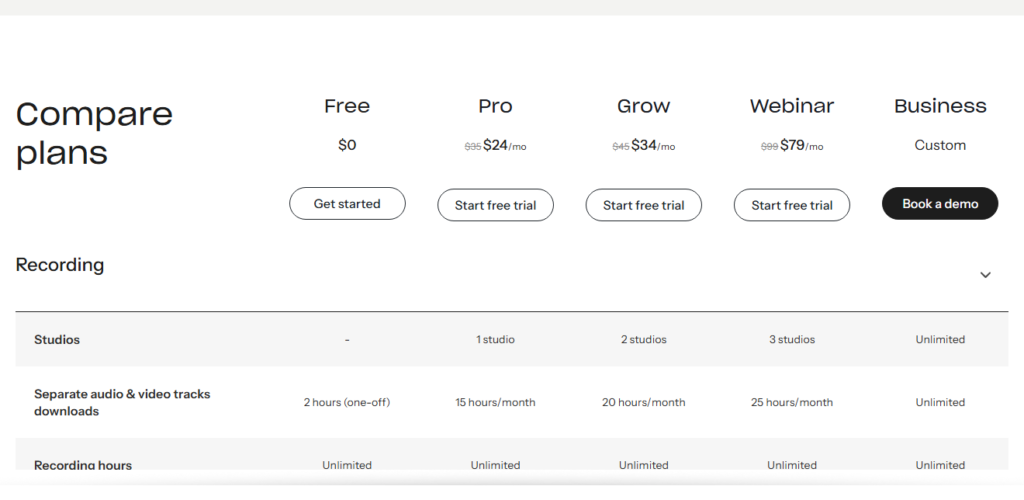
- Riverside Pro costs $24 a month billed yearly or $35 month to month, and caps separate-track downloads at 15 hours a month even though recording is unlimited.
- Riverside only adds live streaming on its Grow plan, at $34 a month billed yearly or $45 month to month, with multistreaming to unlimited destinations.
- StreamYard does not offer an RSS feed, while every paid Riverside plan includes podcast hosting and analytics.
- StreamYard’s free plan limits local recording to 2 hours a month and only in recording sessions, not live streams.
StreamYard vs Riverside at a glance
Prices come from StreamYard’s pricing page and Riverside’s pricing page, checked with both the monthly and yearly toggles in September 2026. Limits come from each company’s help center.
| StreamYard | Riverside | |
|---|---|---|
| Built around | Live streaming, with recording | Local recording and editing, with streaming on Grow and up |
| Entry paid plan | Core, $35.99/mo billed yearly or $44.99 monthly | Pro, $24/mo billed yearly or $35 monthly |
| Separate track per guest | Yes, unlimited on paid plans, 2 hours a month on Free | Yes, downloads capped at 15 hours a month on Pro, 20 on Grow |
| Max local recording quality | 1080p on Core, 4K on Advanced | Up to 4K and 48kHz audio from Pro |
| Live streaming | Every plan. Multistream to 3 destinations on Core, 8 on Advanced | Grow and up, 1080p, unlimited destinations |
| Editing | Trim, split, AI clips, export to Premiere, Final Cut, or Resolve | Unlimited text-based editing, filler-word removal, Magic Clips, show notes |
| Podcast hosting | No RSS feed | Yes, on every paid plan |
| Free plan | StreamYard logo, 6 on screen, 2 hours of local recording a month | One 2-hour multitrack session, 720p, watermark |
| Refund window | Refund requests within 20 days of a monthly charge, 60 days of a yearly one | 24 hours on monthly, 14 days on yearly |
Does StreamYard record each guest locally like Riverside?
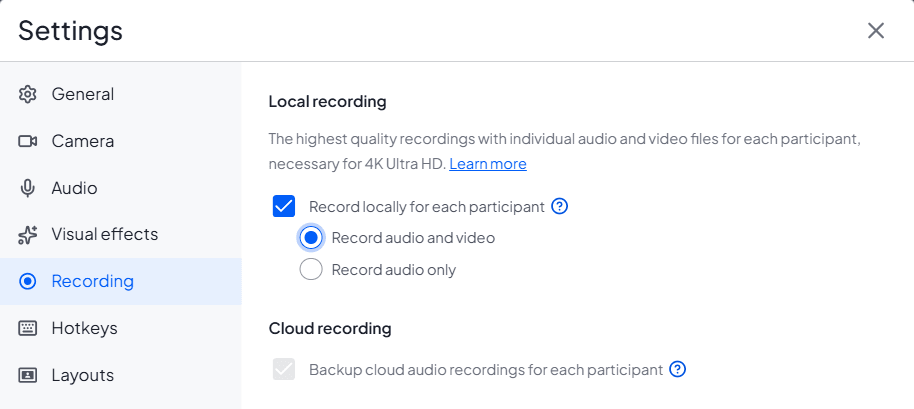
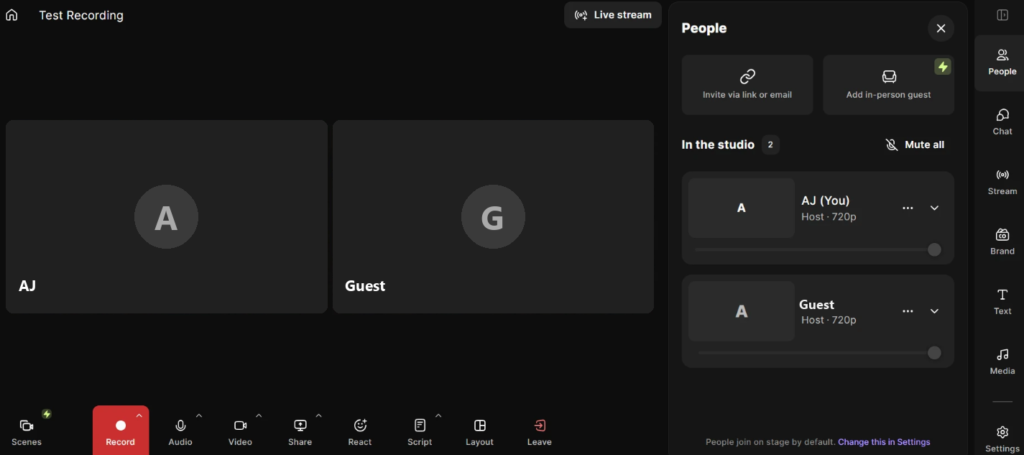
Yes. StreamYard’s help center says local recording saves an individual audio file and an individual video file for each participant, recorded in the browser on their own device. The audio comes down as WAV. Every paid plan gets unlimited local recordings. The free plan gets 2 hours a month, and only in a recording session, not during a live stream.
Local recording is a checkbox in the studio’s Recording settings, and it has to be on before you start. StreamYard says plainly that if it was off, the separate files cannot be recovered afterward. On Riverside, local capture of every participant is the product itself, and separate tracks are the first thing its pricing page sells.
Which records better quality, StreamYard or Riverside?
Riverside, on the plan most people buy. Pro records up to 4K video and 48kHz audio, per its pricing page. StreamYard’s local recordings follow the studio resolution, so Core tops out at 1080p, and 4K local recording needs Advanced at $68.99 a month billed yearly. StreamYard’s pages give the WAV format but not a sample rate, so we are not going to guess one.
For an audio podcast, 1080p versus 4K does not matter at all. What matters is that both tools keep a guest’s bad Wi-Fi out of the file. StreamYard does add a caveat of its own: local recordings still partly rely on the connection, and if a guest’s upload struggles during a live stream, it pauses their upload to protect the stream and finishes afterward. Guests have to stay in the studio until the upload is done, or return within 30 days to finish it.
Is StreamYard or Riverside better for live streaming?
StreamYard. It streams on every plan, including Free, and the studio is built for a live audience: overlays, backgrounds, a chat overlay that puts viewer comments on screen, a greenroom for guests, and guest destinations that let a guest stream to their own channel. Core multistreams to 3 destinations. Advanced raises that to 8 and adds On-Air webinars for 100 viewers. Paid plans also record every live stream automatically, up to 10 hours per stream.
Riverside streams too, but only on Grow. That plan adds 1080p live streaming, multistreaming to unlimited destinations, custom RTMP, overlays, lower thirds, and Omnichat. Pro has none of it. If you only stream now and then, Riverside Grow does the job. If the live show is the product, StreamYard is the better studio, and our live streaming software guide explains why it beats Restream too.
Which is better for editing and AI clips?
Riverside, by a distance. Pro includes unlimited text-based editing, where you cut the video by deleting words in the transcript, plus filler-word and silence removal, unlimited transcriptions, Magic Clips, and AI show notes. A recorded interview can go from raw tracks to a finished episode and a set of clips without leaving the app.
StreamYard’s editing is lighter. You can trim and split recordings, and Core adds AI clips that turn a stream into vertical shorts. Transcript downloads are an Advanced feature. Its strength is the handoff. It exports local recordings as ready-made project files for Premiere Pro, Final Cut, and DaVinci Resolve. So with StreamYard, budget for a real editor. Descript is one option, and Riverside vs Descript covers how that editor compares.
Can StreamYard or Riverside host your podcast?
Riverside can. StreamYard cannot. Every paid Riverside plan includes podcast hosting and analytics and publishes to Apple Podcasts, Spotify, YouTube, and more. Grow hosts two shows, and Business adds private podcast hosting. Riverside’s pricing page does not list dynamic ad insertion, so if you sell ads, a dedicated host is still the safer home for your feed.
StreamYard’s help center says outright that it does not offer an RSS feed. It will publish videos of up to 20 minutes straight to Facebook, LinkedIn, and YouTube, and send vertical clips to Shorts, Reels, and TikTok. For Apple Podcasts and Spotify, you download the files and upload them to a podcast host. If you still need one, start with how to choose a podcast host.
How many guests can you have?
StreamYard puts 10 people on screen on its paid plans, you plus 9 guests, and 6 on the free plan. Advanced adds 15 backstage participants waiting to come on. Riverside’s help center says a studio can record up to 100 participants in a session. For a podcast with one to three guests, neither limit will ever come up.
StreamYard vs Riverside pricing: which costs less?
For recording alone, Riverside. Pro is $24 a month billed yearly ($288 up front) or $35 month to month. StreamYard Core is $35.99 a month billed yearly or $44.99 month to month, and Advanced is $68.99 or $88.99. Riverside Grow is $34 billed yearly or $45 month to month. Webinar is $79 or $99, and Business is a custom quote.
Streaming flips the price comparison. The cheapest way to stream on Riverside is Grow, at $34 a month billed yearly, which is a little under StreamYard Core’s $35.99 and brings unlimited destinations. Month to month, the two cost the same to the cent: $45 against $44.99. What Core buys over Grow is the studio and uncapped separate tracks. Riverside meters those downloads at 20 hours a month on Grow.
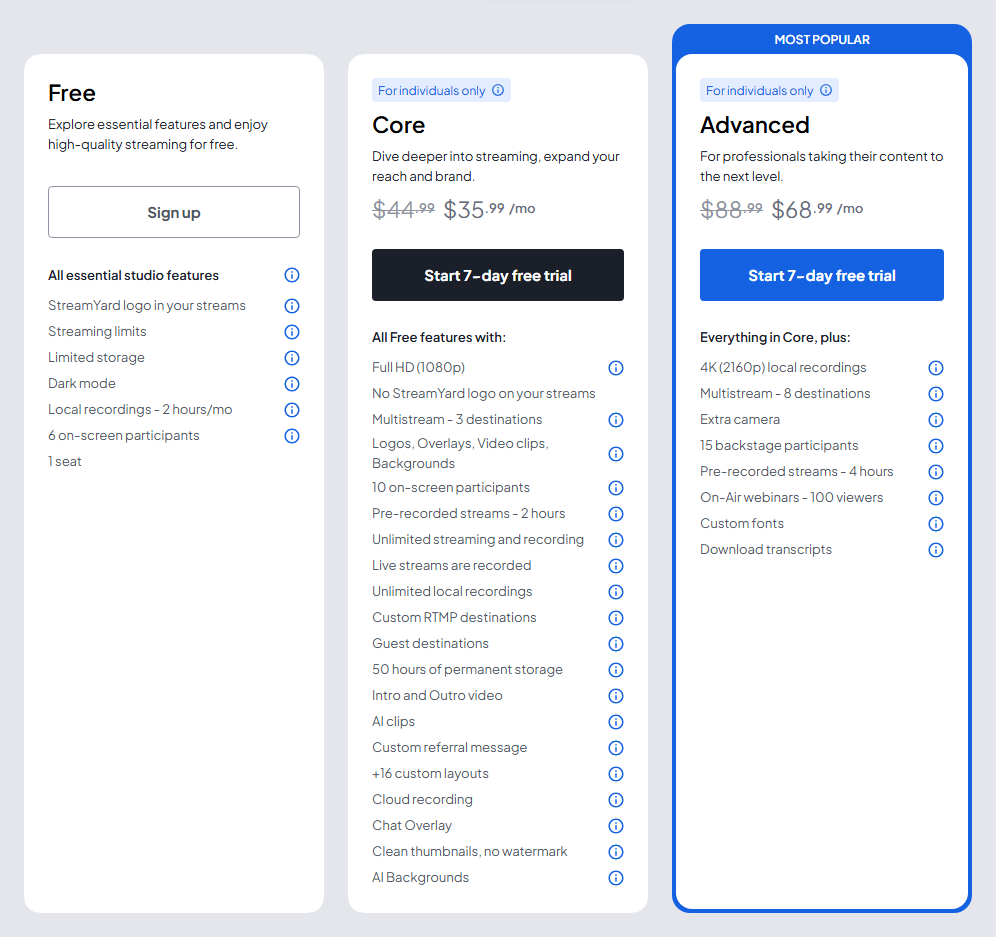
Each side has a limit to know. StreamYard’s Core and Advanced plans are for individuals only, and its help center says a signup with a company email domain needs a Business plan. On Riverside, the separate-track download cap is the meter to watch. Recording is unlimited, but once you pass 15 hours of track downloads on Pro, new tracks wait until the next billing cycle or an upgrade. Our Riverside pricing breakdown covers every plan.
Which free plan is better?
StreamYard’s, if you want to go live for free. Its free plan streams with the StreamYard logo, fits 6 people on screen, and allows 2 hours of local recording a month. It does not multistream, and its help center says free live streams are not recorded, so it is a test bench more than a home.
Riverside’s free plan is one 2-hour multitrack session, not 2 hours a month, at 720p and 44.1kHz with a watermark. It does not stream at all. Both paid tiers come with a trial instead: 7 days on StreamYard Core and Advanced, 14 days on Riverside Pro, Grow, and Webinar.
So should you pick StreamYard or Riverside?
Live show first? Choose StreamYard Core at $35.99 a month billed yearly. It is the better live studio, it streams on every plan, and its separate tracks are uncapped. Try StreamYard free. The downside: no transcript editor and no RSS feed, so you still need an editor and a podcast host.
Recorded interview show? Choose Riverside Pro at $24 a month billed yearly. You get 4K local recording, the editor, clips, and hosting in one app, for less than StreamYard Core. Start at riverside.com. The downside: 15 hours of track downloads a month, and no live streaming until Grow.
A recorded show that also streams now and then? Riverside Grow covers it at $34 billed yearly. If the live broadcast is weekly and the audience watches it, pay for StreamYard and edit elsewhere. For other options, see our Riverside alternatives, or StreamYard alternatives if StreamYard is the tool you are leaving.
FAQ
Does StreamYard record separate tracks for each guest? Yes, when local recording is switched on before the session starts. Each participant gets an individual audio file (WAV) and an individual video file. It is unlimited on paid plans and 2 hours a month on the free plan.
Is Riverside cheaper than StreamYard? For recording, yes. Riverside Pro is $24 a month billed yearly against $35.99 for StreamYard Core. To stream on Riverside you need Grow at $34 billed yearly, which is roughly the same money as Core.
Can Riverside live stream? Yes, from the Grow plan up. Grow adds 1080p live streaming and multistreaming to unlimited destinations. The Pro plan does not include live streaming.
Can you use StreamYard as a podcast host? No. StreamYard’s help center says it does not offer an RSS feed, so you download your files and publish them through a podcast host.