Hello Audio Review 2026: Is It Worth It for a Private Podcast?
This post contains affiliate links, and we may earn a commission if you sign up through them, at no cost to you. See our Affiliate Disclosure. Pricing as of November 20, 2026.
Hello Audio is worth it if you sell courses, coaching, or memberships and want students added to a private feed without you touching a list. It is the wrong buy if you already pay a podcast host, since Transistor, Captivate, and Castos all include private feeds, often for less per feed.
Key takeaways
- Hello Audio’s Starter plan costs $17 a month, or $14 a month billed annually, for one private feed with unlimited listeners.
- Hello Audio limits feeds rather than listeners: Starter allows 1 private feed, Pro 3, and Powerhouse unlimited.
- Hello Audio’s Thinkific sync connects one Thinkific product to one feed and does not run during the 7-day free trial.
- Hello Audio converts uploaded video files, including MP4, MOV, and WEBM, into MP3 audio on every plan.
- Hello Audio’s help center says its download count cannot tell whether a listener pressed play.
- Hello Audio’s pricing page offers a refund if you cancel within 30 days of your first payment and ask support.
What is Hello Audio, and who is it for?
Hello Audio is a private podcast platform for people who already have the content. Its help center describes the loop in one line: you upload material you already own, and each listener subscribes with their own link in the podcast app they already use. Course lessons, masterclass replays, coaching calls, and summit sessions are the examples it leans on, alongside lead magnets and membership bonuses.
It is not a general podcast host, and it does not pretend to be. The pricing FAQ says regular hosts “serve podcasters, whereas we serve creators.” Every plan includes a public feed too, but the private side is the product. If you run a public interview show and want it to grow in Apple Podcasts and Spotify, a general host fits better, so start with the Captivate review.
A note on how this review was built. My own captures of Hello Audio’s pricing page, both billing toggles, are the screenshots below. Everything about the dashboard comes from Hello Audio’s pricing page, terms, and help center, all read on September 25, 2026. I have not run a live feed with real students on it, and I will say so wherever that matters.
How do you turn course videos or coaching calls into a feed?
You upload what you have and Hello Audio converts it. Its file-type guide lists MP3, M4A, WAV, and OGG for audio, and MP4, M4V, MOV, AVI, and WEBM for video. Anything that is not already an MP3 gets converted automatically, and the guide says files over an hour can take 10 to 15 minutes. A 45-minute test video I uploaded on November 9, 2026 was done in about three minutes, but it was a blank screen with a test tone, so expect a real lesson to take longer. The upload limit is 4GB per file. The upload box on my trial listed seven of those formats and left off OGG and WEBM, so try one of those before you count on it. Video conversion is on every plan, including Starter.
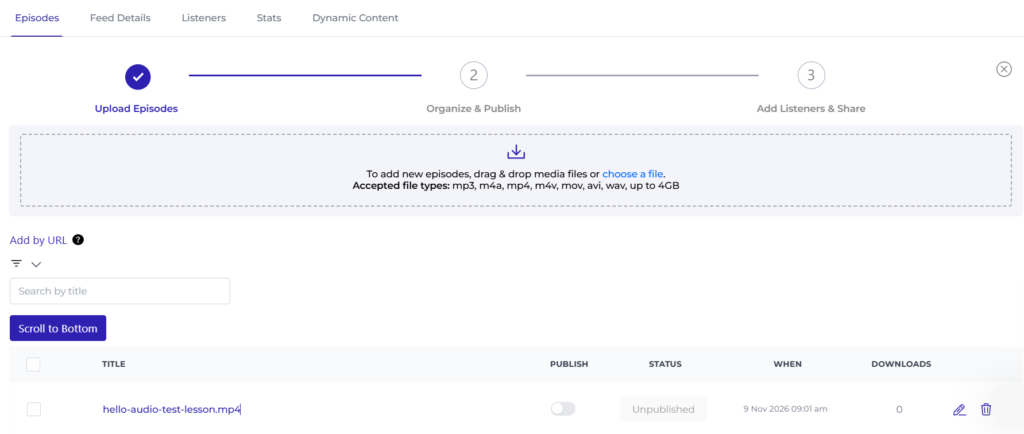
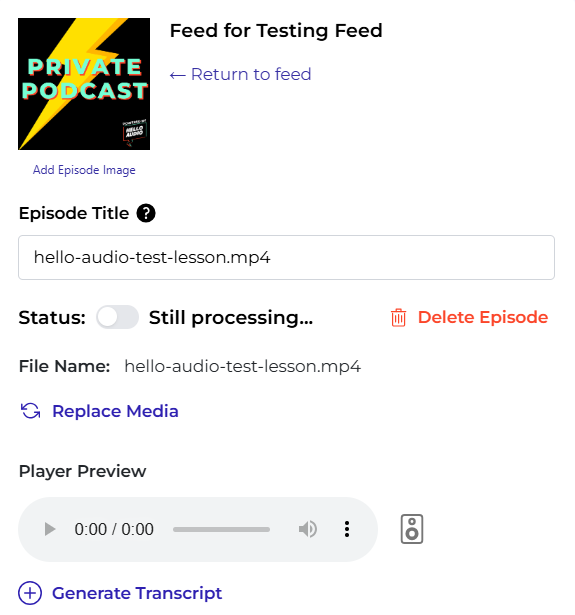
One trap before you upload. Hello Audio’s terms say it destroys your video files once they are converted, and the help guide confirms it keeps only the MP3. Keep your originals somewhere else.
You do not have to upload by hand, either. The Audio Inbox connects to Zoom, Google Drive, and Dropbox. Once Zoom is connected, your cloud recordings appear in a list, and you tick the ones you want and send them to a feed. For a coach who records every call in Zoom, that is the feature I would pay for first. An existing podcast can also be imported by its RSS feed.
Then you pick a feed type. Instant releases everything at once, which suits a finished course. Date-Based releases on calendar dates, like a normal podcast. Drip releases episodes a set number of days after each listener joins, and it starts on Pro. Hello Audio’s feed-type guide flags the gotcha that catches people: anything added to an Instant feed later is dated to the original build, so the listener’s app never shows it as new. Monthly calls belong in a separate Date-Based feed.
Does Hello Audio have AI features?
Yes, as a paid add-on. Hello Audio AI costs $5 a month on top of any paid plan and includes 200 minutes a month that do not roll over, per the pricing page and the AI help article. Inside an episode it writes a transcript and summary plus whatever you pick: social posts, an email newsletter, a blog post, a YouTube description, and a few more. The help article says an active, paid account is required.
Two related features are easy to confuse with it. Unlimited transcripts, downloadable as a text file, come only with Powerhouse. Audio remastering, which runs on Dolby.io’s Enhance API to cut background noise and even out loudness, is on every plan but metered: 1 credit a month on Starter, 5 on Pro, and 10 on Powerhouse. Extra credits cost $15 for 5 and never expire.
How do students and clients get access to the feed?
Each listener gets a unique link. They open it, tap their podcast app, and subscribe. There is no login and no new app. Hello Audio’s pricing FAQ says it works in any podcast player that can add a feed by URL, on iPhone and Android.
The link locks itself after use, which is the part I like most. Per the grace period guide, a listener’s subscribe page stops working one hour after they subscribe in an app, so a forwarded invite email is useless. You can change the window, and you can reset one listener’s link when they get a new phone. Blocking a listener empties their feed of every past and future episode.
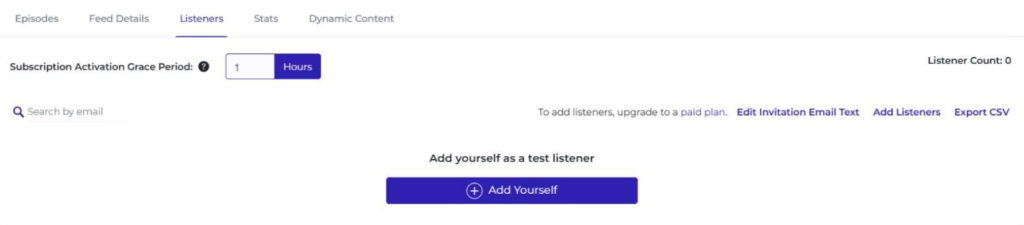
There are four ways in. You can paste up to 1,000 email addresses at a time. You can share a signup page, free or paid through Stripe. You can hand out a universal link that anyone can reuse, which is fine for a lead magnet and wrong for a paid course. Or you can let an integration add people.
Spotify is the exception to all of this. Hello Audio’s Spotify guide says the feed’s titles and show notes are visible to the public there, even though the audio stays locked. Drip feeds, tag-gated episodes, and expiring feeds do not work in Spotify, and Spotify plays are not counted in your Hello Audio stats. Steer students toward Apple Podcasts or Overcast.
How does the Thinkific sync work, and what else connects?
You install the Hello Audio app from the Thinkific app store and log in. Then, inside a feed, you click Sync with Thinkific, choose one Thinkific product from the dropdown, and decide whether to send an introductory email. According to Hello Audio’s Thinkific guide, students already enrolled are added straight away, and new enrollments appear in the feed within a minute or two.
Two limits come with it. The sync needs a paid Hello Audio account and will not run on the trial. And it is one product to one feed. Three Thinkific courses means three feeds, which is Pro money, not Starter. Thinkific itself sends you here, by the way: its support center says it cannot turn course content into a podcast and names Hello Audio as the app to use, as covered in how to turn your online course into a private podcast.
Thinkific and MemberVault are the two native course-platform integrations the help center names. MemberVault has a gap: its guide says new signups are added automatically, but removing someone from the product does not remove them from the feed, so you need Zapier or an ActiveCampaign webhook for that. Past those two, Hello Audio connects to ThriveCart, Kit, ActiveCampaign, Mailchimp, MailerLite, Ontraport, and ManyChat, and to almost anything else through Zapier. Kajabi is not on the integrations list. The FAQ says you can still use Hello Audio beside any course platform by emailing students their links.
How many listeners do you get on each plan?
Unlimited, on every plan. What Hello Audio limits is feeds. Its feed limits article gives Starter 1 private feed and 1 public feed, Pro 3 private feeds and 1 public feed, and Powerhouse unlimited private feeds and 2 public feeds. The same article says there is no limit to episodes or listeners “at this time,” so treat it as current policy, not a promise.
That flips the usual math. A general host charges you for seats, so a 2,000-student course costs more than a 50-student one. Hello Audio charges the same for both and bills you for the number of products instead. Its FAQ even recommends one feed per product in your business. Count your courses, programs, and bonus bundles before you count your students. Archived feeds do not count toward the limit.
How much does Hello Audio cost?
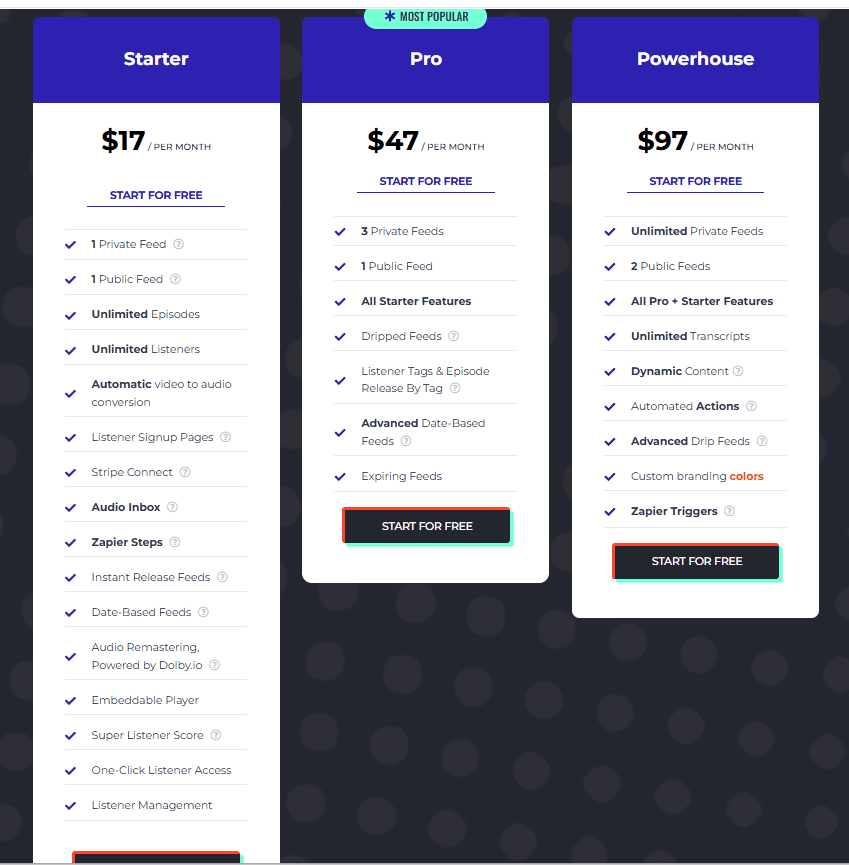
Between $14 and $97 a month. These are the prices on Hello Audio’s pricing page, with the monthly and annual views both read on November 20, 2026. They match our September captures of both billing toggles.
| Plan | Monthly | Billed annually | Private feeds | What it adds |
|---|---|---|---|---|
| Starter | $17 a month | $14 a month | 1, plus 1 public | Unlimited listeners and episodes, video conversion, signup pages, Stripe, Audio Inbox, Zapier steps, embeddable player |
| Pro | $47 a month | $39 a month | 3, plus 1 public | Drip feeds, listener tags, release by tag, advanced date-based feeds, expiring feeds |
| Powerhouse | $97 a month | $81 a month | Unlimited, plus 2 public | Unlimited transcripts, dynamic pre-roll and post-roll, automated actions, advanced drip, custom colors, Zapier triggers |
There is a second cost if you sell access through Hello Audio’s signup page. On top of Stripe’s 2.9% plus 30 cents, Hello Audio takes an application fee of 5% on Starter, 2% on Pro, and nothing on Powerhouse, per its signup page guide. If you already charge through Thinkific, this never applies. If Hello Audio is your checkout, a $500 program loses $25 to that fee on Starter.
One point in its favor. The terms say you keep the price you signed up at for as long as you stay on the same plan. Cancel and come back, though, and the reactivation guide says you pay the current price, with any old discount gone.
Does the free trial let you test everything?
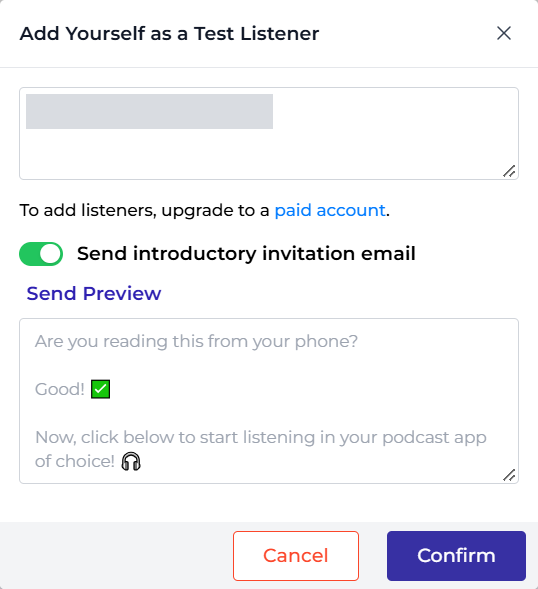
Most of it, for 7 days. The pricing FAQ says every trial comes with Powerhouse features, so you can build drip and expiring feeds and see the whole dashboard. But a trial account is not an active paid account, and three things care about that. The Thinkific sync does not run during the trial. The AI add-on also needs an active, paid account. And you cannot add real listeners. When I tried on November 9, 2026, the box was titled Add Yourself as a Test Listener, it only took my own email, and it said “To add listeners, upgrade to a paid account.”
So the one feature most course creators are buying is the one you cannot test for free. Plan the trial around everything else: upload a real lesson, check the conversion, add yourself as a listener, and subscribe on your own phone. Then pay for a month and connect Thinkific while the refund window is open.
The card question has two answers. The pricing page says “7-day free trial, no credit card required.” Hello Audio’s terms, last modified February 16, 2021, say it requires payment details before any trial and bills automatically when the trial ends. The pricing page is newer, so expect no card. If the signup form asks for one anyway, cancel before day seven.
What do Hello Audio’s analytics show?
Less than the marketing suggests. Hello Audio’s homepage talks about completion rates, but its downloads help article is plainer: the count goes up by one each time a listener’s app fetches a file, whether they streamed part of it or downloaded it all, and Hello Audio says it cannot see whether anyone pressed play. It also cannot count subscribers to public feeds or universal links. Public feeds can add a Podtrac prefix if you want third-party numbers.
What you do get is per-person status, and for a course that matters more than totals. Each listener shows as invited or subscribed, so you can see who never activated their feed. Hello Audio can email reminders to people who have not subscribed, and the My Listeners page keeps an event log for each person across every feed. The pricing page also lists a Super Listener Score, described only as lead scoring for your audio. I could not find a help article explaining how it is calculated.
Can you brand your feeds?
Partly. Every plan lets you set the cover art, title, author, and description, and the signup page adds a rich-text description, your terms link, and optional name and phone fields. If you have no artwork yet, the launch guide offers four preset covers. Custom button colors across the subscribe page, invite email, and embeddable player are Powerhouse only. On the cheaper plans your students see Hello Audio’s default colors, and the invite email comes from your name “via Hello Audio,” per the account help article. That is fine for a bonus feed. It is a small letdown on a premium program.
How does Hello Audio compare with Transistor, Captivate, and Castos?
On raw private feeds per dollar, the hosts win. On automation for course sellers, Hello Audio wins. Here is the entry tier of each, from our own reviews and each vendor’s pricing page, as of November 20, 2026.
| Option | Entry price | Private feeds | Private listeners | Students added |
|---|---|---|---|---|
| Hello Audio Starter | $17 a month, or $14 billed annually | 1 | Unlimited | Thinkific or MemberVault sync, Zapier, a signup page, or by hand |
| Transistor Starter | $19 a month | Unlimited shows | 200, shared across shows | By hand, CSV, invite link, or Zapier |
| Captivate Personal | $19 a month, or $17 billed yearly | Unlimited | 50,000 in total | One at a time, in bulk, or Zapier |
| Castos Essentials | $19 a month, or $190 a year | Not compared here | Up to 100 | By hand, CSV, or invite link |
Captivate is the uncomfortable comparison for Hello Audio. Its cheapest plan includes unlimited private podcasts and 50,000 private subscribers in total, so three course feeds cost $19 a month there against $47 on Hello Audio Pro. What Captivate does not have is a Thinkific app, video conversion, a Zoom inbox, or drip and expiring feeds. You add students yourself or wire up Zapier. The full picture is in the Captivate review, and Captivate’s free trial runs 30 days.
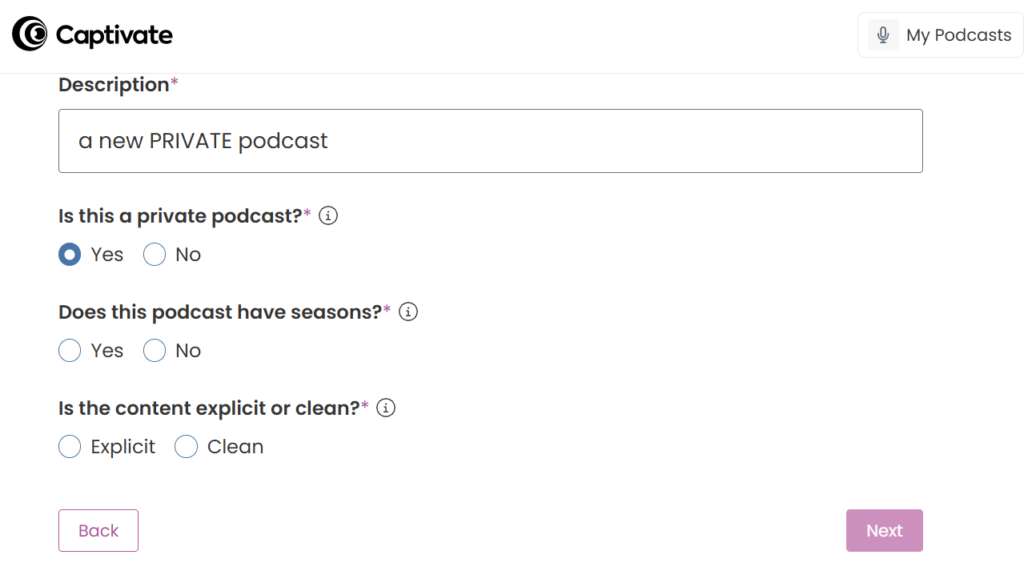
Transistor makes sense when you already run a public show there, since the course feed is just another show on the same plan. The catch is seats: 200 on the $19 plan, 1,500 on the $49 plan, and 5,000 on the $99 plan, shared across every private show. Our Transistor review covers it, and Transistor’s trial is 14 days.
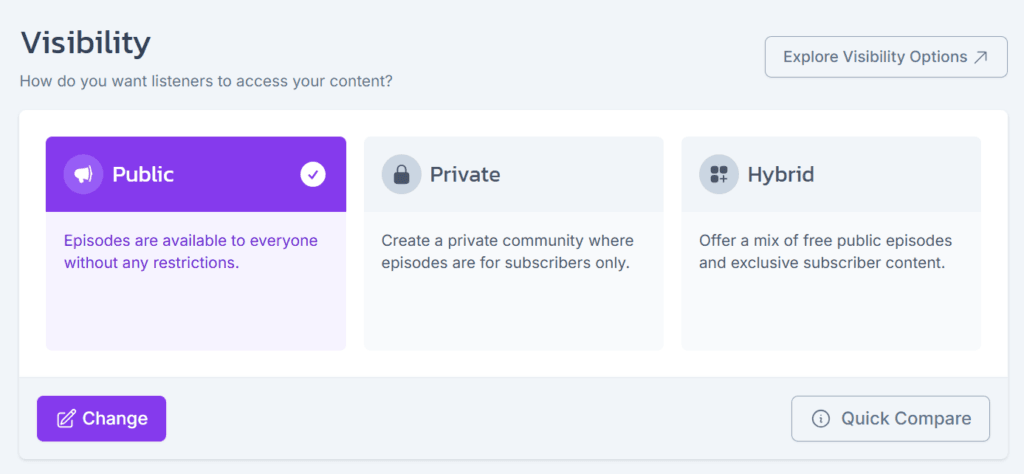
Castos is the easy trial for a small group, with 100 private subscribers on its $19 Essentials plan and a 14-day trial with no credit card. Its $99 Pro plan tops out at 500 subscribers, and Transistor gives you more seats than Castos at every price. Castos asks public, private, or hybrid when you create the show.
The whole field, seat counts and all, is in the best host for a private or internal podcast. If you are still deciding whether a private feed fits your material at all, start with what private podcasting is.
What are the downsides of Hello Audio?
The feed limit is the big one. Starter gives you one private feed, and the jump to three costs $30 more a month, billed monthly. A creator with four products is on Powerhouse at $97, or $81 billed annually. Captivate would carry all four for $19 a month.
The rest are smaller. You cannot test the Thinkific sync on the trial. Stats are downloads, not plays. Spotify exposes your show notes and breaks drip feeds. MemberVault removals need Zapier. Signup-page sales carry a 5% fee on Starter. Transcripts and custom colors sit on the top plan, and AI is an extra $5 on any paid plan. Video originals are deleted after conversion. And the terms were last modified in 2021, and they disagree with the pricing page about the trial.
One more to plan for. Hello Audio’s import guide notes that a 301 redirect only moves public feeds, and private subscribers have to subscribe again to a new feed. The same logic applies if you ever leave, so moving off Hello Audio means every student gets a new link. The general process is in how to switch podcast hosts without losing subscribers.
How do you cancel Hello Audio, and can you get a refund?
You cancel from your dashboard, according to the pricing FAQ, which promises “no long-term commitments.” Plan changes live at the Subscription page, and billing details run through a Stripe customer portal, per the billing help article. I could not find a step-by-step cancellation article in the help center, so if the button is not where you expect, ask support in chat.
The terms say cancellation takes effect at the end of the current billing cycle, and annual customers keep access for the months they paid for. They also advise you to download your content before canceling. The reactivation guide warns that Hello Audio can remove content from canceled accounts at any time. If yours is still there when you come back, your feeds return archived and old listeners regain access once you republish.
Refunds have a 30-day window. The pricing page says that if you cancel within 30 days of your first payment and ask support, it will issue a refund. The terms put the same window at 30 days after the trial ends, by email to support@helloaudio.fm, and say every other purchase is final. The two line up if you start paying the day your trial ends. Either way, send that email inside the month.
Checked against Hello Audio’s pricing page, terms of service, and help center, September 25, 2026.
Verdict: who should use Hello Audio?
Get Hello Audio if you sell a course on Thinkific or MemberVault with steady enrollment, or if your raw material is video and Zoom calls you do not want to convert yourself. Unlimited listeners on every plan, links that lock after use, and students added the minute they enroll make it the least work of any option I have looked at. Start Hello Audio’s 7-day trial, then connect Thinkific in your first paid month, inside the refund window.
Skip it if you already pay a podcast host, if you add students twice a year, or if you have more products than you want to pay Powerhouse for. Captivate carries unlimited private feeds for $19 a month, and that is the honest downside here: you pay Hello Audio for automation, not for anything a host cannot store.
FAQ
Is Hello Audio worth the money? For a course seller with rolling enrollment on Thinkific or MemberVault, yes, because the sync replaces a daily chore. For one small cohort a year, a podcast host you already pay does the same job.
Does Hello Audio have a free plan? No. It has a 7-day free trial with Powerhouse features, and Starter at $17 a month, or $14 billed annually, is the smallest paid plan.
Can Hello Audio host a public podcast? Yes. Starter and Pro include 1 public feed and Powerhouse includes 2, but it is built for private feeds.
Can students listen to a Hello Audio feed on Spotify? Yes, with an access code, but the show notes are public there, drip feeds do not work, and Spotify plays are missing from your stats.
Can I get a refund from Hello Audio? Yes, within 30 days of your first payment, by asking support. After that, the terms say purchases are final.