Captivate Review 2026: Is It Worth It for Your Podcast?
This post contains affiliate links, and we may earn a commission if you sign up through them, at no cost to you. See our Affiliate Disclosure. Pricing as of September 2026.
Captivate is worth it if you want to grow or monetize a show, run several podcasts, or host a large private feed. Every plan carries every feature, ad insertion included, and you only pay more as downloads climb. Skip it if you want a free plan or the simplest possible first show.
Key takeaways
- Captivate’s Personal plan costs $17 a month billed yearly or $19 month to month, and it includes every feature Captivate sells.
- Captivate hosts unlimited podcasts and unlimited team members on every plan, and the plans differ only in their monthly download allowance.
- Captivate’s AMIE dynamic content insertion is free on every plan, and Captivate announced an optional ad marketplace with DAX US in June 2026.
- Every Captivate plan allows unlimited private podcasts with 50,000 private subscribers in total.
- Captivate describes its analytics as IAB certified on every plan.
- Captivate’s terms say subscription fees are non-refundable once charged, so the 30-day free trial is the time to decide.
Is Captivate a good podcast host?
Yes. It is the host I point people to once they say the word “sponsor.” Captivate stores your audio, builds your RSS feed, and submits the show to the apps, like every host. The difference is the pricing rule. Nothing is locked by tier. The $17 plan gets the same ad tools, private feeds, website, and analytics as the $90 one, and you move up only when your audience does.
Three kinds of podcaster get the most from it. A solo creator who plans to sell sponsor spots soon. A network or agency running several shows, and client shows, from one login. And a business or membership that needs a private feed for thousands of people rather than dozens. The person it fits least is a first-timer who wants to pay nothing while testing the idea, since Captivate has no free plan.
What is it like to set up a show on Captivate?
Fast, and the questions come in a sensible order. Add a Podcast first asks whether you are switching an existing show or starting fresh. A new show takes three short steps: a name and description, then yes-or-no answers on whether it is private, whether it has seasons, and whether it is explicit, then cover art, the feed address, and categories. The form tells you all of it can be changed later.
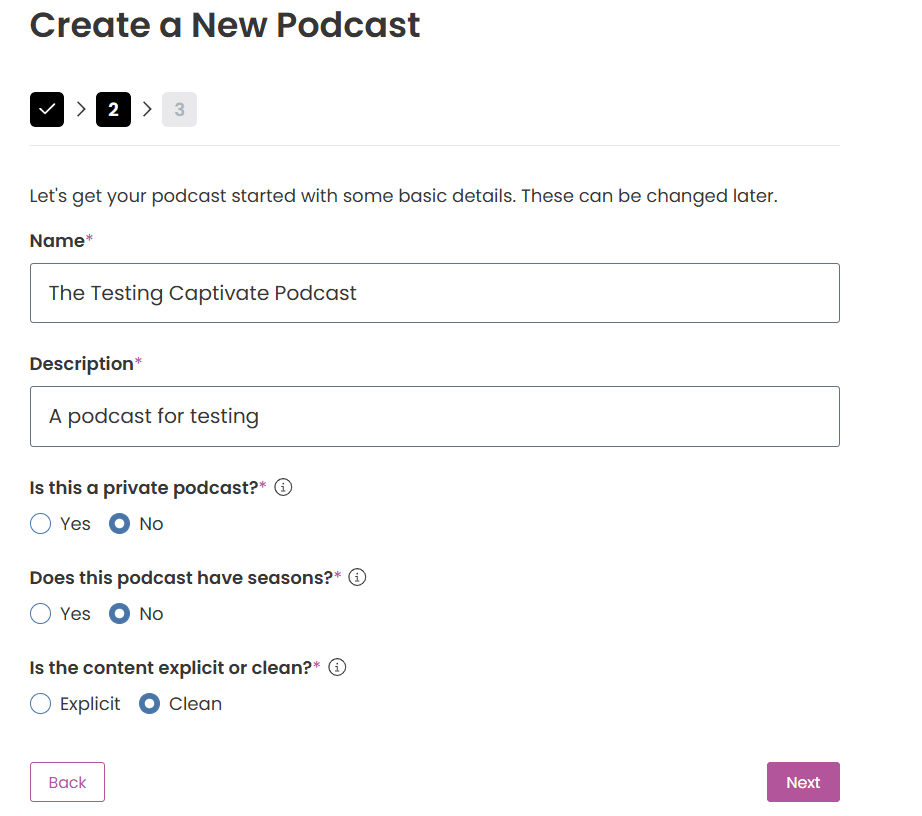
After that, each show has its own header with Podcast Settings, the RSS Feed link, and a Create New button. On my test account, the episode form takes an MP3 upload, a pick from your content library, or an import straight from Descript, and a publish date and time for scheduling. The dashboard is busier than Transistor’s because there is more in it. Captivate’s onboarding sends short tutorial pop-ups the first time you open each area, which helps.
How do Captivate’s plans and download limits work?
You pay for downloads, and nothing else changes. Personal covers up to 30,000 downloads a month, Professional 150,000, and Business 300,000, at $17, $44, and $90 a month billed yearly, per Captivate’s pricing page. Every tier lists unlimited podcasts and unlimited uploads and storage, and the FAQ answers the features question plainly: nothing is restricted by plan. Above 300,000 downloads, Captivate quotes a custom plan by email.
Captivate is relaxed about overages. The pricing FAQ says Captivate will not stop your podcast in a month you pass your limit. If you are over for a second month in a row, it gets in touch about moving up a plan. The allowance belongs to the account, so a network of small shows shares one number. The month-to-month prices, the yearly savings, and the discount details are all in Captivate pricing explained.
Are Captivate’s analytics any good, and are they IAB certified?
They are good, and yes, Captivate calls them certified. Its pricing page lists “Advanced, IAB certified analytics” on every plan, and its help center says it is “IAB Certified when it comes to the accuracy of your data.” Captivate also announced that it passed IAB Tech Lab Podcast Measurement 2.2 certification. That matters when a sponsor asks for certified numbers by name, which Transistor cannot offer.
The show dashboard opens on downloads for today, yesterday, the last 7, 28, and 90 days, and all time, with per-day, per-week, 28-day, and 90-day averages beside them. Captivate’s features page adds link analytics, network analytics, episode comparison, location and device data, web player stats, and CSV export. If you are moving from another host, Captivate’s Legacy Analytics Importer can bring your old download history across. More on reading the numbers is in how to read your podcast analytics.
How does AMIE dynamic ad insertion work?
AMIE is Captivate’s insertion engine, and it costs nothing extra on any plan. Its FAQ answers the price question in one word, “Nothing!” You add pre-roll and post-roll audio from your content library, and place mid-rolls on the episode waveform. Ad Slot inserts up to three pieces of audio between sections, and Ad Painter lays new audio over a baked-in read so you can replace an old sponsor across the back catalog. Bulk editors apply changes to every episode at once.
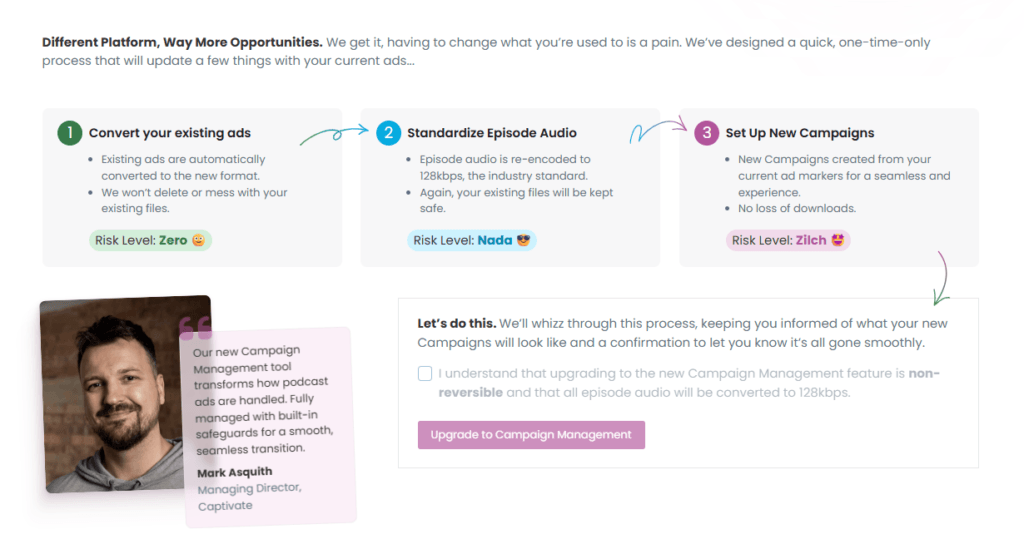
Campaign Management, the newer layer on top of AMIE, adds campaigns with start and end dates, country geo-targeting, and a maximum impression cap, so a sponsor who bought 50,000 impressions stops at 50,000. One warning from my own account: the upgrade screen says switching to Campaign Management is “non-reversible” and that all episode audio will be converted to 128kbps. Captivate’s help center separately says it does not modify the file you upload, so read that screen before you tick the box.
For a full comparison of which hosts gate insertion behind a pricier tier, see the cheapest podcast host with dynamic ad insertion. If the idea is new, what dynamic ad insertion actually does covers the mechanics.
Can you make money on Captivate beyond your own sponsors?
Increasingly, yes. In 2026, Captivate launched Captivate Marketplace, built with DAX US, which combines direct deals, where an advertiser picks your show, with programmatic ads that fill empty slots. It is optional. You choose how many ads run, where they sit, and which categories to block. Captivate says payments go out monthly for completed campaigns and delivered impressions, with no cost to join.
Two details are missing. Captivate does not publish the revenue share, and its features page still lists the DAX ad marketplace as “coming soon,” so check your own dashboard before counting on it. Past ads, every plan includes paid memberships, listener tips, exclusive and early-access episodes, and a one-click media kit for pitching sponsors. The bigger picture is in the best podcast host for monetization.
How good is Captivate for a private podcast?
Very good, and it is where Captivate beats Transistor. The features table gives every plan unlimited private podcasts and 50,000 private subscribers in total. Transistor’s entry plan allows 50. Each Captivate subscriber gets a unique RSS feed, you can add people one at a time or in bulk, and if you suspect someone is sharing their link, you regenerate just their URL. A Zapier integration can tie access to a membership tool.
You choose private at setup, and the same Access Type setting sits in the show’s settings afterward. On my account it warns that a private show cannot be submitted to Apple Podcasts or other directories, which is the point. Per-subscriber download tracking is there too. For a company feed or a paid course with a big audience, that seat count decides it. The full field is in the best host for a private or internal podcast.
Does the built-in Captivate website hold up?
It does the job, with one limit. Captivate Sites is free on every plan. Switch it on and your show gets a captivate.fm subdomain right away, with a note that you can connect your own domain in the domain settings. The builder has tabs for Header, Team, Monetization, Email Opt-In, SEO and Sharing, and Advanced settings. Email signup connects directly to AWeber and Mailchimp, and other providers work through embed code.
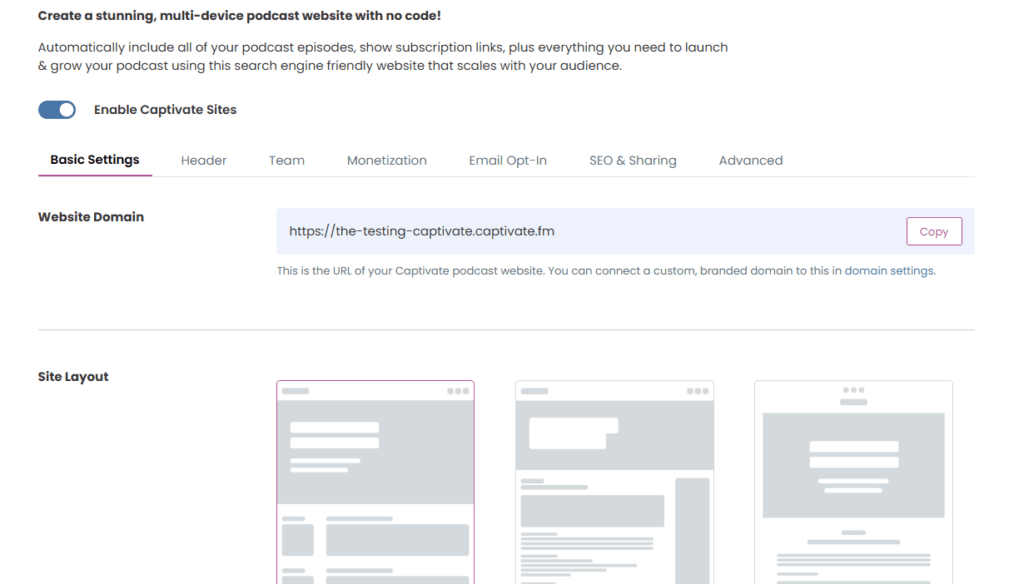
The limit is layouts. Captivate’s help guide offers three templates, and three is all I saw in the builder. They are clean, but sites built on them look alike. There is also a Captivate Sync WordPress plugin if you would rather run the show on your own WordPress site. Here is how it compares with other hosts in which podcast hosts include a free website.
How does distribution work, including Apple video?
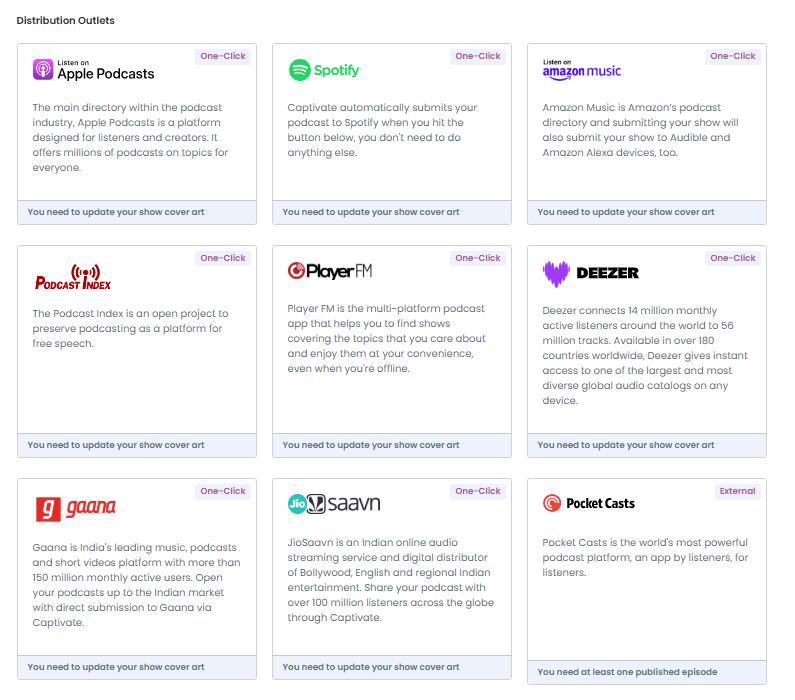
Distribution is a grid of outlets, and most are one click: Apple Podcasts, Spotify, Amazon Music, Podcast Index, Player FM, Deezer, Gaana, and JioSaavn, with others such as Pocket Casts marked external. Each card tells you what is still missing before it will submit, which on my fresh test show was cover art. Amazon’s card notes that submitting there also reaches Audible and Alexa devices.
Video to Apple Podcasts is a paid add-on. Captivate’s Apple video page prices it at $12 a month per podcast, with the first 1,000 HLS downloads included and bandwidth billed after that, and you can set safety limits to cap a surprise bill. Captivate published its launch-partner post on April 29, 2026. Its FAQ says video processes at 720p by default, 1080p needs a support request, and the video goes only to Apple, not Spotify or YouTube. Compare the options in the best host for video podcasts.
Can you add team members?
Yes, unlimited, on any plan, to a single podcast or a whole network. Captivate’s permissions tables list four podcast roles. Viewers see analytics and episode details. Publishers manage episodes, playlists, and marketing. Producers can also delete episodes and media and handle distribution and guest booking. Admins unlock monetization and can delete the podcast. Networks have their own set of roles, from Viewer and Marketer up to Admin, and only an Admin can create sub-networks. Invitees make a free Captivate login.
How hard is it to move a podcast to Captivate, or off it?
Moving in is an RSS import. Click Add New Podcast, choose to switch your podcast, and type the show’s name or paste its feed. Captivate sends a verification email to the address in your feed, and its import guide says the job takes minutes. You set the 301 redirect at your old host, and Apple and Spotify follow it on their own. Captivate recommends keeping the old account active for at least three weeks afterward.
Leaving is a built-in option, which is a good sign. In Podcast Settings, scroll down to Cancel Show, choose the Moving option, enter your new host’s RSS feed, tick the two disclaimers, and click Move Podcast. Download your analytics first, since Captivate says they do not transfer. Captivate’s cancellation guide says the feed gets a 301 redirect to your new one, but I could not find how long Captivate keeps that redirect running. The full process is in how to switch podcast hosts without losing subscribers.
What is Captivate’s support like?
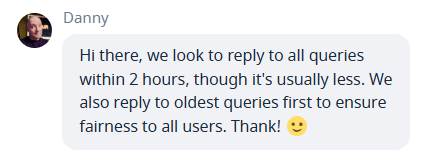
Human and reasonably quick. Live chat sits in the corner of the dashboard. Captivate’s support hours page says the team is available around the clock on weekdays, with an average reply time of two hours or less, and that weekend replies usually come within 24 hours. When I asked in chat, the agent said the same thing: replies within two hours, usually sooner, oldest questions first.
Beyond chat, there is email support, a private Facebook group for customers, and Growth Labs, Captivate’s growth program with an accountability community and live Q&A masterminds, included on every plan.
What are the downsides of Captivate?
The headline price assumes you pay for a year. The $17 Personal plan is $19 month to month, and there is no free plan, only the 30-day trial. For a show that just wants to exist, Buzzsprout is cheaper to start and easier to learn, as laid out in Captivate vs Buzzsprout.
The rest are smaller. The website has three layouts. Apple video is an extra $12 a month per show, metered past 1,000 downloads, and reaches Apple only. The marketplace does not publish its revenue share. The Campaign Management upgrade cannot be undone and, per the screen in my account, re-encodes your episodes. And the dashboard has a lot in it, from guest booking to research links, which some people love and others never open.
How do you cancel Captivate, and can you get a refund?
Close your shows first. Captivate’s cancellation guide says you must close any live show before the account can be canceled, either by moving it with a redirect or by deleting it. Deleting also removes it from Apple Podcasts, Spotify, and the rest. Then click your name at the top right, open My Account, go to the Billing tab, and click Cancel Account.
The refund answer is mostly no. Captivate’s terms, last updated April 30, 2026, say subscriptions renew automatically and that subscription fees are non-refundable once charged. The trial converts to a paid plan unless you cancel before it ends. UK consumers have a legal right to change their mind, with a refund within 14 days. Everyone else should cancel during the trial if they are unsure.
Export first. The terms make you responsible for backing up your files before the subscription ends, and say your content is deleted within 30 days after you stop using the platform.
Checked against Captivate’s help center and terms of service, September 2026.
How does Captivate compare with Transistor and Buzzsprout?
Against Transistor, it is close. Both host unlimited shows. Captivate includes ad insertion and 50,000 private subscribers on its cheapest plan, while Transistor keeps each show more cleanly separated and gates ads behind its $49 tier, as Transistor vs Captivate lays out. Against Buzzsprout, Buzzsprout is the simpler, cheaper first host for one show, covered in the Buzzsprout review. Captivate wins as soon as money or a second show enters the picture.
Verdict: who should use Captivate?
Get Captivate if you want to sell sponsors, need a private feed for more than a few hundred people, or run several shows and want every tool on the cheapest plan. Free insertion, certified stats, and 50,000 private seats make the $17 plan the most complete entry tier I have tested. It also wins on price in the best podcast host for multiple shows. Start a free Captivate trial and import a feed during the 30 days.
Skip it if you want to pay nothing, or you want the plainest possible dashboard for one hobby show. The honest downside is commitment: the good price needs a yearly bill, and once you are charged, Captivate’s terms say the money is not refundable.
FAQ
Is Captivate worth the money? For a show that plans to monetize, run private feeds, or add more shows, yes, because the $17 yearly-billed Personal plan includes every feature. For one small show with no plans to grow, a cheaper or free host does the same job.
Does Captivate have a free plan? No. Its pricing FAQ says it has no free plan, but every plan comes with a 30-day free trial with full access.
Are Captivate’s analytics IAB certified? Yes. Captivate lists IAB certified analytics on every plan and says it passed IAB Tech Lab Podcast Measurement 2.2 certification.
Does Captivate have an ad marketplace? Captivate launched Captivate Marketplace with DAX US in 2026. It is optional, and Captivate does not publish the revenue share.
What happens to my podcast if I cancel Captivate? You must move or delete each live show first. A moved show gets a 301 redirect to your new feed. Captivate’s terms say remaining content is deleted within 30 days of termination.