
Best Live Streaming Software for Podcasters (2026)
Last updated: October 2026
This post contains affiliate links, and we may earn a commission if you sign up through them, at no cost to you. See our Affiliate Disclosure. Pricing as of August 2026.
Get StreamYard if you want to run a clean live show in your browser and walk away with a solid recording, and get Restream if your priority is blasting that same broadcast out to a pile of platforms at once. Those are the two live-streaming tools worth paying for as a podcaster, and the pick comes down to whether you care more about the studio or the reach.
One honest thing before you spend a dime. These are video and live tools. If you run an audio-only show and you are not streaming it live anywhere, you probably do not need either of them, and buying one is money lit on fire. And even if you do stream, neither of these is a podcast host. They put your show on YouTube or Facebook in the moment and hand you a recording file, but distributing that episode to Apple Podcasts and Spotify afterward still needs a real host. I cover where the audio should actually live and how to choose a podcast host, and whether you need one at all if you only ever post to YouTube.
What does live streaming software do for a podcast?
It turns a browser tab into a broadcast studio. You bring in your guests by link, add lower thirds and your logo and a backdrop, and push the whole thing out live to YouTube, Facebook, LinkedIn, or wherever your audience already hangs out. At the same time it records, so the live stream doubles as your episode file.
That is the real appeal for a podcaster. You get the live event and the recording in one session, no separate capture step. People can watch you make the show, drop comments you read on air, and the finished video is sitting in your account when you wrap.
Where these tools split is emphasis. One camp is built around the studio itself, the on-screen look, the guest experience, the recording quality. The other camp is built around distribution, getting one feed onto as many destinations as possible without your upload choking. StreamYard and Restream sit on opposite ends of that line, which is exactly why the right answer depends on what you are optimizing for. YouTube keeps a plain-language rundown of what a live stream on YouTube actually requires if you want to sanity-check the destination side.
StreamYard vs Restream: which should a podcaster use?
Here is the short version in a table. Both annual prices below are the per-month rate when you pay for a year up front, which is how most people buy these.
| StreamYard | Restream | |
|---|---|---|
| Free plan | Yes, with StreamYard branding, 6 on-screen guests, 2 hours/mo local recording | Yes, streams to 2 destinations at once, with Restream branding |
| Entry paid tier | Core, $44.99/mo monthly or $35.99/mo annual | Standard, $19/mo monthly or $16/mo annual |
| Destinations at once (entry paid) | 3 | 3 |
| Max multistream destinations | 8 (Advanced tier) | 8 (Business tier) |
| Removes branding | Yes, from Core up | Yes, from Standard up |
| Recording | Unlimited on Core, 50 hours cloud storage, AI clips | 4K recording on Professional and up |
| Built for | The live studio and the recording | Multistreaming reach across platforms |
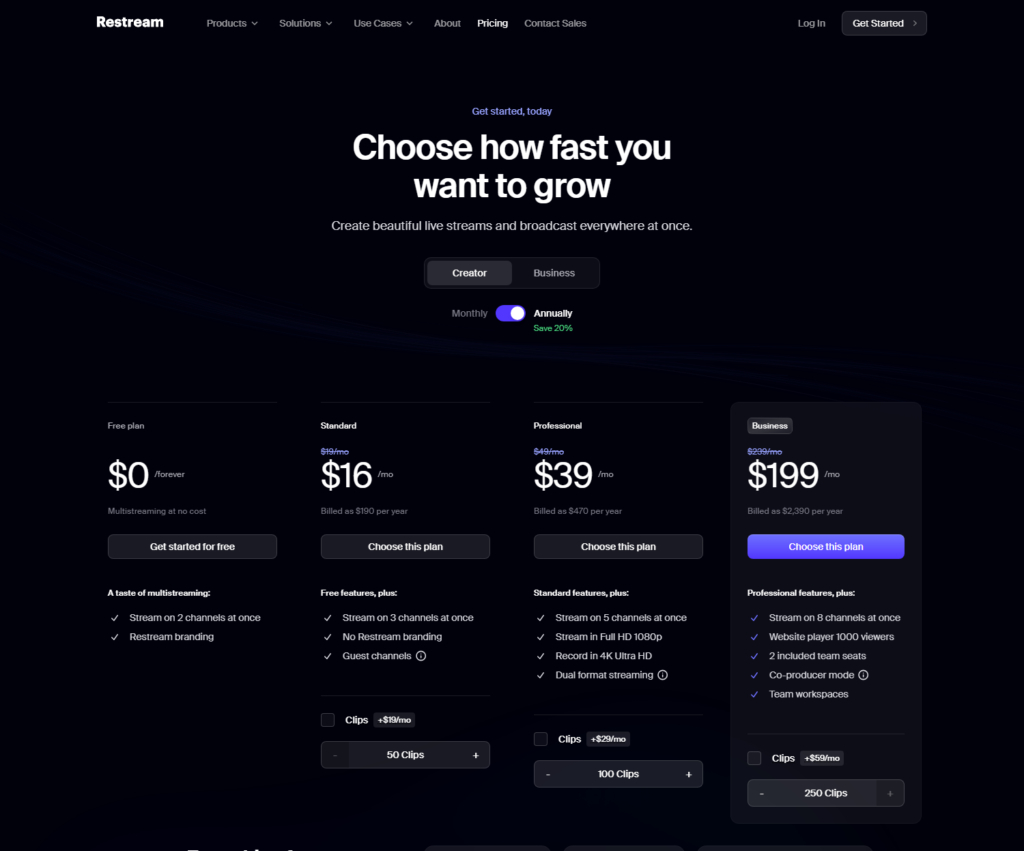
Two rows decide most of this. On price at the entry tier, Restream is dramatically cheaper, sixteen dollars a month against StreamYard’s thirty-six, for the same three simultaneous destinations. But StreamYard’s paid plan leads with the recording and the studio polish, where Restream treats those as things you climb tiers to unlock. So the cheaper multistreamer and the nicer studio are two different products, and you are picking which problem you have.
When is StreamYard the best live streaming software for podcasters?
When the show itself is the point, StreamYard wins. If you are recording a video podcast in the browser, interviewing guests, and you want the finished video to look clean without an editor, this is the one I reach for. The studio is the most polished in the category. Guests join from a link with no software to install, the layouts and branding are quick to set, and the recording that lands in your account is genuinely usable as your episode.
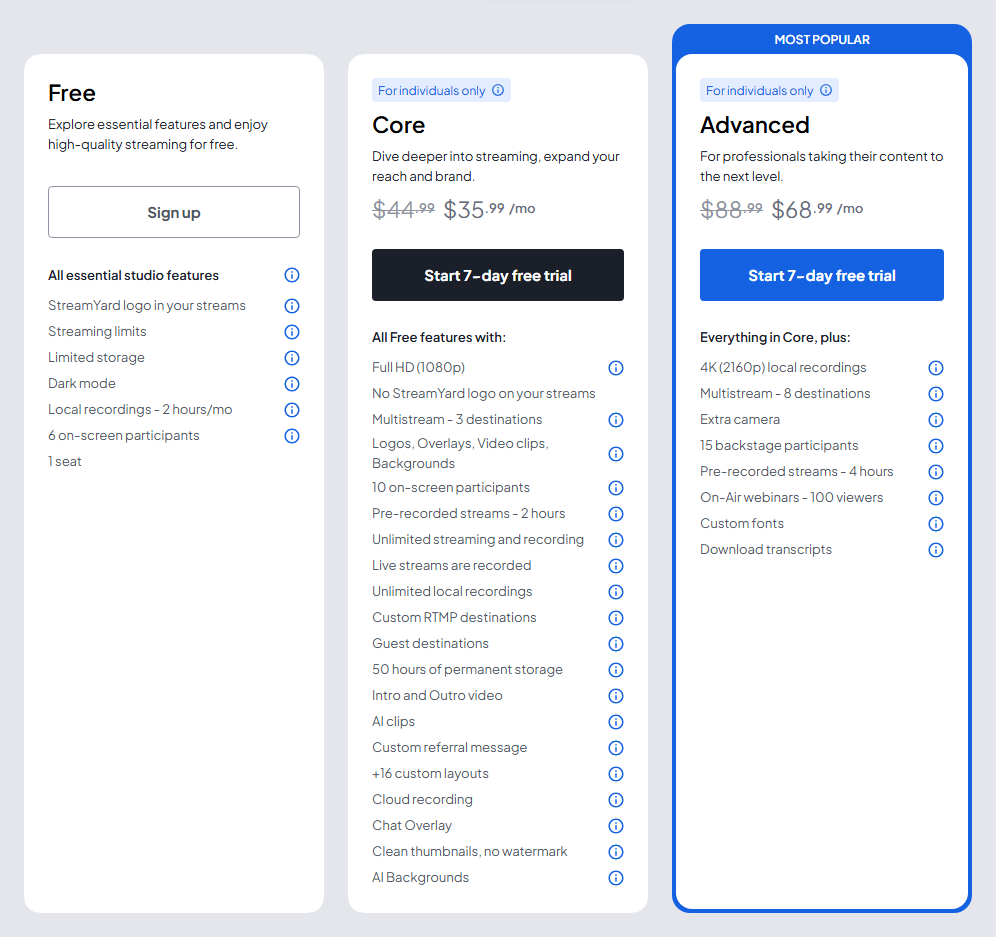
The paid entry tier is Core at $44.99 a month billed monthly, or $35.99 a month if you pay annually. That gets you 1080p, no StreamYard watermark, multistreaming to 3 destinations, unlimited streaming and recording, 50 hours of permanent cloud storage, and AI-generated clips for social, which are fine for a quick post but no match for a dedicated clip tool. The free plan is a real trial rather than a demo, but it stamps every stream with StreamYard branding and caps you at 2 hours of local recording a month, so anyone shipping regular episodes will outgrow it fast.
The downside to know going in: StreamYard is the pricier way to multistream. If reaching eight platforms at once is your whole reason for being here, you are paying for a studio you may not need, and Restream does the broadcasting job for less. If price is what has you looking around, our StreamYard alternatives guide compares Riverside, Restream, Ecamm Live, and OBS Studio by reason for leaving.
When should you choose Restream instead?
Choose Restream when reach is the job. Its entire identity is multistreaming, taking one feed and pushing it live to many destinations at once without your own upload buckling under the load. Even the free plan streams to 2 destinations simultaneously, and the $16-a-month annual Standard plan bumps that to 3 and strips the Restream branding. That is a serious amount of distribution for the money.
Restream does have a built-in Studio for hosting guests and going live in the browser, so it is not only a relay. But the studio experience and the higher-end recording sit further up the ladder. Full 1080p streaming and 4K recording arrive on the Professional plan at $39 a month annual, or $49 monthly, which also opens 5 simultaneous destinations and up to 10 on-screen guests. If you genuinely need to be everywhere at once, the Business plan reaches 8 destinations.
The honest catch: Restream’s cheap tiers are cheap because the studio and recording are not the headline. If your priority is a great-looking video episode rather than raw platform coverage, you will find yourself paying up to Professional to match what StreamYard gives you at Core, and StreamYard still feels more refined as a recording tool.
Do you still need a podcast host if you use one of these?
Yes, and this is the part beginners miss. StreamYard and Restream get your show onto YouTube and social in the moment and hand you a video or audio file when you finish. Neither one generates the RSS feed that Apple Podcasts, Spotify, and every other podcast app pull from. That feed, and the storage and download stats behind it, is what a podcast host provides.
So the realistic workflow is two tools doing two jobs. You stream and record the episode live in StreamYard or Restream, then you take the audio and publish it through your host, which distributes it to the podcast apps and counts the downloads. If you are recording remote guests and want the cleanest possible audio and video files to work from, a dedicated recording tool is worth a look too. Our guide on how to record a podcast remotely covers the three worth using. And for where the finished audio belongs, start with best podcast hosting for beginners.
Verdict: which live streaming tool wins for podcasters?
For most podcasters who want to run a live video show and come away with a recording they can publish, StreamYard is the one I would point you to. The studio is the best in the class, guests join without friction, and the recording is clean enough to be your episode with light editing. Its real weakness is price at the top end, where multistreaming to many platforms gets expensive, so go in knowing you are paying for the studio, not the reach.
Go with Restream instead when the goal is being live on as many platforms as possible for as little as possible. Its free and Standard tiers multistream further per dollar than anything else here, and that is the whole reason to pick it. Just know that the polished studio and the high-resolution recording live further up the pricing ladder, so a video-first creator may end up spending more than the sticker price suggests.
Either way, remember the tool that actually feeds the podcast apps is your host, not your streaming software. Sort that out first in how to choose a podcast host.
FAQ
Do I need live streaming software to record a video podcast? Not strictly, but it is the easiest path if you want to go live and record at the same time. StreamYard and Restream both let you host guests in the browser, brand the stream, and capture a recording in one session. If you never stream live and only want the cleanest remote-recording files, a dedicated recording tool is the better fit than a live-streaming studio.
What is the difference between StreamYard and Restream? StreamYard is built around the studio and the recording, so it is the pick for a polished live video show. Restream is built around multistreaming, pushing one feed to many platforms at once, and it does that far more cheaply. StreamYard costs $35.99 a month annually at its Core tier. Restream starts at $16 a month annually for its Standard plan.
Can I use the free plans for a real podcast? For testing, yes. For a show you publish on a schedule, the free plans get tight fast. StreamYard’s free tier brands every stream with its logo and caps local recording at 2 hours a month. Restream’s free plan multistreams to only 2 destinations and carries Restream branding. Both push you to a paid tier once you are serious.
Does StreamYard or Restream host my podcast? No. Neither one creates the RSS feed that Apple Podcasts and Spotify need, and neither stores your back catalog or counts downloads. They handle the live stream and the recording only. Distributing the finished episode to the podcast apps still requires a dedicated podcast host.






