
How to Move Off Libsyn Without Losing Subscribers
This post contains affiliate links, and we may earn a commission if you sign up through them, at no cost to you. See our Affiliate Disclosure. Checked against Libsyn’s help center and each host’s pricing page in October 2026.
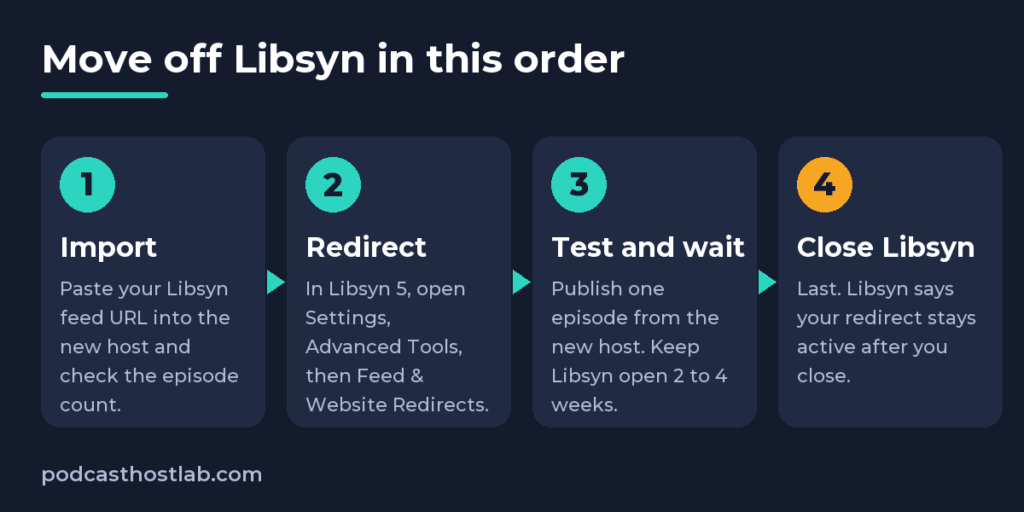
Import your show into the new host first. Then, in Libsyn 5, open Settings, then Advanced Tools, then Feed & Website Redirects, paste your new feed URL, and save. Keep your Libsyn account open until a fresh episode from the new host shows up in Apple Podcasts and Spotify, which means at least two weeks. Close Libsyn last. Do it in that order and your listeners follow you without noticing.
Libsyn has one thing going for you on the way out: its help center says a redirect you add stays active after you close the show. The wrinkle is a redirect problem Libsyn had earlier this year, which is why step 4 is a test.
Key takeaways
- Libsyn 5 adds a feed redirect under Settings, Advanced Tools, Feed & Website Redirects, and only the show owner can edit it.
- Libsyn’s help center says a redirect you set up stays active after you close the show, but your episodes and artwork leave your Libsyn account.
- Apple asks you to keep the 301 redirect and the new-feed-url tag in place for at least four weeks after a feed change.
- Libsyn only lets you download a stats report on the Advanced plan or higher, and your old analytics do not carry over to a new host on their own.
- Libsyn still pays pending Automatic Podcast Ads and PodRoll earnings after you close, but a balance under $20 is not paid out.
Will you lose subscribers moving off Libsyn?
Not if the redirect is in place before the show goes offline. Your subscribers sit in Apple Podcasts, Spotify, Overcast, and every other app. Each one checks the feed address it has on file, and a 301 redirect tells it that address moved for good. The apps update themselves.
What loses listeners is the order. Libsyn’s own closing page warns that after you close, your episodes disappear from podcast apps unless you migrated your feed. Resubmitting the show to Apple as if it were new is the other classic mistake, and Libsyn says it creates a duplicate listing.
Step 1: Copy your Libsyn feed URL and save what will not move
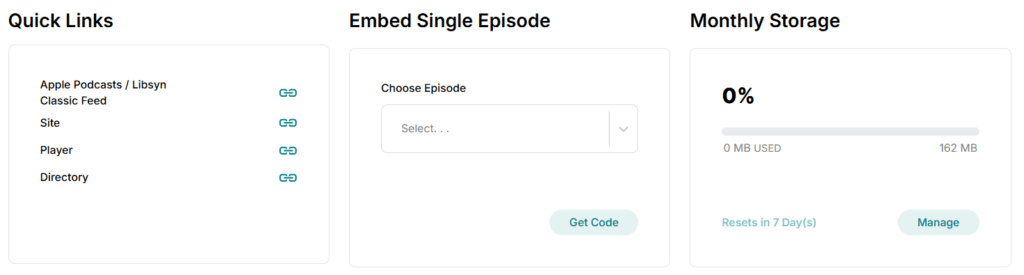
Sign in, open the Dashboard, scroll to Quick Links, and click the copy icon next to Apple Podcasts / Libsyn Classic Feed. That is your main RSS feed, and it is the address a new host asks for. Our Libsyn 5 dashboard walkthrough shows where that panel sits.
Then save what the new host cannot import on its own. Analytics do not carry over automatically, so a new dashboard starts at zero. Libsyn offers a stats report download with the Advanced plan or higher. Click Stats, then Download Report, pick the statistics you want, set the range to All Time, and export a CSV, XLSB, or PDF. Do it before you close, because Libsyn says you lose access to your content once the show is closed.
Download your final episode files too, and back up your show notes. Libsyn recommends both. On a lower plan with no report download, screenshot the Episode Totals table so you keep a record of your numbers. Some hosts can take those numbers back in, which the last section covers.
Step 2: Import the show into your new host
Paste that feed URL into the new host’s import tool. Every host in this guide pulls your episodes from the feed. Your Libsyn feed keeps working until you add the redirect, so there is no risk in doing this first, and importing before you redirect is the order Libsyn’s help center asks for.
Then check the import before moving on. The episode count should match exactly. Play your oldest and newest episodes and read one set of show notes. Apple also says to keep each episode’s original GUID, because altering it may result in duplicate episodes being shown to listeners. If that already happened, here is how to fix duplicate episodes after switching hosts.
Step 3: Add the redirect in Libsyn 5
You have to be the show owner. Click the gear icon to open Settings, click Advanced Tools, and in the Feed & Website Redirects row click Edit. Paste your new host’s feed URL into Feed Redirect URL and click Save. Per Libsyn’s redirect guide, that is the whole job on the Libsyn side. Transistor’s guide to forwarding a Libsyn feed says a redirect should be active within a couple of minutes.
The form has two other boxes. Website Redirect URL is for the Libsyn Podcast Website. Enter your new site address and visitors to the old Libsyn site get forwarded. Use New Feed URL Tag is marked not applicable, because it only matters when you are moving to Libsyn.
Apple wants one more piece, the itunes:new-feed-url tag. It goes in the new feed, not the old one, and Apple says to keep the tag and the redirect for at least four weeks. Apple adds that most hosts handle a migration through the redirect, so you do not need to do anything in Apple Podcasts Connect. The tag lives in your new host’s feed, so ask its support to confirm it is set.
Step 4: Test the redirect, because Libsyn had a bug this year
Open your old Libsyn feed address in a browser. It should land on your new host’s feed. That is the same check Transistor’s Libsyn guide uses.
Test more than one address, because Libsyn builds several feeds per show. Podnews reported in January 2026 that Libsyn had stopped offering redirects on some of them, the ones starting with rss.libsyn. In Podnews’s sample, more Libsyn shows were listed under those addresses than under the standard feeds.libsyn ones. Libsyn called it a temporary technical issue, and told Podnews in April that it had fixed it.
Load the Classic Feed address from Quick Links, and the feed address Apple Podcasts Connect shows for your show if you have a Connect login. Libsyn says the April fix worked, so confirm it on your own feeds. If any address fails to redirect, email support@libsyn.com before you cancel anything.
What about Apple Podcasts and Spotify?
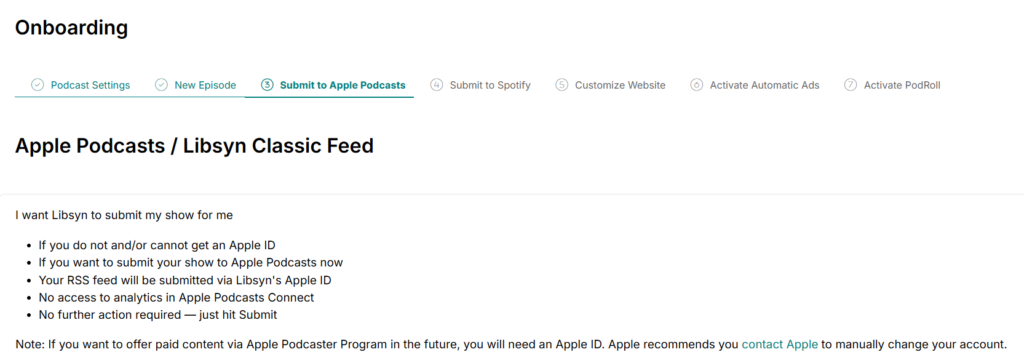
Start with who owns your Apple listing. If you let Libsyn submit your show to Apple Podcasts during setup, the listing sits under Libsyn’s Apple ID. Libsyn says to contact Apple Podcasts Support to transfer ownership to your own Apple ID, and not to resubmit the show. The Submit Show versus Link to Existing Show choice in our Libsyn 5 guide is what decides this.
Libsyn also warns that not every directory updates automatically after a redirect. A week later, search for your show in Apple Podcasts and Spotify, then publish one episode through the new host. If it appears in both without you touching either dashboard, the move worked. If a directory is stuck on the old feed, your new host can help with that one.
When can you close Libsyn?
After the test episode lands. Buzzsprout and Transistor both recommend waiting two weeks before deleting the old account, and Apple’s minimum for the redirect and tag is four. Libsyn says your redirect stays active after you close, so the account is not what holds it up. The wait is a safety margin for slow apps, and an extra month of Libsyn billing costs little.
To close, pick the show, open Billing from the upper-right menu, click Cancel Subscription, and choose Cancel Plan. Pause Show is a different option. It disables the show for up to three months and then restarts billing on its own. Closing stops future billing, and the show goes offline after the billing period ends.
Four things on Libsyn’s closing page catch people:
- The Libsyn player embedded on your website stops working, and Libsyn cannot remove the embeds for you.
- A custom domain set up through Libsyn cannot be managed after closing, so change it with your registrar first.
- Pending Automatic Podcast Ads and PodRoll payouts still go out, including the month you close, but a balance under $20 is not paid. You also cannot log in afterward to fix a payment problem, so update your payment details first.
- Billing is per show, so each show on your account has to be closed separately.
Where should you land?
It depends on why you are leaving. If the dashboard is your only complaint, you may not need to go. Learning where everything lives can fix that. If you are going, our Libsyn alternatives breakdown covers five hosts by reason. Three of them, with prices from each host’s pricing page in October 2026:
Transistor suits several shows or a cleaner dashboard. Starter is $19 a month for 20,000 downloads and unlimited shows, with a 14-day trial. To import, click Add show, paste your Libsyn feed, and Transistor emails you when it finishes. The downside is that there is no free plan. Start a Transistor trial.
Buzzsprout suits one show and the least friction. Audio is $15 a month billed yearly, with 72 upload hours a year. Its import copies a few episodes so you can preview the result, and once you upgrade it brings in the rest without counting them against your upload allowance, which helps with a big Libsyn archive. You can also add your Libsyn episode totals by hand. The downside is that the Audio plan covers one show, and a heavy publisher can hit the hours ceiling. See Buzzsprout’s plans.
Captivate suits a show that wants built-in dynamic ad insertion. Personal is $17 a month paid yearly, or $19 month to month, for 30,000 downloads and unlimited podcasts, with a 30-day free trial. Its help center lists importing from another host under Getting started, and its analytics migration tool takes a CSV of your old host’s download history into a Legacy Analytics section. The downside is that the $17 needs annual billing, and there is no free plan. Start a Captivate trial.
How to switch podcast hosts without losing your subscribers covers the redirect logic that applies to any host.
Frequently asked questions
Does the Libsyn redirect keep working after I cancel?
Yes, per Libsyn. Its help center says the redirect you set up stays active after you close the show, so directories still reach your new feed. Your episodes and artwork do not stay. Close only after your new host has everything.
Can I add the redirect after I already closed my Libsyn show?
Possibly, but you have to ask. Libsyn’s closing page says you can rejoin within a year by contacting support, and Transistor’s guide says Libsyn will still enable a 301 redirect on request even if you no longer have an account. Email support@libsyn.com, and do not resubmit the show to Apple as a new one.
Will I lose my download stats when I leave Libsyn?
Not if you export them first, though they will not show up in a new dashboard on their own. Analytics do not carry over automatically. Libsyn’s report download needs the Advanced plan or higher, and you lose access to Libsyn once the show is closed. Buzzsprout lets you add episode totals by hand, and Captivate has a CSV import for your old numbers.
Where is the redirect setting in Libsyn 5?
Click the gear icon for Settings, then Advanced Tools, then Edit in the Feed & Website Redirects row. Paste your new feed into Feed Redirect URL and save. Only the show owner can edit it, and older guides that say Settings, then Redirects were written for an earlier layout.






