Podcast Trailer: How to Make One That Gets Episode Plays
This post contains affiliate links, and we may earn a commission if you sign up through them, at no cost to you. Buzzsprout is one of them. See our Affiliate Disclosure. Platform rules as of October 2026, read in Apple’s and Spotify’s help pages on October 20.
A trailer that gets plays while episode 1 gets none is usually a setup problem, not a quality problem. Mark the file with the Trailer episode type, set the show type to Serial if your show is a story told in order, and end the trailer on one instruction. Apple and Spotify each publish rules for how they treat it.
Key takeaways
- Apple Podcasts describes the Trailer episode type as a short promotional preview of your current show, and it shows a feed’s trailer to help listeners find new shows.
- On Apple Podcasts an episodic show lists the newest episode first and shows the oldest trailer, while a serial show lists episode 1 first and shows the latest season’s trailer, then falls back to the oldest.
- Apple makes episode numbers mandatory for serial shows and optional for episodic shows, and its advice for serialized shows is to set the type to Serial, add episode and season numbers, and include a trailer.
- Spotify says a trailer appears at the top of the show page, and a show hosted elsewhere sets one in Spotify for Creators by choosing an existing episode.
- No platform sets a trailer length. Podbean’s help page says under two minutes, and Transistor says trailers usually run 30 seconds to 5 minutes.
- Spotify says most analytics update every 15 minutes but some metrics can take up to 48 hours, so check episode 1’s numbers again two days after launch before changing anything.
What is a podcast trailer, and where does it show up?
A trailer is an episode in your feed with the episode type set to Trailer. Apple’s Create an episode page lists three types, Full, Bonus, and Trailer, and describes a trailer as a short promotional preview of your current show. Apple’s guidance on episode order adds that when a feed has a trailer, the app shows it to help listeners find new shows.
Spotify puts it at the top of the show page, according to its trailer help article. Apple does not say where on the page, and hosts disagree. Buzzsprout’s help says the trailer sits at the top of the Apple listing for people who have not subscribed, while Transistor says it sits near the bottom, above ratings and reviews. Plan on it being seen, not on where.
Why does a podcast trailer get plays but the episodes get none?
Check six mechanical causes before you rewrite the script. We cannot see your stats, but each of these takes a few minutes to rule out. For a story show, the likely culprit is a show page that opens on the wrong episode and a trailer that never says where to go.
- The stats have not caught up. Spotify says most analytics update every 15 minutes but some take up to 48 hours. Look again in two days.
- Episode 1 is not live. Apple calls a trailer a preview of your current show. A trailer for a show that has not launched has nothing to send listeners to.
- The show page opens on the wrong episode. An episodic show lists the newest episode first. In a story, that is the wrong place to start. A serial show lists episode 1 first.
- Your promotion links to the trailer. If a shoutout or newsletter points at the trailer, the trailer is what people play. Link to episode 1 instead.
- The trailer ends without a next step. A listener who liked it needs an instruction, and a logo is not one.
- The file is typed Full. A trailer published as a regular episode is one more item in the list.
Should a story show be serial or episodic on Apple Podcasts?
Serial if listeners should start at episode 1, episodic if they can start anywhere. Apple’s best-practices page says an episodic show is displayed with the newest episode at the top, and a serial show with the first episode at the top. Serial shows can be grouped into seasons, and the newest season shows by default.
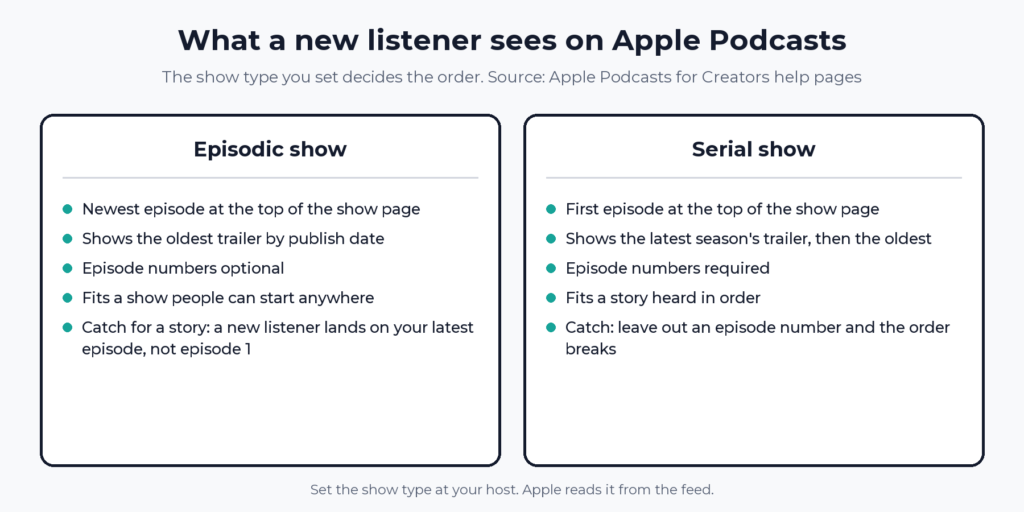
| Episodic | Serial | |
|---|---|---|
| Order on the show page | Newest episode first | First episode first |
| Trailer Apple shows | The oldest trailer by publish date | The latest season’s trailer, then the oldest |
| Episode numbers | Optional, encouraged | Mandatory |
| Fits | A show people can start anywhere | A story heard in order |
Apple’s advice for serialized shows is to set the show type to Serial together with episode and season numbers, remove episode numbers from titles, and include a trailer. Interview and news shows are usually fine as episodic. Apple lists the two types in opposite orders, so expect the show page to change if you switch an existing show. Decide before launch.
How do you set the Trailer episode type?
In your host’s episode settings, before you publish. The wording differs by host.
- Buzzsprout: the episode type is on the episode details page.
- Transistor: choose Trailer as the episode type when you upload.
- Podbean: open More Episode Settings in the publish window, find the iTunes episode type field, and choose Trailer.
- Spotify for Creators, for a show hosted on Spotify: set the Episode type to Trailer under Additional details when you create the episode.
- Spotify for Creators, for a show hosted elsewhere: you cannot upload a trailer there. Go to Settings, choose the trailer option, pick an existing episode, and select Set Trailer.
Spotify suggests short episodes as trailer candidates and offers longer ones from All Episodes. Transistor also suggests backdating the trailer to a date before episode 1, so existing subscribers are not alerted to a new episode. That is Transistor’s tip. Apple’s pages do not mention it.
If your host has no episode type field, the setting lives in the feed as the itunes:episodeType tag. Our RSS feed guide explains how the feed carries it.
How long should a podcast trailer be, and what should it say?
No platform sets a length. Podbean’s help page says under two minutes and Transistor says 30 seconds to 5 minutes. For a story show, 60 to 90 seconds is enough for the premise, one taste, and the next step. That range is our recommendation, not a platform rule.
A five-part script that fits:
- The hook. The strangest or most urgent line in the show, in the first five seconds.
- The premise. One sentence on what the show is.
- Who it is for. One sentence, so the right listener recognizes themselves.
- A taste. 10 to 20 seconds of the best moment, in the show’s own voice.
- The next step. Exactly one instruction.
For a fiction show, the next step might read: “Episode one is out now. Open the show, press play on the first episode, and tell us what you heard.” It names the episode and the action and nothing else. Skip “subscribe, rate, review, and follow us everywhere.” Four asks at once give a listener four ways to do nothing.
How do you get listeners from the trailer to episode 1?
Make the path one step long. The checklist below covers the settings, and the list under it covers what you say and link.
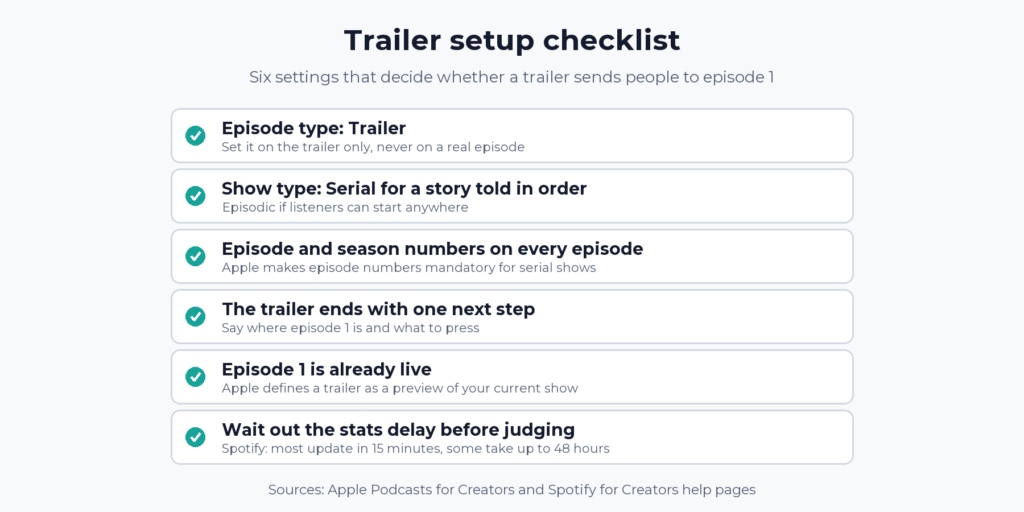
- Say it in the audio. Name episode 1 and where it is. For a serial show on Apple, it is the first episode at the top of the show page. For an episodic show, say the title.
- Link it in the description. Our guide to podcast show notes covers what belongs there.
- Point outside promotion at episode 1. A newsletter or social post that links the trailer sends the plays to the trailer.
- Number the episodes. Serial requires it.
- Watch episode 1, not the trailer. Reading your podcast analytics explains which numbers to trust.
Which setup should you use?
A fiction or narrative show: Serial, numbered episodes, and a 60 to 90 second trailer that ends on “press play on episode one.” The downside: every episode needs a number, forever.
An interview or news show: Episodic, with a trailer only if you have a clear premise. End it by naming your best episode. The downside: Apple lists the newest episode first, so you cannot control where a new listener starts.
A show hosted elsewhere and promoted on Spotify: keep your host and pick the trailer in Spotify for Creators settings. The downside: it must be an existing episode, not a separate upload.
What are the catches with a podcast trailer?
- It does not promote itself. A trailer sits on your show page, so a listener has to reach the page first.
- Placement is unclear on Apple. Apple’s pages say it shows the trailer but not where, and two hosts describe different positions.
- Trailer plays are not listeners. Episode 1’s numbers show whether anyone continued.
- Serial means numbering everything. Apple makes episode numbers mandatory for serial shows, and a missed number breaks the order.
- Switching types reorders the page. Apple lists the two types in opposite orders.
If you are still choosing a host, our best podcast host for beginners and how to choose a podcast host guides cover what to compare. Buzzsprout and Transistor both list an episode type setting, which is the one feature this article needs.
FAQ
Why does my podcast trailer have plays but my episodes don’t?
Usually one of six mechanical causes: stats that have not refreshed, episode 1 not live, a show page that opens on the wrong episode, promotion that links to the trailer, a trailer with no next step, or a file typed Full. Check them in that order. Spotify says some analytics take up to 48 hours to refresh.
Does a podcast trailer count as an episode?
It is published like one, with the episode type set to Trailer, and Apple shows it as the show’s trailer. It is not one of your numbered episodes.
Do I need a trailer for each season?
Not required. For a serial show, Apple presents the trailer for the latest season, then falls back to the oldest trailer. A new season’s trailer takes over once that season is the latest.
How long should a podcast trailer be?
Platforms set no limit. Podbean says under two minutes. Transistor says 30 seconds to 5 minutes. We suggest 60 to 90 seconds for a story show.
Can any episode be my trailer on Spotify?
If your show is hosted elsewhere, yes. Pick an existing episode in Spotify for Creators settings. Spotify suggests short episodes and lets you choose a longer one from All Episodes.