quso.ai Pricing 2026: Plans, Credits, and Is It Worth It?
Last updated: November 2026
This post contains affiliate links, and we may earn a commission if you sign up through them, at no cost to you. quso.ai is one of them. See our Affiliate Disclosure. Pricing as of November 2026, read on quso.ai’s pricing page and credits article on November 3 and its FAQ and help center on October 20.
quso.ai Essential is the plan to price a weekly video podcast against: $39 a month for 300 credits, enough to process five hour-long episodes, and paying for a year no longer saves anything, at $468. Lite’s 100 credits cover one episode, and Free is a one-episode test. Some visitors see a test pricing page instead, where 400 credits cost $30 a month. Two catches decide it for podcasters. quso takes video files, not MP3s, and it says every plan is non-refundable.
Every limit below is quso’s own wording from its pricing page, FAQ, and help center, read on October 20, 2026, with the pricing page and credits article re-read on November 3. Every cost-per-episode figure is our arithmetic on those published numbers.
Key takeaways
- quso.ai Lite costs $29 a month billed monthly or $348 a year billed yearly, and includes 100 credits a month.
- quso.ai Essential costs $39 a month billed monthly or $468 a year billed yearly, and includes 300 credits a month and scheduling to 7 platforms.
- quso.ai Growth costs $49 a month billed monthly or $588 a year billed yearly, and includes 600 credits a month, a brand kit, and social analytics.
- quso.ai ended its half-price yearly offer by November 3, 2026, so a year now costs exactly twelve monthly payments on every plan.
- quso.ai charges 1 credit per minute of video you upload, rounded up, so a 60-minute episode costs 60 credits no matter how many clips it produces.
- quso.ai says monthly and annual plans are both non-refundable, though it will reimburse credits for processing that failed or disappointed you.
- quso.ai’s help center lists only MP4, MKV, MOV, and WebM uploads, so an audio-only episode needs a video version first.
How much does quso.ai cost in 2026?
Four plans: Free, Lite, Essential, and Growth. A fifth, Plus, exists only in a phone browser and is covered below. Yearly billing now costs exactly twelve monthly payments on every plan. In October the same page said “Save 50% with yearly billing”, and that offer has ended. The numbers come from quso’s pricing page, read on November 3, 2026. The per-month column is our division.
| Plan | Billed monthly | Billed yearly | Per month on yearly (our math) | Credits a month | Storage |
|---|---|---|---|---|---|
| Free | $0 | $0 | $0 | 75 | 7 days of data retention |
| Lite | $29 | $348 a year | $29 | 100 | 10GB |
| Essential | $39 | $468 a year | $39 | 300 | 25GB |
| Growth | $49 | $588 a year | $49 | 600 | 75GB |
Did quso.ai change its prices?
Yes, twice in three weeks. When we read the page on October 12, yearly billing saved about a third (Essential was $26 a month billed yearly) and the page doubled the credits on yearly plans. On October 20 it said yearly billing saved 50 percent and printed Essential at $234 for the year. By November 3 that offer had ended, and a year cost twelve monthly payments, $468 for Essential.
quso is also testing a second pricing page. Instead of named plans, it sells credits by the month: 150 for $14, 400 for $30, 1,000 for $50, or 2,500 for $98, at the same price monthly or yearly. That page says every plan has all features and that credits never expire while you stay subscribed. We saw both versions on November 3, so the one you get may differ. If you get the test page, 400 credits for $30 a month beats Essential’s 300 for $39.
The credit side is less clear. quso’s credits article says yearly subscribers receive credits for all 12 months at the start, and gives no number. Its plans article describes Growth as 600 to 1,800 monthly credits, which the pricing page does not show. Until quso says which is current, plan around the listed monthly figure. If extra yearly credits are the reason you want a year, email help@quso.ai before you pay.
What is a quso.ai credit, and how far does a plan go?
One credit is one minute of the video you upload. Per quso’s credits article, partial minutes round up, so a video of 25 minutes 40 seconds costs 26, and anything under a minute costs 1. Credits are spent at upload. After that, quso says you can edit, publish, and download clips without spending more. A 60-minute episode therefore costs 60 credits whether it yields 5 clips or 25, and quso shows the cost before processing starts.
| Plan | Credits a month | 60-minute episodes covered | Cost per episode, billed monthly | Cost per episode, billed yearly |
|---|---|---|---|---|
| Free | 75 | 1, with 15 credits left | $0 | $0 |
| Lite | 100 | 1, with 40 credits left | $17.40 | $17.40 |
| Essential | 300 | 5 | $7.80 | $7.80 |
| Growth | 600 | 10 | $4.90 | $4.90 |
The last two columns are the plan price divided by its credits, times 60, and they assume you spend every credit. They match because a year now costs twelve monthly payments. A weekly 60-minute show uses 240 credits in a four-week month and 300 in a five-week one, so Essential fits it with nothing to spare in the long month. A weekly 90-minute show uses 360 to 450, which is Growth territory. Lite only suits a monthly show.
Unused credits do not carry over. Base-plan credits expire at the end of each subscription period, so monthly credits do not roll into the next month and annual credits reset after 12 months. Add-on credits are the exception. quso’s help center prices them at $0.15 each, says the price can vary by region, and says they never expire. At that rate a 60-minute episode costs $9.00 in top-up credits, our math.
What does the quso.ai Free plan include?
75 credits a month, 720p renders, chapters and short videos, publishing to TikTok, CutMagic (its automatic scene-layout tool), and 7 days of data retention, per the pricing page. quso’s billing article says you do not need a card to use it, and its import article caps Free uploads at 5GB per file against 15GB on paid plans. One more condition: quso’s FAQ says some countries get the free plan and others buy one-time credit packs with no subscription.
Our September 22 test of the Free plan, on a Creative Commons interview video, shows what that tier leaves out. The player carries a prompt to remove the watermark, and quso’s plans article describes Lite exports as watermark-free. The transcript panel asked for an upgrade to Growth. The pricing page does not list transcripts by plan, and the prompt may have changed since that test, so check it before you rely on it.
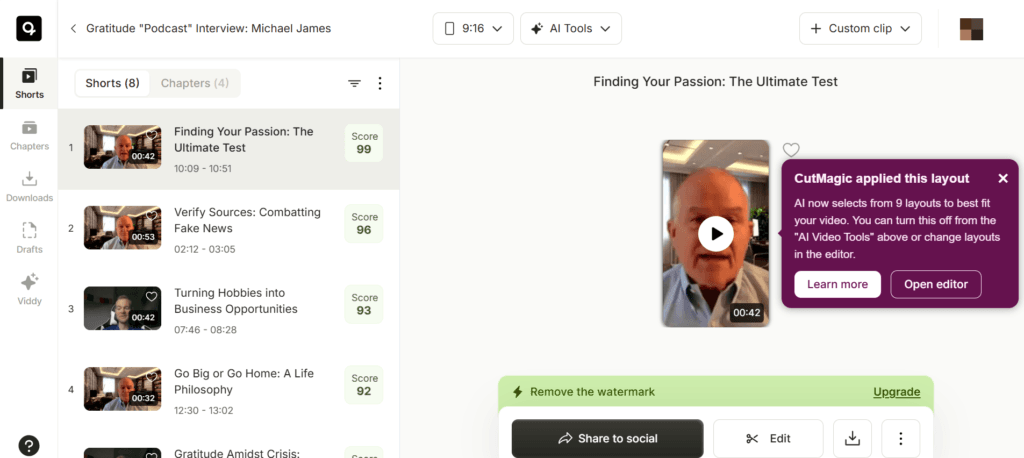
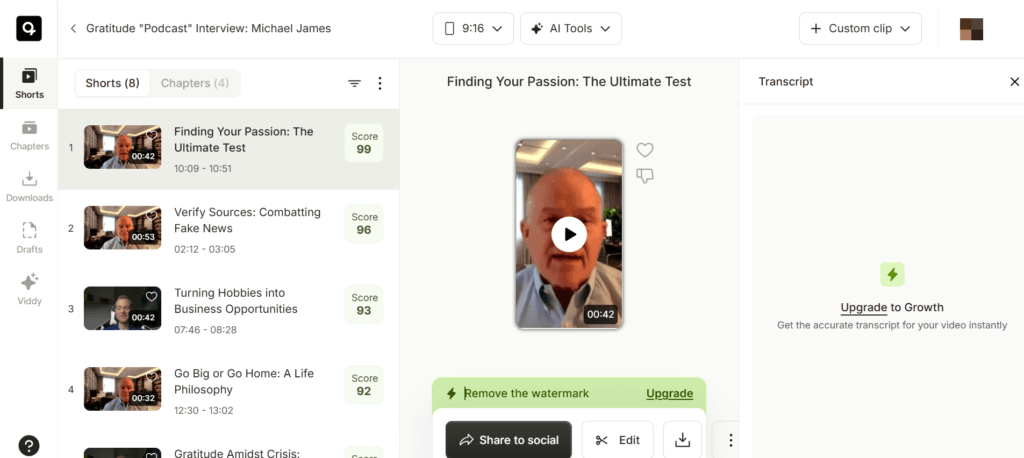
Test video: Gratitude “Podcast” Interview: Michael James by David George Brooke, licensed under CC BY.
The results screen is what the credits buy: short clips ranked best first, each with a score. Treat the score as a sort order, not a forecast. A person still has to watch the clips before anything is posted.
What do Lite, Essential, and Growth add for a podcaster?
Lite removes the 720p cap with unlimited 1080p clips, adds the advanced desktop editor, exports in 16:9, 9:16, and 1:1, and gives 10GB of storage. Per quso’s plans article, Lite publishes and schedules to TikTok only.
Essential adds scheduling to 7 platforms (TikTok, Instagram, YouTube, LinkedIn, Facebook, Pinterest, and X), AI filler and silence removal, a content planner, the option to upload your own finished posts and schedule them, and 25GB of storage.
Growth adds a custom brand kit with logos, colors, and fonts, unlimited branded video templates, the Viddy AI content assistant, social media analytics, priority support, and 75GB. quso points teams here, and its help center says only the team owner can buy the plan and that credits are shared across members.
Plus is a phone-browser plan with 75 credits a month (900 a year), no watermark, 1080p exports, and 10GB, and it has no social account connections. The help center prints no price for it.
Can quso.ai process an audio-only podcast?
Not as an MP3. quso’s import article lists four upload formats, MP4, MKV, MOV, and WebM, and says an upload fails if the file is anything else. Its video length article sets a 5-hour limit and says a video without spoken words will likely not process. You can import from YouTube (public or unlisted links), Google Drive, Box, or your computer. Zoom is listed as coming soon.
The articles we read do not mention audio-only files at all. If your show is audio, export a video version from your recorder first, or test one short file before you pay. Our best podcast clip tool roundup covers tools built to take audio.
What are the catches in quso.ai pricing?
- Video only. No audio formats are listed for upload.
- Credits expire. Monthly plans do not roll over, and annual credits reset after 12 months.
- Yearly billing saves nothing. A year costs twelve monthly payments and cannot be refunded, so there is no reason to pay for one up front.
- Lite posts to TikTok only. The other six platforms start on Essential.
- No API. quso’s help center says it does not offer one at the moment.
- Cards only. Payments run through Paddle by credit or debit card, and the currency is set by your location.
- The free plan depends on your country. Some regions get one-time credit packs instead.
How do you cancel quso.ai, and can you get a refund?
Open Billing and Plans, choose Cancel Plan, and the plan stays active until the billing cycle ends, per quso’s general FAQ. The same FAQ says monthly plans are non-refundable and annual plans are non-refundable. On yearly billing, the whole $468 for Essential is a 12-month commitment. quso says to contact help@quso.ai if you want to ask anyway.
Credits are the softer spot. Per quso’s credits article, credits spent on a video that failed to process come back automatically, and if you are unhappy with the output you can email help@quso.ai and quso says it will reimburse the credits. Downgrades take effect at once, and quso says the cost difference is credited toward your next billing cycle.
How does quso.ai pricing compare with Opus Clip?
On the numbers, Opus Clip Pro is cheaper per credit. The table uses quso’s pricing page and Opus Clip’s pricing page, both read on November 3, 2026. Each tool counts one credit per minute of video you upload.
| Tool and plan | Billed monthly | Billed yearly, per month | Credits a month |
|---|---|---|---|
| quso.ai Lite | $29 | $29 | 100 |
| quso.ai Essential | $39 | $39 | 300 |
| quso.ai test page, 400 credits | $30 | $30 | 400 |
| Opus Clip Starter | $15 | Not offered | 150 |
| Opus Clip Pro | $29 | $14.50 | 300 |
At 300 credits, quso Essential costs $24.50 a month more than Opus Clip Pro on yearly billing and $10 more on monthly billing. quso’s test page comes closer: 400 credits for $30 a month is $1 more than Opus Pro’s monthly price for 100 more credits, but a year of Opus Pro, $174, is less than half the $360 quso charges for a year of 400 credits. Opus Pro also lists filler and silence removal and a scheduler, so the extras that Essential adds are not unique. Neither tool refunds a yearly purchase. Our Opus Clip pricing guide covers its credits, rollover, and refund terms, and Opus Clip vs Descript covers the third common choice.
Is quso.ai worth it for a podcast?
For a video podcast, as a free first pass, yes. As a paid plan it is harder to justify now. Essential is $39 a month, about $7.80 of credit per hour-long episode by our math, and paying for a year no longer brings that down. The test page’s 400 credits for $30 work out to about $4.50 an episode. The Free plan still lets you run one real episode before you pay. The scores give you a sorted shortlist, and a person still picks.
It is the wrong tool for an audio-only show, since no audio formats are listed. It is poor value at the Lite tier, where $29 a month buys one episode of credits while Opus Clip Starter sells 150 credits for $15. And on pure cost, Opus Clip Pro billed yearly is $14.50 a month for the same 300 credits Essential sells for $39. The downsides to weigh are the missing yearly discount, the no-refund rule, and the video-only imports. If it is not the right fit, our quso.ai alternatives guide covers the other tools.
Which quso.ai plan should you buy?
Testing one episode: the Free plan, 75 credits and no card. Try quso.ai free. The downside: 720p, a watermark prompt, 7 days of data retention, and availability that depends on your country.
A monthly video show: stay on Free if 720p and a watermark are acceptable. Lite, $29 a month, is the only paid plan sized for one episode, and paying $348 for a year saves nothing. The downside: it posts to TikTok only, and Opus Clip Starter sells 150 credits for $15.
A weekly 60-minute video show: Essential at $39 a month, or the test page’s 400 credits for $30 if quso shows it to you. Pay monthly, since a year costs the same and cannot be refunded. The downside: Essential’s 300 credits leave nothing spare in a five-week month.
Longer episodes, a brand kit, or a team: Growth, $49 a month or $588 a year, for 600 credits. The downside: you pay $10 a month more than Essential for a brand kit and analytics a solo podcaster may not use.
An audio-only show: not quso.ai without a video version. See the alternatives guide.
FAQ
How much is quso.ai per month?
Lite is $29 a month, Essential is $39, and Growth is $49, and a year costs twelve monthly payments ($348, $468, and $588). Free costs nothing. Some visitors see a test pricing page that sells 150 credits for $14 a month up to 2,500 for $98.
Is quso.ai free?
There is a Free plan with 75 credits a month, 720p renders, and TikTok publishing, and it needs no card. quso’s FAQ says some countries get one-time credit packs instead of the free plan.
What is a quso.ai credit?
One credit is one minute of uploaded video, rounded up to the next minute. A 60-minute episode costs 60 credits, and credits are not spent again when you edit, publish, or download clips.
Does quso.ai offer refunds?
quso’s FAQ says monthly and annual plans are non-refundable. It says failed processing is refunded automatically in credits and that it will reimburse credits if you are unhappy with the output.
Is quso.ai the same as Vidyo.ai?
Yes. quso’s brand update page says Vidyo.ai became quso.ai in January 2025, and that existing plans, prices, and credits carried over unchanged.
Does quso.ai have an API?
Not at the moment, according to its help center, which invites you to contact support to register interest.
Checked against quso.ai’s pricing page, FAQ, and help center articles on credits, plans, billing, imports, video length, upgrades, and the general FAQ, plus Opus Clip’s pricing page, October 20, 2026. quso.ai’s pricing page and credits article and Opus Clip’s pricing page re-read November 3, 2026.