Descript Alternatives: 5 Podcast Editors Worth Switching To
Last updated: October 2026
This post contains affiliate links, and we may earn a commission if you sign up through them, at no cost to you. See our Affiliate Disclosure. Pricing as of September 2026.
Leaving Descript? Pick by the reason. Want to edit by transcript for free? Adobe Podcast. Want to pay nothing, ever? Audacity. Guests sound like a bad phone call? Riverside. Want one beginner tool that also hosts the show? Alitu. Only need clips? Opus Clip. And if you edit a spoken show every week and mostly hate the meters, Descript may still be your best editor on a different plan.
Key takeaways
- Descript Hobbyist costs $16 a month per person billed yearly, includes 10 media hours and 400 AI credits a month, and cannot buy top ups when either runs out.
- Adobe Podcast’s free plan includes transcript-based editing in Studio, but free projects are capped at 30 minutes and 2 downloads a day.
- Audacity is free and open source on Windows, Mac, and Linux, and it edits on a waveform, not a transcript.
- Riverside Pro costs $24 a month billed yearly and includes unlimited text-based editing, filler-word removal, and 15 hours of separate-track downloads a month.
- Alitu costs $38 a month with free hosting up to 1,000 downloads a month, but its call recorder puts every voice on a single track.
- Opus Clip charges 1 credit per minute of source video, so it replaces Descript’s clip tool, not the editor.
Why do people leave Descript?
Mostly the meters. Descript’s pricing page gives Hobbyist 10 media hours and 400 AI credits a month for $16 per person billed yearly, or $24 month to month. Media hours count everything you upload or record, whether you use it or not. Credits pay for Studio Sound, filler removal, Underlord, and the other AI tools. Both reset each cycle, and nothing rolls over.
What pushes people out is on the top-up page: extra hours and credits are sold only on Creator and Business. A Hobbyist who runs dry mid-month waits or upgrades. Creator is $24 billed yearly, or $35 month to month, and every price is per person, so a co-host who edits is a second seat. The refund policy allows 48 hours from the invoice date, which is no help on a yearly plan you regret.
Then there is speed on big projects. Trustpilot and Capterra reviewers both describe freezes, crashes, and lost edits. On credits, Trustpilot reviewers say they drain fast on simple jobs, and a Capterra reviewer reports credits spent on AI generations that never finished. Descript’s own performance help page concedes that projects with several gigabytes of files or long compositions slow the editor. As of September 25, 2026, Descript held 2.7 out of 5 from 288 reviews on Trustpilot and 4.6 out of 5 from 183 on Capterra, so plenty of people are happy too. Our Descript review covers both sides.
The learning curve is a smaller push. If you can edit a document, day one is easy. The vocabulary of compositions, scenes, layers, and sequences takes longer, and it bites the first time you build a multitrack interview.
Which Descript alternatives should you compare?
Five tools cover the main reasons people leave. Every price below came off the vendor’s own page on September 25, 2026. Look at the fourth column first. Editing by transcript is what Descript sells, and only some of these do it.
| Tool | Free plan | Entry paid price | Edits by transcript | Pick it for |
|---|---|---|---|---|
| Descript | 1 media hour a month, 100 AI credits one time, watermarked video | Hobbyist, $16/mo billed yearly or $24 monthly, per person | Yes | Baseline: text editing plus AI cleanup |
| Adobe Podcast | Yes, Studio projects up to 30 minutes, 2 downloads a day | Premium comes with Adobe Firefly Pro, US$19.99/mo | Yes, in Studio (beta) | Free text editing and speech cleanup |
| Audacity | Free, open source, no caps | None, it stays free | No, waveform only | Spending nothing |
| Riverside | No free plan, a 14-day trial | Pro, $24/mo billed yearly or $35 monthly | Yes | Recording remote guests, then editing |
| Alitu | No free plan, a 7-day trial | $38/mo, or $380 a year | Yes, plus a waveform | Beginners who want hosting included |
| Opus Clip | 60 credits a month, watermarked clips | Starter, $15/mo, monthly only | Clip editing only, from Starter | Short clips from a finished video |
Nothing here copies all of Descript. It is the only tool on the list with transcript editing, AI voice clones, remote recording, clips, and a full video editor on one plan. Each alternative wins by doing one of those jobs for less, or by doing it without a meter.
Is there a free Descript alternative that edits by text?
Yes, Adobe Podcast, with one big limit. Adobe’s plans page ticks transcript-based editing on the free plan. You cut, copy, and paste audio like a text document in Studio, which Adobe still labels beta. Free Studio recording is unlimited, and Adobe says it captures each person as a separate 16-bit, 48 kHz WAV track. Since a March 2026 update, you can also upload separate tracks from Zoom, Riverside, or StreamYard and edit them in sync.
The limit is length. Free Studio projects top out at 30 minutes, with 2 downloads a day and Podcast-branded audiograms. Enhance Speech, Adobe’s answer to Studio Sound, takes free files up to 30 minutes and 500 MB, and only an hour a day. A 45-minute interview does not fit.
Paying lifts that. The plans page now sells Adobe Podcast Premium only as part of the Adobe Firefly Pro plan, which Adobe’s Firefly page lists at US$19.99 a month. That raises projects to 2 hours, removes the download cap, and allows 4 hours of Enhance Speech a day. The Firefly page itself never mentions Podcast, though, so confirm Premium is attached before you pay. You would also be paying for image and video credits a podcaster may never touch. Start at podcast.adobe.com.
What is the best completely free Descript alternative?
Audacity. Audacity’s site says it “has always been and will always remain free,” it is open source, and it runs on Windows, Mac, and Linux. Version 4.0.0 is current, with an updated interface. It imports and exports every common format, takes VST3 and Nyquist plugins, and has no account, no watermark, and no hours to count.
What you give up is the whole reason Descript exists. Audacity edits waveforms, so you find the cough by looking for it. There is no transcript to delete words from and no one-click filler removal. Its OpenVINO AI plugins add noise suppression and transcription, but the cutting still happens on the waveform.
For a solo show that needs trims, levels, and a music bed, that is fine. For a talky weekly interview, the hours you save on subscriptions come back as hours spent editing. On a Mac, GarageBand is the other free option.
Which alternative records and edits in the same app?
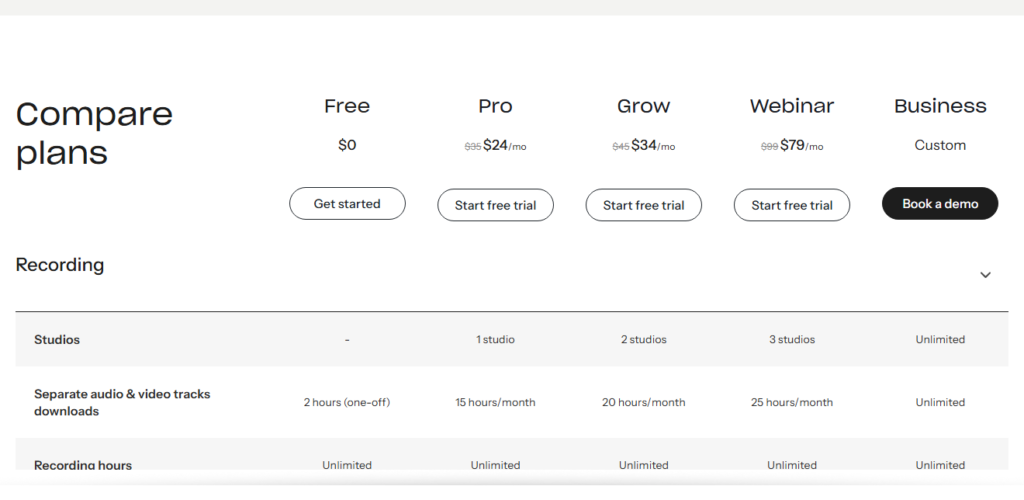
Riverside. It is a recorder first, but it now edits by transcript too. Riverside’s pricing page lists unlimited text-based editing, silence and filler-word removal, Magic Audio cleanup, and clips and show notes on Pro. That costs $24 a month billed yearly ($288 up front). The plan cards showed $35 month to month on our September 24 check, although the FAQ on the same page still says $29.
The meter here is different, and friendlier for a podcast. Recording is unlimited on every paid plan. The cap is on downloading each person’s separate track: 15 hours a month on Pro and 20 on Grow. Riverside’s FAQ says core AI tools like Magic Clips and Magic Audio need no credits. Credits are spent on extras like AI translation and AI B-roll, and Pro starts with 2,000.
Pick it when remote guests are why your episodes sound rough, because each person is recorded locally and no editor can fix a bad call after the fact. The downside is the edit. Descript’s editor is deeper, with AI voice clones and DAW timeline export on Creator. A second editor on Pro is a separate add-on seat, so it does not escape the co-host problem. Our Riverside vs Descript comparison and Riverside pricing breakdown go deeper. Start with Riverside.
What is the easiest Descript alternative for a beginner?
Alitu, if the technical side is what stops you publishing. Alitu’s pricing page puts everything on one plan at $38 a month, or two months free on a yearly plan, which Alitu prices at $380. Noise removal, leveling, and theme music happen automatically on upload. You assemble episodes by dragging blocks into a row, and Magic Filters find filler words and silences for you to review. You can edit by transcript or on a simple waveform.
The part Descript cannot match is hosting. Alitu hosts one show free up to 1,000 downloads a month and publishes to Apple Podcasts in a click. Descript only edits, so a Descript user still pays a host.
Anyone past beginner will hit the limits. Alitu’s recording FAQ says every voice on a call lands on one track, files are converted to mono, and finished episodes export as MP3. Most of the processing has no controls. There is no free plan, only a 7-day trial that needs a card, followed by a 30-day money-back window after the first charge. That window is far kinder than Descript’s 48 hours. Start at alitu.com.
What if you only used Descript for clips?
Then switch to Opus Clip and edit the episode in whatever you like. Descript’s Create clips tool cuts 1 to 20 clips, but it has no ranking, and Descript’s help center says it cannot publish YouTube Shorts. Opus Clip picks the clips itself, scores each one from 0 to 99, crops to vertical, adds captions, and posts to Shorts, TikTok, and Reels from Starter up.
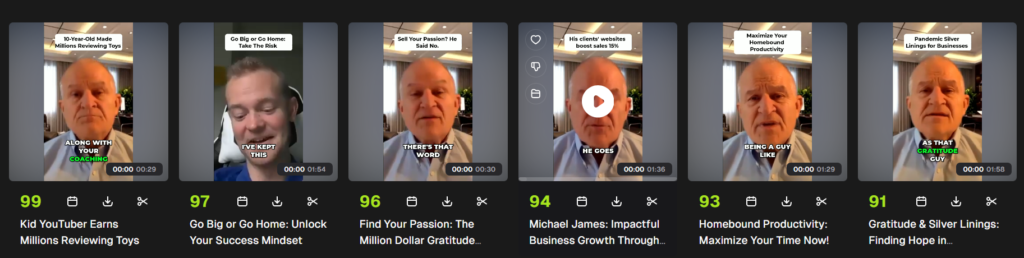
Test video: Gratitude “Podcast” Interview: Michael James by David George Brooke, licensed under CC BY.
Opus Clip’s pricing page puts Starter at $15 a month, monthly only, for 150 credits. Pro is $29 month to month, or $14.50 a month billed $174 a year, for 300 credits a month. One credit buys one minute of source video, so an hour-long episode costs 60 credits and Starter covers two episodes a month. A weekly show belongs on Pro.
Opus Clip does not edit an episode, though. Its editor fixes a clip and stops there. Keep an editor for the full show, even a free one. Our Opus Clip vs Descript comparison runs the numbers, and the wider field is in the best tool to turn a podcast into clips. Start with Opus Clip.
When should you stay with Descript?
When you edit a spoken show every week and the edit is the slow part. Nothing on this page matches the whole package: transcript editing that cuts every track of a multitrack interview at once, one-click filler removal, Studio Sound, AI voice clones to patch a flubbed line, and remote recording in Rooms. Adobe comes closest on editing, but a 30-minute free project is not a podcast.
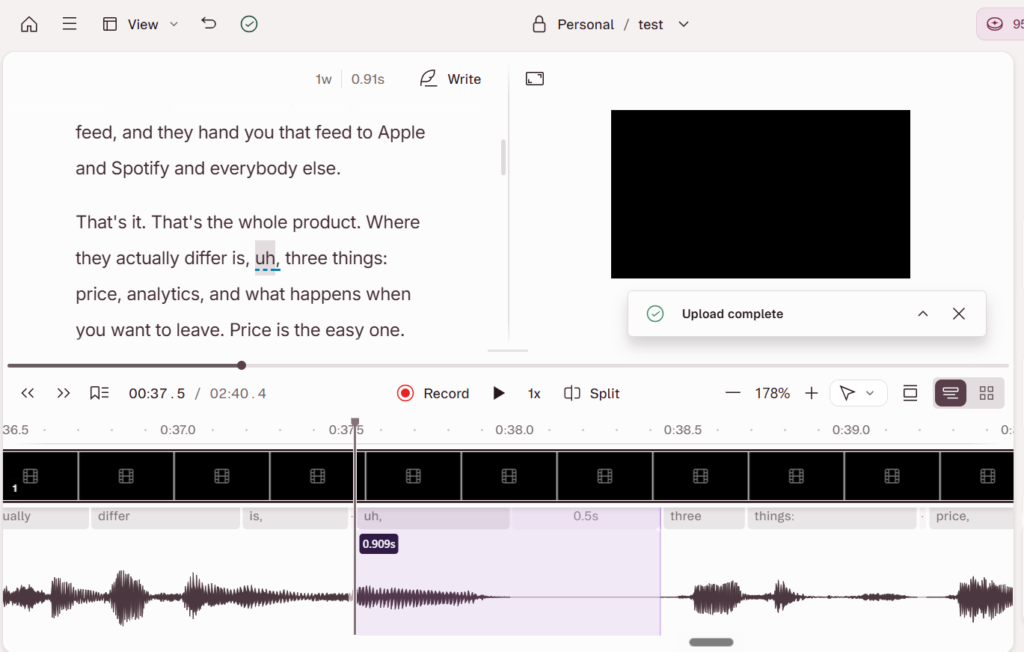
If the meters are the only complaint, fix the plan before you switch tools. A weekly solo show uses about 4 to 5 media hours a month, well inside Hobbyist. An interview show that uploads a separate track per person burns through 10 hours fast. For that show, recording in Rooms, which charges one session length however many people join, or moving to Creator at $24 billed yearly, costs less than rebuilding your workflow. Our Descript pricing guide has every plan and top-up price. Try Descript’s free plan.
So which Descript alternative should you pick?
Want transcript editing for free? Choose Adobe Podcast. Start at podcast.adobe.com. The downside: free projects stop at 30 minutes, and Premium now comes bundled inside Firefly Pro.
Want to spend nothing at all? Choose Audacity. The downside: waveform editing only, so a long interview takes longer to cut.
Guests sound rough? Choose Riverside at $24 a month billed yearly. Start with Riverside. The downside: a lighter editor than Descript, and a second editor is an add-on seat.
New and want one tool that also hosts? Choose Alitu at $38 a month. The downside: one track per call and almost no control over processing. Only need clips? Choose Opus Clip. Start with Opus Clip. The downside: you still need an editor for the episode.
Descript, Adobe Podcast, Audacity, and Opus Clip do not publish your feed. Alitu and Riverside include hosting, and otherwise you need a podcast host, and how to choose a podcast host covers that half. If you are switching recorders too, how to record a podcast remotely covers the setup that works in any of them.
FAQ
What is the best alternative to Descript? It depends on why you are leaving. Adobe Podcast is the closest free match for editing by transcript, Audacity is the pick for spending nothing, Riverside for recording remote guests, Alitu for beginners who want hosting included, and Opus Clip for clips only.
Is there a free alternative to Descript? Yes. Adobe Podcast’s free plan includes transcript-based editing, with Studio projects capped at 30 minutes. Audacity is free with no caps, but it edits on a waveform.
Is Riverside cheaper than Descript? Not at the entry tier. Descript Hobbyist is $16 a month per person billed yearly, and Riverside Pro is $24. Riverside meters separate-track downloads instead of media hours, and recording is unlimited, which suits a show that records a lot.
Does any Descript alternative also host my podcast? Alitu hosts one show free up to 1,000 downloads a month. Riverside’s pricing page lists podcast hosting and analytics on paid plans. Adobe Podcast, Audacity, and Opus Clip do not host.