Duplicate Episodes After Switching Podcast Hosts? Fix the GUID
Last updated: September 2026
This post contains affiliate links, and we may earn a commission if you sign up through them, at no cost to you. See our Affiliate Disclosure. Steps verified September 2026.
Duplicate episodes after a host switch almost always trace to one cause: your episode GUIDs changed during the import. Apps read the new ID as a brand-new episode and re-flag your whole back catalog. Fix it by matching the original GUIDs. Prevent it by running a trial import and checking that the new feed’s GUIDs match the old ones before you redirect anything.
Why do apps show duplicate episodes after switching hosts?
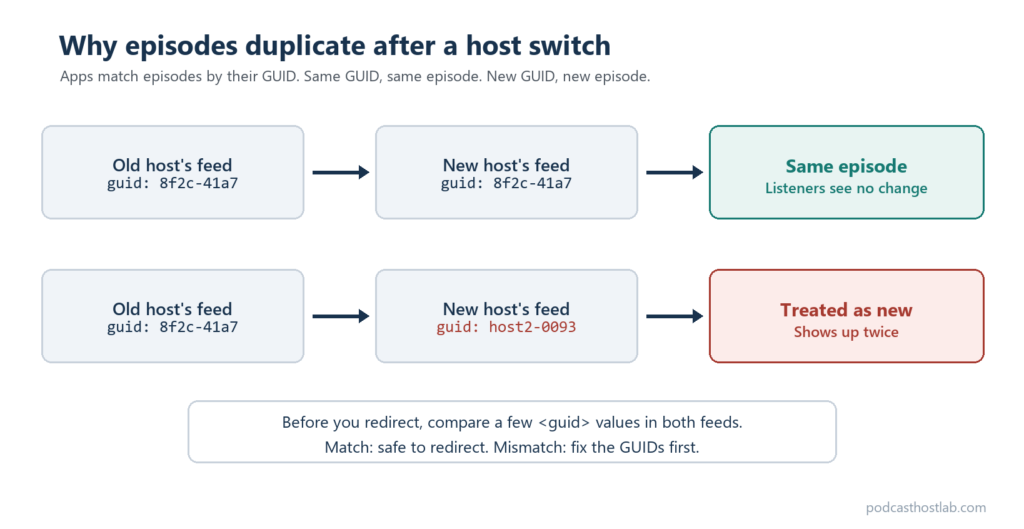
Because the unique ID on each episode changed, and apps trust that ID over everything else. Apple is direct about the stakes: each episode has a globally unique identifier, and “it’s very important that each episode has a unique, alphanumeric GUID that never changes,” even when the title or file URL changes, per Apple’s change-hosting-providers guide. When a migration mints new GUIDs, every old episode looks new. Apple’s own warning is that changed GUIDs cause duplicate episodes and analytics disruption on Apple Podcasts.
So the culprit is rarely the 301 redirect. A redirect forwards apps to the new feed. It does nothing about the IDs inside that feed. If the IDs changed, the redirect faithfully delivers duplicates.
What is an episode GUID and why does it matter?
It is the fingerprint an app uses to tell your episodes apart. GUID stands for globally unique identifier, a string attached to every episode in your RSS feed. When a podcast app checks your feed, it does not match on title or publish date, which can repeat or shift. It matches on the GUID. Same GUID means the app already has that episode. New GUID means download it as fresh. The longer explainer is what a GUID is in a podcast feed.
That is the whole reason a migration can double your catalog. Titles and audio can be identical, but if the new host stamped a different GUID on each item, the app has no way to know it is the same episode it downloaded last year. It just sees a feed full of new IDs and pulls them all.
How do you fix duplicate episodes after a migration?
You make the new feed’s GUIDs match the old ones, episode by episode. Open your old RSS feed, find the <guid> value for each episode, and set the matching episode on the new host to that exact string. Most hosts expose an episode GUID field in advanced or import settings. Once the IDs line up, apps recognize the episodes as the originals on the next feed check and the duplicates collapse back into one listing.
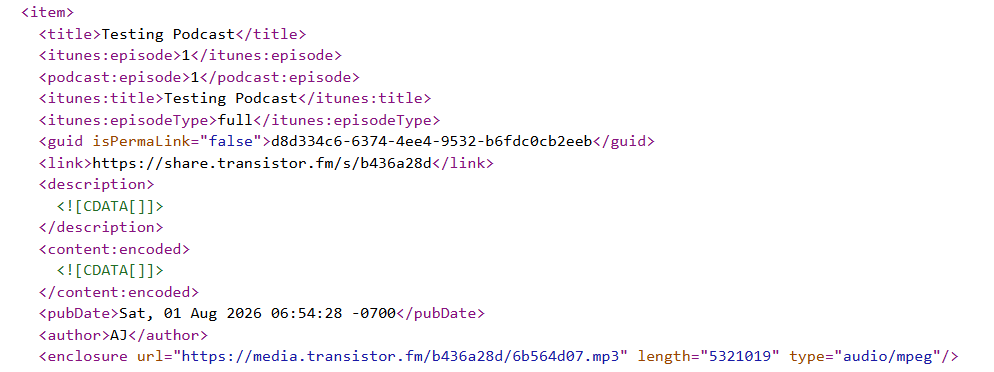
Two cautions. Only match to the original ID. Editing a GUID that was already correct creates a fresh duplicate, so do not touch episodes that imported cleanly. And count your items first: open both feeds, count the <item> tags, and confirm the totals match before you start editing, so you know exactly which episodes drifted.
Does an import episode limit cause missing or duplicated episodes?
It can, and it is easy to miss. Some hosts only publish the most recent slice of your catalog in the live feed, so an importer grabs only what it can see. Transistor flags this directly: it needs every episode present in the feed to import them, and tells you to count the items in your feed and match that to your real episode total, per Transistor’s feed-prep guide. If the old feed was capped at, say, 150 items, older episodes never make the jump.
The tell is a short catalog on the new host paired with duplicates on the directory. Fix it by expanding the old host’s feed limit, or unlocking the feed, then re-run the import and check that every episode came across with its original GUID.
How do you prevent duplicate episodes when you switch?
Test the import before you redirect. Buzzsprout, Transistor, and Captivate all import by pulling your live RSS feed, which is where each episode’s original GUID lives. None of the three says on its public help pages whether imported episodes keep those GUIDs. So do not take it on faith. Check it.
- Start the import on the new host and leave the old feed alone. No redirect yet.
- Open your old RSS feed in a browser and find the
<guid>value for three episodes: your oldest, one from the middle, and your newest. - Open the feed URL the new host gives you and find the same three episodes.
- Compare the values character by character. If all three match exactly, the host kept your IDs. If any differ, even by a prefix, apps will treat those episodes as new.
A match means you are clear to redirect. A mismatch means you set each episode’s GUID back to the original on the new host first, or you pick a different host. Transistor’s importer takes the RSS feed directly with an ownership check, at $19 a month for unlimited shows and 20,000 monthly downloads. Pricing as of September 2026. If you are still choosing among the three, Transistor vs Buzzsprout and Captivate vs Buzzsprout put them head to head.
Then set the 301 redirect after the import finishes, not before, and verify the episode count on the new host matches your old feed before you publish anything. The honest downside on these three: Transistor and Captivate have no free-forever tier, so you pay from day one, while Buzzsprout’s free plan drops episodes after 90 days. Run your trial import on Transistor’s free trial or Captivate, match the count and the GUIDs, then redirect. Doing the whole move for the first time? Walk it step by step on how to switch podcast hosts, and pick a landing spot in how to choose a podcast host.
FAQ
Will a 301 redirect fix duplicate episodes? No. The redirect forwards apps to your new feed, but it cannot change the GUIDs inside it. If the duplicates came from changed IDs, you fix them by matching each episode’s GUID back to the original, then let apps re-sync on the next feed check.
Can you change an episode’s GUID after publishing? Yes, on most hosts, but only match it to the original value from your old feed. Changing a GUID that was already correct spawns a new duplicate, so leave clean episodes alone and edit only the ones that drifted during import.
Do Buzzsprout, Transistor, and Captivate preserve GUIDs on import? None of the three says so on its public help pages, so treat it as unproven until you test it. All three import from your live RSS feed, which already carries each episode’s GUID, but you need to check whether the new feed keeps those values. Run a trial import, compare the <guid> values for a few episodes in the old and new feeds, and redirect only when they match exactly. Apple stresses that the GUID must never change, so this is the one check worth doing before you commit, per Apple’s guide.