How Big Is a Podcast File? Size by Length and Bitrate (2026)
This post contains affiliate links, and we may earn a commission if you sign up through them, at no cost to you. See our Affiliate Disclosure. Specs were checked against Apple’s, Beehiiv’s, and Acast’s own help pages in October 2026. The file sizes come from a test file encoded and measured the same month.
A one-hour podcast MP3 is 43.2 MB at 96 kbps mono, 57.6 MB at 128 kbps, and 86.4 MB at 192 kbps stereo. File size is bitrate multiplied by length. An hour of CD-quality stereo WAV is 635 MB, which is why a WAV can hit an upload cap that an MP3 clears.
The tables below come from the formula and from a ten-minute test file encoded in each format and measured in bytes. If you only need one number for a talk show, use 0.72 MB a minute at 96 kbps mono and 0.96 MB a minute at 128 kbps.
Key takeaways
- A 60-minute MP3 is 28.8 MB at 64 kbps, 43.2 MB at 96 kbps, 57.6 MB at 128 kbps, and 86.4 MB at 192 kbps, because file size is bitrate multiplied by length.
- A 128 kbps mono MP3 and a 128 kbps stereo MP3 are the same size, and our ten-minute test files of each measured 9,600,984 bytes.
- An hour of 16-bit, 44.1 kHz stereo WAV is 635 MB, about 11 times a 128 kbps MP3 and about 15 times a 96 kbps mono MP3.
- Windows Explorer counts a megabyte as 1,048,576 bytes, so a 57.6 MB hour of 128 kbps audio reads about 54.9 there, which matches the roughly 55 MB in Beehiiv’s upload guide.
- Apple Podcasts recommends 64 to 128 kbps for mono feed audio and 128 to 256 kbps for stereo, and it accepts AAC in feeds as well as MP3.
- Acast’s help center names a 150 MB episode limit, which is about 156 minutes at 128 kbps and about 14 minutes of CD-quality stereo WAV.
How big is a podcast file?
About one megabyte a minute at 128 kbps, the setting Beehiiv recommends for a voice show. At 96 kbps mono it is 0.72 MB a minute. The table is our arithmetic on a constant bitrate, in decimal megabytes, and it holds for any host and any editor.
| MP3 setting | 15 min | 30 min | 45 min | 60 min | 90 min | 120 min |
|---|---|---|---|---|---|---|
| 64 kbps mono | 7.2 | 14.4 | 21.6 | 28.8 | 43.2 | 57.6 |
| 96 kbps mono | 10.8 | 21.6 | 32.4 | 43.2 | 64.8 | 86.4 |
| 128 kbps, mono or stereo | 14.4 | 28.8 | 43.2 | 57.6 | 86.4 | 115.2 |
| 192 kbps stereo | 21.6 | 43.2 | 64.8 | 86.4 | 129.6 | 172.8 |
Take a 45-minute interview. It is 32.4 MB at 96 kbps mono and 43.2 MB at 128 kbps. If you also want to know what these settings do to sound, podcast audio quality explained covers formats and bitrate, and should a podcast be mono or stereo covers the channel choice.
How do you calculate a podcast’s file size?
Multiply the bitrate by the length in seconds, divide by 8 to turn kilobits into kilobytes, and divide by 1,000 to reach megabytes. For one hour at 128 kbps: 128 times 3,600 is 460,800 kilobits, which is 57,600 KB, or 57.6 MB. The shortcut is to multiply the bitrate in kbps by 0.0075 to get megabytes per minute.
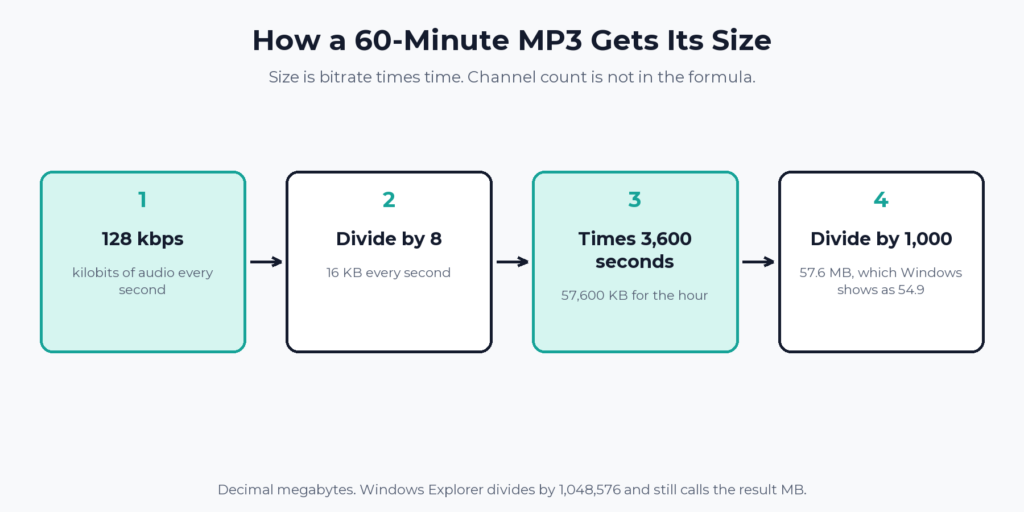
Channel count is not in the formula, so a mono file and a stereo file at the same bitrate weigh the same. Mono saves space only when you give it a lower bitrate, which is what most voice shows do. The details, with Apple’s ranges, are in the mono or stereo guide.
How big are WAV, AAC, and FLAC podcast files?
Far larger for WAV, close to MP3 for AAC, and somewhere in between for FLAC. We took ten minutes of synthesized speech, encoded it each way with ffmpeg 8.1.2, and read each file’s size in bytes. The 60-minute column is the ten-minute size multiplied by six.
| Format and setting | Ten-minute test file | Scaled to 60 minutes |
|---|---|---|
| MP3, 64 kbps mono, constant bitrate | 4.80 MB | 28.8 MB |
| MP3, 96 kbps mono, constant bitrate | 7.20 MB | 43.2 MB |
| MP3, 128 kbps mono, constant bitrate | 9.60 MB | 57.6 MB |
| MP3, 128 kbps stereo, constant bitrate | 9.60 MB | 57.6 MB |
| MP3, 192 kbps stereo, constant bitrate | 14.40 MB | 86.4 MB |
| MP3, LAME V4 mono, variable bitrate (87 kbps average) | 6.55 MB | 39.3 MB |
| AAC in M4A, 96 kbps mono | 7.50 MB | 45.0 MB |
| AAC in M4A, 128 kbps mono | 9.81 MB | 58.9 MB |
| FLAC, 16-bit, 44.1 kHz mono | 15.17 MB | 91.0 MB |
| WAV, 16-bit, 44.1 kHz mono | 52.92 MB | 317.5 MB |
| WAV, 16-bit, 44.1 kHz stereo | 105.84 MB | 635.0 MB |
| WAV, 24-bit, 48 kHz stereo | 172.80 MB | 1,036.8 MB |
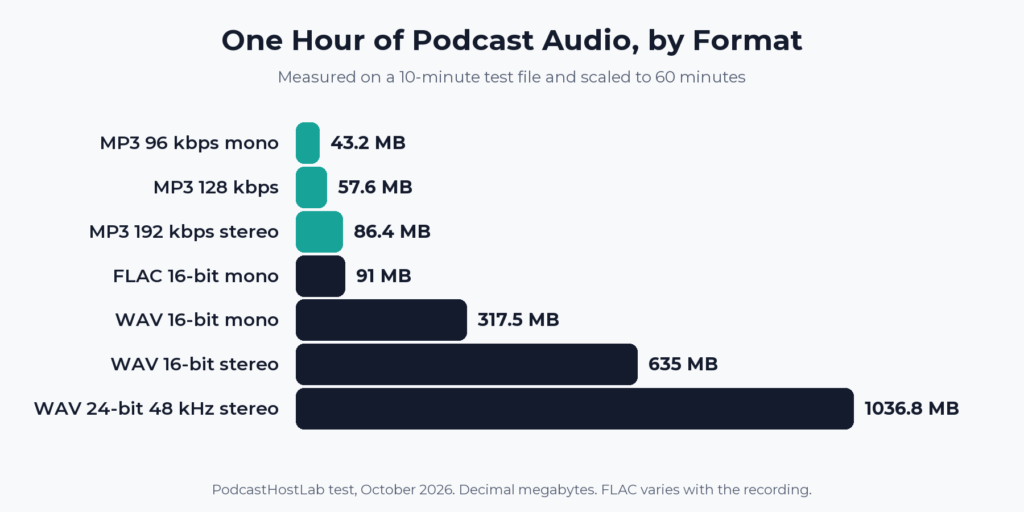
Two cautions on the table. The constant-bitrate MP3 rows are exact for any recording, because their size depends only on bitrate and length. The variable-bitrate, AAC, and FLAC rows depend on the audio. Synthesized speech is clean, and a noisy room needs more bits, so expect your own variable-bitrate and FLAC files to come out different.
Format also decides whether an upload is accepted. Beehiiv’s guide accepts MP3 and WAV and does not accept M4A, AAC, FLAC, AIFF, or OGG. Apple’s audio requirements list WAV, FLAC, and MP3 for uploads in Apple Podcasts Connect, and MP3 or AAC for RSS feeds, where Apple says it strongly recommends AAC and notes AAC sounds better at the same bitrate. Our WAV upload guide lists which hosts take it.
Why is my file a different size than the calculator says?
Usually units. The calculator above counts a megabyte as 1,000,000 bytes. Windows Explorer divides by 1,048,576 and still labels the result MB. Our 128 kbps ten-minute file is 9,600,984 bytes, and Explorer showed it as 9.15 MB. Stretched to an hour, 57.6 MB becomes about 54.9 in Explorer.
That is the gap in Beehiiv’s guide, which says a 60-minute 128 kbps mono MP3 is typically around 55 MB. It is the same file measured in the Windows unit. If you want an unambiguous number, use bytes, which is also what the enclosure tag in an RSS feed wants.
Under a kilobyte of header and tag data rides on top. The 128 kbps file was 984 bytes over the formula’s 9,600,000. Embedded cover art, chapters, and ID3 text add more, in amounts that depend on the file.
Does mono make a podcast file smaller?
Only if the bitrate drops with it. Beehiiv’s guide says mono cuts file size roughly in half. At the same bitrate it does not: our 128 kbps mono and stereo files were identical in size. The saving shows up when a mono file uses a lower bitrate, as in Beehiiv’s own settings of 128 kbps for mono and 192 kbps for stereo with music, which is one third smaller.
Will your file hit a host’s upload limit?
Rarely with an MP3, and almost always with a WAV. Beehiiv sets its cap at 500 MB per episode, and Acast’s help center says Apple limits cellular downloads to 150 MB and that Acast sets its own limit to match. The table shows how many minutes fit under each cap, which is our arithmetic.
| Export | Minutes under 150 MB | Minutes under 500 MB |
|---|---|---|
| MP3, 128 kbps | 156 | 521 |
| MP3, 192 kbps stereo | 104 | 347 |
| WAV, 16-bit, 44.1 kHz mono | 28 | 94 |
| WAV, 16-bit, 44.1 kHz stereo | 14 | 47 |
A two-hour show clears both caps as a 128 kbps MP3 and fails both as a WAV. Other hosts set different limits, and Libsyn limits monthly uploads instead of single files. Podcast episode file size limits by host compares them. Hosts also differ in what they do with your upload, which does your podcast host re-encode your audio covers.
How much data does a listener use per episode?
As much as the file weighs, if the episode downloads in full. A 60-minute episode at 96 kbps is 43.2 MB and at 128 kbps is 57.6 MB. A stream of the same file moves roughly the same amount while it plays.
It adds up for you too. 1,000 downloads of a 45-minute episode at 96 kbps mono move 32.4 GB. At 5,000 downloads of an hour at 128 kbps, the figure is 288 GB. A podcast host carries that traffic for you, and it is one reason not to serve audio from a basic web hosting plan, which podcast hosting vs a website explains.
What bitrate should you export?
- A talk or interview show: MP3, mono, 96 to 128 kbps. Apple recommends 96 to 128 kbps for mono MP3 uploads, and Beehiiv recommends 128 kbps. The downside, which Beehiiv and Apple both flag in their own words, is audible artifacts at low bitrates. Beehiiv puts the line below 96 kbps.
- A show with music or placed sound: MP3 or AAC, stereo, 128 to 192 kbps. Apple’s recommended range for stereo runs to 256 kbps. Beehiiv says going above 192 kbps does not give most listeners an audible improvement.
- A file you plan to keep as a master: WAV or FLAC, never the upload. Keep it for editing, and make the MP3 from it.
If you are still picking a host, the easiest way to stop thinking about file size is one that sets sensible defaults. Our Buzzsprout review covers a host that converts uploads for you, and our Transistor review covers one that leaves your MP3 alone. How to choose a podcast host sorts the rest.
FAQ
How big is a 30-minute podcast?
About 14.4 MB at 64 kbps, 21.6 MB at 96 kbps mono, 28.8 MB at 128 kbps, and 43.2 MB at 192 kbps stereo. Multiply the bitrate by 0.0075 and by 30 to check any other setting.
How many MB is a one-hour podcast?
Between 28.8 and 86.4 MB for a typical MP3 export, and 43.2 MB at the 96 kbps mono setting many talk shows use. A WAV of the same hour is 317.5 MB mono or 635 MB stereo.
Is 128 kbps good for a podcast?
It is a standard choice. Beehiiv recommends 128 kbps mono for voice shows, and Apple lists 128 kbps as the top of its recommended range for mono feed audio and the bottom of its range for stereo.
Should I upload a WAV or an MP3?
MP3 unless your host asks for WAV. A WAV hour is roughly 11 times the size of a 128 kbps MP3 and fails some hosts’ caps outright. Apple Podcasts Connect accepts WAV and FLAC, but Apple’s feed audio guidance is for MP3 or AAC.
Why is my MP3 larger than the calculator says?
Either the encoder used a different bitrate than you set, the file uses variable bitrate, or your computer counts megabytes in 1,048,576-byte units. Check the bitrate in your editor’s export screen, and read the size in bytes if you want a clean comparison.