Opus Clip Alternatives: 7 Tools Worth Switching To
This post contains affiliate links, and we may earn a commission if you sign up through them, at no cost to you. Opus Clip, quso.ai, Podsqueeze, Castmagic, and Descript are among them. See our Affiliate Disclosure. Pricing as of October 2026, read on each vendor’s own pricing page on October 20, with Opus Clip and quso.ai re-read on November 3.
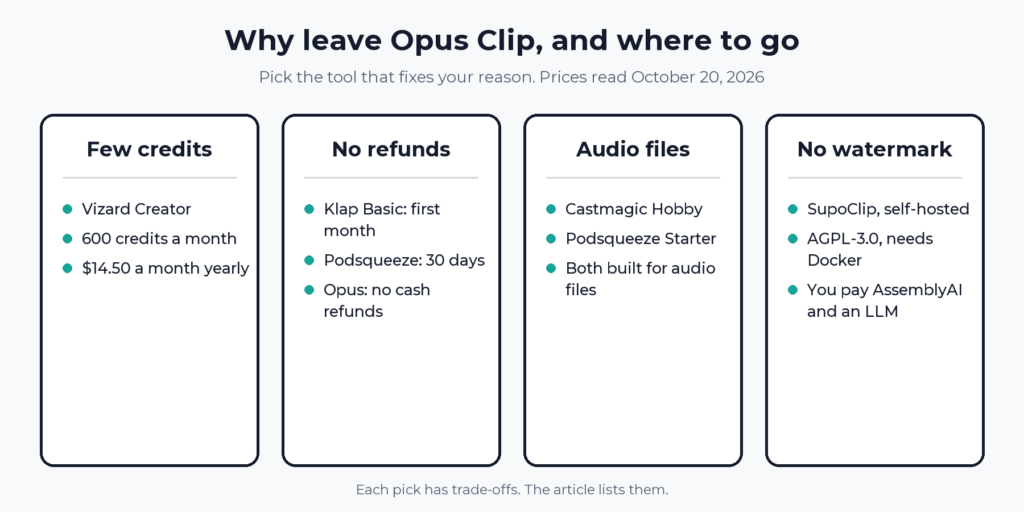
Leaving Opus Clip? Pick by the reason. Want more credits for the same price? Vizard Creator lists 600 a month for $14.50 billed yearly, double Opus Pro’s 300. Want a refund window? Klap or Podsqueeze. Want no watermark and no bill? SupoClip, if you will run it yourself. Opus Clip Pro is still a fair buy for a weekly video show, so leave for a reason, not a hunch.
Every price and rule below comes from the vendor’s own pricing page, help center, terms, or code repository, read on October 20, 2026, unless a line says it comes from one of our own guides. The cost-per-episode figure is our arithmetic on those published numbers.
Key takeaways
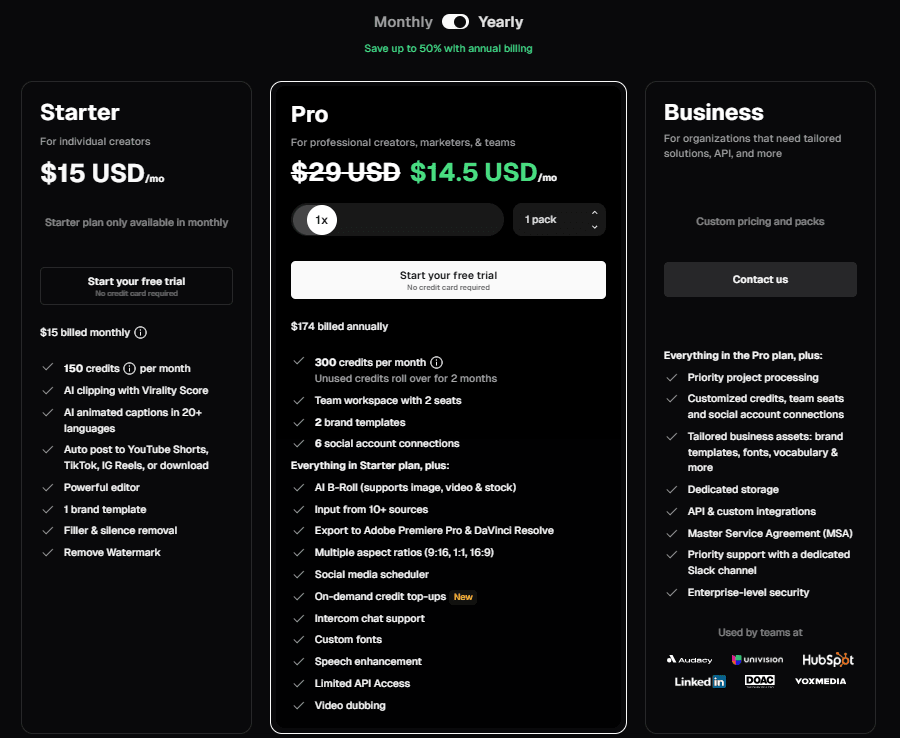
- Opus Clip Pro costs $29 a month or $14.50 a month billed yearly ($174) for 300 credits, at 1 credit per minute of video imported.
- OpusClip 4.0, launched November 2, 2026, added auto-editing for raw talking videos and saved Recipes without changing Opus Clip’s prices or credits.
- Vizard Creator costs the same $14.50 a month billed yearly, and its pricing page lists 600 credits a month by default.
- Opus Clip’s terms say fees already paid are not refunded, while Klap’s terms allow a refund in the first month and Podsqueeze’s policy covers the first 30 days.
- Opus Clip’s Free plan adds a watermark and stops exports after 3 days, and the SupoClip README says its self-hosted clips carry no watermark.
- SupoClip is licensed AGPL-3.0, and its quick start needs Docker, an AssemblyAI key, and a key for one language-model provider.
- quso.ai’s help center lists only video upload formats, while Castmagic and Podsqueeze are built for audio files.
Why do people leave Opus Clip?
Our Opus Clip pricing guide found five reasons in Opus’s own pages. Its terms say fees already paid are not refunded, so yearly Pro is a 12-month commitment. Credits are spent when you import, at 1 per minute, not when you keep a clip. The Free plan adds a watermark and stops exports after 3 days. Its help pages describe yearly credits two ways. And the help center never says whether an audio-only file works.
What do the Opus Clip alternatives cost?
The table puts the baseline first, then six alternatives, each the entry plan that fits a weekly show. Yearly billing is printed as a per-month price. Everything comes from each vendor’s pricing page and refund page as read on October 20, 2026, with Opus Clip and quso.ai re-read on November 3.
| Tool and plan | Billed monthly | Billed yearly, per month | What the plan meters | Free option | Refund rule |
|---|---|---|---|---|---|
| Opus Clip Pro | $29 | $14.50 | 300 credits a month, 1 per minute imported | Free plan, 60 credits, watermark | No cash refunds |
| quso.ai Essential | $39 | $39, no yearly discount | 300 credits a month, 1 per minute uploaded | Free plan, 75 credits, in some countries | None |
| Vizard Creator | $29 | $14.50 | 600 credits a month, 1 per minute | Free plan, 60 credits, 720p | 7 days, unused only |
| Klap Basic | $29 | $14 | 100 clips a month | None listed | First month |
| Podsqueeze Starter | $8.99 | $5.99 ($71.88 a year) | 120 minutes a month, 8 clips or audiograms | 7-day trial on Pro | 30 days, usage based |
| Castmagic Hobby | $29 | $19 ($239 a year) | 30 transcribed hours, unlimited clips | None listed | None for partial months |
| Descript Hobbyist | $24 | $16 | 10 media hours, 400 AI credits | Free plan | 48 hours |
On yearly billing, one 60-minute episode costs about $1.45 on Vizard Creator, $2.90 on Opus Clip Pro, $3.00 on Podsqueeze Starter, and $7.80 on quso.ai Essential, which no longer discounts a year, our math on each plan’s listed credits or minutes. Klap meters clips, at $0.14 a clip on Basic yearly. Descript works out to $1.60 per media hour, but its hours cover all editing.
Which Opus Clip alternative gives the most for the money?
Vizard Creator does on credits. It is $29 a month or $14.50 billed yearly ($174), and its pricing page defaults to 600 credits a month, with 1 credit equal to 1 minute of video. Creator also lists no watermark, 4K export, scheduling, 6 social accounts, and 100GB of storage. The Free plan gives 60 credits and 720p export, and its comparison table caps Free uploads at 60 minutes against 600 on paid plans. The downsides: a February 2024 help article says Vizard does not support audio uploads, and its refund policy covers only billing errors and unused plans within 7 days. Link: Try Vizard.
quso.ai Essential is the same 300 credits at $39 a month on either billing, $24.50 more than Opus Pro billed yearly, and adds scheduling to 7 platforms and a content planner. It calls every plan non-refundable and lists only video upload formats. Our quso.ai pricing guide has the plan table.
Klap meters clips, not minutes. Basic is 100 clips a month for $29 or $14 a month billed yearly, Pro is 300 clips for $79 or $39, and Pro+ is 1,000 clips for $189 or $94. Every plan lists unlimited social accounts and analytics. Its terms, dated July 25, 2024, allow a refund before the end of your first month if you are not satisfied, including a full refund on a yearly plan in that month. The downside: no free plan or trial is listed, and the clip meter makes the cost per episode a guess until you run one. Try Klap.
Which Opus Clip alternative takes audio files?
Castmagic and Podsqueeze are built around audio. Castmagic Hobby is $29 a month or $19 a month billed yearly ($239), with 30 hours of transcription across your library, uploads up to 10GB, and unlimited media clipping and audiogram generation. It imports from Zoom, Google Drive, RSS, and YouTube, TikTok, or Instagram links. The downsides: its pricing page lists clipping but no AI clip ranking, and its terms give no refunds for partial months. See our Castmagic review. See the Castmagic pricing page.
Podsqueeze Starter is $8.99 a month ($5.99 a month billed yearly) for 120 minutes and 8 video clips or audiograms, and Pro is $49 ($35 yearly) for 320 minutes and 20 clips, with a 7-day free trial. Starter has no minute rollover and a 4GB upload cap. Its refund policy covers the first 30 days, in full if you have used under half the plan’s minutes or 100 minutes, and it excludes accounts that began as a free trial. See the Podsqueeze pricing page.
Descript is an audio editor first. Hobbyist is $24 a month or $16 billed yearly, it lists Create Clips and filler-word removal, and there is a Free plan. It fits if you edit episodes anyway. The meter is media hours, so raw takes count. See Descript pricing and Opus Clip vs Descript.
Opus Clip’s own source list includes links from Apple Podcasts, but its help center does not say that an MP3 upload works. Vizard’s pages disagree with each other, since its audio editor page invites audio uploads and its upload help article says audio is not supported. Test one short file before paying.
Is there a free Opus Clip alternative with no watermark?
Only one we could verify: SupoClip, an open-source clipping tool. Its GitHub README says clips carry no watermark, and the repository is licensed AGPL-3.0, with about 1,600 stars when we read it. It scores clips, crops vertically around the speaker, adds word-synced subtitles, and can post to your own YouTube, TikTok, and Instagram accounts. Its README says the language model picks 3 to 7 segments from the transcript, against 23 to 32 candidates that Opus returns for a 30 to 60 minute video, per our Opus guide.
Free here means free software, not a free run. The quick start needs Docker, an AssemblyAI API key for transcription, and a key for one language-model provider, Google, OpenAI, Anthropic, or a local Ollama model. Those providers bill you. A hosted version exists if you do not want to run servers. Expect an afternoon of setup, and decide whether your time is cheaper than $14.50 a month.
The hosted free plans we read are different. Opus Clip’s Free plan carries a watermark and stops exports after 3 days. quso.ai’s Free player prompts you to remove the watermark. Vizard sells no watermark as a Creator feature, and Descript lists watermark-free export on Hobbyist.
What if you record in Riverside?
Then Magic Clips is already in the plan. Riverside’s pricing page lists Magic clips and show notes on Pro, which was $35 a month on monthly billing in our October 20 reading, with a lower yearly price. Riverside no longer shows a free plan, as our Is Riverside free? guide explains. If you do not record there, buying Riverside for the clips alone costs more than any tool above. See Riverside pricing for every plan.
When should you stay with Opus Clip?
When you publish a weekly one-hour video show and want scored, ranked candidates. Pro billed yearly is $14.50 a month, about $2.90 of credit per hour-long episode, and the 300 credits cover a five-week month exactly. Pay monthly for two months before committing to a year, which Opus allows. Leave if a refund window, audio files, or double the credits matter more than Opus’s ranking.
OpusClip 4.0, launched November 2, 2026, is worth a look before you go. Per Opus’s launch post, it now auto-edits raw talking videos with speech cleanup, captions, B-roll, a Viral Hook, and Motion Graphics, turns one edit into 60- to 90-second highlights, a 3- to 5-minute extended cut, or a quick update, and saves that setup as a Recipe. Prices and credits did not change. Opus publishes no separate credit cost for the new edits, though its Recipes help article says the Summary screen shows the credit usage before you click Create.
Opus has since added AI Producer, an editing agent that opens your video in Claude or ChatGPT so you can ask for changes in chat. Its page says you can start for free, but the planning runs on your Claude or ChatGPT plan and some editing steps spend Opus credits. It only takes one person talking to camera for now, so a multi-camera podcast or a screen recording is out.
So which Opus Clip alternative should you pick?
More credits for the same money: Vizard Creator, $174 a year for 600 credits. The downside: it is unclear whether audio files upload.
A refund window: Klap Basic, $14 a month billed yearly, or Podsqueeze. The downside: Klap meters clips, and Podsqueeze Starter’s 120 minutes cover two hours of audio.
Audio files: Castmagic Hobby, or Podsqueeze Starter at $5.99 a month billed yearly. The downside: Castmagic’s page lists no AI clip ranking.
No bill, no watermark: SupoClip, self-hosted. The downside: you run Docker and pay for transcription and the language model.
You already edit in Descript, or want scheduling: Descript Hobbyist at $16 a month yearly, or quso.ai Essential. Try quso.ai free. The downside: Descript meters media hours, and quso.ai costs $24.50 a month more than Opus Pro billed yearly for the same credits.
FAQ
What is the best free alternative to Opus Clip?
Among hosted tools, Vizard’s Free plan gives 60 credits and quso.ai’s gives 75, both with limits, and Descript has a Free plan. SupoClip is free software you run yourself and pay API providers for.
Is there an open-source alternative to Opus Clip?
Yes. SupoClip is an open-source Opus Clip alternative under the AGPL-3.0 license, per its GitHub page. It needs Docker, an AssemblyAI key, and a language-model key.
Is there an Opus Clip alternative with no watermark?
Opus Clip’s own paid plans remove the watermark. Vizard Creator and Descript Hobbyist list watermark-free export, and self-hosted SupoClip says it adds none.
Does Opus Clip work with audio-only podcasts?
Its help center lists links from Apple Podcasts among its sources, but it never states that an MP3 upload works. Run one short audio file through the Free plan to check.
Is quso.ai better than Opus Clip?
Not on price. quso.ai Essential is $39 a month for 300 credits on either billing, against $14.50 for Opus Clip Pro billed yearly. Neither refunds cash on a paid plan.
Checked against the pricing pages of Opus Clip, quso.ai, Vizard, Klap, Podsqueeze, Castmagic, Descript, and Riverside, plus Opus Clip’s source list, Vizard’s refund and upload help articles, Klap’s terms, Podsqueeze’s refund policy, and the SupoClip GitHub repository, October 20, 2026. Opus Clip’s and quso.ai’s pricing pages re-read, and the OpusClip 4.0 launch post and Opus’s Recipes help article read, November 3, 2026. OpusClip’s AI Producer page read November 5, 2026.